
Introduction
This manual provides instructions for the Azwok GCBLTV02ADBBT replacement remote control, designed for various CHIQ TV models. This remote is ready to use without programming; simply install batteries to begin operation. It serves as a functional replacement for lost or malfunctioning original remote controls.
Product Overview
The Azwok GCBLTV02ADBBT remote control features a standard layout with dedicated buttons for power, channel navigation, volume control, number input, and quick access to popular streaming services like Netflix and YouTube. It is designed for intuitive use with compatible televisions.
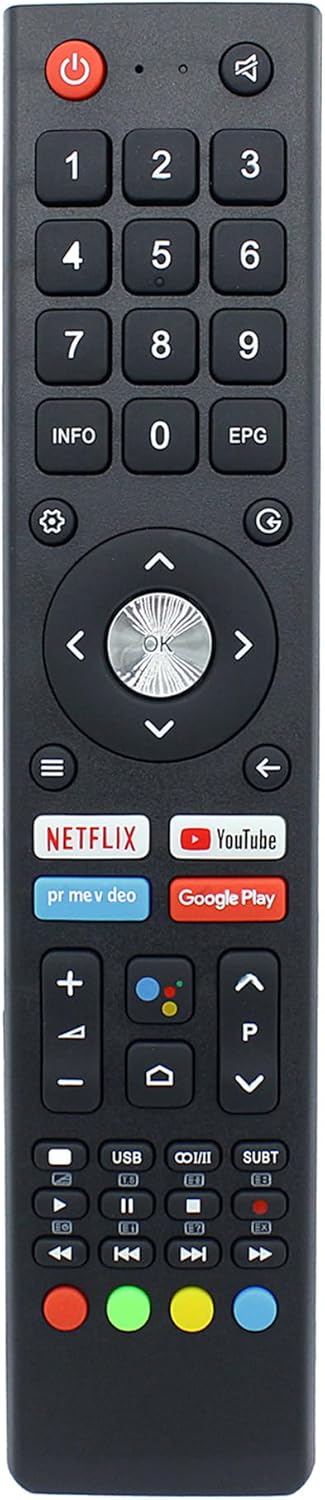
Image 1: Front view of the Azwok GCBLTV02ADBBT remote control, showing all buttons including power, number pad, navigation, volume, channel, and streaming service shortcuts.
Setup
Battery Installation
- Locate the battery compartment on the back of the remote control.
- Slide the battery cover downwards or press the latch to open it.
- Insert two AAA 1.5V batteries, ensuring the positive (+) and negative (-) terminals align correctly with the markings inside the compartment.
- Replace the battery cover by sliding it back into position until it clicks securely.
The remote control is now ready for use. No programming is required.

Image 2: Back view of the remote control with the battery compartment open, showing the slots for two AAA batteries and polarity markings.
Operating Instructions
This remote control functions identically to the original remote for compatible CHIQ TV models. Point the remote directly at your television's infrared receiver for optimal performance.
- Power Button: Press to turn the TV on or off.
- Number Buttons (0-9): Use to directly select channels or input numerical data.
- Volume Up/Down: Adjust the television's volume level.
- Channel Up/Down: Change television channels sequentially.
- Navigation Pad (Up, Down, Left, Right, OK): Use to navigate menus and confirm selections.
- Back/Exit: Return to the previous screen or exit a menu.
- Home/Menu: Access the TV's main menu or smart features.
- Streaming Service Buttons (Netflix, YouTube, etc.): Provide direct access to these applications.
- Media Control Buttons (Play, Pause, Stop, Rewind, Fast Forward): Control media playback.
Compatibility
This replacement remote control is compatible with the following CHIQ TV models:
- GCBLTVC1GBBT
- GCBLTVC1GBBT-C2
- GCBLTVC1GBBT-C5
- GCBLTVC1GBBT-C6
- GCBLTVC1GBBT-CHANGHONG
- GCBLTVC1GBBT-CHIQ-2
- GCBLTVC1GBBT-JVC-2
- GCBLTVC1GBBT-THOMSON
- GCBLTVC1GBBT-THOMSON-1
- GCBLTVC1GWBT-HITACHI
- GCBLTVC1GWBT-HITACHI-1
- GCBLTVC2GBBT-BENQ L24D6C
If your specific model is not listed, or if your original remote differs significantly in appearance, please contact customer support for confirmation of compatibility.
Maintenance
- Cleaning: Wipe the remote control with a soft, dry cloth. Do not use liquid cleaners or abrasive materials.
- Battery Replacement: Replace batteries when the remote's response becomes sluggish or stops working. Always replace both batteries simultaneously with new ones of the same type (AAA 1.5V).
- Storage: Store the remote in a dry place, away from direct sunlight and extreme temperatures. If storing for an extended period, remove the batteries to prevent leakage.
Troubleshooting
| Problem | Solution |
|---|---|
| Remote control is not working. |
|
| Buttons are unresponsive or sticky. |
|
| Remote works intermittently. |
|
Specifications
| Feature | Detail |
|---|---|
| Model Number | GCBLTV02ADBBT (Internal: AU-UV018-CQ) |
| Brand | Azwok |
| Compatible Devices | CHIQ Televisions (specific models listed in Compatibility section) |
| Power Source | 2 x AAA 1.5V Batteries (not included) |
| Dimensions (L x W x H) | 8.27 x 1.77 x 0.59 inches |
| Item Weight | 2.11 ounces |
| Special Feature | No Programming Required |
Warranty and Support
This Azwok remote control comes with a 12-month warranty from the date of purchase. If you encounter any issues or have questions regarding compatibility or functionality, please contact the seller or manufacturer for assistance.
For support, please refer to the contact information provided by your retailer or the manufacturer, Azwok.