
Beurer BF 183
Contents
Beurer BF 183 Diagnostic Scales User Manual
Model: BF 183
Introduction
The Beurer BF 183 Diagnostic Scales are designed to provide comprehensive body analysis, helping you monitor your health and fitness progress. This scale accurately measures weight, body fat, body water, muscle mass, bone mass, and calculates your Body Mass Index (BMI) and metabolic age. With its large XL display and user memory for up to 10 individuals, it offers convenient and precise tracking for the whole family.
Important Safety Information
Please read these instructions for use carefully and keep them for later use. Make sure to make them accessible to other users and observe the information they contain.
- This device is not intended for medical or commercial purposes.
- The scale is designed for personal use only.
- Do not step on the scale with wet feet or if the surface is wet, as this may cause slipping.
- Keep the scale away from strong electromagnetic fields.
- Do not expose the scale to direct sunlight or extreme temperatures.
- This device is not suitable for persons with pacemakers or other medical implants.
- Children should be supervised to ensure that they do not play with the device.
Package Contents
Ensure all items are present and in good condition:
- 1 x Beurer BF 183 Diagnostic Scales
- 1 x Lithium Metal Battery (included)
- 1 x Instruction Manual
Product Overview
The Beurer BF 183 Diagnostic Scales feature a sleek design with a safety glass surface and brushed stainless steel electrodes for accurate measurements.
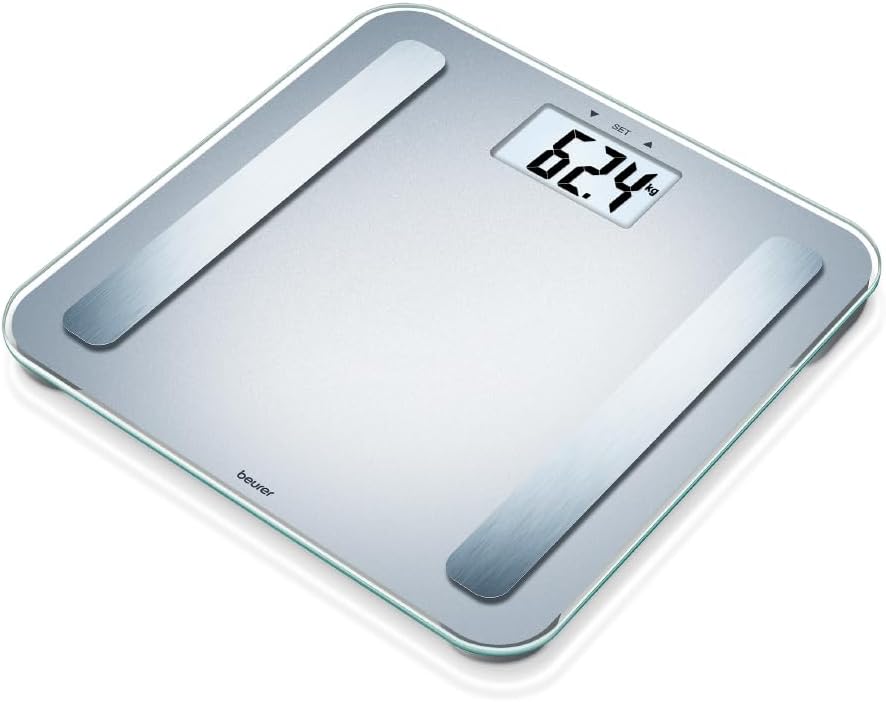
Image: The Beurer BF 183 Diagnostic Scales. This image displays the silver-colored scale with its clear glass surface and two metallic electrode strips. The digital display shows "62.4 kg", indicating a weight measurement. The Beurer logo is visible on the lower left side of the scale. The overall design is modern and minimalist.
Key Components:
- Weighing Surface: Made of sturdy 6mm safety glass.
- Electrodes: Brushed stainless steel for body analysis measurements.
- LCD Display: Large 38mm numbers for easy readability, showing weight and analysis values.
- User Memory: Stores data for up to 10 different users.
Setup and First Use
1. Battery Installation:
- Open the battery compartment on the underside of the scale.
- Insert the included Lithium Metal battery, ensuring correct polarity (+/-).
- Close the battery compartment securely.
2. Initial Setup and User Data Entry:
Before first use, you need to set up your personal data. The scale can store data for up to 10 users.
- Place the scale on a firm, level surface.
- Press the "SET" button on the scale to enter setup mode.
- Use the arrow buttons (if available, or step on/off to cycle) to select a user memory slot (P1-P10). Confirm with "SET".
- Enter your personal data: height, age, gender, and activity level. Use the arrow buttons to adjust values and "SET" to confirm each entry.
- Once all data is entered, the scale will save your profile.
Operating Instructions
Taking a Measurement:
- Ensure the scale is on a flat, hard surface.
- Gently tap the scale with your foot to turn it on, or simply step on it. The scale has an automatic on/off function.
- Step onto the scale barefoot, ensuring your feet are positioned on the stainless steel electrodes. Stand still.
- The scale will first display your weight. Then, it will cycle through your body analysis values (body fat, body water, muscle mass, BMI, metabolic age).
- The measurements will be displayed for a few seconds before the scale automatically turns off.
Selecting a User Profile:
If multiple users are set up, the scale will attempt to identify the user based on weight. If it cannot, or if you wish to manually select, follow these steps:
- Turn on the scale.
- Press the "SET" button repeatedly until your user number (P1-P10) is displayed.
- Step onto the scale to take your measurement.
Care and Maintenance
- Clean the scale regularly with a damp cloth and a mild detergent if necessary. Do not use abrasive cleaning agents.
- Do not immerse the scale in water or rinse it under running water.
- If the scale is not used for an extended period, remove the battery to prevent leakage.
- Store the scale in a dry, safe place, away from extreme temperatures and humidity.
Troubleshooting
| Problem | Possible Cause | Solution |
|---|---|---|
| Scale does not turn on. | Battery is dead or incorrectly inserted. | Check battery polarity or replace battery. |
| "Lo" or "Err" displayed. | Low battery or measurement error. | Replace battery. Re-step on the scale, ensuring proper contact. |
| "O-Ld" displayed. | Overload (weight exceeds maximum capacity). | The scale's maximum capacity is 180 kg. Reduce weight. |
| Inaccurate measurements. | Scale not on a flat surface, or feet not properly placed on electrodes. | Place scale on a hard, level surface. Ensure bare feet are centered on electrodes. |
| Body analysis values not displayed. | Not stepping on barefoot, or user profile not set up. | Ensure bare feet are on electrodes. Set up your user profile as per "Setup" section. |
Technical Specifications
- Model: BF 183
- Dimensions: 32.8 x 3.5 x 31.5 cm
- Weight: 1.55 kg
- Weight Capacity: Up to 180 kg (396 lbs / 28 st)
- Measurement Increments: 100g for weight, 0.1% for body analysis
- Display: Large LCD with 38mm digits
- User Memory: 10 user memory slots
- Power Source: 1 x Lithium Metal battery (included)
- Automatic Features: On/Off function
- Material: Safety glass surface, brushed stainless steel electrodes
Warranty and Support
Beurer GmbH provides a warranty for this product. For detailed warranty terms and conditions, please refer to the warranty card included with your product or visit the official Beurer website.
For technical support, troubleshooting assistance, or spare parts, please contact Beurer customer service. Contact information can typically be found on the official Beurer website or on the product packaging.
Online Resources: www.beurer.com
Documents and downloads
Ask a question about this manual
Ask about setup, troubleshooting, compatibility, parts, safety, or missing instructions. Manuals+ will review the question and use this page’s manual context to help answer it.