
1. Introduction
The Nobsound VFD253 is a versatile audio device that integrates multiple functions into a single unit. It serves as an audio spectrum analyzer, a Bluetooth receiver, an audio switcher, and a high-precision clock. This manual provides essential information for setting up, operating, and maintaining your VFD253 to ensure optimal performance.

Image 1.1: The Nobsound VFD253 Audio Spectrum Analyzer Receiver displaying the time.
2. Key Features
- Multi-functional Design: Combines an audio spectrum analyzer, Bluetooth 5.0 receiver, 3.5mm AUX audio switcher, and a high-precision clock.
- High-Resolution VFD Display: Features a 25x15 dedicated green VFD display for accurate visualization of audio frequency bands.
- Versatile Audio Inputs: Includes a built-in microphone pickup, Bluetooth 5.0 connectivity, and two 3.5mm AUX inputs for compatibility with various audio sources like smartphones, PCs, game players, amplifiers, and speakers.
- Adjustable Display Modes & Brightness: Offers 5 decorative music spectrum display modes and 2 clock display modes. The VFD backlight brightness can be adjusted manually (3 levels) or automatically to suit different environments.
- High-Precision Clock: Equipped with an RX8025T built-in crystal oscillator, providing a clock accuracy of ±3ppm, resulting in an annual error of less than 1 minute.
- Wide Frequency Range & AGC Display: Supports an 80Hz-16KHz frequency sweep. A special Automatic Gain Control (AGC) algorithm and customized output curve ensure optimal visual effects across a wide range of input signal levels, preventing under-display for low inputs and over-display for high inputs.
- Customizable Display Effects: Individual adjustments for gain, brightness, main light column fall speed, hold time, and peak fall speed.
- Power-Off Memory: All settings are saved automatically and retained after power cycling, eliminating the need for re-configuration.
- Convenient Remote Control: Allows easy adjustment of all settings from a distance.

Image 2.1: Overview of the VFD253's multi-functional capabilities, including audio spectrum analysis, Bluetooth, and AUX inputs.

Image 2.2: The VFD253 displaying an audio spectrum in a typical home audio environment, highlighting its wide frequency range and AGC display.
3. Package Contents
Please check the package for the following items:
- 1 × Nobsound VFD253 Audio Spectrum Analyzer Receiver
- 1 × USB Type-C Cable
- 1 × Remote Control (Batteries not included)

Image 3.1: The Nobsound VFD253 package contents: the main unit, a USB Type-C cable, and a remote control.
4. Product Overview (Controls and Ports)
Familiarize yourself with the various controls and connection ports on your VFD253 unit.

Image 4.1: Front panel buttons and rear panel connections of the VFD253. Front buttons include 'Mode -', 'Mode +', and 'Audio source selection / Power switch'. Rear ports include 3.5mm AUX output, microphone pickup, 3.5mm AUX input (IN1), 3.5mm AUX input (IN2), and DC IN (Type-C).
- Front Panel Buttons:
- Mode -: Decreases display mode or setting value.
- Mode +: Increases display mode or setting value.
- Audio Source Selection / Power Switch: Short press to cycle through audio inputs; long press to power on/off.
- Rear Panel Ports:
- 3.5mm AUX Output: Connects to an amplifier or active speakers.
- Microphone Pickup: Built-in microphone for ambient sound analysis.
- 3.5mm AUX Input (IN1): Connects to an audio source via 3.5mm cable.
- 3.5mm AUX Input (IN2): Connects to a second audio source via 3.5mm cable.
- DC IN (Type-C): Power input for the unit.
5. Setup
- Power Connection: Connect the provided USB Type-C cable to the DC IN port on the rear of the VFD253 and plug the other end into a suitable USB power adapter (5V DC, not included).
- Power On: Long press the 'Audio Source Selection / Power Switch' button on the front panel or press the power button on the remote control to turn on the unit.
- Audio Input Connection:
- Bluetooth: Select Bluetooth input using the front panel button or remote. Enable Bluetooth on your audio source (e.g., smartphone, PC) and pair with 'VFD253'.
- AUX Input: Connect your audio source (e.g., CD player, PC) to either the IN1 or IN2 3.5mm AUX input port using a 3.5mm audio cable. Select the corresponding AUX input.
- Microphone: Select the microphone input to analyze ambient sound.
- Audio Output Connection (Optional): If using the VFD253 as an audio switcher, connect the 3.5mm AUX Output port to your amplifier or active speakers.
6. Operating Instructions
6.1. Basic Operation
- Power On/Off: Long press the 'Audio Source Selection / Power Switch' button on the front panel or press the Power button on the remote.
- Input Selection: Short press the 'Audio Source Selection / Power Switch' button on the front panel or use the Input button on the remote to cycle through AUX1, AUX2, Bluetooth, and Microphone inputs.
- Display Mode Selection: Use the Mode button on the remote to switch between the 5 music spectrum display modes and 2 clock display modes.
- Brightness Adjustment: Use the Brightness button on the remote to adjust the VFD display brightness manually (3 levels). The unit also supports automatic brightness adjustment.
6.2. Advanced Settings (via Remote Control)
The remote control provides access to various advanced settings for customizing the display effects.
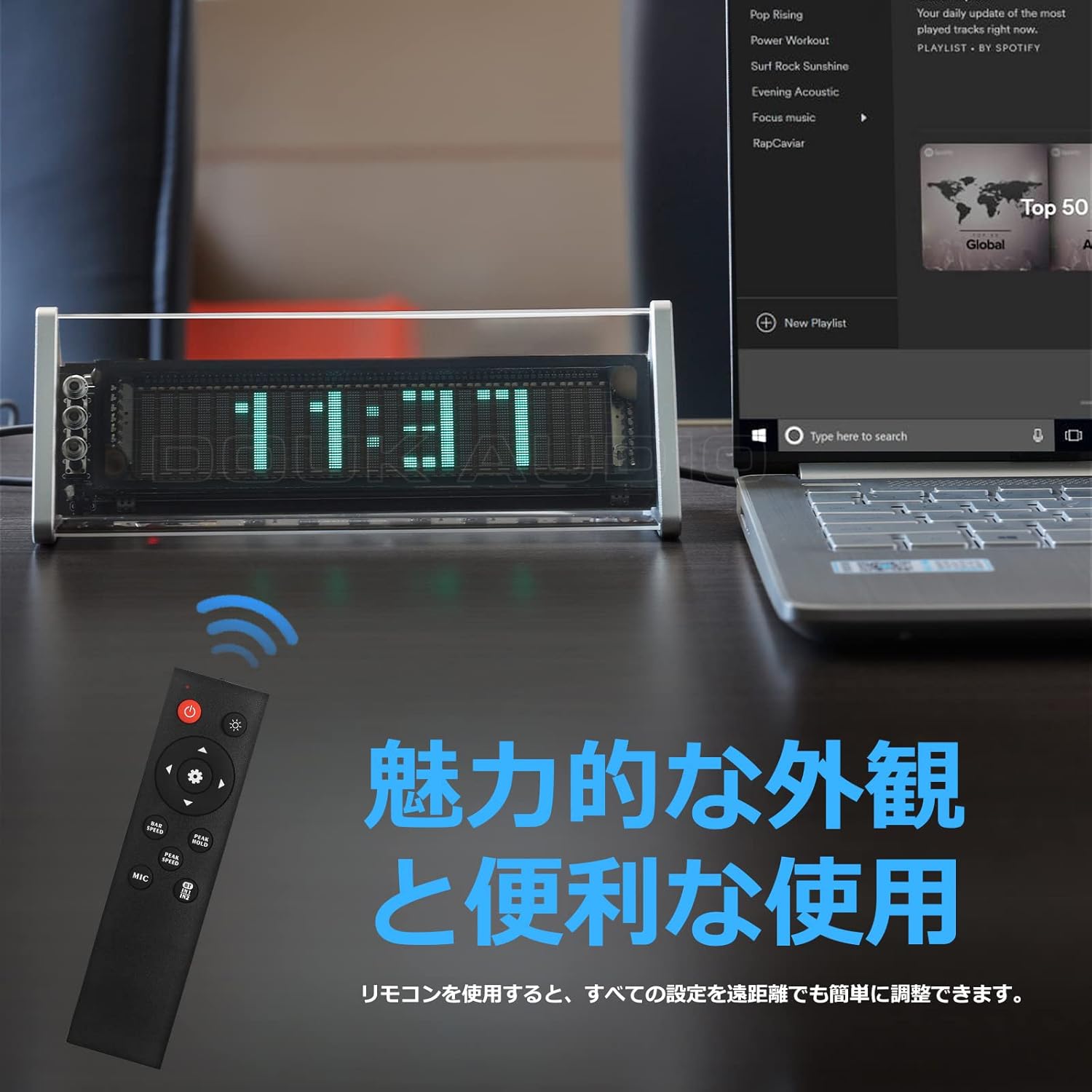
Image 6.1: The remote control for the Nobsound VFD253, showing buttons for power, input, mode, brightness, gain, and speed adjustments.
- Gain Adjustment: Use the Gain +/- buttons to adjust the input sensitivity, affecting the height of the spectrum display.
- Fall Speed Adjustment: Use the Speed +/- buttons to adjust the fall speed of the main light column and peak indicators.
- Hold Time Adjustment: Adjust the duration for which peak indicators remain on screen.
- MIC Input Toggle: Use the MIC button to enable or disable the built-in microphone input.
- Settings Memory: All adjustments are automatically saved thanks to the power-off memory function.
7. Display Modes
The VFD253 offers a variety of visual display options to enhance your audio experience or provide time information.
7.1. Music Spectrum Display Modes (5 Types)
These modes visualize the audio input in different dynamic patterns on the VFD screen.

Image 7.1: Examples of various music spectrum display modes available on the VFD253.

Image 7.2: A detailed view of one of the music spectrum display modes.
7.2. Clock Display Modes (2 Types)
When no audio signal is detected for a period, or when manually selected, the unit can display the time.

Image 7.3: A detailed view of one of the clock display modes.
8. Specifications
| Feature | Specification |
|---|---|
| Brand | Nobsound |
| Model | VFD253 |
| Display Type | Digital VFD (25 × 15 resolution) |
| Frequency Range | 80Hz - 16KHz |
| Clock Accuracy | ±3ppm (annual error < 1 minute) |
| Connectivity | Bluetooth 5.0, 2 × 3.5mm AUX Input, 1 × 3.5mm AUX Output |
| Power Input | DC 5V (USB Type-C) |
| Dimensions (L × H × D) | 184mm × 66mm × 75mm (approx. 7.24in × 2.60in × 2.95in) |
| Net Weight | 322g (0.71lb) |
| Frame Material | ABS |
9. Troubleshooting
If you encounter any issues with your VFD253, please refer to the following common problems and solutions:
- No Display:
- Ensure the USB Type-C power cable is securely connected and receiving power.
- Press the power button on the unit or remote to ensure it is turned on.
- No Audio Output (when using AUX Out):
- Verify that the correct input source (AUX1, AUX2, or Bluetooth) is selected.
- Check all 3.5mm audio cable connections between the source, VFD253, and your amplifier/speakers.
- Ensure your amplifier/speakers are powered on and set to the correct input.
- Display Not Reacting to Audio:
- Ensure an audio source is playing and connected correctly.
- If using microphone input, ensure the MIC input is enabled and there is ambient sound.
- Adjust the Gain setting via the remote control to increase sensitivity.
- Bluetooth Pairing Issues:
- Ensure the VFD253 is set to Bluetooth input mode.
- Disable and re-enable Bluetooth on your audio source device.
- Move the audio source closer to the VFD253 to ensure a strong signal.
- Remote Control Not Working:
- Check and replace the batteries in the remote control.
- Ensure there is a clear line of sight between the remote and the VFD253.
10. Maintenance
To ensure the longevity and proper functioning of your Nobsound VFD253, follow these maintenance guidelines:
- Cleaning: Use a soft, dry cloth to wipe the unit. Avoid using abrasive cleaners, solvents, or chemical sprays, as these can damage the finish or internal components.
- Environment: Place the unit in a dry, well-ventilated area away from direct sunlight, high temperatures, humidity, and strong magnetic fields.
- Handling: Handle the unit with care. Avoid dropping or subjecting it to strong impacts.
- Disassembly: Do not attempt to disassemble or modify the unit. This will void the warranty and may cause damage or injury.
11. Warranty and Support
Nobsound products are designed for reliability and performance. For warranty information, technical support, or service inquiries, please refer to the official Nobsound website or contact your authorized dealer.
- Online Support: Visit the official Nobsound website for FAQs, product updates, and contact information.
- Customer Service: If you require further assistance, please contact Nobsound customer support with your product model and purchase details.

