
1. Introduction
This manual provides detailed instructions for the safe and effective use of your Wefomey 120W Universal Adjustable DC Power Supply. Please read this manual thoroughly before operation and retain it for future reference.
The Wefomey 120W Universal Power Supply is designed to provide adjustable DC voltage from 4V to 24V with a maximum current of 5A, suitable for a wide range of electronic devices. It features multiple DC tips and a polarity converter for enhanced versatility.
2. Package Contents
Verify that all items are present in the package:
- 1x Wefomey 120W Universal Power Supply Adapter
- 14x DC Tips (various sizes)
- 1x Reverse Polarity Converter Cable
- 1x AC Power Cord

Image: The Wefomey 120W Universal Power Supply, including the main adapter unit, the detachable AC power cord, 14 interchangeable DC tips, and a polarity converter cable.
3. Safety Information
- Do not expose the power supply to water or excessive moisture.
- Do not disassemble the unit. Refer servicing to qualified personnel.
- Ensure the voltage and current settings match the requirements of your device before connecting.
- Unplug the power supply from the wall outlet when not in use for extended periods.
- This device is equipped with multiple safety protections including short circuit, over voltage, over temperature, overcurrent, and electromagnetic wave protection.

Image: The power supply unit with icons illustrating its safety features: Short Circuit Protection, Over Voltage Protection, Over Temperature Protection, Overcurrent Protection, and Electromagnetic Wave Protection.
4. Setup and Connection
- Connect the AC Power Cord: Plug the detachable AC power cord into the power supply unit and then into a standard wall outlet (AC 100V-240V, 50/60Hz).
- Select the Correct DC Tip: Identify the appropriate DC tip from the 14 included tips that matches your device's input port. The main output connector on the power supply is 5.5mm x 2.5mm.
- Determine Polarity: Most devices use a "center positive" polarity (inner positive, outer negative). If your device requires "center negative" polarity, use the included reverse polarity converter cable.
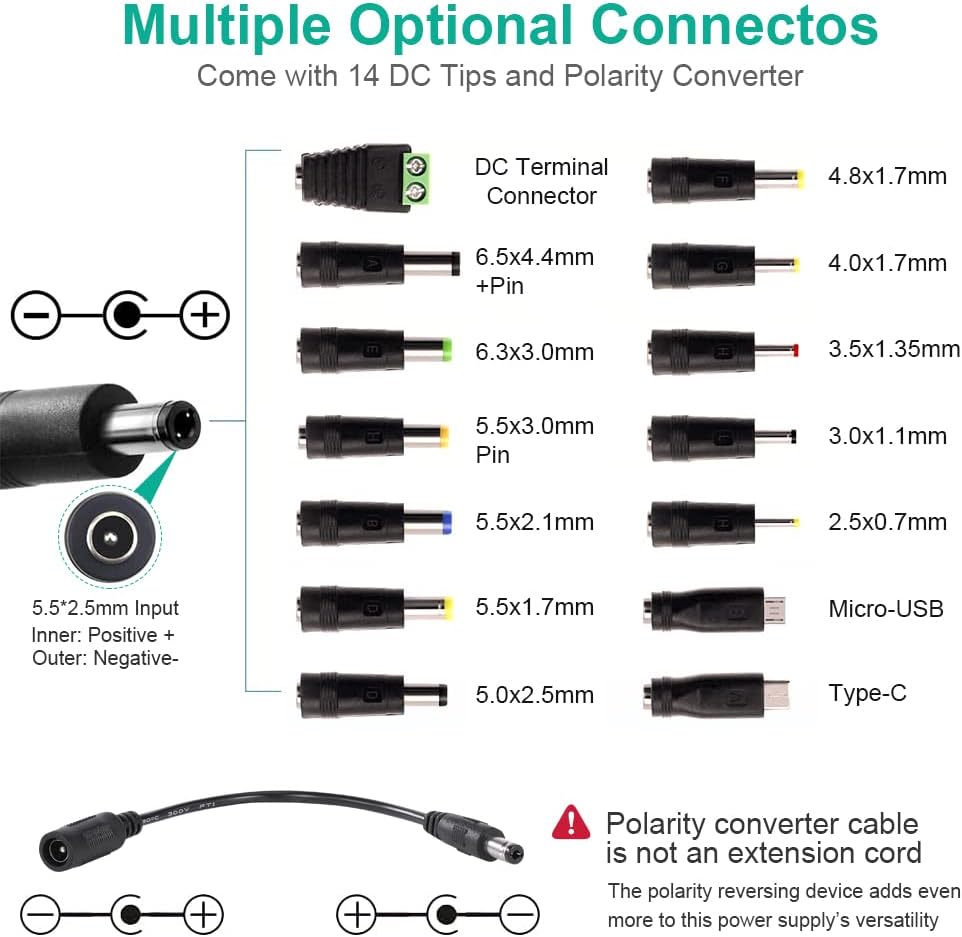
Image: A visual guide to the 14 interchangeable DC tips and the polarity converter cable. It also illustrates the standard 5.5mm x 2.5mm input with inner positive and outer negative polarity.
- Attach DC Tip: Connect the selected DC tip to the power supply's output cable. If needed, connect the polarity converter cable between the power supply's output cable and the selected DC tip.
- Set Output Voltage: Before connecting to your device, turn the voltage adjustment knob on the power supply to the desired output voltage. The digital display will show the current voltage setting. The adjustable range is 4V to 24V.
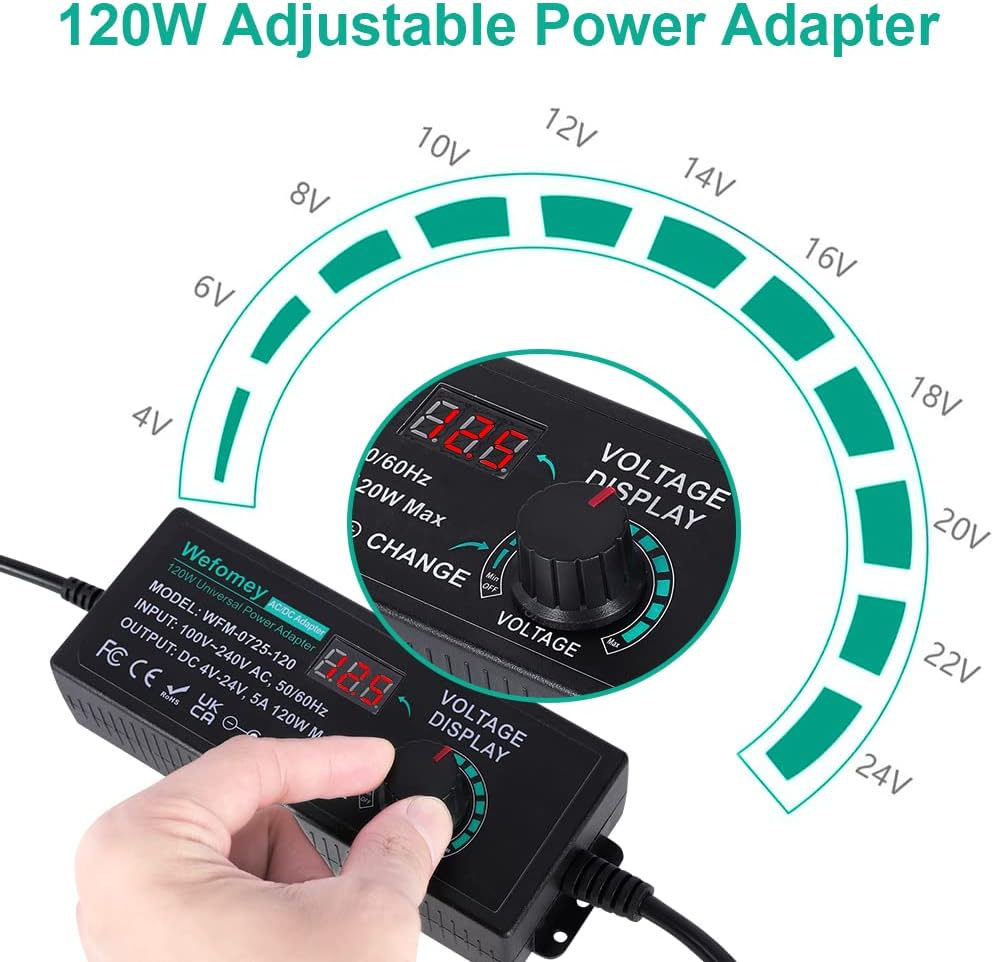
Image: A detailed view of the power supply's main unit, highlighting the digital voltage display and the rotary knob used to adjust the output voltage from 4V to 24V.
- Connect to Device: Once the voltage is correctly set and polarity confirmed, plug the DC tip into your electronic device.
5. Operating Instructions
The Wefomey power supply is designed for straightforward operation:
- Voltage Adjustment: Use the rotary knob on the main unit to precisely adjust the output voltage. The digital display provides real-time voltage readings.
- Voltage Display Accuracy: The screen displays voltage from 3.5V to 24.5V to compensate for a slight voltage drop (0.4V-0.6V) in the power cord between the power brick and the DC plug. This ensures your device receives the intended 3V-24V.
- Current Limit: The maximum output current is 5A. Ensure your device's current requirement does not exceed this limit to prevent damage to the power supply or the connected device. The maximum wattage is 120W.
6. Maintenance
- Cleaning: Wipe the unit with a soft, dry cloth. Do not use liquid cleaners or aerosols.
- Storage: Store the power supply and its accessories in a cool, dry place away from direct sunlight and extreme temperatures.
- Cable Care: Avoid sharp bends or kinks in the power cables. Do not place heavy objects on the cables.
7. Troubleshooting
- No Power/Display Off:
- Ensure the AC power cord is securely plugged into both the power supply and the wall outlet.
- Check if the wall outlet is functioning correctly by plugging in another device.
- Device Not Powering On:
- Verify that the selected DC tip is firmly connected to your device and the power supply cable.
- Confirm that the output voltage is correctly set for your device.
- Check the polarity. If your device requires center negative, ensure the polarity converter cable is used correctly.
- Ensure your device's current requirement does not exceed the power supply's 5A maximum.
- Inaccurate Voltage Reading (Multimeter vs. Display):
- The power supply's display accounts for a slight voltage drop in the cable. The displayed voltage (3.5V-24.5V) is calibrated to deliver the advertised 3V-24V to your device.
8. Specifications
| Input Voltage | AC 100V~240V, 50/60Hz |
| Output Voltage | DC 4V~24V Adjustable (Display shows 3.5V~24.5V) |
| Output Current | Max 5A |
| Output Wattage | Max 120W |
| Output DC Connector | 5.5mm x 2.5mm (Inner positive, outer negative) |
| Included DC Tips | 14 tips including 6.5x4.4mm+Pin, 5.5x2.1mm, 5.5x3.0mm+Pin, 5.0x2.5mm, 6.3x3.0mm, 5.5x1.7mm, 4.8x1.7mm, 4.0x1.7mm, 3.5x1.35mm, 3.0x1.1mm, 2.5x0.7mm, Micro-USB, Type-C, and DC terminal connector. |
| Reverse Polarity Converter | Included (5.5mm x 2.1mm) |
| Power Cable Length | 6.56ft / 200cm |
| Safety Compliance | FCC / CE / RoHS |
| Working Temperature | -20~50℃ |
| Ambient Humidity | 5~95% Non-Condensation |
| Weight | 1.18 lb / 535g |

Image: A diagram illustrating the dimensions of the Wefomey 120W Universal Power Supply unit and its associated cables, providing measurements in both inches and centimeters.
9. Warranty and Support
No specific warranty or support contact information is provided in this manual. Please refer to your purchase documentation or contact the retailer for warranty details and customer support.


