
1. Introduction
This manual provides comprehensive instructions for the installation, operation, and maintenance of your XIAOVV 10000mAh Wireless Outdoor Solar Security Camera. Please read this manual thoroughly before using the product to ensure proper functionality and safety.
2. Safety Information
- Ensure the solar panel receives adequate direct sunlight for optimal charging.
- Do not expose the camera to extreme temperatures outside its operating range (-10°C to 50°C / 14°F to 122°F).
- Avoid placing the camera in areas prone to strong electromagnetic interference.
- Keep the device away from children and pets.
- Only use approved accessories and power adapters.
- Do not attempt to disassemble or repair the camera yourself. Contact customer support for assistance.
3. Package Contents
Verify that all items are present in the package:
- XIAOVV Wireless Outdoor Solar Security Camera
- Solar Panel (integrated)
- Mounting Bracket and Screws
- USB Charging Cable
- User Manual (this document)
4. Product Overview
4.1 Key Features
- 10000mAh Built-in Battery: Ensures extended operation, supplemented by solar charging.
- Solar Powered: Designed for continuous operation with sufficient sunlight.
- PIR Smart Detection: Reduces false alarms by detecting human body temperature.
- Spotlight and Voice Siren: Deters intruders with visual and auditory alarms.
- IP65 Weatherproof: Withstands rain, snow, and high temperatures for outdoor use.
- Pan & Tilt Functionality: 355° horizontal and 100° vertical rotation for wide coverage.
- HD Night Vision: Clear visibility in low-light conditions.
- Motion Tracking: Automatically follows detected movement within the monitoring range.
- Military-Grade Data Encryption: Ensures user privacy and data security.
4.2 Camera Components
Refer to the image below for a visual representation of the camera's main components.

Figure 4.2.1: Front view of the XIAOVV Solar Security Camera, showing the main camera unit, solar panel, and mounting bracket. The camera features a dome shape with integrated spotlights and lenses.
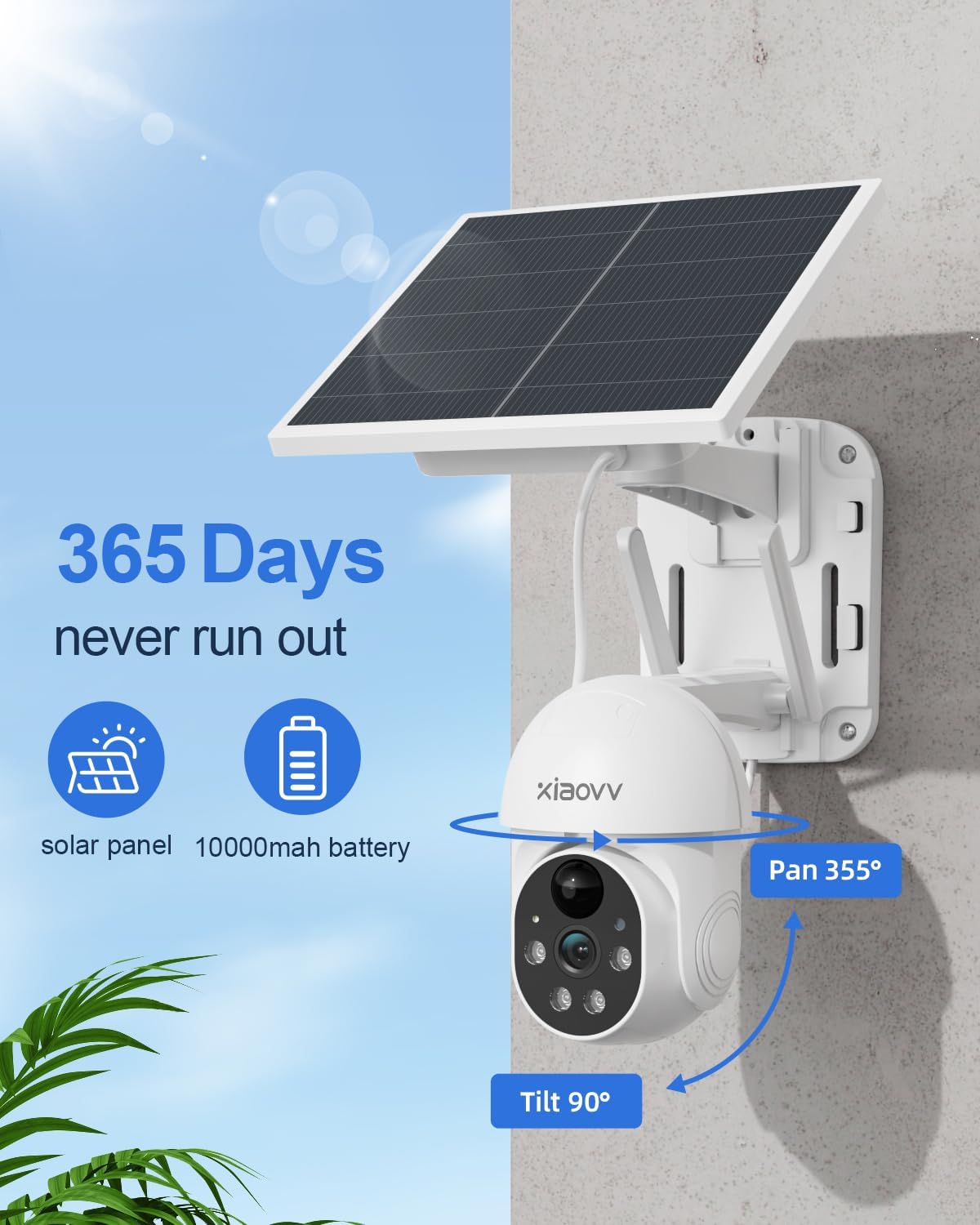
Figure 4.2.2: Diagram illustrating the 355-degree pan and 90-degree tilt capabilities of the XIAOVV Solar Security Camera, highlighting its wide coverage area.
5. Setup
5.1 Initial Charging
Before first use, fully charge the camera's built-in 10000mAh battery using the provided USB cable. Connect the cable to the camera's charging port and a standard 5V USB power adapter (not included). The charging indicator will show the status.
5.2 App Installation
The XIAOVV camera operates via a dedicated mobile application. Download the "XIAOVV APP" from your device's app store:


Figure 5.2.1: Icons representing the availability of the XIAOVV APP on both Apple App Store and Google Play Store.
5.3 Camera Pairing
- Open the XIAOVV APP and create an account or log in.
- Follow the in-app instructions to add a new device. Ensure your smartphone is connected to a 2.4GHz Wi-Fi network.
- Power on the camera. The camera will enter pairing mode (indicated by a specific light pattern or voice prompt).
- Scan the QR code on the camera or follow alternative pairing methods provided in the app.
- Once connected, you can name your camera and begin live viewing.
5.4 Mounting the Camera
The camera offers flexible installation options. Choose a location that provides optimal sunlight for the solar panel and a clear view of the desired monitoring area.
- Wall Mount: Use the provided screws and mounting bracket to secure the camera to a sturdy wall. Ensure the solar panel is positioned to receive maximum direct sunlight throughout the day.
- Tree Mount: The design allows for mounting on trees, ensuring the camera and solar panel are stable and have an unobstructed view.

Figure 5.4.1: The XIAOVV Solar Security Camera mounted on an outdoor wall, demonstrating a typical installation scenario.

Figure 5.4.2: The XIAOVV Solar Security Camera mounted on a tree, showcasing an alternative outdoor installation method.
6. Operating Instructions
6.1 Live View and Pan/Tilt Control
Access the live feed of your camera through the XIAOVV APP. Use the on-screen controls to pan the camera 355° horizontally and tilt it 100° vertically to adjust the viewing angle.

Figure 6.1.1: Illustration of the PIR detection zone, showing how the camera identifies human presence to minimize false alarms.
6.2 Motion Detection and Alerts
The camera features PIR (Passive Infrared) smart detection, which senses changes in body temperature to trigger recording and alerts. You can customize sensitivity settings within the app.
- Automatic Tracking: When motion is detected, the camera can automatically track the moving object.
- Spotlight and Siren: Configure the camera to activate its spotlight and/or voice siren upon detection to deter intruders.
- Notifications: Receive instant notifications on your smartphone when motion is detected.

Figure 6.2.1: The XIAOVV Solar Security Camera with its spotlight activated, demonstrating its ability to illuminate and deter in low-light conditions.
6.3 Night Vision
The camera is equipped with HD night vision, allowing clear monitoring even in complete darkness. It utilizes infrared and LED vision for optimal performance.

Figure 6.3.1: A split image showing the difference between daytime and night vision views from the camera, highlighting its clarity in darkness.
6.4 Recording and Storage
The camera supports local storage via an SD card (up to 128GB, not included) or cloud storage subscription. Recordings are triggered by motion detection.
- Local Storage: Insert a microSD card into the designated slot on the camera.
- Cloud Storage: Subscribe to the cloud storage service through the XIAOVV APP for remote access to recordings.
6.5 Multi-Camera View
The XIAOVV APP allows you to view live feeds from up to four cameras simultaneously, providing comprehensive coverage of your property.
Figure 6.5.1: A smartphone screen displaying live feeds from four different XIAOVV cameras simultaneously, illustrating the multi-view feature.
7. Maintenance
- Cleaning: Periodically wipe the camera lens and solar panel with a soft, damp cloth to ensure clear vision and efficient charging. Do not use harsh chemicals.
- Battery Care: While the solar panel provides continuous power, ensure the camera receives sufficient sunlight. In prolonged cloudy periods, you may need to manually charge the battery via USB.
- Firmware Updates: Check the XIAOVV APP regularly for firmware updates to ensure optimal performance and security.
8. Troubleshooting
| Problem | Possible Cause | Solution |
|---|---|---|
| Camera frequently goes offline. | Weak Wi-Fi signal; low battery; app issue. | Ensure camera is within Wi-Fi range. Recharge battery if needed. Restart the app or camera. Consider a Wi-Fi extender. |
| Battery not charging via solar. | Insufficient direct sunlight; dirty solar panel. | Relocate the camera to an area with more direct sunlight. Clean the solar panel surface. |
| False motion alerts. | PIR sensitivity too high; environmental factors (e.g., swaying branches). | Adjust PIR sensitivity settings in the app. Reposition the camera to avoid non-human triggers. |
| Night vision unclear. | Dirty lens; obstructions. | Clean the camera lens. Ensure no obstructions are blocking the infrared LEDs. |
9. Specifications
| Feature | Detail |
|---|---|
| Model Number | B0BTYBSDJQ |
| Brand | XIAOVV |
| Power Source | Solar Powered |
| Battery Capacity | 10000 mAh |
| Connectivity | 2.4 GHz Wi-Fi |
| Pan Angle | 355° |
| Tilt Angle | 100° |
| Waterproof Rating | IP65 |
| Storage Options | MicroSD (up to 128GB), Cloud Storage |
| Operating Temperature | -10°C to 50°C (14°F to 122°F) |
| Item Weight | 3.32 pounds |
| Package Dimensions | 9.65 x 8.82 x 7.95 inches |
10. Warranty and Support
XIAOVV provides a one-year after-sales guarantee for this product. If you encounter any issues or require assistance, please contact our customer support team.
For technical support, troubleshooting, or warranty claims, please visit the official XIAOVV website or contact us via the information provided in the XIAOVV APP.
Note: Please retain your proof of purchase for warranty purposes.


