
1. Introduction
Thank you for choosing the Ustellar Remote Control. This remote is specifically designed to operate Ustellar 55W and 100W motion sensor flood lights, allowing for convenient adjustment of various settings. Please read this manual carefully before use to ensure proper operation and to maximize the lifespan of your product.
1.1 Safety Information
- Keep the remote control away from water and high humidity.
- Do not expose the remote control to direct sunlight or extreme temperatures.
- Do not attempt to disassemble or modify the remote control. This will void the warranty.
- Dispose of used batteries according to local regulations. Do not mix old and new batteries, or different types of batteries.
2. Product Overview
2.1 Package Contents
- Ustellar Remote Control (Model: UT88125)
- User Manual
Note: Batteries are typically not included and must be purchased separately.
2.2 Remote Control Layout
The Ustellar remote control features an ergonomic design with clearly labeled buttons for intuitive operation of your flood light.
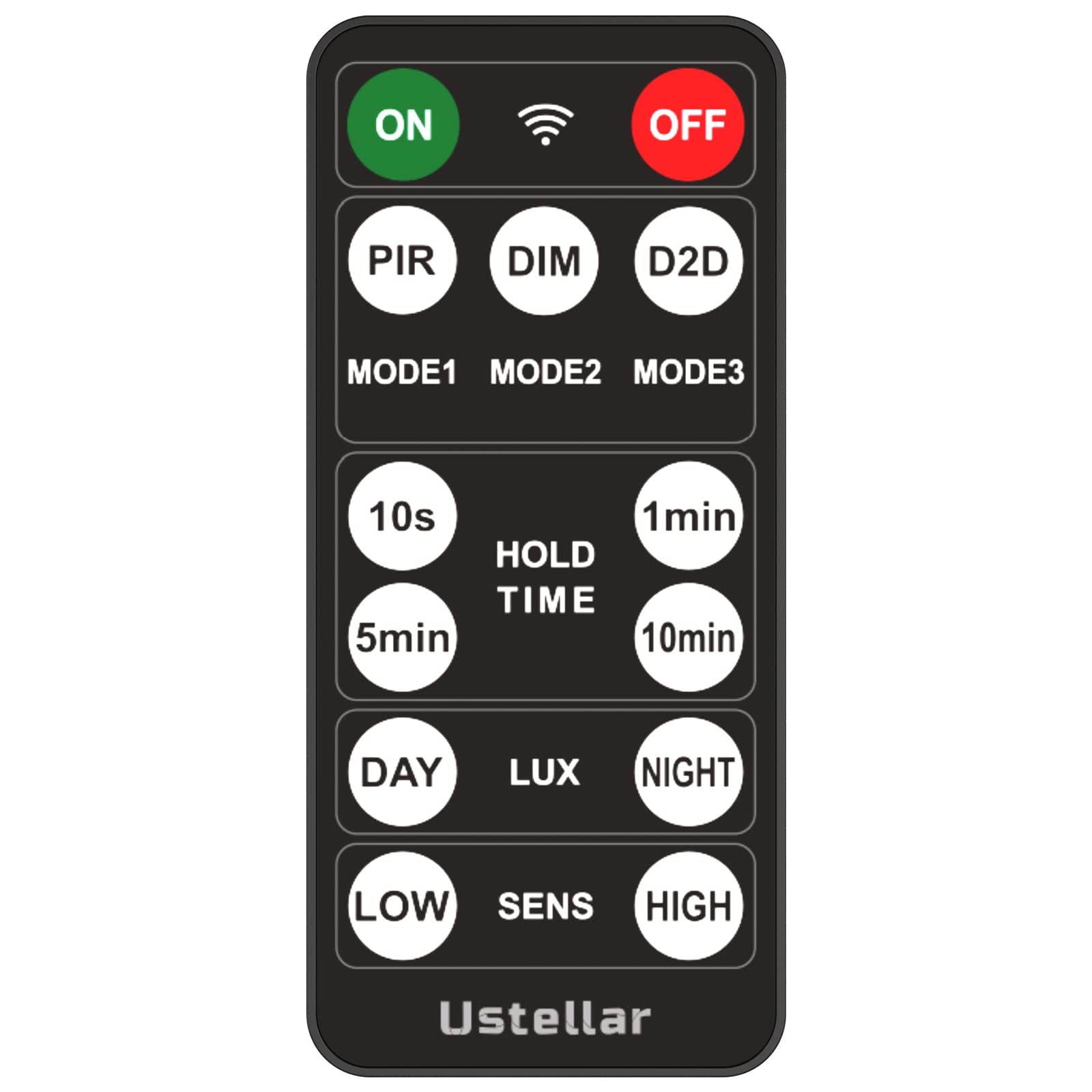
Image: Front view of the Ustellar remote control, showing various control buttons for power, brightness, mode selection, and timer functions.
Familiarize yourself with the button functions:
- ON/OFF: Powers the flood light on or off.
- Brightness +/-: Adjusts the light intensity.
- Mode Selection: Cycles through different lighting modes (e.g., motion sensor, always on, dusk-to-dawn).
- Timer: Sets a specific duration for the light to remain on.
- Sensitivity: Adjusts the motion sensor's detection range.
3. Setup
3.1 Battery Installation
- Locate the battery compartment on the back of the remote control.
- Slide open the battery cover.
- Insert two AAA batteries (not included), ensuring the correct polarity (+ and -) as indicated inside the compartment.
- Close the battery cover securely.
3.2 Pairing with Flood Light
The Ustellar remote control is designed to work seamlessly with compatible Ustellar 55W and 100W motion sensor flood lights. Typically, no manual pairing is required; the remote should function directly with the flood light upon battery installation.
- Ensure the flood light is powered on and within range of the remote control.
- Point the remote control directly at the flood light's sensor or receiver.
- Press any function button (e.g., ON) to test the connection.
If the remote does not respond, refer to the troubleshooting section or the specific manual for your Ustellar flood light model for detailed pairing instructions, if any are required.
4. Operating Instructions
This section outlines the basic and advanced functions of your Ustellar remote control.
4.1 Basic Functions
- Power ON/OFF: Press the ON/OFF button to toggle the flood light's power state.
- Adjust Brightness: Use the Brightness + or Brightness - buttons to increase or decrease the light output.
- Mode Selection: Press the MODE button to cycle through available lighting modes. Common modes include:
- Motion Sensor Mode: Light activates only when motion is detected.
- Always On Mode: Light remains on continuously.
- Dusk-to-Dawn Mode: Light automatically turns on at dusk and off at dawn.
4.2 Advanced Settings
- Timer Function: Press the TIMER button to set the duration for which the light remains on after activation (e.g., 1 min, 5 min, 10 min).
- Motion Sensor Sensitivity: Use the SENSITIVITY button (if available) to adjust how easily the motion sensor is triggered. Higher sensitivity detects motion from further away or with less movement.
5. Maintenance
5.1 Cleaning
To clean the remote control, gently wipe its surface with a soft, dry cloth. Do not use abrasive cleaners, solvents, or wet cloths, as these can damage the remote's finish or internal components.
5.2 Battery Replacement
When the remote control's range decreases or it becomes unresponsive, it is likely time to replace the batteries. Follow the battery installation steps in Section 3.1. Always replace both batteries at the same time with new ones of the same type (AAA).
5.3 Storage
If the remote control will not be used for an extended period, it is recommended to remove the batteries to prevent leakage and potential damage to the device.
6. Troubleshooting
If you encounter issues with your Ustellar remote control, please refer to the following common problems and solutions:
- Remote is unresponsive:
- Check if the batteries are correctly installed with the proper polarity.
- Replace the batteries with new ones.
- Ensure there are no obstructions between the remote and the flood light's sensor.
- Confirm the flood light is powered on.
- Limited operating range:
- Replace the batteries.
- Ensure you are within the recommended operating distance and pointing the remote directly at the flood light.
- Minimize interference from other electronic devices.
- Specific function not working:
- Ensure the flood light supports the specific function you are trying to use.
- Refer to the flood light's manual for compatibility and specific feature activation.
If the problem persists after trying these solutions, please contact Ustellar customer support.
7. Specifications
7.1 Technical Data
| Brand | USTELLAR |
| Model Number | UT88125 |
| Model Name | NTSP-RMT-UT88125 |
| Color | Black |
| Power Source | Battery Powered (2x AAA, not included) |
| Control Method | Remote Control |
| Special Feature | Ergonomic |
| Manufacturer | Shenzhen Ustellar Technology Ltd. |
8. Warranty and Support
8.1 Warranty Information
Ustellar products are manufactured to high quality standards and are backed by a limited warranty. Please refer to the warranty card included with your original flood light purchase or visit the official Ustellar website for detailed warranty terms and conditions.
8.2 Customer Support
For technical assistance, troubleshooting, or any questions regarding your Ustellar Remote Control, please contact Ustellar customer support through their official website or the contact information provided with your product packaging. When contacting support, please have your product model number (UT88125) and purchase information readily available.


