1. Introduction
This manual provides essential information for the safe and efficient operation, installation, and maintenance of your Hitachi 2 Ton Class 3 Star ice Clean Wifi Enabled Inverter Split AC. Please read this manual thoroughly before using the air conditioner and retain it for future reference.
2. Safety Information
Always observe the following safety precautions to reduce the risk of electric shock, fire, or injury.
- Ensure the air conditioner is installed by a qualified technician.
- Do not attempt to repair or modify the unit yourself. Contact authorized service personnel.
- Keep the power cord free from damage and do not place heavy objects on it.
- Do not insert fingers or objects into the air inlet/outlet.
- Turn off the power supply before cleaning or performing any maintenance.
- Use only the specified refrigerant (R-32).
3. Product Overview
The Hitachi iZen 3500FWXL (RAS.V322PCAISH) is a 2-ton, 3-star inverter split air conditioner designed for efficient cooling. It features an inverter compressor, copper condenser coil, and R-32 refrigerant for improved performance and environmental friendliness.
Key Features:
- Inverter Compressor: Adjusts power based on heat load for energy efficiency.
- Capacity: 1.8 Ton (suitable for rooms 180-200 Sq.Ft.).
- Energy Rating: 3 Star (ISEER Value: 3.90).
- Copper Condenser Coil: Ensures better cooling and requires low maintenance.
- Refrigerant: Eco-friendly R-32.
- ice Clean Feature: Self-cleaning function for the indoor unit.
- Wi-Fi Enabled: Control via the airCloud Home mobile app.
- Special Features: Anti Bacterial Filter, Dehumidifier, Fast Cooling, Auto Mode, Cool Mode, Fan Mode, Dry Mode, LCD Remote Control, Auto Fan Speed, Auto Restart, Super Silent operation, Ambience Light, Odour-free air, My Mode, Hexa Sensor, 5 Fan Speed, 100% Cooling Capacity even at 43°C, 3M Coating.
Components Included:
- Indoor Unit (IDU)
- Outdoor Unit (ODU)
- Remote Control
- Installation Kit
- User Manual
Product Dimensions:

Indoor Unit: 105 cm (W) x 29.4 cm (H) x 25.5 cm (D)

Outdoor Unit: 80 cm (W) x 64 cm (H) x 29.8 cm (D)

Energy Efficiency Label: Displays ISEER value of 3.90 and annual energy consumption.
4. Setup
4.1 Professional Installation
It is highly recommended that the installation of your Hitachi Inverter Split AC be performed by a certified and authorized Hitachi service technician. Improper installation can lead to reduced performance, damage to the unit, and void the warranty.
4.2 Wi-Fi Setup (airCloud Home App)
Your air conditioner is Wi-Fi enabled, allowing for remote control and smart features via the airCloud Home mobile application.
- Download the airCloud Home app from your smartphone's app store.
- Follow the in-app instructions to create an account and register your air conditioner.
- Ensure your home Wi-Fi network is active and the AC unit is within range.
- The app will guide you through connecting the AC to your Wi-Fi network.

airCloud Home App: Control your AC remotely via Wi-Fi.
5. Operating Instructions
Operate your Hitachi AC using the provided LCD remote control or the airCloud Home mobile app.
5.1 Remote Control Functions
The LCD remote control allows you to select various modes and settings.
- Power Button: Turns the unit ON/OFF.
- Mode Button: Cycles through Auto, Cool, Fan, and Dry modes.
- Temperature Adjustment: Use UP/DOWN arrows to set desired temperature.
- Fan Speed: Adjusts fan speed (Auto, Silent, Low, Medium, High, Super High).
- My Mode: Saves and recalls your preferred settings.
- Swing Button: Controls the louver direction.
- Timer Button: Sets ON/OFF timers.

My Mode: Customize and save your favorite settings.

5 Fan Speed: Choose from multiple fan speeds for optimal comfort.

Ambience Light: Visual indicator for operational status.
5.2 Operating Modes
- Cool Mode: Provides cooling to reach the set temperature.
- Fan Mode: Circulates air without cooling.
- Dry Mode: Reduces humidity in the room.
- Auto Mode: Automatically selects the appropriate mode based on room temperature.
5.3 Smart Features
- Wi-Fi Control: Manage your AC from anywhere using the airCloud Home app.
- Voice Control: Compatible with Google Home and Amazon Alexa for hands-free operation.
- Auto Restart: The unit automatically restarts with previous settings after a power outage.
- Hexa Sensor: Advanced sensors for optimized performance.
6. Maintenance
Regular maintenance ensures optimal performance and longevity of your air conditioner.
6.1 Filter Cleaning
The Anti Bacterial Filter should be cleaned regularly to maintain air quality and cooling efficiency.
- Turn off the air conditioner and disconnect the power supply.
- Open the front panel of the indoor unit.
- Remove the air filters.
- Clean the filters with a vacuum cleaner or wash them with lukewarm water.
- Allow filters to dry completely before reinstalling.
- Close the front panel and restore power.
6.2 ice Clean Feature
The ice Clean feature automatically cleans the indoor unit's coil by freezing and then melting the ice, washing away dust and dirt. This helps maintain clean and odour-free air.
- Activate the ice Clean function via the remote control or airCloud Home app as per the detailed instructions in the full user manual.
- This process helps remove viruses, bacteria, and mold from the coil.

ice Clean: Automatic coil cleaning for improved air quality.
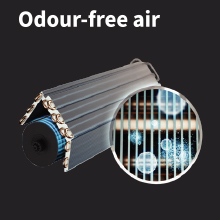
Odour-free Air: Contributes to a fresher indoor environment.
6.3 General Cleaning
- Wipe the exterior of the indoor and outdoor units with a soft, damp cloth.
- Do not use harsh detergents, solvents, or abrasive cleaners.
- The unit features a 3M coating for enhanced durability and ease of cleaning.
7. Troubleshooting
Before contacting service, check the following common issues:
| Problem | Possible Cause | Solution |
|---|---|---|
| Unit does not turn on | No power supply, remote control batteries low | Check power connection, replace remote batteries |
| Insufficient cooling | Dirty air filters, blocked outdoor unit, wrong mode selected, room too large | Clean filters, clear obstructions, select Cool mode, ensure room size matches capacity |
| Unusual noise | Loose parts, foreign objects, unit not level | Check for loose parts, remove objects, ensure unit is level |
| Water leakage | Blocked drain pipe, improper installation | Clear drain pipe, contact service for inspection |
| Wi-Fi connection issues | Router issues, incorrect password, unit out of range | Restart router, re-enter password, ensure unit is within Wi-Fi range |
If the problem persists after attempting these solutions, please contact Hitachi customer support.
8. Specifications
| Specification | Value |
|---|---|
| Brand | Hitachi |
| Model Name | iZen 3500FWXL |
| Model Number | RAS.V322PCAISH |
| Capacity | 1.8 Tons (2 Ton Class) |
| Cooling Power | 21500 British Thermal Units |
| Energy Rating | 3 Star |
| ISEER Value | 3.90 |
| Annual Energy Consumption | 1251 Kilowatt Hours |
| Refrigerant | R-32 |
| Core Material | Copper |
| Noise Level | 37 Decibels |
| Indoor Unit Dimensions (D x W x H) | 25.5D x 105W x 29.4H Centimeters |
| Outdoor Unit Dimensions (D x W x H) | 29.8D x 80W x 64H Centimeters (approx. from image) |
| Item Weight | 44700 Grams (44.7 kg) |
| Voltage | 230 Volts |
| Wattage | 2020 KW |
| Control Method | Remote, Wi-Fi App |
9. Warranty and Support
Hitachi provides comprehensive warranty coverage for your air conditioner.
9.1 Warranty Details
- 1 Year Comprehensive Warranty on the complete unit.
- 1 + 4 Years on the Controller (PCB).
- 1 + 9 Years on the Compressor.
Please retain your purchase invoice for warranty claims.

Quality Assurance: Undergoes 43 quality tests.
9.2 Customer Support
For any service requests, technical assistance, or warranty claims, please contact Hitachi customer care:
- Customer Care Number: 7567884848
- Email: customercare@jci-hitachi.com
- Manufacturer/Importer: JCH-IN., Hitachi Complex, Karannagar, Kadi. Dist. Mehsana- 382715. Gujarat. India.


