1. Introduction
This manual provides essential instructions for the safe and effective use of your Goplus 2-in-1 Rollator Walker and Transport Wheelchair. This versatile mobility aid is designed to assist individuals with limited mobility, functioning both as a rollator for independent walking support and as a transport wheelchair for assisted movement.
Key features include a lightweight yet sturdy aluminum frame, 8-inch all-terrain PVC wheels, adjustable handles with integrated brakes, a comfortable seat with a reversible backrest, and foldable footrests. It also offers convenient folding for transport and storage, along with practical accessories like a detachable storage bag and an umbrella/cane holder.

Figure 1: The Goplus 2-in-1 Rollator Walker in its dual configurations: as a rollator (left) and as a transport wheelchair (right).
2. Safety Information
WARNING: Failure to follow these safety instructions may result in serious injury.
- Always ensure all locking mechanisms are engaged before use.
- Do not exceed the maximum weight capacity of 350 lbs.
- Ensure the user's feet are on the footrests when using as a transport wheelchair.
- Engage the brakes when sitting on the seat or when the unit is stationary.
- Avoid using on uneven or slippery surfaces without extreme caution.
- Regularly inspect the wheels, brakes, and frame for wear or damage. Do not use if damaged.
- Seek assistance when navigating inclines, declines, or rough terrain.
- Keep hands and fingers clear of moving parts during folding and unfolding.
3. Package Contents
Verify that all components are present upon unpacking:
- Goplus 2-in-1 Rollator Walker main frame with seat and backrest
- Detachable footrests (2)
- Detachable storage bag
- Umbrella/cane holder
- Instruction Manual
4. Setup
4.1 Unfolding the Rollator
- Place the folded rollator on a flat, stable surface.
- Gently pull the handles outwards until the frame fully expands and locks into place.
- Press down on the seat until it is flat and secure.
4.2 Attaching Footrests (for Wheelchair Mode)
- Locate the attachment points on the front frame of the rollator.
- Slide the footrests into the designated slots until they click securely into place.
- Ensure both footrests are firmly attached before use.
4.3 Adjusting Handle Height
The handles can be adjusted to 6 different height levels to suit individual user height.
- Locate the height adjustment pins on each handle post.
- Press the pin and slide the handle up or down to the desired height.
- Release the pin and ensure it locks securely into one of the adjustment holes.
- Repeat for the other handle, ensuring both are at the same height.

Figure 2: Illustration of adjustable handle height, reversible backrest, and foldable footrests.
5. Operating Instructions
5.1 Using as a Rollator Walker
- Stand behind the rollator with the handles adjusted to a comfortable height.
- Push the rollator forward slowly, maintaining a steady pace.
- To slow down, gently pull the brake levers upwards.
- To lock the wheels, push the brake levers downwards until they click into the locked position. Pull them up again to release.
- When sitting on the seat, ensure the brakes are locked and the backrest is in the forward-facing position (for rollator use).

Figure 3: Proper use of the handle brakes for slowing down and locking the wheels.
5.2 Using as a Transport Wheelchair
- Ensure the footrests are securely attached and folded down.
- Flip the backrest over to the rear position, allowing the user to sit facing forward.
- Assist the user to sit on the seat, ensuring their feet are placed on the footrests.
- The attendant should stand behind the wheelchair, holding the handles.
- Push the wheelchair to transport the user. Use the brakes as needed for control and to secure the chair when stationary.
5.3 Folding for Storage and Transport
The rollator features a one-hand folding design for convenience.
- Ensure the storage bag is empty and removed if desired.
- Lift the handle located on the center of the seat.
- The rollator will begin to fold inwards. Continue lifting until it is fully collapsed.
- Secure any locking mechanisms if present to keep it folded.
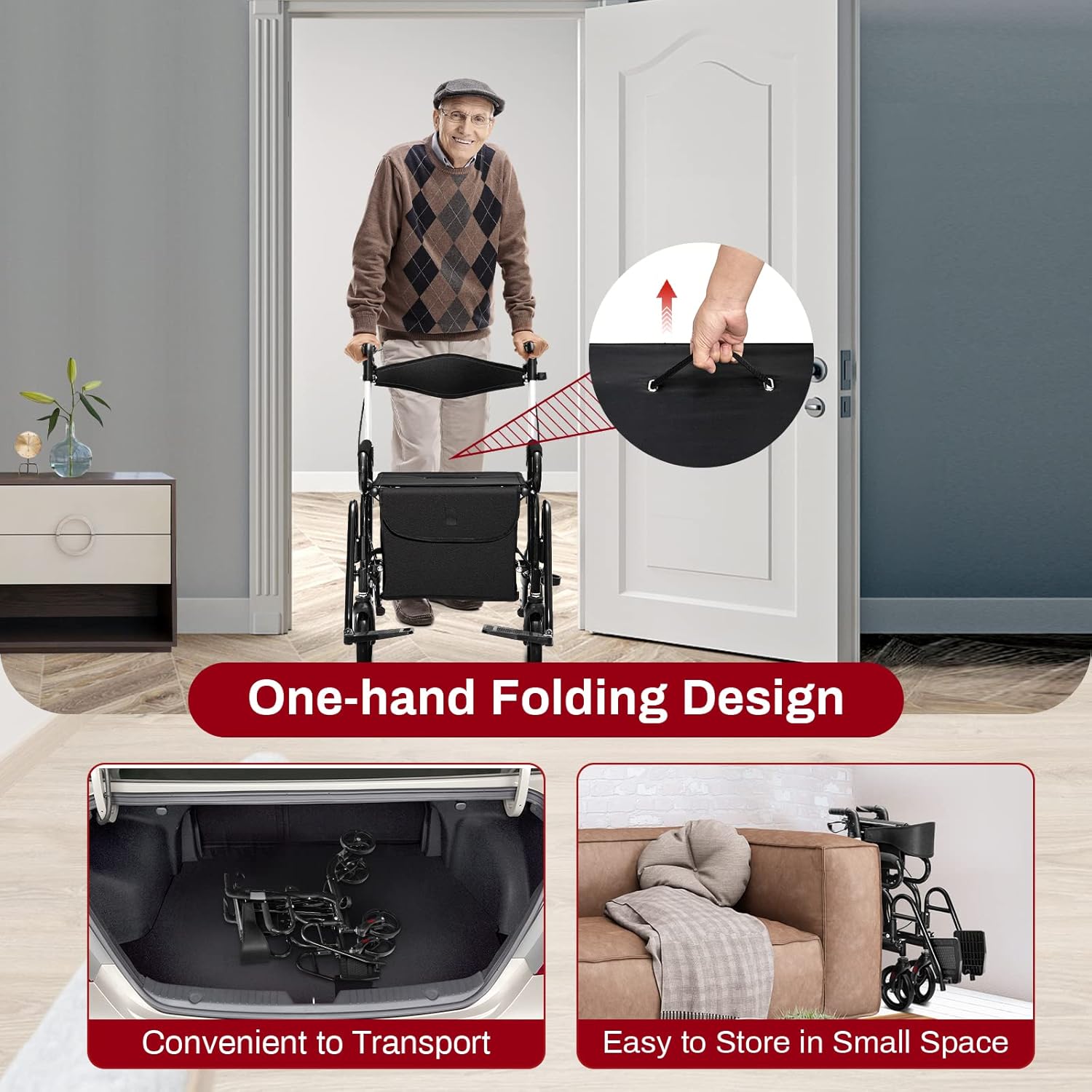
Figure 4: The rollator can be folded compactly for easy transport and storage.
6. Maintenance
6.1 Cleaning
- Wipe down the frame and seat with a damp cloth and mild soap.
- Avoid abrasive cleaners or solvents that could damage the finish.
- Ensure all parts are dry before storage or next use.
6.2 Inspection
- Periodically check all screws, bolts, and fasteners to ensure they are tight.
- Inspect the wheels for wear and tear, and ensure they rotate freely.
- Test the brakes regularly to confirm they engage and disengage properly.
- Examine the frame for any signs of cracks, bends, or damage.
7. Troubleshooting
| Problem | Possible Cause | Solution |
|---|---|---|
| Wheels do not roll smoothly. | Debris in wheels, loose axle, worn wheels. | Clean wheels, check axle tightness, replace worn wheels if necessary. |
| Brakes are not engaging or locking. | Brake cable too loose, worn brake pads. | Adjust brake cable tension, inspect and replace brake pads. |
| Rollator feels unstable. | Loose frame components, uneven handle height. | Check all fasteners for tightness, ensure handles are adjusted to the same height. |
| Difficulty folding/unfolding. | Mechanism obstructed, seat not fully lifted. | Clear any obstructions, ensure the seat handle is fully lifted. |
8. Specifications
- Model Number: SU-10010BK-HJ-CA
- Product Dimensions (Unfolded): 41"L x 25"W x 34"-39"H
- Product Dimensions (Folded): 41"L x 10"W x 34"-39"H
- Seat Size: 18"W x 12"D
- Seat Height from Ground: 22.5"
- Wheel Diameter: 8 inches (PVC)
- Material: Aluminum, Polyvinyl Chloride (PVC)
- Item Weight: 21 Pounds
- Weight Capacity: 350 lbs
- Color: Black

Figure 5: Detailed product dimensions.
9. Warranty & Support
For warranty information, technical support, or to order replacement parts, please contact Goplus customer service. Refer to your purchase documentation for specific contact details or visit the official Goplus website.
Please have your model number (SU-10010BK-HJ-CA) and date of purchase available when contacting support.


