
G-Homa OT1001D
G-Homa OT1001D 24-Hour Mechanical Outdoor Timer Outlet Instruction Manual
Model: OT1001D
Introduction
This instruction manual provides essential information for the safe and efficient operation of your G-Homa 24-Hour Mechanical Outdoor Timer Outlet. This device is designed to control outdoor electrical appliances such as lighting and engine block heaters with programmable on/off settings.
Important Safety Information
- Always use with a grounded outdoor outlet.
- Ensure the timer is installed vertically at least 2 feet (0.6 meters) above the ground to maintain its waterproof rating.
- Do not immerse in water.
- Keep children away from the device.
- Unplug the timer before cleaning.
- Do not exceed the maximum electrical ratings: 125V 60Hz, 15A, 1875W (resistive or general purpose), 10A (tungsten lamp), 3/4HP.
- This product is CSA listed and conforms to UL Std. 917.
Product Overview
The G-Homa Outdoor Timer Outlet offers reliable control for your outdoor electrical needs. It features a robust design suitable for various weather conditions and simple mechanical programming.

Figure 1: Two G-Homa 24-Hour Mechanical Outdoor Timer Outlets.
Key Features:
- 24-Hour Programmable: Up to 48 on/off settings per day with 30-minute intervals.
- Heavy Duty & Weatherproof: Built with a rainproof and rugged transparent lid and casing, designed to operate in rain, wind, or snow.
- Easy to Use: Simple mechanical dial for setting schedules.
- Versatile Applications: Ideal for outdoor lighting, engine block heaters, pool pumps, and other outdoor electrical devices.
- Flexible Placement: Features an 18-inch cord and a mounting hole for secure installation.
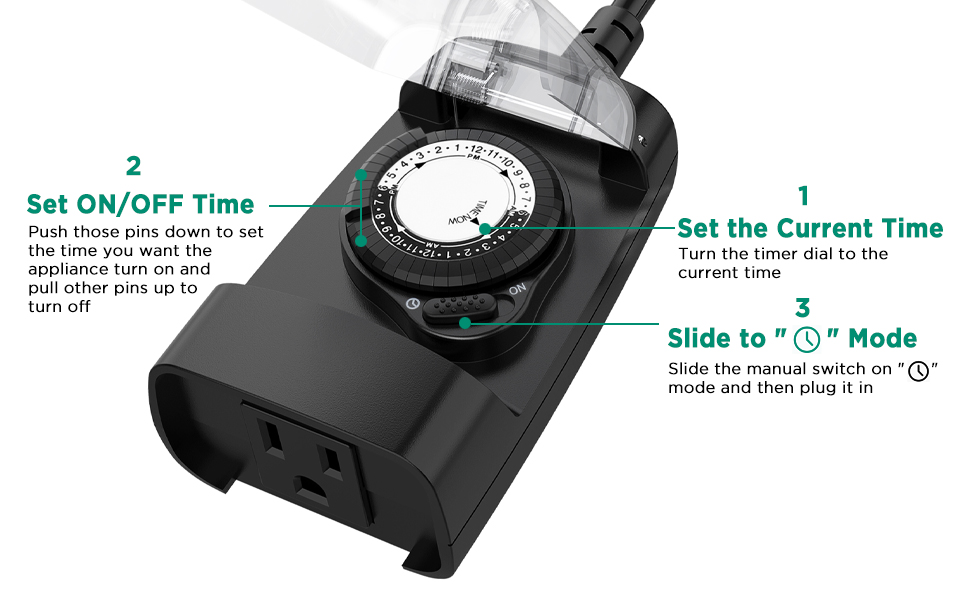
Figure 2: Overview of the G-Homa 24-Hour Mechanical Outdoor Timer's features.
Setup Instructions
- Prepare the Timer:
Lift all the small pins on the timer dial to the 'UP' position. These pins represent the 'OFF' time for your device.

Figure 3: Lift all pins on the timer dial to the 'UP' position.
- Set ON Times:
Push down the pins corresponding to the times you want your attached device to be 'ON'. Each pin represents a 30-minute interval. For example, to set the device to be ON from 6:00 PM to 10:00 PM, push down the pins from '6PM' to '10PM'.

Figure 4: Pins up indicate OFF, pins down indicate ON.
- Set Current Time:
Rotate the entire timer dial clockwise until the arrow on the dial aligns with the current time of day. The black portion of the dial represents 6 PM to 6 AM (nighttime), and the white portion represents 6 AM to 6 PM (daytime).
- Select Operating Mode:
Slide the manual switch located on the side of the timer to the 'Timer' mode (indicated by a clock icon). If you wish for the device to be continuously on, slide the switch to the 'ON' position.
- Plug In and Connect Device:
Plug the timer into a grounded outdoor wall socket. Then, plug your electrical device into the timer's outlet. Ensure your device is switched to the 'ON' position for the timer to control it.

Figure 5: Detailed steps for setting the timer's schedule and current time.
Operating Modes
Your G-Homa Outdoor Timer Outlet supports two primary operating modes:
- Timer Mode (Clock Icon): The device will turn on and off according to the pins you have pushed down on the dial. This schedule will repeat daily.
- Always ON Mode: Slide the manual switch to the 'ON' position. The timer will bypass its programmed schedule, and the connected device will remain continuously powered.
Video 1: Official G-Homa demonstration of the outdoor electrical outlet timer for lights, showing basic operation and features.
Maintenance
- To clean the timer, unplug it from the power source and wipe with a dry cloth. Do not use liquid cleaners.
- Regularly inspect the timer and its cord for any signs of damage. Discontinue use if damage is found.
- Ensure the transparent lid is securely closed to maintain its rainproof integrity.
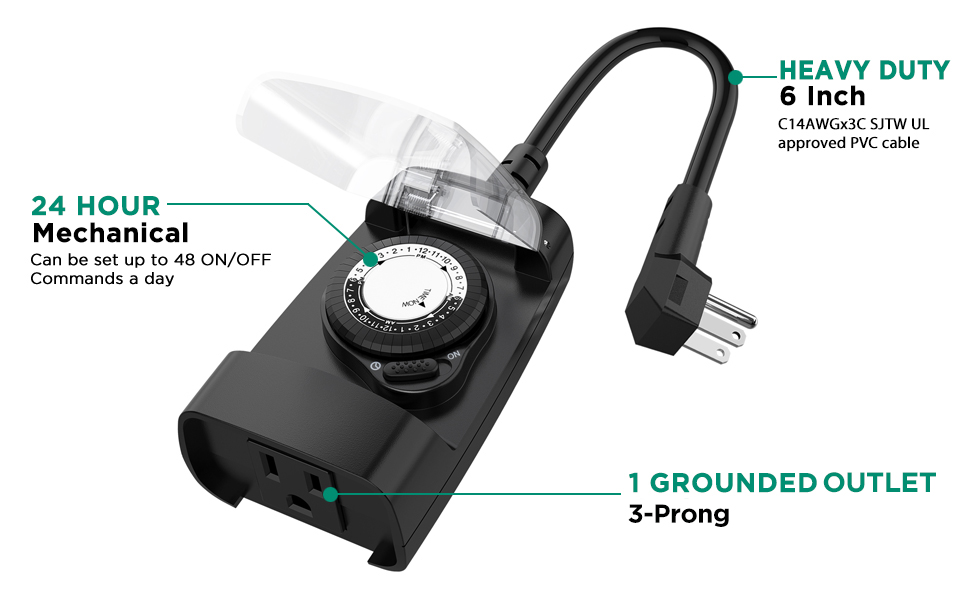
Figure 6: The timer is designed to be weatherproof, operating reliably in various outdoor conditions.
Troubleshooting
| Problem | Possible Cause | Corrective Action |
|---|---|---|
| Appliance does not turn on/off as programmed. |
|
|
| Appliance is not receiving power. |
|
|
Specifications
- Model Number: OT1001D
- Brand: G-Homa
- Color: Black
- Material: Plastic
- Product Dimensions: 1.5"D x 2.3"W x 4"H
- Item Weight: 14.9 ounces (0.42 Kilograms)
- Number of Settings: 48 (30-minute intervals)
- Rated Voltage: 125V 60Hz
- Max Loading (Resistive/General Purpose): 15A / 1875W
- Max Loading (Tungsten Lamp): 10A / 1250W
- Motor Rating: 3/4HP
- Certifications: CSA Listed, Conforms to UL Std. 917
- Cord Length: 18 inches (approx.)

Figure 7: Physical dimensions and key features of the G-Homa Outdoor Timer.
Warranty and Support
The G-Homa 24-Hour Mechanical Outdoor Timer Outlet comes with a limited lifetime warranty. For any questions or support, please contact our USA-based customer service. Our dedicated team is available to assist you within 24 hours.
Manufacturer: G-Homa

Figure 8: G-Homa timer highlighting its robust design and certifications.
Ask a question about this manual
Ask about setup, troubleshooting, compatibility, parts, safety, or missing instructions. Manuals+ will review the question and use this page’s manual context to help answer it.