
Andoer YT1200
Andoer YT1200 Motorized Pan Tilt Head User Manual
Comprehensive instructions for the setup, operation, and maintenance of your Andoer YT1200 Motorized Pan Tilt Head.
1. Introduction
The Andoer YT1200 is a versatile 2-axis motorized pan tilt head designed for panoramic photography, video recording, and live streaming. It features 360-degree horizontal rotation, ±35° tilt adjustment, and 9 levels of adjustable speed. With its wireless remote control and various working modes, it offers enhanced control and flexibility for your camera or smartphone setups.
2. Safety Information and Warnings
Please read and understand all safety instructions before using the Andoer YT1200 Motorized Pan Tilt Head. Failure to follow these instructions may result in injury or damage to the device.
- Not suitable for children: This product is not a toy. Keep out of reach of children.
- Read instructions carefully: Always read the product instructions and applicable age range carefully before purchase and use.
- Load Capacity: Do not exceed the maximum load capacity of 1kg. Overloading can damage the device and connected equipment.
- Power Source: Use only the specified charging voltage (5V) and the included USB cable for charging.
- Battery Safety: Do not disassemble, puncture, or expose the built-in lithium battery to extreme temperatures or fire.
- Remote Control Batteries: Ensure correct polarity when installing AAA batteries in the remote control. Remove batteries if the remote is not used for extended periods.
- Environmental Conditions: Avoid using the device in extreme temperatures, high humidity, or dusty environments.

Image: Safety warning label indicating the product is not suitable for children and to read instructions.
3. Package Contents
Verify that all items are present in the package:
- 1 x Andoer YT1200 2-axis Motorized Pan Tilt Head
- 1 x Wireless Remote Control
- 1 x USB Charging Cable
- 1 x Mobile Phone Clip
- 1 x User Manual (English)

Image: The Andoer YT1200 Pan Tilt Head with a camera attached and its wireless remote control, illustrating the main components.
4. Product Overview
Familiarize yourself with the key features and components of the Andoer YT1200.

Image: An infographic highlighting the main features of the pan tilt head, such as wireless control, time-lapse, 360-degree rotation, and 1kg load capacity.
4.1. Pan Tilt Head
- Top Plate: Features a 1/4 inch screw for mounting cameras or the phone clip.
- Base: Includes a 1/4 inch screw hole for easy installation onto a tripod.
- Display Screen: Shows current settings, battery level, and channel information.
- Power Button: Used to turn the device on/off and check battery status.
- Charging Port: USB port for charging the built-in battery.
- Shutter Release Interface: 3.5mm port for connecting a camera shutter release cable (cable not included).
4.2. Wireless Remote Control
- Directional Buttons: Control horizontal (pan) and vertical (tilt) movement.
- Speed Adjustment: Buttons to increase or decrease movement speed.
- Mode Buttons (M1, M2, etc.): For selecting different working modes (e.g., A-B point, time-lapse).
- Shutter Button: Triggers the camera shutter when connected via the shutter release interface.
- Channel Selection: Allows selection of 99 remote control channels to avoid interference.

Image: The wireless remote control in use, highlighting its 2.4G connectivity and 100M effective range.
4.3. Mobile Phone Clip
- Designed to securely hold smartphones for video recording or photography.
- Attaches to the 1/4 inch screw on the pan tilt head.

Image: The pan tilt head with a smartphone securely attached via the mobile phone clip, demonstrating its compatibility with smartphones.
5. Setup
5.1. Charging the Pan Tilt Head
- Connect the included USB charging cable to the charging port on the pan tilt head.
- Connect the other end of the USB cable to a 5V USB power adapter (not included).
- The display screen will indicate charging status. A full charge typically takes several hours.
- To check remaining battery power, short press the power button.
5.2. Installing Remote Control Batteries
The remote control requires 2 x AAA batteries (not included).
- Open the battery compartment on the back of the remote control.
- Insert 2 AAA batteries, ensuring correct polarity (+/-).
- Close the battery compartment securely.
5.3. Mounting the Device
- On a Tripod: Screw the 1/4 inch screw hole at the bottom of the pan tilt head onto your tripod's mounting screw. Ensure it is securely tightened.
- Mounting Camera/Smartphone:
- For cameras (mirrorless, DSLR): Screw your camera onto the 1/4 inch screw on the top plate of the pan tilt head.
- For smartphones: Attach the mobile phone clip to the 1/4 inch screw on the top plate, then secure your smartphone within the clip.
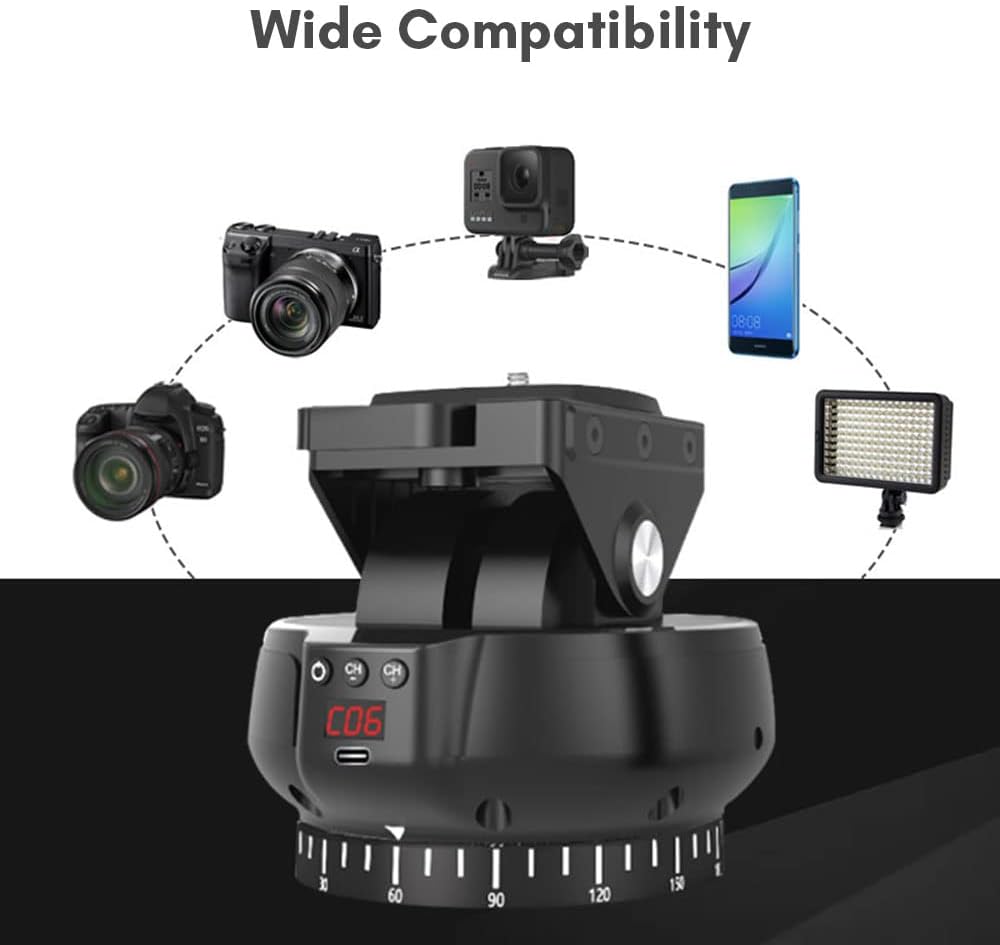
Image: Demonstrates the wide compatibility of the pan tilt head with different devices like cameras and smartphones.
6. Operating Instructions
6.1. Power On/Off
- Power On: Press and hold the power button on the pan tilt head until the display screen illuminates.
- Power Off: Press and hold the power button again until the display screen turns off.
6.2. Remote Control Pairing and Channel Selection
The remote control and pan tilt head are usually pre-paired. If connection issues occur or you need to change channels:
- Ensure both devices are powered on.
- The remote control supports 99 channels. Refer to the remote control's specific instructions for changing channels if interference is experienced.
- The effective wireless control distance is up to 100 meters (line-of-sight).
6.3. Basic Movement Control
Use the directional buttons on the remote control to move the pan tilt head:
- Horizontal Rotation (Pan): Use the left/right directional buttons for 360-degree rotation.
- Vertical Adjustment (Tilt): Use the up/down directional buttons for ±35° tilt adjustment.

Image: Illustrates the flexible movement capabilities of the pan tilt head, including 360-degree horizontal rotation and ±35° tilt.
6.4. Adjusting Speed
The pan tilt head supports 9 levels of adjustable speed for both horizontal and vertical movement.
- Use the dedicated speed adjustment buttons on the remote control to increase or decrease the movement speed.
- The current speed level will be displayed on the pan tilt head's screen.
7. Working Modes
The Andoer YT1200 offers several advanced working modes for various shooting scenarios:
- AB Point Positioning: Set two specific points (A and B), and the head will automatically move between them. This is ideal for repeatable camera movements.
- Time-lapse: Program the head to move incrementally over time for time-lapse photography.
- Automatic Recording: Enables continuous movement for recording.
- Panoramic Recording: Specifically designed for capturing panoramic images or videos with precise, smooth rotation.
Refer to the detailed instructions in the included user manual for specific steps on how to set up and use each working mode.

Image: Illustrates the A-B Point Positioning Shooting feature, where the head automatically moves between two set points.

Image: Shows the 360-degree horizontal rotation capability, essential for panoramic photography.
8. Maintenance
Proper maintenance ensures the longevity and optimal performance of your Andoer YT1200.
- Cleaning: Use a soft, dry cloth to clean the exterior of the device. Do not use liquid cleaners or solvents.
- Storage: Store the pan tilt head in a cool, dry place away from direct sunlight and extreme temperatures.
- Battery Care: If storing for extended periods, charge the built-in battery to approximately 50% every three months to maintain battery health. Remove AAA batteries from the remote control during long-term storage.
- Avoid Impact: Protect the device from drops and impacts, which can damage internal components.
9. Troubleshooting
If you encounter issues with your Andoer YT1200, refer to the following common problems and solutions:
| Problem | Possible Cause | Solution |
|---|---|---|
| Device does not power on. | Low or depleted battery. | Charge the pan tilt head using the USB cable. Ensure the charging cable and adapter are working. |
| Remote control not responding. | Dead or incorrectly installed AAA batteries in remote. Out of range. Interference. | Replace AAA batteries, ensuring correct polarity. Move closer to the pan tilt head. Try changing the remote control channel. |
| Pan/Tilt movement is erratic or stops. | Overload (exceeding 1kg). Obstruction. Low battery. | Ensure the mounted equipment does not exceed 1kg. Check for any physical obstructions. Charge the pan tilt head. |
| Display screen shows error codes. | Internal malfunction. | Try restarting the device. If the problem persists, contact customer support. |
10. Specifications
Detailed technical specifications for the Andoer YT1200 Motorized Pan Tilt Head:
| Feature | Specification |
|---|---|
| Color | Black |
| Horizontal Rotation | 360 degrees |
| Horizontal Speed | 9 levels adjustable |
| Vertical Speed | 9 levels adjustable |
| Load Capacity | 1kg (2.2 lbs) |
| Battery Capacity | 3.7V 2000mAh (Built-in Lithium Battery) |
| Rated Charging Voltage | 5V |
| Remote Control Distance | 100M (line of sight) |
| Remote Control Power Supply | 2 * AAA batteries (not included) |
| Item Size | 13.4 * 12.9 * 11.5cm (5.3 * 5.1 * 4.5in) |
| Item Weight | 518g (18.3oz / 1.14 pounds) |
| Compatible Devices | Mirrorless cameras, DSLR cameras, smartphones |
11. Warranty and Support
11.1. Warranty Information
Specific warranty terms and conditions for the Andoer YT1200 Motorized Pan Tilt Head are typically provided by the manufacturer or the seller at the time of purchase. Please refer to your purchase documentation or contact the seller directly for detailed warranty information.
11.2. Customer Support
For technical assistance, troubleshooting beyond this manual, or warranty claims, please contact the seller or Andoer customer support through their official website or the platform where the product was purchased. Have your product model number (YT1200) and purchase details ready when contacting support.
Ask a question about this manual
Ask about setup, troubleshooting, compatibility, parts, safety, or missing instructions. Manuals+ will review the question and use this page’s manual context to help answer it.