1. Introduction
Thank you for choosing the QTshine 36800mAh High-Capacity Power Bank. This manual provides essential information for the safe and efficient operation, maintenance, and troubleshooting of your device. Please read this manual thoroughly before use and retain it for future reference.
2. Safety Instructions
To ensure safe operation and prevent damage, please observe the following precautions:
- Do not expose the power bank to extreme temperatures, direct sunlight, or fire.
- Avoid dropping, impacting, or disassembling the device.
- Keep the power bank away from water, moisture, and corrosive materials.
- Do not use the power bank if it is damaged, swollen, or leaking.
- Use only certified charging cables and adapters.
- Keep out of reach of children.
- Dispose of the power bank responsibly according to local regulations.
3. Product Overview
Familiarize yourself with the components of your QTshine Power Bank.

Image 1: Front view of the QTshine 36800mAh Power Bank, showcasing its sleek black design and LED indicators.
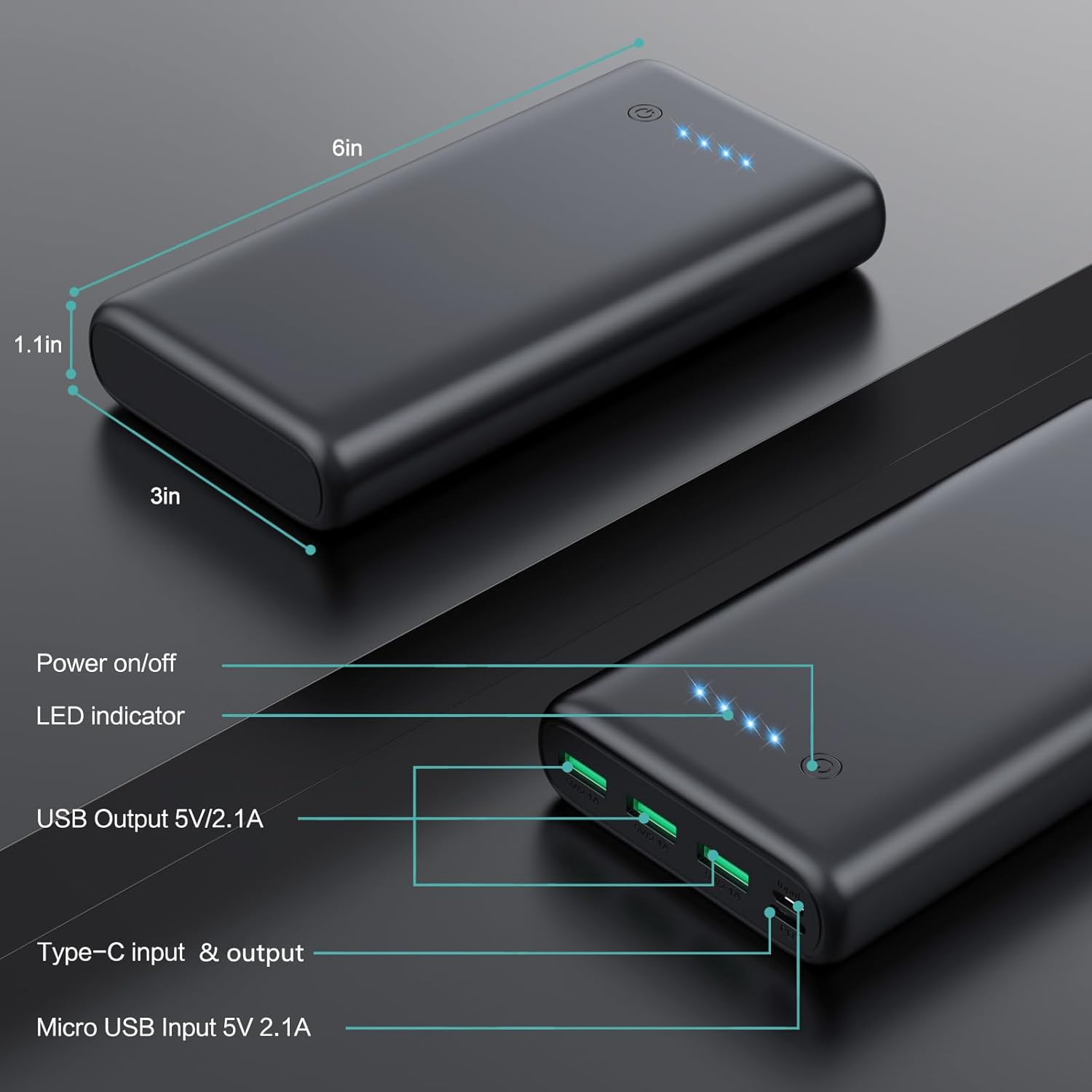
Image 2: Detailed view of the power bank's ports and LED indicators. It features a power on/off button, four LED indicators, three USB 5V/2.1A output ports, one USB-C input/output port, and one Micro USB 5V/2.1A input port.
Components:
- Power Button: Press to check battery level or turn on.
- LED Indicators: Four blue LEDs indicate the remaining battery capacity (25%, 50%, 75%, 100%).
- USB Output Ports (x3): Standard USB-A ports for charging devices (5V/2.1A).
- USB-C Port: Functions as both input (for charging the power bank) and output (for charging devices) (5V/3.0A).
- Micro USB Input Port: For charging the power bank (5V/2.1A).
4. Setup
Initial Charging of the Power Bank:
Before first use, fully charge your QTshine Power Bank.
- Connect the power bank to a power source (e.g., wall adapter, computer USB port) using either a USB-C cable or a Micro USB cable.
- The LED indicators will light up and flash to show the charging progress.
- When all four LEDs are solid blue, the power bank is fully charged. This may take several hours due to its high capacity.
5. Operating Instructions
Charging Your Devices:
- Connect your device to one of the power bank's output ports (USB-A or USB-C) using a compatible charging cable.
- The power bank will automatically begin charging your device. If not, press the power button once.
- The LED indicators will show the remaining battery level of the power bank during charging.
- You can charge up to four devices simultaneously using the available output ports.

Image 3: The QTshine Power Bank simultaneously charging multiple devices, including an iPhone, Samsung smartphone, and a tablet, demonstrating its multi-device charging capability.
Checking Battery Level:
Press the power button once to view the current battery level indicated by the blue LEDs:
- 1 LED: 0-25% remaining
- 2 LEDs: 25-50% remaining
- 3 LEDs: 50-75% remaining
- 4 LEDs: 75-100% remaining
6. Maintenance
- Cleaning: Use a soft, dry cloth to clean the power bank. Do not use harsh chemicals or abrasive materials.
- Storage: Store the power bank in a cool, dry place away from direct sunlight and extreme temperatures. For long-term storage, charge the power bank to approximately 50-75% every three months to maintain battery health.
- Battery Care: Avoid fully discharging the power bank regularly, as this can reduce its lifespan.
7. Troubleshooting
- Power bank not charging:
- Ensure the charging cable and adapter are working correctly.
- Check if the charging port on the power bank is clean and free of debris.
- Try a different charging cable or adapter.
- Device not charging from power bank:
- Press the power button on the power bank to activate charging.
- Ensure the power bank has sufficient charge (check LED indicators).
- Try a different output port or charging cable.
- Verify that your device is compatible with the power bank's output specifications.
- Slow charging:
- Ensure you are using a fast-charging compatible cable and adapter for both the power bank and your device.
- Charging multiple devices simultaneously may reduce individual charging speeds.
8. Specifications
| Feature | Specification |
|---|---|
| Model Name | HX200Q6 |
| Battery Capacity | 36800 mAh |
| Battery Composition | Lithium-Polymer |
| USB-C Input/Output | 5V/3.0A |
| Micro USB Input | 5V/2.1A |
| USB Output (x3) | 5V/2.1A |
| Voltage | 5 Volts |
| Special Features | Fast Charger, Portable, Travel-friendly |
| Connector Type | Micro USB, USB Type C |
| Power Source | Cable Electric |

Image 4: Illustration of the power bank's universal compatibility with various devices, including iPhones (XS/XS Max, XR, 11/11 Pro, 12/12 Pro), iPads, OnePlus phones, Samsung Galaxy phones (S10+/9+/8+), and Fitbit trackers.
9. Warranty and Support
QTshine products are designed for reliability and performance. For warranty information or technical support, please refer to the contact details provided with your purchase or visit the official QTshine website. Please have your model number (HX200Q6) and purchase details ready when contacting support.


