
LEIPUT FIND A Pro
LEIPUT Ear Wax Removal Tool User Manual
Model: FIND A Pro
Brand: LEIPUT
Product Overview
The LEIPUT Ear Wax Removal Tool is an advanced ear cleaning device featuring a 1080P camera and 6 LED lights for clear visualization of the ear canal. It is designed to assist in safe and effective earwax removal and is compatible with both iOS and Android devices via Wi-Fi connection. The kit includes various ear cleaning attachments and a convenient storage base.

Figure 1: Complete LEIPUT Ear Wax Removal Tool kit, including the camera pen, charging base, and multiple ear cleaning accessories.
Safety Information and Important Notes
Please read and understand all safety warnings and instructions before using this product. Failure to follow these guidelines may result in injury or damage to the device.
- Always ensure the silicone sleeve is tightly placed on the ear pick before use.
- Do not attempt to break the ear pick with your hands.
- Children should only use the Visual Ear Endoscope under adult supervision.
- This product is not recommended for children under 6 years old or for use on moving pets.
- Keep the product out of reach of children.
- For first-time users, approach the ear canal gently and slowly.
- Follow this user manual for your initial use.
- Do not use metal ear picks directly to clean earwax without proper visualization.
- Charge the product using a regular 5V1A charging plug.
- Do not use the product while it is charging.
- Do not place the product near a fire source under any circumstances.
- Avoid continuous charging for more than 1.5 hours.
Package Contents
Your LEIPUT Ear Wax Removal Tool package includes the following items:
- 1 x LEIPUT Ear Wax Removal Tool (Camera Pen)
- 1 x Charging Base/Storage Container
- 8 x Various Ear Cleaning Attachments (including silicone ear scoops, spring earwax spoon, spiral earwax spoon, traditional earwax spoon, and ear pick cleaning brush)
- 1 x USB Type-C Charging Cable (charging cube not included)
- User Manual (this document)
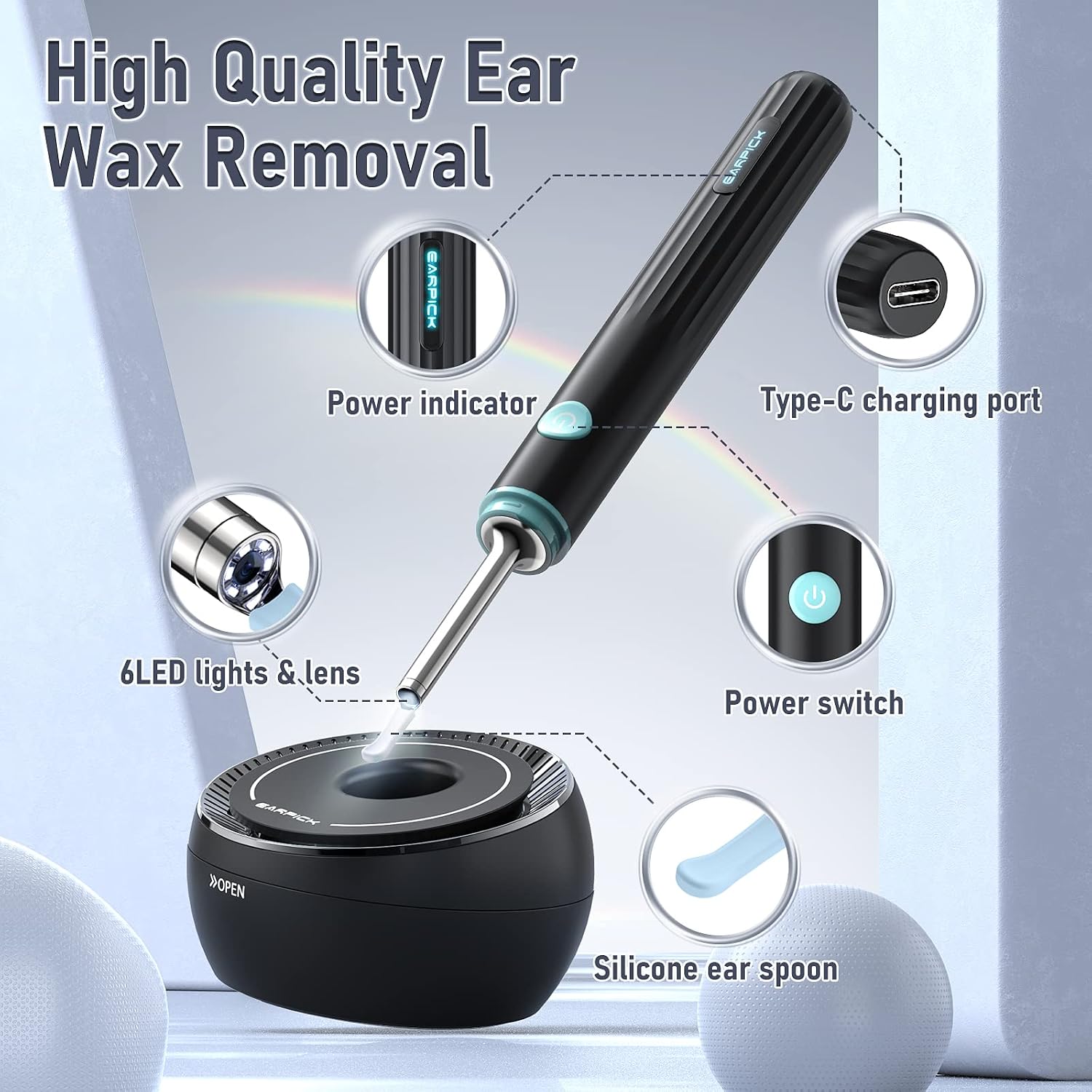
Figure 2: Key components of the ear wax removal tool.

Figure 3: Detailed view of the included ear cleaning attachments.
Features
- 1080P HD Camera: Provides clear images and videos for precise ear examination and cleaning.
- 6 LED Lights: Illuminates the ear canal for optimal visibility.
- 360° Wide Angle Lens: Offers a comprehensive view of the ear canal.
- Wi-Fi Connectivity: Connects wirelessly to your smartphone or tablet for real-time viewing.
- Long Battery Life: Up to 90 minutes of continuous use on a single charge.
- Silicone Ear Scoops: Soft and elastic, designed with three arcs (low, middle, or high) to prevent scratching the ear canal.
- Wide Compatibility: Works seamlessly with iOS and Android operating systems.
- Multi-purpose Use: Can be used for ear, nose, and mouth examination.
- Waterproof Lens: The camera lens is waterproof for easy cleaning, but the main body of the otoscope is not waterproof.

Figure 4: Key technical features of the device.

Figure 5: Different arc designs of the silicone ear scoops.

Figure 6: Illustration of the waterproof lens feature.

Figure 7: Device compatibility with various mobile platforms.

Figure 8: Examples of multi-purpose use for the ear cleaning tool.
Setup Instructions
- Charge the Device: Before first use, fully charge the ear wax removal tool using the provided USB Type-C cable and a 5V1A charging plug. The power indicator light will show charging status.
- Attach an Ear Scoop: Select the appropriate silicone ear scoop (low, middle, or high arc) for your needs. Gently twist the chosen ear scoop onto the tip of the camera pen until it is securely attached.
- Download the App: Scan the QR code in the included paper instructions or search for the designated app in your device's app store (compatible with iOS and Android).
- Power On: Press and hold the power switch button on the camera pen. The light on the tip will begin to flash, indicating it is ready to connect.
- Connect via Wi-Fi: Go to your smartphone or tablet's Wi-Fi settings. Locate and select the Wi-Fi network broadcast by the ear wax removal tool (usually named "EARPICK" or similar, as per the instructions). Once connected, open the downloaded app. The app should automatically display the live feed from the camera.

Figure 9: The device features an integrated WiFi chip for seamless connectivity.
Operating Instructions
- Prepare for Use: Ensure the device is charged and connected to your mobile device via Wi-Fi. Select and securely attach the desired ear scoop.
- Positioning: Gently insert the ear pick into the ear canal while observing the live feed on your connected device. Maintain a slow and careful approach, especially for first-time users.
- Earwax Removal: Use the chosen ear scoop to carefully and gently dislodge and remove earwax. The 1080P camera and 6 LED lights provide a clear view, allowing for precise maneuvering.
- Monitor Progress: Continuously monitor the live video feed to ensure safe and effective cleaning, avoiding contact with the eardrum.
- Other Applications: For nose or mouth examination, adjust the angle and depth as needed, always observing the live feed.
- Power Off: After use, press and hold the power switch button to turn off the device.
Maintenance
- Cleaning the Ear Scoops: After each use, remove the silicone ear scoop and clean it thoroughly with water or an alcohol wipe. The camera lens is waterproof and can be wiped clean. Ensure the ear scoop is dry before reattaching or storing.
- Cleaning the Device: Wipe the main body of the camera pen with a dry or slightly damp cloth. Do not submerge the main body in water as it is not waterproof.
- Charging: Recharge the device when the power indicator shows low battery. Use the provided USB Type-C cable. Avoid overcharging (do not charge continuously for more than 1.5 hours).
- Storage: Store the camera pen and all attachments in the provided charging base/storage container. The base is designed to securely hold the pen and accessories. Twist the cover on the base to lock it for secure storage.

Figure 10: The storage base provides organized storage for accessories.
Troubleshooting
| Problem | Possible Cause | Solution |
|---|---|---|
| Device does not turn on. | Low battery. | Charge the device fully. |
| Cannot connect to Wi-Fi. | Incorrect Wi-Fi selection; device not in pairing mode. | Ensure the device is powered on and flashing. Select the correct Wi-Fi network (e.g., "EARPICK"). Restart the app and device if necessary. |
| Image/video quality is poor or blurry. | Dirty lens; app issue. | Clean the camera lens carefully. Restart the app. |
| Device gets hot during use. | Normal operation; prolonged use. | This can be normal for some devices. If it becomes excessively hot, discontinue use and allow it to cool down. Limit continuous usage time. |
| Silicone ear scoop detaches easily. | Not securely attached. | Ensure the silicone sleeve is twisted on tightly before each use. |
Specifications
- Model Number: FIND A Pro
- Camera Resolution: 1080P HD
- Lighting: 6 LED Lights
- Connectivity: Wi-Fi
- Compatibility: iOS, Android
- Battery Life: Approximately 90 minutes (continuous use)
- Charging Port: USB Type-C
- Package Dimensions: 6.89 x 4.25 x 0.94 inches
- Item Weight: 4.97 ounces
- Manufacturer: LEIPUT
Warranty and Support
For warranty information, technical support, or any product-related inquiries, please refer to the contact details provided on the product packaging or visit the official LEIPUT website. Keep your purchase receipt for warranty claims.
You can visit the official LEIPUT Store on Amazon for more information: LEIPUT Store
Ask a question about this manual
Ask about setup, troubleshooting, compatibility, parts, safety, or missing instructions. Manuals+ will review the question and use this page’s manual context to help answer it.