
Brandmotion FVMR-1181
Brandmotion FullVUE Mirror and Camera System User Manual
Model: FVMR-1181
Product Overview
The Brandmotion FullVUE Mirror and Camera System is designed to enhance visibility and safety for Ford F-150 (2015-Current) and Super Duty (2017-Current) truck owners. This system integrates a high-definition digital video mirror with a truck-specific third brake light camera, providing multiple camera views and recording capabilities.
Key features include:
- Seamless Integration: Designed to fit perfectly into your vehicle's third brake light for an OEM look.
- Always-On Camera: Provides continuous, clear views behind the vehicle, reducing blind spots.
- Touchscreen Control: Allows easy adjustment of settings and switching between camera views.
- Dual Camera System: Includes a built-in dash-cam and a rear-facing camera with DVR recording.
- Low-Light Visibility: Equipped with a 0.1 Lux camera for clear viewing in challenging light conditions.

Image: The FullVUE digital mirror and the third brake light camera module, showcasing the primary components of the system.
What's Included
Before beginning installation, please verify that all components are present in the box:
- FullVUE Mirror and Camera System
- DVR Recorder
- SD card
- Hardwire Kit
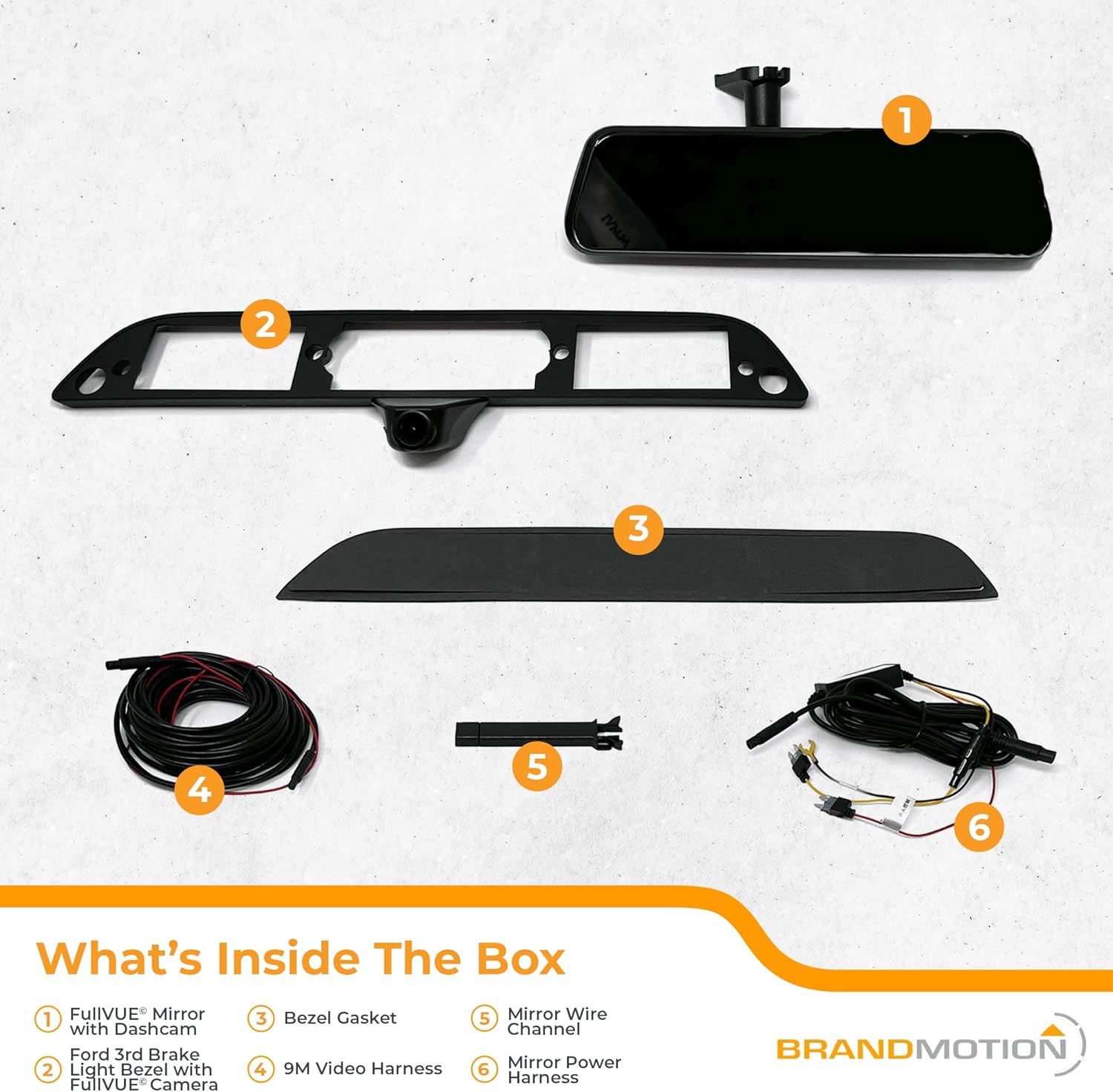
Image: A layout of all components included in the package, clearly labeled for identification.
Setup and Installation
The Brandmotion FullVUE system is designed for a seamless and rapid installation process, often requiring no drilling. It integrates directly into the vehicle's existing third brake light housing.
While the system is designed for ease of installation, professional installation is recommended to ensure proper functionality and integration with your vehicle's electrical system. Refer to the detailed installation guide provided with your product for step-by-step instructions specific to your Ford F-150 or Super Duty model.
- Vehicle-Specific Bezel: The system includes a bezel designed to match your truck's third brake light.
- Hardwire Kit: Use the provided hardwire kit for power connection.
- Cable Routing: Carefully route all cables to avoid interference with vehicle operations.

Image: An interior view of a truck cabin, showing the FullVUE mirror installed on the rearview mirror mount, demonstrating its integrated appearance.

Image: A close-up view of the third brake light camera seamlessly integrated into the truck's rear lighting assembly.
Operating Instructions
The FullVUE Mirror and Camera System offers intuitive operation via its touchscreen interface.
Camera Views and Switching
The system provides multiple camera perspectives, including an integrated dash-cam, a rear-facing camera, and a cargo camera (via the third brake light camera). You can easily switch between these views or display them in a split-screen format using the touchscreen mirror.
- Front View: Provided by the integrated dash-cam.
- Rear View: Provided by the third brake light camera, offering an unobstructed view behind the vehicle.
- Cargo View: The third brake light camera also provides a view of the truck bed, useful for monitoring cargo or trailers.

Image: An illustrative diagram depicting a truck towing a boat, highlighting the three camera views: integrated dash cam, cargo monitor, and an overhead view for trailers.
DVR Recording
The system includes DVR recording capabilities for both the dash-cam and rear-facing camera. Footage is recorded onto the included SD card. Ensure the SD card is properly inserted before operation.
- Continuous Recording: The system records continuously when powered on.
- G-Shock Sensor: In the event of an impact, the G-Shock sensor automatically secures and protects the relevant footage, preventing it from being overwritten.
Low-Light Performance
The camera is designed with 0.1 Lux sensitivity, providing clear visibility for nighttime driving and reversing in low-light conditions.
Maintenance
Proper maintenance ensures the longevity and optimal performance of your FullVUE system.
- Cleaning the Mirror: Use a soft, lint-free cloth and a non-abrasive cleaner suitable for electronic displays. Do not spray cleaner directly onto the mirror.
- Cleaning the Camera Lens: Gently wipe the camera lens on the third brake light with a soft, damp cloth to remove dirt or debris that may obstruct the view.
- SD Card Management: Periodically format the SD card (refer to the detailed manual for instructions) to maintain optimal recording performance and prevent data corruption. Replace the SD card if it shows signs of degradation or error.
- Firmware Updates: Check the Brandmotion website for any available firmware updates to ensure your system has the latest features and bug fixes.
Troubleshooting
If you encounter issues with your Brandmotion FullVUE system, refer to the following common troubleshooting steps:
| Problem | Possible Cause | Solution |
|---|---|---|
| No Power to Mirror | Loose power connection, blown fuse. | Check all power connections. Inspect vehicle's fuse box for a blown fuse related to the system's power source (e.g., fuse #2 in footwell for some F-150 models). |
| Poor Camera Image Quality | Dirty camera lens, low light conditions, incorrect settings, camera malfunction. | Clean the camera lens. Ensure adequate lighting. Check display settings on the mirror. If problem persists, contact support. |
| Mirror Glare | Environmental lighting, mirror angle. | Adjust the mirror angle. Consider anti-glare film if glare is persistent and severe. |
| DVR Not Recording | SD card full, SD card error, incorrect settings. | Check SD card capacity. Format the SD card. Ensure recording function is enabled in settings. |
For issues not listed here or if solutions do not resolve the problem, please contact Brandmotion customer support.
Specifications
| Feature | Detail |
|---|---|
| Model Name | FVMR-1181 |
| Product Dimensions | 18 x 6 x 5 inches |
| Item Weight | 3.24 pounds |
| Connectivity Technology | TVI |
| Display Technology | LCD |
| Video Capture Resolution | 1980x320 |
| Field Of View | 170 Degrees (Horizontal), 150 Degrees (Vertical) |
| Color | Black |
| Mounting Type | Rearview Mirror Mount |
| Manufacturer | Brandmotion |
Warranty and Support
For warranty information, technical support, or service inquiries, please contact Brandmotion directly. Keep your purchase receipt and product model number (FVMR-1181) readily available when contacting support.
You can find contact information and additional resources on the official Brandmotion website: Visit the Brandmotion Store on Amazon
Related documentsFVMR-1181


Ask a question about this manual
Ask about setup, troubleshooting, compatibility, parts, safety, or missing instructions. Manuals+ will review the question and use this page’s manual context to help answer it.