
1. Introduction
Thank you for choosing the Homirxan 2.1 Cub Digital Home Safe. This safe is designed to provide secure storage for your valuables, documents, and personal items. It features a robust steel construction, a programmable digital keypad, and an alarm system for enhanced security. Please read this manual thoroughly before operating the safe to ensure proper use and to maximize its security features.

Image: The Homirxan 2.1 Cub Digital Home Safe, highlighting its fireproof and anti-theft features.
2. Safety Information
- Do not store the emergency keys inside the safe. Keep them in a secure, separate location.
- Ensure the safe is installed on a stable surface or securely mounted to a wall or floor to prevent unauthorized removal.
- Keep the safe away from excessive moisture or direct heat sources.
- Do not attempt to force the safe open if the digital code fails. Use the emergency key.
- Regularly check battery levels to ensure continuous operation of the digital keypad.
3. Package Contents
Please verify that all items listed below are included in your package:
- 1 x Homirxan Digital Home Safe
- 2 x Emergency Keys
- 4 x Expansion Screws (for mounting)
- 1 x USB Charge Cable (for emergency power)
- 1 x User Manual (this document)
- 1 x Floor Mat

Image: Contents of the safe package, showing the safe, emergency keys, expansion screws, USB cable, and user manual.
4. Setup
4.1 Initial Opening and Battery Installation
- Locate the emergency keyhole, usually concealed behind the keypad cover or a small plate.
- Insert one of the emergency keys into the keyhole and turn it clockwise.
- While the key is turned, rotate the knob on the keypad clockwise to open the safe door.
- Inside the safe, locate the battery compartment on the back of the door.
- Insert 4 AA batteries (not included) into the compartment, ensuring correct polarity.
- Close the battery compartment. The safe is now powered.
4.2 Setting Your Personal Passcode
- With the safe door open, press the red reset button located on the inside of the door, near the hinge. You will hear a beep.
- On the keypad, enter your desired 3 to 8 digit passcode.
- Confirm the passcode by pressing the "#" or "*" button. You will hear a confirmation beep.
- Test the new passcode with the door open to ensure it works correctly before closing the safe.
4.3 Mounting the Safe (Optional)
For added security, the safe can be bolted to a wall or floor.
- Choose a suitable location for mounting.
- Mark the drilling points through the pre-drilled holes on the back or bottom of the safe.
- Drill pilot holes in the wall or floor using an appropriate drill bit.
- Align the safe with the drilled holes and secure it using the provided expansion screws.
- Ensure the safe is firmly attached and stable.

Image: Visual guide for wall or floor mounting installation of the safe.
5. Operating Instructions
5.1 Opening the Safe
There are three methods to open your Homirxan safe:

Image: Three methods for unlocking the safe, including digital passcode, emergency key, and external power with passcode.
Method 1: Using the Digital Passcode
- Enter your 3 to 8 digit personal passcode on the keypad.
- Press the "#" or "*" button to confirm.
- Within 5 seconds, turn the knob clockwise to open the safe door.
Method 2: Using the Emergency Key
This method is used for the first time operation, if you forget your passcode, or if the batteries are dead.
- Locate the emergency keyhole.
- Insert an emergency key and turn it clockwise.
- Turn the knob clockwise to open the safe door.
Method 3: Using USB Charge Cable (Low Battery)
If the batteries are completely drained, you can use the USB charge cable for temporary power.
- Connect the USB charge cable to the external power port on the safe.
- Enter your personal passcode on the keypad.
- Turn the knob clockwise to open the safe door.
5.2 Anti-Theft Alarm System
The safe is equipped with an alarm system to deter unauthorized access.
- If an incorrect passcode is entered 3 consecutive times, the alarm will activate for 20 seconds.
- During the alarm, the keypad will be locked, preventing further attempts.
- To silence the alarm, enter the correct passcode or use the emergency key.

Image: Illustration of the safe's smart alarm system, activated after three incorrect passcode entries.
5.3 Using the Removable Shelf
The safe includes a removable shelf to help organize your items. You can adjust or remove the shelf based on the size of the items you wish to store.
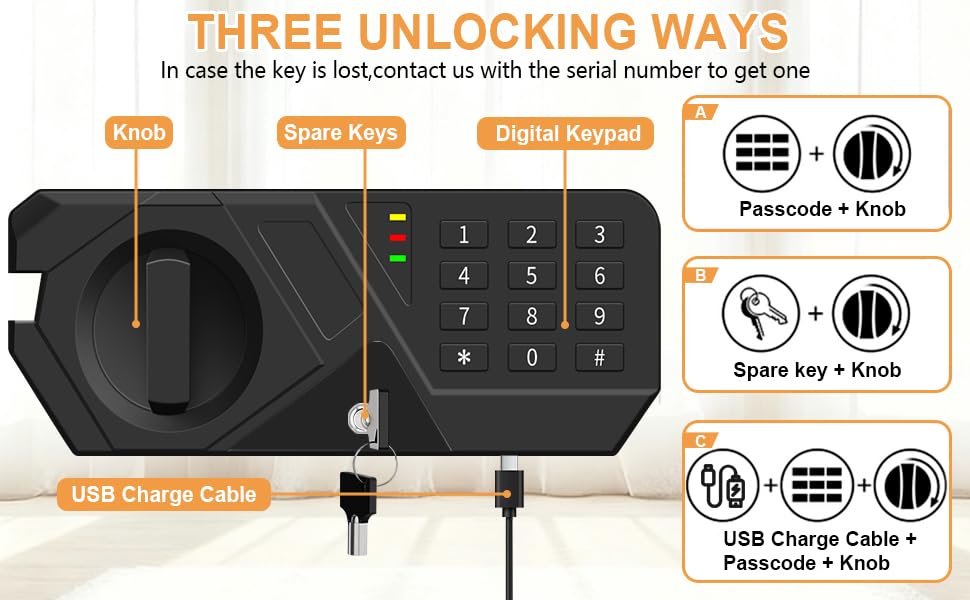
Image: The safe interior, demonstrating how the removable shelf allows for flexible storage of various items.
6. Maintenance
- Battery Replacement: Replace the batteries when the low battery indicator lights up or if the keypad becomes unresponsive. Always use 4 new AA alkaline batteries.
- Cleaning: Clean the safe's exterior with a soft, damp cloth. Avoid using abrasive cleaners or solvents that could damage the finish or keypad.
- Keyhole Maintenance: Keep the emergency keyhole clean and free of debris. Do not lubricate the lock mechanism unless specifically instructed by customer support.
7. Troubleshooting
| Problem | Possible Cause | Solution |
|---|---|---|
| Safe does not open with passcode. | Incorrect passcode entered; dead batteries. | Re-enter correct passcode. Replace batteries or use USB charge cable. Use emergency key if necessary. |
| Keypad is unresponsive. | Dead batteries; alarm activated. | Replace batteries or use USB charge cable. Wait for alarm to reset or use emergency key. |
| Alarm sounds frequently. | Incorrect passcode attempts; safe moved or tampered with. | Ensure correct passcode is used. Check for tampering. |
| Cannot set new passcode. | Reset button not pressed correctly; passcode too short/long. | Ensure reset button is pressed until a beep is heard. Enter a 3-8 digit code. |
8. Specifications
| Feature | Detail |
|---|---|
| Brand | Homirxan |
| Model | 2.1 Cub (B0BTP56PQN) |
| Product Dimensions | 31D x 35W x 36H Centimetres |
| Capacity | 1.8 Cubic Feet |
| Lock Type | Electronic Combination Lock, Key |
| Colour | Black |
| Material Type | Alloy Steel |
| Additional Features | Alarm System, Anti-Theft, Combination Lock, Fire Resistant, Water Resistant |
| Mounting Type | Floor Mount |
| Alarm | Audible |
| Control Type | Key Control |

Image: Detail of the safe's robust steel construction and anti-pry bolts, designed for enhanced security.
9. Warranty Information
Homirxan products are manufactured to high-quality standards. For specific warranty details, please refer to the warranty card included with your purchase or contact customer support. Keep your purchase receipt as proof of purchase for any warranty claims.
10. Customer Support
If you have any questions, require assistance with setup, or encounter any issues not covered in this manual, please contact Homirxan customer support. You can reach us via the contact information provided on our official website or through your purchase platform.
Manufacturer Contact Information: If there is any question, please contact us again.