
1. Introduction
This manual provides comprehensive instructions for the safe and effective use of your K&F Concept VA18+ VH081 Professional Video Tripod. Please read this manual thoroughly before operating the product and retain it for future reference.
2. Safety Information
- Ensure all locking mechanisms are securely fastened before mounting equipment or adjusting the tripod.
- Do not exceed the maximum load capacity of 8KG (17.6LBS) to prevent damage to the tripod or attached equipment.
- Always maintain a stable base for the tripod, especially on uneven surfaces.
- Avoid sudden movements when adjusting the fluid head with equipment mounted.
- Keep hands clear of moving parts during setup and adjustment.
3. Package Contents
Verify that all items are present in your package:
- K&F Concept VA18+ VH081 Video Tripod with Fluid Head
- Quick Release Plate (with 1/4''-20 and 3/8''-16 screws)
- Carrying Bag
- Instruction Manual
- Hex Wrenches (for adjustments)

Figure 3.1: K&F Concept VA18+ VH081 Video Tripod package contents.
4. Setup
4.1 Unfolding the Tripod
- Place the folded tripod on a flat surface.
- Release the leg locking clips located near the top of each leg.
- Extend each leg outwards until the tripod forms a stable base.
- Ensure the aluminum alloy center support is fully extended and locked for maximum stability.
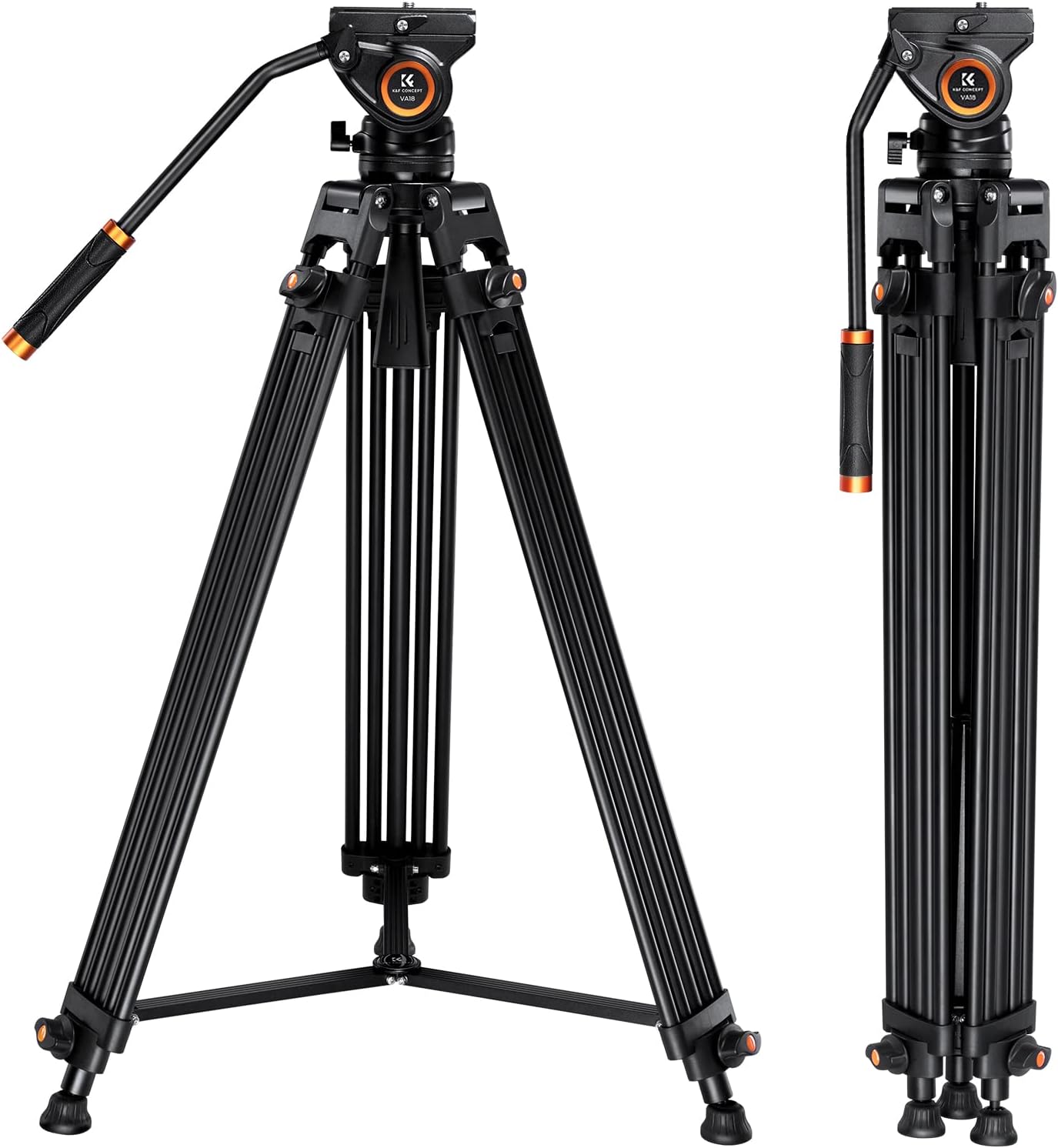
Figure 4.1: Tripod in folded and fully extended positions.
4.2 Adjusting Leg Height
- Locate the flip locks on each leg section.
- Flip open the locks to release the leg sections.
- Extend the leg sections to the desired height. The tripod can extend from 33 inches (84cm) to 72 inches (184cm).
- Securely close all flip locks to prevent the legs from collapsing.

Figure 4.2: Tripod height adjustment range.
4.3 Attaching the Camera
- Ensure the quick release plate locking knob on the fluid head is loosened.
- Press the side release button and slide the quick release plate out of the fluid head.
- Attach the quick release plate to the bottom of your camera or camcorder using the appropriate 1/4''-20 or 3/8''-16 screw. Use the built-in wrench if needed.
- Slide the camera with the attached quick release plate back into the fluid head until it clicks into place.
- Tighten the quick release plate locking knob to secure the camera.

Figure 4.3: Fluid head components and quick release plate.

Figure 4.4: Quick-release plate mechanism for fast and secure camera mounting.
5. Operating Instructions
5.1 Fluid Head Operation
The fluid head allows for smooth 360° pan and -70°/90° tilt movements.
- To pan horizontally, loosen the pan locking knob (usually located at the base of the fluid head) and rotate the camera. Tighten to lock.
- To tilt vertically, loosen the tilt locking knob (on the side of the fluid head) and adjust the camera angle. Tighten to lock.
- The detachable handle can be mounted on either side of the fluid head for left or right-hand operation.

Figure 5.1: Fluid head demonstrating pan and tilt ranges.
5.2 Leveling the Tripod
The tripod features a 75mm bowl base for quick leveling on uneven terrain.
- Loosen the bowl set handle located underneath the fluid head.
- Adjust the fluid head until the built-in bubble level indicates a perfectly level position.
- Tighten the bowl set handle to secure the fluid head in the level position.

Figure 5.2: 75mm bowl set for leveling.
5.3 Accessory Mounting
The tripod head includes a 3/8" threaded hole for connecting external photographic equipment such as monitors, LED lights, or magic arms.

Figure 5.3: Tripod with mounted accessories.
6. Maintenance
- Regularly inspect all screws and locking mechanisms for tightness.
- Clean the tripod with a soft, dry cloth after each use. Avoid abrasive cleaners.
- Store the tripod in its carrying bag in a dry, dust-free environment when not in use.
- Lubricate moving parts periodically with a silicone-based lubricant, if necessary, to maintain smooth operation.
7. Troubleshooting
| Problem | Possible Cause | Solution |
|---|---|---|
| Tripod is unstable. | Leg locks are loose; center support not fully extended; uneven surface. | Ensure all leg locks are tightened. Fully extend and lock the center support. Adjust leg lengths to level on uneven ground using the bubble level. |
| Fluid head movement is stiff. | Pan/tilt locking knobs are too tight; lack of lubrication; dirt/debris. | Loosen pan/tilt locking knobs. Clean the fluid head mechanism. Apply a small amount of silicone lubricant if needed. |
| Camera not securely attached. | Quick release plate not fully engaged; locking knob loose. | Ensure the quick release plate is fully seated and the side release button has clicked. Tighten the quick release plate locking knob. |
8. Specifications
| Feature | Detail |
|---|---|
| Brand | K&F CONCEPT |
| Model Name | VA18+ VH081 |
| Item Model Number | KF09.121 |
| Material | Aluminum Alloy |
| Maximum Height | 184 cm (72 inches) |
| Folded Length | 88 cm (34 inches) |
| Weight Limit | 8 kg (17.6 lbs) |
| Item Weight | 3.88 kg (8.54 lbs) |
| Tripod Head Type | Fluid Head (75mm bowl base) |
| Compatible Devices | DSLR Cameras, Mirrorless Cameras, Camcorders, Gimbals, Video Rigs |
9. Official Product Video
Watch this official product video from K&F Concept for a visual guide on the tripod's features and setup.
Video 9.1: K&F Concept 72-inch Professional Video Tripod overview. This video demonstrates the tripod's key features, assembly, and usage scenarios, including quick release plate installation, leg adjustments, and fluid head movements.
10. Warranty and Support
For warranty information and customer support, please refer to the official K&F Concept website or contact their customer service directly. Keep your purchase receipt as proof of purchase.
- Online Support: Visit the K&F Concept Store for FAQs and contact options.
- Product Registration: Register your product on the official website to activate your warranty and receive updates.