
Introduction
The Lifepro Waver Mini Vibration Plate is a compact and portable whole body vibration platform designed for home and travel use. It utilizes therapeutic vibrations to engage muscles and support various physical activities. This manual provides essential information for the safe and effective use of your device, including setup, operation, maintenance, and troubleshooting.

Figure 1: Lifepro Waver Mini Vibration Plate and included accessories.
The device features a robust 200W motor and is designed to support a maximum user weight of 260 lbs. Its compact size makes it suitable for storage and transport.

Figure 2: The compact design allows for easy portability.
Setup
- Unpacking: Carefully remove all components from the packaging. Verify that all items listed in the product contents are present: the Waver Mini Vibration Plate, remote control, 2 loop bands, 4 resistance bands, and the user guide.
- Placement: Place the vibration plate on a flat, stable, and non-slip surface. Ensure there is adequate space around the device for safe operation and movement. Avoid placing it near water or in excessively humid environments.
- Power Connection: Connect the power cord to the designated port on the vibration plate, then plug the other end into a standard electrical outlet.
- Remote Control: Insert the required batteries into the remote control. The remote is essential for convenient operation of the device.

Figure 3: Product dimensions and included components.
Operating Instructions
The Lifepro Waver Mini Vibration Plate can be operated using the control panel on the device or the included remote control.
Control Panel and Remote Functions:

Figure 4: Control panel detail.
- Power Button: Turns the device on or off.
- Start/Stop: Initiates or pauses the vibration.
- Time: Adjusts the duration of the vibration session.
- Speed +/-: Increases or decreases the vibration intensity (levels 1-99).
- Mode: Switches between manual and pre-set program modes.
- Program: Selects different pre-programmed vibration routines.
Basic Operation:
- Power On: Press the Power button on the control panel or remote. The display will illuminate.
- Set Time: Use the Time buttons to set your desired session duration.
- Select Mode/Program: Choose between manual mode (adjust speed manually) or a pre-set program using the Mode and Program buttons.
- Adjust Speed: In manual mode, use the Speed +/- buttons to set your preferred vibration intensity.
- Start Vibration: Press the Start button to begin the vibration.
- Stop Vibration: Press the Stop button to pause or end the vibration. The device will automatically stop when the set time expires.
Recommended Usage:
Step onto the platform with both feet, maintaining balance. Various postures can be adopted, such as standing, sitting, or performing exercises with the included resistance bands. Ensure a stable stance and avoid sudden movements while the device is operating.
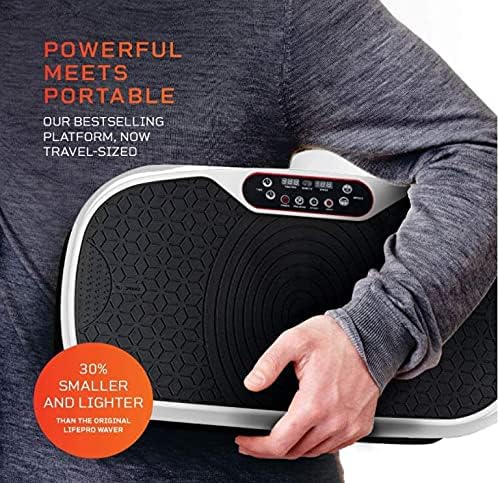
Figure 5: Example of use during exercise.

Figure 6: The platform can be used in various positions, including seated.
Maintenance
- Cleaning: Disconnect the power cord before cleaning. Wipe the surface of the vibration plate with a soft, damp cloth. Do not use abrasive cleaners or solvents, as they may damage the finish.
- Storage: When not in use, store the device in a cool, dry place away from direct sunlight and extreme temperatures. Ensure the power cord is neatly coiled and not kinked.
- Inspection: Periodically inspect the power cord for any signs of damage. If the cord is damaged, discontinue use and contact customer support.
Troubleshooting
If you encounter issues with your Lifepro Waver Mini Vibration Plate, refer to the following common troubleshooting steps:
- Device Does Not Power On:
- Ensure the power cord is securely plugged into both the device and a working electrical outlet.
- Check if the power outlet is functional by plugging in another appliance.
- Remote Control Not Responding:
- Verify that the batteries in the remote control are correctly inserted and are not depleted. Replace batteries if necessary.
- Ensure there are no obstructions between the remote and the device's sensor.
- Unusual Noises or Vibrations:
- Ensure the device is placed on a flat, stable surface. Uneven surfaces can cause irregular operation.
- Check for any foreign objects lodged beneath or around the plate.
If the issue persists after attempting these steps, please contact customer support for further assistance.
Specifications
| Feature | Specification |
|---|---|
| Brand | LifePro |
| Model Number | LP-WVRM-WHT |
| Manufacturer | Lifepro |
| Operation Mode | Automatic |
| Power Source | Corded Electric |
| Motor Horsepower | 0.268 horsepower |
| Maximum Weight Recommendation | 260 Pounds |
| Material | Plastic |
| Color | White |
| Item Dimensions (LxWxH) | 27 x 16 x 8.5 inches |
| Item Package Dimensions (LxWxH) | 27.5 x 15.5 x 7.5 inches |
| Package Weight | 12.2 Kilograms |
| UPC | 657768288364 |
| ASIN | B0BTMSRD9N |
Warranty Information
The Lifepro Waver Mini Vibration Plate comes with a 90 days limited warranty. This warranty covers defects in materials and workmanship under normal use. Please retain your proof of purchase for warranty claims. For specific terms and conditions, refer to the warranty documentation included with your product or contact Lifepro customer support.
Customer Support
For any questions, technical assistance, or warranty inquiries regarding your Lifepro Waver Mini Vibration Plate, please contact Lifepro customer support. Refer to the contact information provided in your product packaging or visit the official Lifepro website for the most up-to-date support details.