1. Important Safety Instructions
When using electrical appliances, basic safety precautions should be followed, including the following:
- Read all instructions before using the appliance.
- Do not attempt to operate this oven with the door open as this can result in harmful exposure to microwave energy.
- Do not place any object between the oven front face and the door or allow soil or cleaner residue to accumulate on sealing surfaces.
- Do not operate the oven if it is damaged. It is particularly important that the oven door closes properly and that there is no damage to the: (1) door (bent), (2) hinges and latches (broken or loosened), (3) door seals and sealing surfaces.
- The oven should not be adjusted or repaired by anyone except properly qualified service personnel.
- Liquids or other foods must not be heated in sealed containers since they are liable to explode.
- Only use utensils that are suitable for use in microwave ovens.
- When heating food in plastic or paper containers, keep an eye on the oven due to the possibility of ignition.
- If smoke is observed, switch off or unplug the appliance and keep the door closed in order to stifle any flames.
- Microwave heating of beverages can result in delayed eruptive boiling, therefore care must be taken when handling the container.
- The contents of feeding bottles and baby food jars shall be stirred or shaken and the temperature checked before consumption, in order to avoid burns.
- Eggs in their shell and whole hard-boiled eggs should not be heated in microwave ovens as they may explode, even after microwave heating has ended.
2. Product Overview
The Aiwa AMW-202DG/BK is a 20-liter digital microwave oven with an integrated 800W grill function, designed for efficient cooking and reheating.
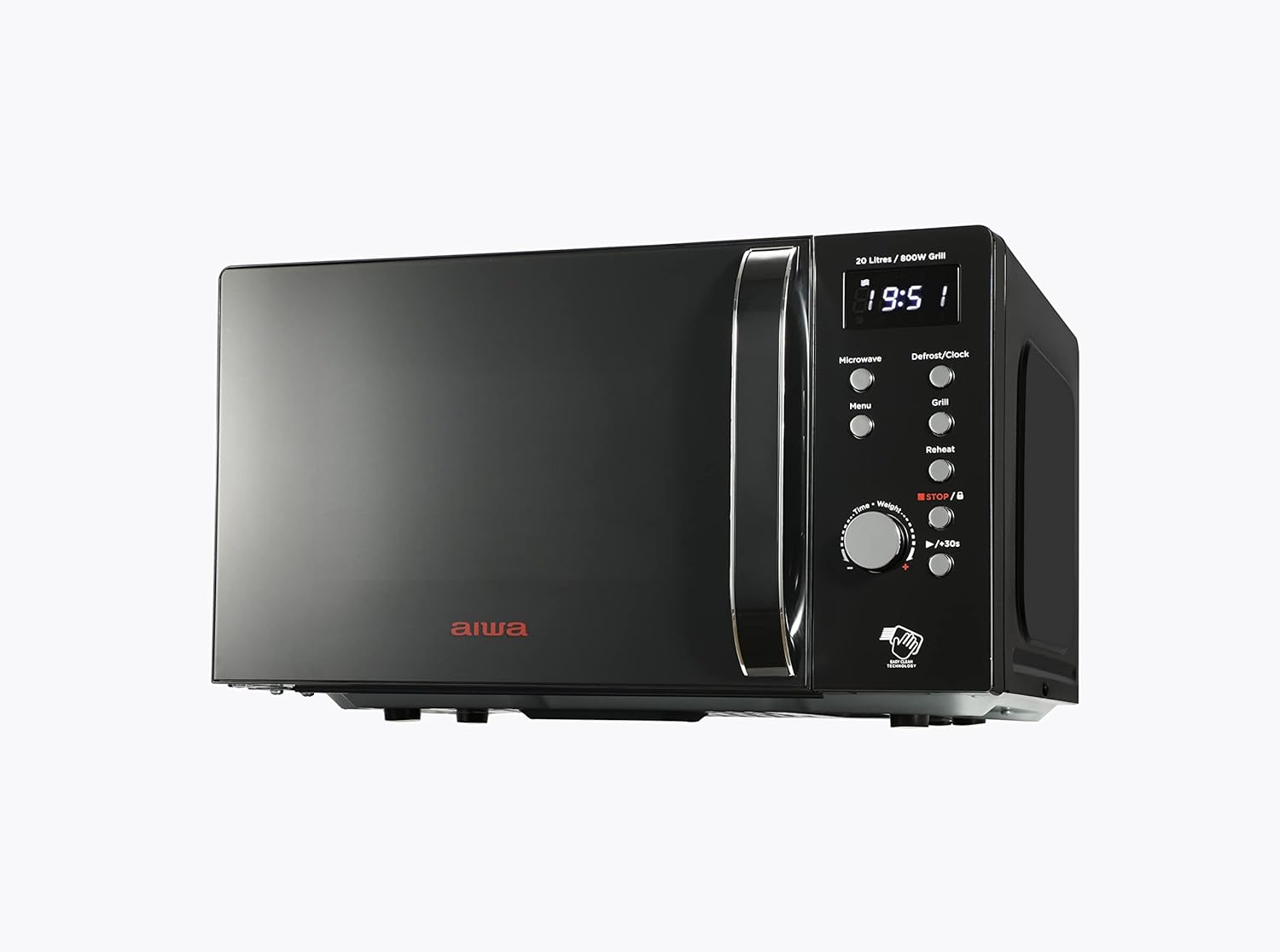
Figure 2.1: Front view of the Aiwa AMW-202DG/BK Digital Microwave with Grill. This image displays the sleek black design, the digital display, and the control panel on the right side.
2.1 Components
- Microwave Oven Unit: The main appliance body.
- Glass Turntable (25.5 cm diameter): For even heating of food.
- Turntable Ring and Coupling: Supports and rotates the glass turntable.
- Stainless Steel Grill Rack: Used for grilling food.
- Instruction Manual: This document.

Figure 2.2: Interior view of the microwave oven, showing the glass turntable and the oven cavity. The turntable ensures uniform cooking by rotating the food.

Figure 2.3: The included stainless steel grill rack, used for elevating food closer to the grill element for optimal browning.
2.2 Control Panel
The control panel features a digital LED display, various function buttons, and a rotary dial for time and weight adjustments.

Figure 2.4: Close-up of the digital control panel, showing the display, function buttons (Microwave, Defrost/Clock, Menu, Grill, Reheat), and the Time/Weight rotary dial with Start/+30s and Stop/Cancel buttons.
- Digital LED Display: Shows time, power level, and cooking status.
- Microwave Button: Selects microwave cooking mode and power levels.
- Defrost/Clock Button: Sets defrost mode or the current time.
- Menu Button: Accesses the 8 automatic cooking menus.
- Grill Button: Activates the grill function.
- Reheat Button: Initiates the reheat function.
- Time/Weight Rotary Dial: Adjusts cooking time, weight for defrost, or menu selections.
- Start/+30s Button: Starts cooking or adds 30 seconds to cooking time.
- Stop/Cancel Button: Stops cooking, clears settings, or activates child safety lock.
3. Setup
3.1 Unpacking and Placement
- Remove all packaging materials from inside and outside the oven.
- Check the oven for any damage, such as a misaligned or bent door, damaged door seals, or dents in the cavity. Do not operate the oven if any damage is present.
- Place the microwave oven on a stable, level surface that is strong enough to hold the oven and the food you will be placing in it.
- Ensure adequate ventilation. Leave a minimum of 20 cm of space above the oven, 10 cm at the rear, and 5 cm on both sides. Do not block any ventilation openings.
3.2 Electrical Connection
- Plug the power cord into a standard grounded electrical outlet. Ensure the voltage matches the rating label on the oven.
- Do not use extension cords or adapters.
3.3 Initial Clock Setting
- In standby mode, press the Defrost/Clock button once. The hour digits will flash.
- Turn the Time/Weight dial to set the hour.
- Press the Defrost/Clock button again. The minute digits will flash.
- Turn the Time/Weight dial to set the minutes.
- Press the Defrost/Clock button a third time to confirm the setting. The clock is now set.
4. Operating Instructions
4.1 Microwave Cooking
- Place food in a microwave-safe container on the glass turntable. Close the door.
- Press the Microwave button repeatedly to select the desired power level (100%, 80%, 50%, 30%, 10%).
- Turn the Time/Weight dial to set the cooking time. The maximum cooking time is 60 minutes.
- Press the Start/+30s button to begin cooking.
4.2 Grill Function
Use the stainless steel grill rack for best grilling results.
- Place food on the grill rack within a suitable heat-resistant dish. Close the door.
- Press the Grill button. The display will show 'G-1'.
- Turn the Time/Weight dial to set the grilling time.
- Press the Start/+30s button to begin grilling.
4.3 Combination Cooking
This function combines microwave and grill cooking for faster and more even results.
- Place food in a suitable container on the turntable or grill rack. Close the door.
- Press the Microwave button to select a microwave power level, then press the Grill button to select the grill function. The display will show 'C-1' (70% microwave, 30% grill) or 'C-2' (50% microwave, 50% grill).
- Turn the Time/Weight dial to set the total cooking time.
- Press the Start/+30s button to begin combination cooking.
4.4 Defrost Function
The oven offers defrosting by weight or by time.
Defrost by Weight:
- Place the frozen food on the turntable. Close the door.
- Press the Defrost/Clock button twice. The display will show 'dEF1'.
- Turn the Time/Weight dial to select the food weight (e.g., 200g to 2000g).
- Press the Start/+30s button to begin defrosting.
Defrost by Time:
- Place the frozen food on the turntable. Close the door.
- Press the Defrost/Clock button three times. The display will show 'dEF2'.
- Turn the Time/Weight dial to set the defrosting time.
- Press the Start/+30s button to begin defrosting.
4.5 Automatic Cooking Menus
The oven has 8 pre-programmed automatic cooking menus for common foods.
- Place food in a suitable container. Close the door.
- Press the Menu button repeatedly to cycle through the 8 menu options (e.g., Popcorn, Potato, Pizza, Beverage, Meat, Chicken, Reheat, Pasta).
- Once the desired menu is selected, turn the Time/Weight dial to select the quantity or weight as indicated by the menu.
- Press the Start/+30s button to begin cooking.
4.6 Express Cooking (+30s)
For quick heating, press the Start/+30s button directly in standby mode to start cooking at 100% microwave power for 30 seconds. Each subsequent press adds 30 seconds to the cooking time.
4.7 Child Safety Lock
To prevent unintended operation, especially by children:
- To activate: In standby mode, press and hold the Stop/Cancel button for 3 seconds. A lock indicator will appear on the display.
- To deactivate: Press and hold the Stop/Cancel button for 3 seconds again. The lock indicator will disappear.
5. Maintenance and Cleaning
Regular cleaning helps maintain the performance and longevity of your microwave oven.
- Before Cleaning: Always unplug the oven from the power outlet.
- Oven Interior: Wipe the cavity after each use with a damp cloth to remove food splatters. For stubborn stains, use a mild detergent or microwave-safe cleaner. Avoid abrasive cleaners or scouring pads.
- Oven Exterior: Clean the exterior with a damp cloth and mild soap. Do not allow water to enter the ventilation openings.
- Door and Door Seals: Clean the door, door seals, and adjacent parts carefully with a damp cloth to remove any spills or splatters.
- Glass Turntable and Turntable Ring: These can be washed in warm soapy water or in a dishwasher. Ensure they are completely dry before placing them back in the oven.
- Grill Rack: Wash with warm soapy water and dry thoroughly.
6. Troubleshooting
If you encounter issues with your microwave, refer to the following common problems and solutions:
| Problem | Possible Cause | Solution |
|---|---|---|
| Oven will not start | Power cord not plugged in; Door not closed properly; Fuse blown or circuit breaker tripped; Child safety lock activated. | Ensure plug is secure; Close door firmly; Check household fuse/breaker; Deactivate child safety lock (hold Stop/Cancel for 3s). |
| Food not heating | Door not closed properly; Incorrect cooking time/power level set; Food container not microwave-safe. | Close door firmly; Adjust time/power; Use microwave-safe dishes. |
| Turntable not rotating | Turntable not correctly placed; Turntable ring or coupling dirty/damaged. | Ensure turntable is centered on coupling; Clean or replace ring/coupling. |
| Excessive steam inside door | Normal during cooking of high-moisture foods. | Wipe with a dry cloth after use. This is normal and does not indicate a fault. |
If the problem persists after attempting these solutions, please contact qualified service personnel.
7. Specifications
Detailed technical specifications for the Aiwa AMW-202DG/BK microwave oven.
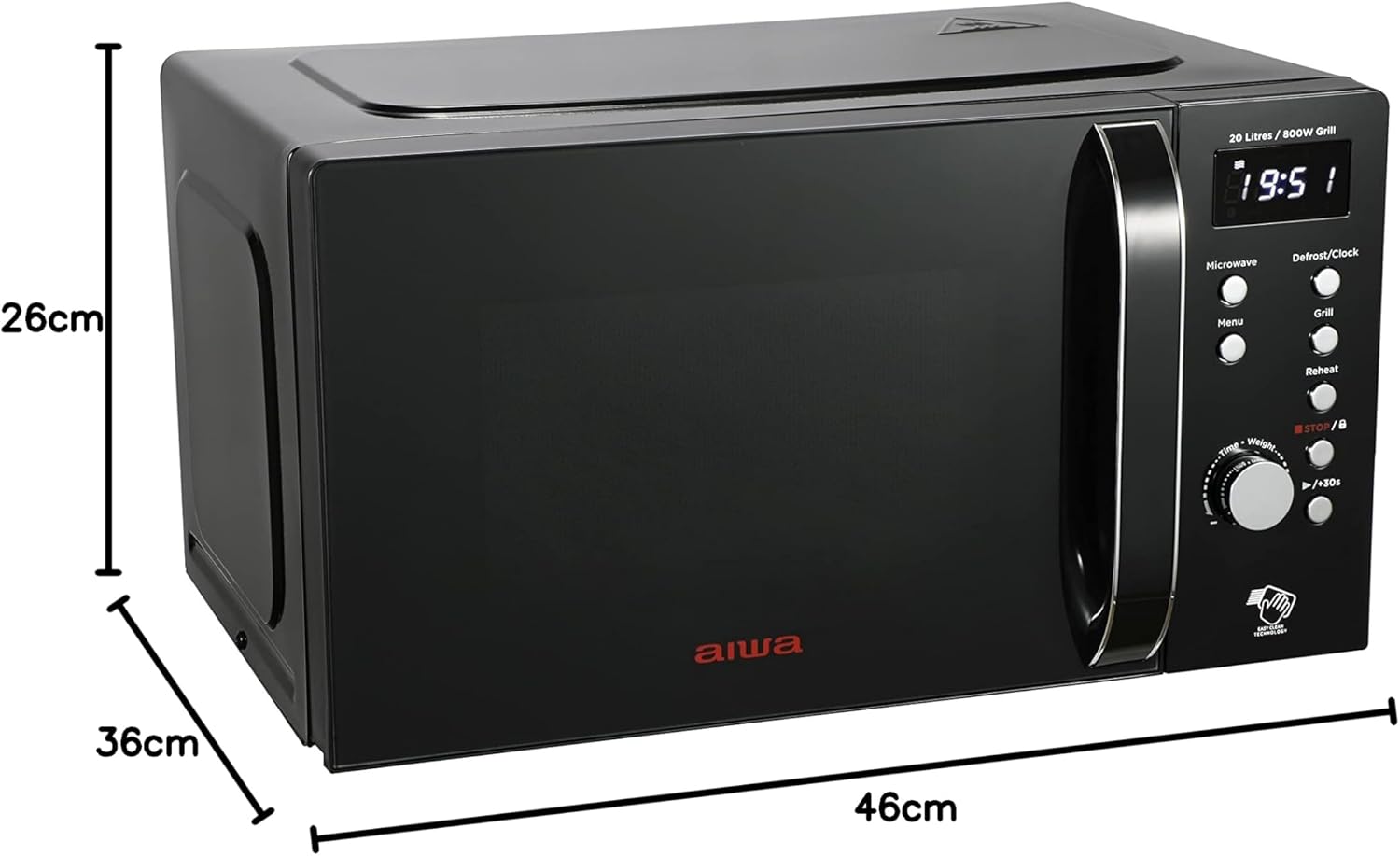
Figure 7.1: Diagram illustrating the external dimensions of the microwave oven: 46 cm (width), 36 cm (depth), and 26 cm (height).
- Model: AMW-202DG/BK
- Brand: Aiwa
- Capacity: 20 Liters
- Microwave Power Output: 700 Watts
- Grill Power Output: 800 Watts
- Control Type: Digital Buttons and Rotary Dial
- Turntable Diameter: 25.5 cm (Glass)
- Material: Ceramic (interior coating), Metal (exterior)
- Color: Black
- Dimensions (W x D x H): Approximately 46 cm x 36 cm x 26 cm
- Weight: Approximately 10.8 kg
- Special Features: 8 Auto Cooking Menus, Defrost Function, Grill Function, Safety Lock, LED Interior Lighting, Digital Clock/Timer.
8. Warranty and Support
This product is covered by a manufacturer's warranty in accordance with local regulations. For specific warranty terms, duration, and conditions, please refer to the warranty card included with your purchase or contact Aiwa customer support.
For technical assistance, troubleshooting beyond this manual, or spare parts, please contact your retailer or the official Aiwa service center in your region. Keep your proof of purchase for warranty claims.