
1. Safety Instructions
Please read these safety instructions carefully before installing or using your Teka HAK 625 BK built-in oven. Keep this manual for future reference.
- Electrical Safety: Ensure the oven is correctly earthed. Do not use adapters or extension cords. Disconnect from power before cleaning or maintenance.
- Hot Surfaces: The oven and its accessible parts become hot during use. Exercise caution to avoid touching heating elements. Keep children away.
- Supervision: Do not leave the oven unattended during operation, especially when cooking with oil or fat.
- Cleaning: Use only recommended cleaning agents. Do not use abrasive cleaners or sharp metal scrapers.
- Ventilation: Ensure adequate ventilation around the oven as per installation instructions.
2. Product Overview
The Teka HAK 625 BK is a versatile built-in oven designed for modern kitchens. It features a digital timer and multiple cooking functions.
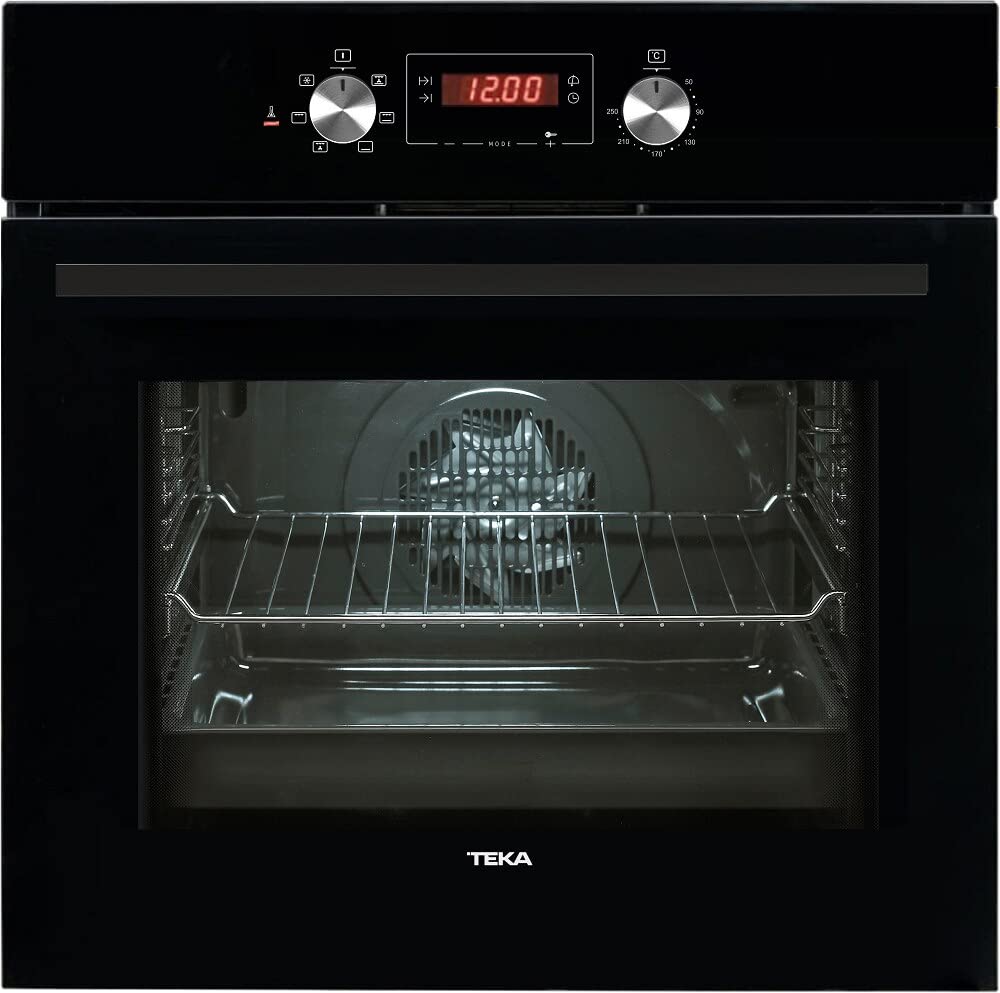
Image 1: Front view of the Teka HAK 625 BK Built-in Oven. This image displays the black finish, control panel with knobs and digital display, and the oven door with a handle.
Key Components:
- Control Panel: Located at the top, featuring control knobs and a digital display for settings.
- Oven Cavity: The interior space where food is cooked, equipped with rack supports.
- Oven Door: Features a handle for opening and closing, and a glass panel for viewing food.
- Heating Elements: Located at the top and bottom of the cavity, and potentially a fan element for convection cooking.
3. Installation
Installation should be performed by a qualified technician in accordance with local regulations and safety standards.
3.1 Pre-installation Checks
- Verify that the power supply voltage and frequency match the specifications on the oven's rating plate.
- Ensure the cabinet opening dimensions are suitable for the oven. Refer to the installation diagram provided with the product packaging.
- Confirm that the cabinet material can withstand temperatures up to 90°C.
3.2 Mounting the Oven
- Carefully slide the oven into the prepared cabinet opening.
- Secure the oven to the cabinet using the screws provided, typically through mounting holes located on the oven frame.
- Ensure the oven is level and stable.
3.3 Electrical Connection
- Connect the oven to a suitable earthed electrical outlet.
- The electrical connection must comply with local wiring regulations.
- Do not use multi-plugs or extension cables.
4. Operating Instructions
Familiarize yourself with the control panel before first use.
4.1 First Use and Setting the Clock
- Upon first connection to power, the digital display will flash.
- Use the time setting buttons (usually '+' and '-') to adjust the hour and minute.
- Confirm the time setting by pressing the clock button or waiting a few seconds.
4.2 Selecting Cooking Functions and Temperature
- Turn the function selector knob to choose the desired cooking mode (e.g., Conventional, Grill, Fan Assisted).
- Turn the temperature selector knob to set the desired cooking temperature.
- The oven will begin to heat up. The indicator light will turn off when the set temperature is reached.
4.3 Using the Timer Function
The Teka HAK 625 BK features a timer function for precise cooking control.
- Minute Minder: Set a countdown timer that signals when the time expires, without turning off the oven.
- Cooking Duration: Set a specific cooking time, after which the oven will automatically switch off.
- End Time: Program the oven to switch off at a specific time of day.
Refer to the detailed instructions in the full manual for specific timer programming steps.
5. Cleaning and Maintenance
Regular cleaning and maintenance ensure the longevity and efficient operation of your oven.
5.1 General Cleaning
- Always ensure the oven is cool and disconnected from the power supply before cleaning.
- Clean the exterior with a soft cloth and mild detergent. Avoid abrasive cleaners.
- For the interior, wipe spills immediately. For stubborn stains, use a specialized oven cleaner following the product's instructions.
5.2 Removing Oven Racks and Door
Oven racks can be removed for easier cleaning. Consult the full manual for instructions on how to safely remove and re-install the oven door for thorough cleaning.
5.3 Replacing the Oven Light
If the oven light needs replacement, ensure the oven is cool and unplugged. Unscrew the protective cover, replace the bulb with a suitable high-temperature resistant bulb (check specifications for wattage), and reattach the cover.
6. Troubleshooting
Before contacting service, refer to the following common issues and solutions:
| Problem | Possible Cause | Solution |
|---|---|---|
| Oven does not heat up. | No power supply; Incorrect settings. | Check power connection and circuit breaker; Ensure function and temperature knobs are correctly set. |
| Oven light not working. | Bulb is faulty or loose. | Replace the oven light bulb (see Section 5.3). |
| Food not cooking evenly. | Incorrect rack position; Overcrowding. | Use recommended rack positions; Avoid placing too many items in the oven at once. |
| Digital display shows an error code. | Internal fault. | Disconnect power for a few minutes, then reconnect. If the error persists, contact customer service. |
If the problem persists after attempting these solutions, please contact Teka customer support.
7. Specifications
Technical details for the Teka HAK 625 BK Built-in Oven:
| Feature | Detail |
|---|---|
| Brand | Teka |
| Model | HAK 625 BK |
| ASIN | B0BTMBXLHG |
| Color | Black |
| Finish Type | Brushed |
| Installation Type | Built In |
| Timer Function | Timer Function Available |
8. Warranty and Support
Your Teka HAK 625 BK Built-in Oven comes with a manufacturer's warranty. Please refer to the warranty card included with your product for specific terms and conditions, including the warranty period and coverage details.
Customer Support:
For technical assistance, spare parts, or warranty claims, please contact Teka customer service. Contact information can typically be found on the Teka official website or in the documentation provided with your appliance.
When contacting support, please have your oven's model number (HAK 625 BK) and serial number ready. The serial number is usually located on a label inside the oven door frame or on the back of the appliance.


