
Introduction
This instruction manual provides detailed information on the setup, operation, and maintenance of your ALLIMITY Replacement Remote Control. This remote is designed to be a direct replacement for various Toshiba and TELEFUNKEN TV models, offering full functionality without the need for complex programming.
Compatible models include, but are not limited to: TFL32AHD20BC TFL50AUHD20BC TFL55AUHD20BC TFL55UHDA19B TFL65AUHD20BC TFL65AUHDCL TFL65UHDA19B CT-8557 43UA2063DA 50UA2063DA CT-8557 RC43157 32LA2063DA 32WA2063DAI 49UA2063DG 55UA2063DA 24WA2063DG 55UA2063DAI 50UA2063DG 32LA2063DG 24WA2063DA 43LA2063DG 32WA2063DG 65UA2063DG 32WA2063DA 55UA2063DG 43UA2063DG 58UA2063DG 24DTAH524 50UG8450 55UA9001 50UA9001 TE42550G54V4H TKA500UHD10B 55UG8450 RC43157 TFA55UA655 65UG8450 65QUA9040 TE32554G54Q2HA 55DTAU655 TFL58AUHDCL 43QUA9040 TFA43UA421 TKA650UHD10B TKA32HD05B TFL65AUHD20BC170 TFL43AUHDCL 75UA9001 TFL32AHD22BC 32DTAF524 43FAE5510 55QUA9040 TKA430UHD10B 32DTAH524 TFL55AUHD22B 40DTAF455 TE43554G54V2KA TKA550UHD10B 43UA9001 FA43UA655 43UG8450 TE32554G54Q2DA 32FA6000 TKA39HD10B TFL55AUHD20BC170 39DTHA455 43DTAF524 TFA32HA524 50QUA9040 XH24AJ600V 32HG8450.
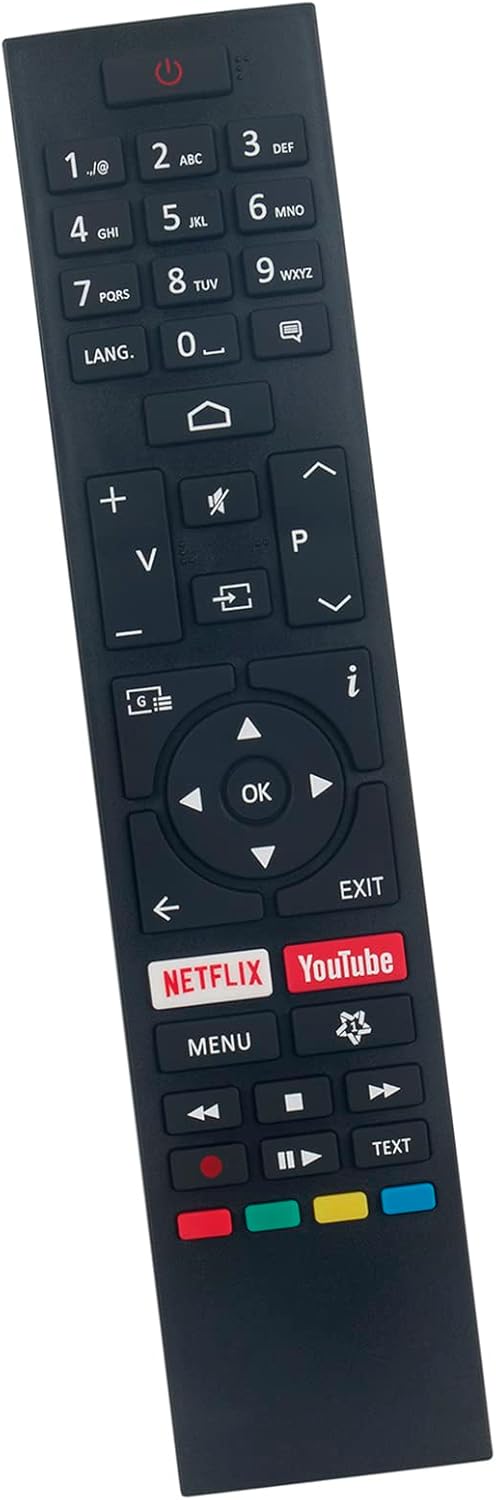
Figure 1: Front view of the ALLIMITY Replacement Remote Control, showing all buttons including number pad, volume, channel, navigation, and dedicated Netflix and YouTube buttons.
Setup
1. Battery Installation
The ALLIMITY Replacement Remote Control requires two AAA alkaline batteries (not included). Follow these steps to install the batteries:
- Locate the battery compartment cover on the back of the remote control.
- Press down on the tab and slide the cover downwards to open the compartment.
- Insert two AAA alkaline batteries, ensuring the positive (+) and negative (-) terminals align correctly with the markings inside the compartment.
- Slide the battery compartment cover back into place until it clicks securely.
Note: No programming is required. Once batteries are installed, the remote is ready for immediate use with compatible TV models.

Figure 2: Rear view of the remote control, illustrating the battery compartment location.
Operating Instructions
This remote control is designed to replicate the full functionality of your original Toshiba or TELEFUNKEN TV remote. Below is a general guide to common button functions:
| Button | Function |
|---|---|
| Power (⏻) | Turns the TV On or Off. |
| 0-9 (Number Buttons) | Direct channel selection. |
| Volume (+/-) | Adjusts the volume level. |
| Channel (P^ / P_) | Changes the TV channel up or down. |
| Mute | Mutes or unmutes the TV audio. |
| Source/Input | Selects the input source (HDMI, AV, etc.). |
| Navigation (Up, Down, Left, Right, OK) | Navigates through menus and confirms selections. |
| Menu | Opens the TV's main menu. |
| Exit | Exits the current menu or function. |
| Netflix | Direct access to the Netflix application. |
| YouTube | Direct access to the YouTube application. |
| Playback Controls (Play, Pause, Stop, Rewind, Fast Forward) | Controls media playback. |

Figure 3: Angled view of the remote control, highlighting the layout of the buttons.
Maintenance
To ensure the longevity and optimal performance of your remote control, please follow these maintenance guidelines:
- Cleaning: Use a soft, dry cloth to wipe the surface of the remote. For stubborn dirt, slightly dampen the cloth with water or a mild, non-abrasive cleaner. Do not use harsh chemicals or abrasive materials.
- Battery Replacement: Replace batteries when the remote's response becomes sluggish or stops working. Always replace both batteries at the same time with new alkaline batteries of the same type.
- Storage: Store the remote in a cool, dry place away from direct sunlight, extreme temperatures, and high humidity.
- Avoid Drops: Protect the remote from physical impact. Dropping the remote can damage internal components.
- Liquid Exposure: Do not expose the remote to water or any other liquids.
Troubleshooting
If you experience issues with your ALLIMITY Replacement Remote Control, refer to the following common problems and solutions:
| Problem | Possible Cause / Solution |
|---|---|
| Remote not responding |
|
| Some buttons not working |
|
| Remote works intermittently |
|
Specifications
- Brand: ALLIMITY
- Model: Replacement Remote Control (Compatible with various Toshiba and TELEFUNKEN models)
- Connectivity Technology: Infrared
- Max Number of Supported Devices: 1 (Controls one TV at a time)
- Power Source: 2 x AAA Alkaline Batteries (not included)
- Product Dimensions: 4 x 12 x 0.3 cm
- Product Weight: Approximately 50 g
- Manufacturer: ALLIMITYQYSY
- ASIN: B0BTM44JGM
- Date First Available: 15 July 2024

Figure 4: The remote control as typically packaged.
Warranty and Support
This ALLIMITY Replacement Remote Control is designed for reliable performance. For any issues not covered in the troubleshooting section, or for further assistance, please contact the seller or manufacturer directly through the platform where the product was purchased.
Please retain your proof of purchase for any warranty claims or support inquiries. Information regarding extended warranty options may be available from your retailer.