
Introduction
Thank you for choosing the iGear Spectrum Mini Bluetooth Speaker. This portable speaker is designed to deliver a rich, immersive audio experience with dynamic lighting. Please read this manual carefully before use to ensure proper operation and to maximize your enjoyment of the product.
What's in the Box
- 1 x iGear Spectrum Mini Bluetooth Speaker
- 1 x AUX Cable
- 1 x Charging Cable (Type-C)
- 1 x Warranty Card
- 1 x User Guide
Product Features
The iGear Spectrum Mini Bluetooth Speaker offers a range of features designed for an enhanced audio and visual experience:
- 360-Degree Immersive Sound: Experience audio from all directions with powerful 15W output.
- Dynamic LED Lights: Features 9 light modes and 180-degree pulsating lights to complement your music.
- Extended Playtime: Enjoy up to 12 hours of continuous music playback on a single charge.
- True Wireless Stereo (TWS) Technology: Connect two Spectrum Mini speakers wirelessly for a stereo sound experience.
- Multiple Connectivity Options: Supports Bluetooth, AUX input, USB input, and TF card slot.
- Fast Type-C Charging: Convenient and quick charging via a Type-C port.
- Portable Design: Lightweight at 650 grams, making it easy to carry.

Image: The iGear Spectrum Mini Bluetooth Speaker showcasing its dynamic lighting effects.

Image: An illustration highlighting the 15W stereo speaker and extra bass feature.
Setup
1. Initial Charging
Before first use, fully charge the speaker. Connect the provided Type-C charging cable to the speaker's charging port and the other end to a USB power adapter (not included). The charging indicator will show the charging status. A full charge takes approximately 2 hours.
2. Powering On/Off
Press and hold the power button (⏻) for 2-3 seconds to turn the speaker on or off. A sound prompt will indicate the power status.
Operation
1. Bluetooth Pairing
- Turn on the speaker. It will automatically enter Bluetooth pairing mode, indicated by a flashing LED light.
- Enable Bluetooth on your device (smartphone, tablet, etc.).
- Search for "iGear Spectrum Mini" in your device's Bluetooth list and select it to connect.
- Once connected, the LED light will become solid, and you will hear a confirmation sound.
2. Basic Controls
- Play/Pause: Press the Play/Pause button (▶‖) once.
- Volume Up: Press the Volume Up button (+).
- Volume Down: Press the Volume Down button (-).
- Next Track: Press and hold the Volume Up button (+).
- Previous Track: Press and hold the Volume Down button (-).
3. Light Mode Control
Press the Light Mode button (💡) to cycle through the 9 available light modes. Press and hold to turn the lights off or on.
4. True Wireless Stereo (TWS) Pairing
To pair two iGear Spectrum Mini speakers for TWS stereo sound:
- Ensure both speakers are turned off and not connected to any Bluetooth device.
- Turn on both speakers.
- On one speaker (this will be the primary speaker), double-press the Play/Pause button (▶‖). It will search for the secondary speaker.
- Once paired, you will hear a confirmation sound, and the LED indicators on both speakers will synchronize.
- Connect your device to the primary speaker via Bluetooth as described in step 1.
Connectivity Options
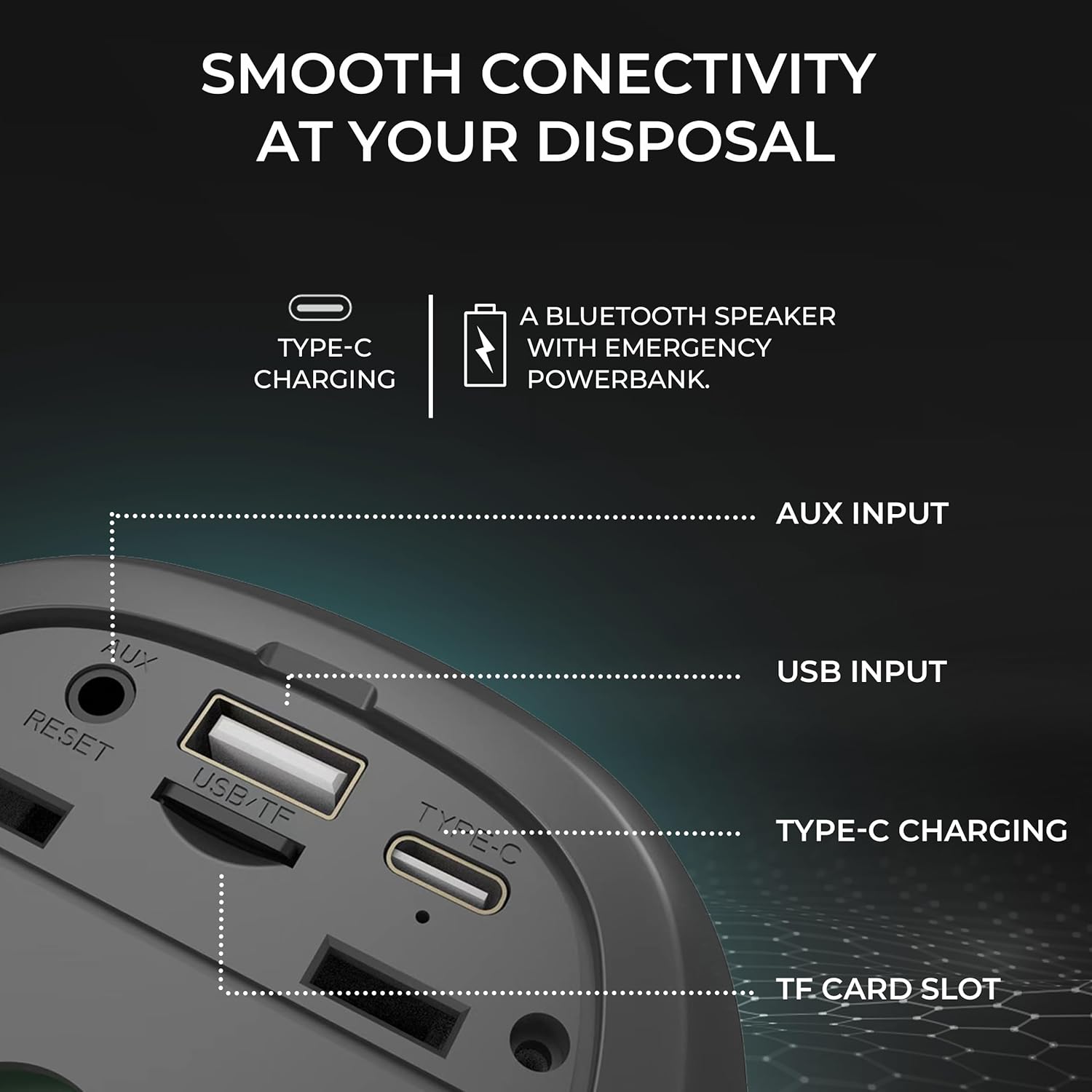
Image: Detailed view of the speaker's input ports for various connectivity options.
- Bluetooth: Connect wirelessly to your devices.
- AUX Input: Use the provided AUX cable to connect to devices without Bluetooth capabilities. Insert the 3.5mm jack into the AUX port on the speaker and your audio source.
- USB Input: Insert a USB flash drive with audio files into the USB port to play music directly.
- TF Card Slot: Insert a TF (MicroSD) card with audio files into the TF card slot to play music directly.
Charging
The iGear Spectrum Mini speaker is powered by a built-in Lithium Ion battery. To charge the speaker:
- Connect the Type-C charging cable to the speaker's Type-C port.
- Connect the other end of the cable to a standard USB power source (e.g., wall adapter, computer USB port).
- The charging time is approximately 2 hours for a full charge.
- A fully charged speaker provides up to 12 hours of playtime, depending on volume and light usage.

Image: The speaker highlighting its 12-hour playtime capability.
Maintenance
To ensure the longevity and optimal performance of your iGear Spectrum Mini speaker, follow these maintenance guidelines:
- Cleaning: Use a soft, dry cloth to wipe the speaker's surface. Do not use abrasive cleaners, alcohol, or chemical solvents.
- Storage: Store the speaker in a cool, dry place away from direct sunlight and extreme temperatures.
- Water Exposure: The product is not waterproof. Avoid exposing it to water or high humidity to prevent damage.
- Battery Care: If not used for extended periods, charge the speaker at least once every three months to maintain battery health.
Troubleshooting
| Problem | Possible Solution |
|---|---|
| Speaker does not turn on | Ensure the speaker is charged. Connect it to a power source using the Type-C cable. |
| No sound | Check volume levels on both the speaker and your connected device. Ensure the device is properly paired via Bluetooth or connected via AUX/USB/TF card. |
| Bluetooth pairing fails | Ensure the speaker is in pairing mode (flashing LED). Turn off and on Bluetooth on your device. Move the speaker closer to your device. Disconnect from other Bluetooth devices. |
| TWS pairing fails | Ensure both speakers are off and not connected to any device before initiating TWS pairing. Follow TWS pairing steps carefully. |
| Lights are not working | Press the Light Mode button (💡) to cycle through modes or turn lights on. |
Specifications
| Feature | Detail |
|---|---|
| Model Name | Spectrum Mini |
| Item Model Number | iG-1149 |
| Audio Wattage | 15 Watts |
| Connectivity Technology | Bluetooth |
| Wireless Range | Up to 10 meters |
| Battery Type | Lithium Ion |
| Playtime | Up to 12 Hours |
| Charging Time | Approximately 2 Hours |
| Charging Port | Type-C |
| Control Method | Touch |
| Material | ABS + Fabric |
| Item Weight | 650 Grams |
| Product Dimensions | 10D x 10W x 12.3H Centimeters |
| Waterproof | No |
Warranty and Support
The iGear Spectrum Mini Bluetooth Speaker comes with a 1 Year Carry-In Warranty. For warranty claims or technical support, please refer to the contact information provided on your warranty card or visit the official iGear website.
Manufacturer/Importer: iGear Tech Private Limited, Goregaon west, Mumbai 400063, Contact: 9327667193

