
1. Introduction
Thank you for choosing the Kisonli I-570 Wired USB Multimedia Speaker. This manual provides essential information for the proper setup, operation, and maintenance of your speaker. Please read this manual thoroughly before using the product to ensure optimal performance and longevity.
The Kisonli I-570 is designed to deliver clear audio for your computer or other compatible devices. Its compact and lightweight design makes it suitable for various desktop environments.

Image 1.1: Kisonli I-570 speaker and its retail packaging. The image shows the black speaker unit next to its orange and black box, which features "USB 2.0 Multimedia speaker" text.
2. Important Safety Instructions
- Do not expose the speaker to water, moisture, or extreme temperatures.
- Avoid dropping or subjecting the speaker to strong impacts.
- Do not attempt to disassemble or modify the speaker. This will void the warranty and may cause damage.
- Keep the speaker away from heat sources such as radiators, heat registers, stoves, or other apparatus (including amplifiers) that produce heat.
- Use only attachments/accessories specified by the manufacturer.
- Clean only with a dry cloth.
- Unplug this apparatus during lightning storms or when unused for long periods of time.
3. Package Contents
Please check the package contents upon unboxing. If any items are missing or damaged, contact your retailer.
- Kisonli I-570 USB Multimedia Speaker (x1)
- User Manual (this document)
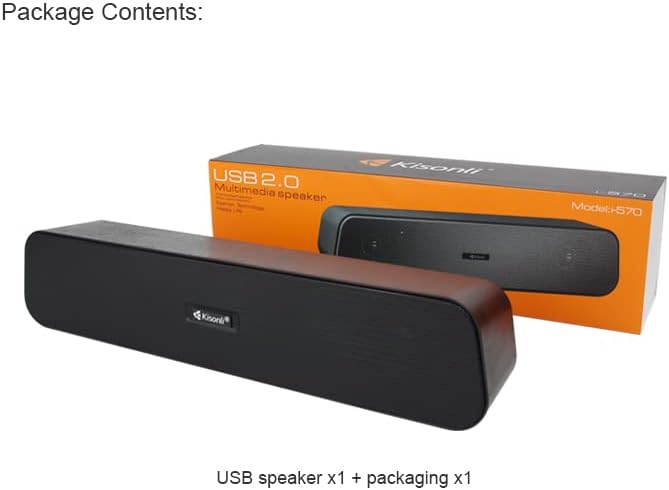
Image 3.1: Package contents showing one Kisonli I-570 USB speaker and its retail packaging. The speaker is black with a wooden-like texture on the sides.
4. Product Overview
The Kisonli I-570 is a compact, wired USB multimedia speaker designed for ease of use and reliable audio output. It features a single unit design with integrated controls.
4.1 Components
- Speaker Unit: The main audio output device.
- USB Cable: For power and audio input (integrated).
- 3.5mm Audio Jack: For audio input (integrated).

Image 4.1: The Kisonli I-570 speaker unit, displaying its integrated USB cable and 3.5mm audio jack, ready for connection.
5. Setup Instructions
Follow these steps to set up your Kisonli I-570 speaker:
- Placement: Place the speaker on a stable, flat surface near your computer or audio source.
- Connect USB: Plug the USB cable from the speaker into an available USB port on your computer or a USB power adapter (DC 5V). The USB connection provides power to the speaker.
- Connect Audio: Plug the 3.5mm audio jack from the speaker into the audio output port (headphone jack) of your computer, laptop, or other audio device.
- Power On: The speaker will typically power on automatically once connected to a powered USB port. Some models may have a power switch or volume knob that also acts as a power switch.
- Volume Adjustment: Adjust the volume using the integrated control on the speaker (if available) and/or your computer's volume settings.
6. Operating Instructions
6.1 Basic Audio Playback
Once connected, the speaker will play audio from your connected device. Ensure your device's audio output is directed to the connected 3.5mm jack.
6.2 Volume Control
Adjust the audio volume using the volume control knob or buttons on the speaker itself (if present). Additionally, you can control the volume through your computer's operating system or the audio source device.
6.3 Power On/Off
The speaker is powered via USB. To turn it off, disconnect the USB cable from the power source. If the speaker has an integrated power/volume knob, turn it fully counter-clockwise until it clicks off.
7. Maintenance and Care
- Cleaning: Wipe the speaker's exterior with a soft, dry cloth. Do not use liquid cleaners or abrasive materials.
- Storage: When not in use for extended periods, store the speaker in a cool, dry place, away from direct sunlight and dust.
- Cable Care: Avoid bending or twisting the cables excessively to prevent internal damage.
8. Troubleshooting
| Problem | Possible Cause | Solution |
|---|---|---|
| No sound from speaker. |
|
|
| Sound is distorted or unclear. |
|
|
| Speaker not recognized by computer. |
|
|
9. Specifications
The following table details the technical specifications of the Kisonli I-570 speaker:

Image 9.1: Visual representation of Kisonli I-570 speaker dimensions (336mm length, 62mm width, 70mm height) and a list of its technical specifications.
| Feature | Detail |
|---|---|
| Brand | Kisonli |
| Model | I-570 |
| Power Supply | USB DC5V |
| Output Power | 3W*2 |
| Maximum Power | 3.5W |
| Impedance | 4Ω |
| Signal to Noise Ratio | ≥58dB |
| Frequency Response | 80Hz-20kHz |
| Distortion | ≤1% |
| Product Size (L x W x H) | 336mm x 62mm x 70mm |
| Function | AUX (3.5mm audio input) |
| Color | Black |
| Connectivity Technology | USB, Wired (3.5mm) |
| Speaker Type | Subwoofer |
| Mounting Type | Tabletop |
| Item Weight | 590 g |
10. Warranty and Support
Kisonli products are manufactured to high-quality standards. For information regarding warranty coverage, please refer to the warranty card included with your purchase or contact your local retailer. Keep your proof of purchase for warranty claims.
For technical support or further assistance, please contact Kisonli customer service through the contact information provided on the product packaging or the official Kisonli website.