1. Introduction
The DAYTECH WiFi Smart Caregiver Pager System is designed to provide a reliable and convenient way for caregivers to be alerted when assistance is needed. This system includes one panic button and one receiver, connecting via Wi-Fi to your smartphone for remote monitoring and alerts. It is ideal for seniors, patients, or anyone requiring immediate assistance at home.
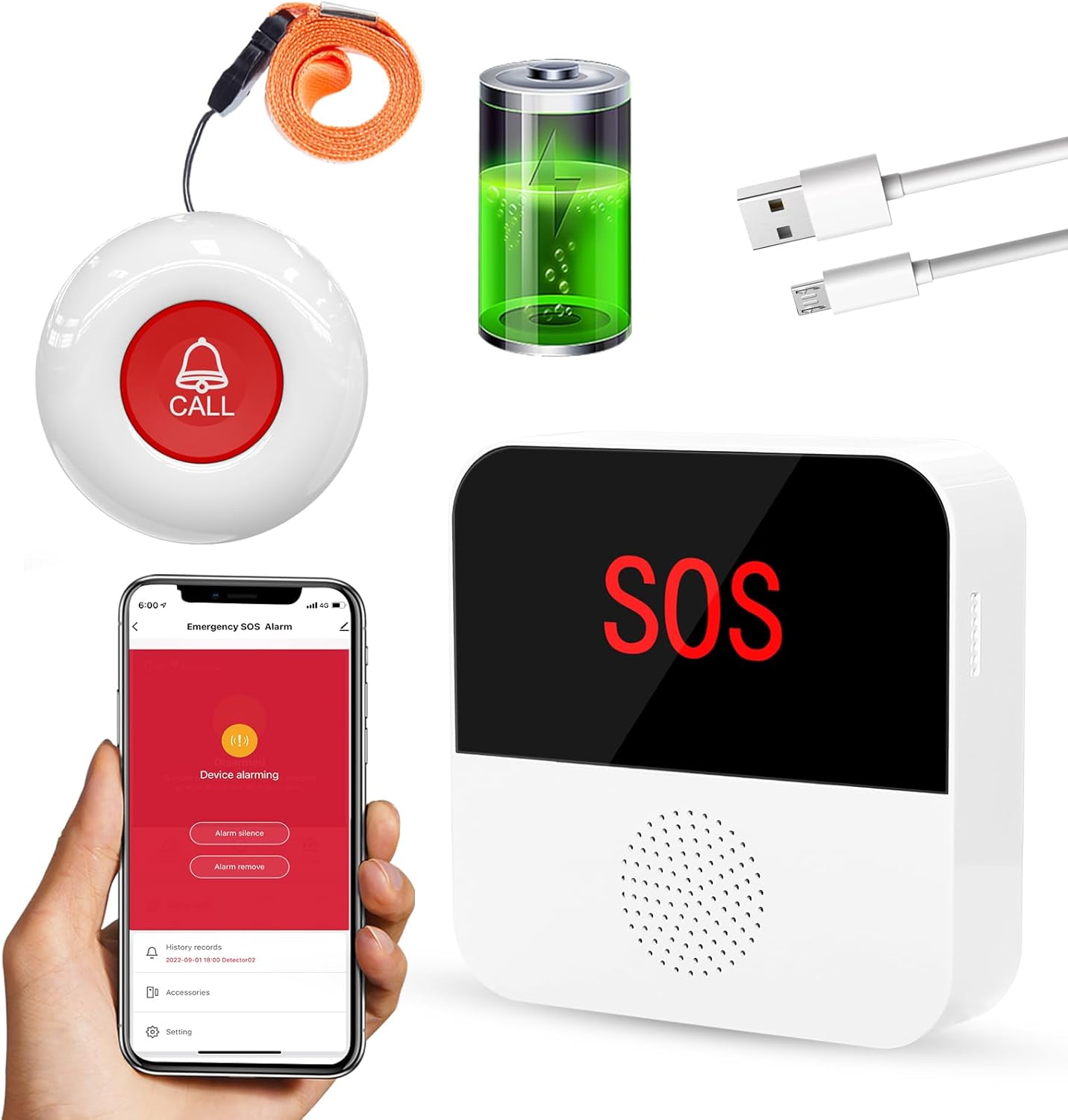
Figure 1.1: Overview of the DAYTECH WiFi Smart Caregiver Pager System components.
The system ensures peace of mind by providing both local audible/visual alerts from the receiver and remote notifications to your mobile device, allowing you to respond promptly to emergencies.
2. Setup Instructions
2.1 Charging the Receiver
Before initial use, ensure the receiver is fully charged. Connect the provided charging cable to the receiver and a suitable USB power adapter. The receiver can operate while charging.
2.2 Wi-Fi Connection and APP Pairing
The system requires a 2.4GHz Wi-Fi network for smartphone connectivity. It does not support 5GHz Wi-Fi. Follow these steps to connect and pair your devices:
- Download the designated mobile application (e.g., Smart Life or Tuya Smart) from your smartphone's app store.
- Register or log in to your account within the app.
- Plug in the receiver. Ensure your smartphone is connected to a 2.4GHz Wi-Fi network.
- In the app, add a new device. Follow the on-screen instructions to put the receiver into pairing mode (usually by pressing and holding a button until an indicator light flashes).
- Confirm the Wi-Fi network and enter the password in the app. The receiver will connect to your Wi-Fi network.
- Once the receiver is connected, pair the panic button(s) with the receiver through the app's interface. The panic button and receiver must be within the same Wi-Fi network for initial pairing.
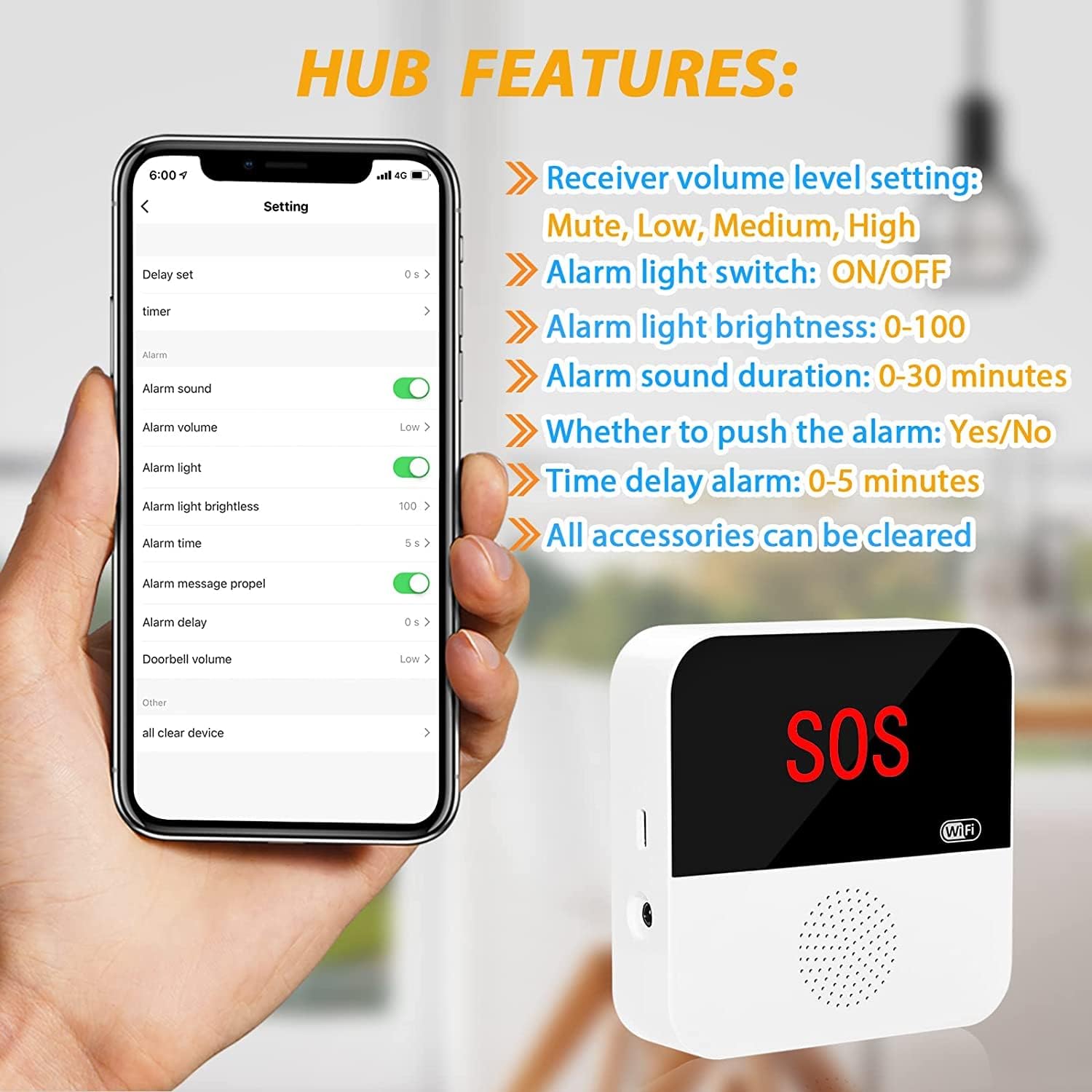
Figure 2.1: Connecting the system to a 2.4GHz Wi-Fi network via the mobile application.

Figure 2.2: The system's capability for global alerts via the smartphone application.

Figure 2.3: For initial pairing, the panic button and receiver must be within the same Wi-Fi network.
3. Operating Instructions
3.1 Using the Panic Button
To send an alert, simply press the large 'CALL' button on the panic button. Upon activation, the signal is sent to the receiver and simultaneously to the connected smartphone application.

Figure 3.1: The panic button can be worn as a pendant for easy access.
3.2 Receiver Alerts
When an alert signal is received, the receiver will:
- Sound an alarm (adjustable volume and ringtones).
- The built-in LED indicator in the SOS area will flash red.
3.3 Smartphone Application Features
The mobile application provides comprehensive control and monitoring capabilities:
- Remote Operation: Receive instant warning alerts on your phone, regardless of your location, as long as your phone has internet access.
- Share Function: Set up sharing alerts within the app to allow multiple family members or caregivers to receive notifications.
- Battery Level: Monitor the remaining battery power of the receiver directly through the phone app.
- Customization: Adjust receiver volume (Mute, Low, Medium, High) and choose from 12 different ringtones. You can also set alarm light brightness and duration.

Figure 3.2: App settings for customizing receiver alerts and functions.

Figure 3.3: Real-time alerts and family sharing capabilities of the system.
3.4 Subscription Information
The system offers both a standard (free) version and a subscription version for enhanced features:
| Feature | Standard Version (Free) | Subscription Version |
|---|---|---|
| Receiver Ring Alert | ✔ | ✔ |
| Receiver LED Flashing Alert | ✔ | ✔ |
| Notifications from APP | ✔ | ✔ |
| SMS notification | X | ✔ |
| Phone call | X | ✔ |
| Subscription Fee | X | $3.99-$49.99 (depending on notifications/billing cycle) |
Table 3.1: Comparison of Standard (Free) vs. Subscription Features.

Figure 3.4: Detailed breakdown of subscription features.
4. Maintenance
4.1 Battery Life and Charging
- The panic button is designed for low power consumption, with a battery that can last up to 2 years. A low battery reminder will cause the indicator light to flash red continuously 5 times when the button is pressed.
- The receiver runs on a rechargeable battery. For best results and continuous operation, it is recommended to keep the receiver plugged in. You can monitor the receiver's battery level via the mobile application.

Figure 4.1: Panic button battery longevity and low battery indicator.
4.2 Placement and Water Resistance
- The panic button is IP55 waterproof, making it suitable for use in bathrooms or other areas where it might encounter splashes.
- It can be carried in a pocket, worn as a pendant, or fixed on a wall/anywhere using adhesive or screws.

Figure 4.2: Versatile placement options and IP55 water resistance for the panic button.
5. Troubleshooting
If you encounter issues with your DAYTECH WiFi Smart Caregiver Pager System, please refer to the following common troubleshooting tips:
- No Alerts on Phone: Ensure your receiver is connected to a 2.4GHz Wi-Fi network. Verify that the mobile application has notification permissions enabled on your smartphone. Check the app for any error messages or disconnections.
- Receiver Not Responding: Confirm the receiver is plugged in or has sufficient battery charge. If the receiver is battery-powered, check its battery level in the app.
- Panic Button Not Triggering Alerts: Ensure the panic button is within range of the receiver. Check the panic button's battery status. Re-pair the panic button with the receiver via the app if necessary.
- Incorrect Wi-Fi Band: Remember that the system ONLY supports 2.4GHz Wi-Fi. If your router broadcasts both 2.4GHz and 5GHz, ensure your phone is connected to the 2.4GHz network during setup.
- Subscription Features: If you are not receiving SMS or phone call alerts, verify that you have an active subscription for these features as per Table 3.1.

Figure 5.1: Review subscription details if experiencing issues with advanced notification types.
6. Specifications
| Feature | Detail |
|---|---|
| Control Method | App |
| Manufacturer | DAYTECH |
| Part Number | TY06-01A 1-1 CA |
| Parcel Dimensions | 13.4 x 11.8 x 5.9 cm |
| Item Weight | 270 g |
| Batteries | 1 Lithium Ion battery required (included) |
| Battery Cell Type | Lithium Ion |
| Power Source | Battery Powered |
| Compatible Devices | Smartphone |
| Wireless Range | Up to 328ft/100m (open area) |
| Wi-Fi Support | Only 2.4GHz |
7. Warranty and Support
Daytech provides a lifetime warranty for this product, ensuring long-term reliability and support. Additionally, the product comes with a 30-day return and exchange service from the date of purchase.
For any problems or inquiries regarding your caregiver pager system, please do not hesitate to contact Daytech customer service. Contact information can typically be found on the product packaging or the official Daytech website.


