
Back Bay Audio Back Bay Tempo 30
Back Bay Audio Tempo 30 Wireless Earbuds User Manual
Model: Back Bay Tempo 30 | Brand: Back Bay Audio
Introduction
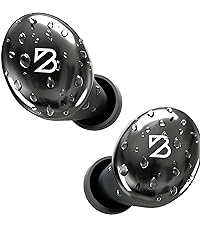
Welcome to the user manual for your Back Bay Audio Tempo 30 Wireless Earbuds. These earbuds are designed to provide award-winning sound quality and a comfortable fit, especially for small ear canals. With advanced features like extra bass mode and IPX7 water resistance, they are suitable for various activities, from daily listening to intense workouts. This manual will guide you through the setup, operation, and maintenance of your new earbuds.
Package Contents
Please ensure all items are present in your package:
- Back Bay Audio Tempo 30 Wireless Earbuds (Left and Right)
- Charging Station (Charging Case)
- USB-C Charging Cable
- Multiple Sizes of Eartips (6 pairs)
- User Manual (this document)
Key Features
- Made for Small Ears: Includes 6 ear-tip sizes and a small profile for comfortable wear, ideal for small ear canals.
- Extra Bass Mode: Activate with a tap for enhanced bass, suitable for workouts or immersive listening.
- Sweatproof + Water Resistant (IPX7): Designed to withstand sweat and rain. Note: Not intended for swimming.
- 32-Hour Battery Life: Provides 8 hours of playtime per earbud, with an additional 24 hours from the charging case.
- Simple Pairing: Connects wirelessly with any Bluetooth-enabled device, including phones and computers.
- Durable Construction: Made from Metal and Premium ABS Plastic.
Setup Guide
1. Charging the Earbuds and Case
Before first use, fully charge the Tempo 30 earbuds and their charging case. The case provides an additional 24 hours of battery life, extending total playtime to 32 hours.
- Connect the provided USB-C cable to the charging case and a power source.
- The charging time for a full charge is approximately 1.5 hours.
- Indicator lights on the case will show charging status.

2. Selecting the Right Ear Tips
A proper fit is crucial for both comfort and sound quality. The Tempo 30 earbuds come with 6 different ear-tip sizes to ensure a secure and comfortable fit for various ear canal sizes, especially smaller ones.
- Experiment with different ear-tip sizes to find the one that creates a snug seal in your ear canal.
- A good seal enhances bass response and noise isolation.

3. Pairing with Your Device
The Tempo 30 earbuds offer simple and quick pairing with any Bluetooth-enabled device.
- Open the charging case and remove both earbuds. They will automatically enter pairing mode.
- On your device (smartphone, tablet, computer), go to Bluetooth settings.
- Select "Back Bay Tempo 30" from the list of available devices.
- Once connected, you will hear an audio confirmation.
Operating Instructions
Touch Controls
The Tempo 30 earbuds feature intuitive touch controls for managing audio playback and calls. Specific tap sequences control various functions:
| Action | Function |
|---|---|
| Single Tap (Either Earbud) | Play/Pause Music, Answer/End Call |
| Double Tap (Right Earbud) | Next Track |
| Double Tap (Left Earbud) | Previous Track |
| Triple Tap (Either Earbud) | Activate Voice Assistant |
| Long Press (Right Earbud) | Increase Volume |
| Long Press (Left Earbud) | Decrease Volume |
| Tap and Hold (Either Earbud) | Toggle Extra Bass Mode On/Off |
Extra Bass Mode
The Tempo 30 earbuds feature an "Extra Bass Mode" for a more powerful audio experience. To activate or deactivate this mode, simply tap and hold either earbud until you hear an audio cue.
Maintenance
To ensure the longevity and optimal performance of your Tempo 30 earbuds, follow these maintenance guidelines:
- Cleaning: Regularly wipe the earbuds and charging case with a soft, dry, lint-free cloth. For the ear tips, remove them and clean with a mild soap solution if necessary, then rinse and dry thoroughly before reattaching.
- Storage: Always store the earbuds in their charging case when not in use to protect them and keep them charged.
- Water Resistance: While IPX7 rated for water resistance (protection against temporary immersion up to 1 meter for 30 minutes), avoid prolonged exposure to water and do not use them for swimming. Ensure earbuds are dry before placing them back in the charging case.

Troubleshooting
If you encounter any issues with your Tempo 30 earbuds, please refer to the following common solutions:
| Problem | Solution |
|---|---|
| Earbuds not pairing/connecting |
|
| No sound from one earbud |
|
| Low volume or poor sound quality |
|
| Charging case not charging |
|
If these solutions do not resolve the issue, please contact Back Bay Audio customer support for further assistance.
Specifications
| Feature | Detail |
|---|---|
| Model Name | Back Bay Tempo 30 |
| Connectivity Technology | Bluetooth 5.0 |
| Wireless Communication Technology | Bluetooth |
| Noise Control | Sound Isolation |
| Frequency Response | 20Hz - 20kHz |
| Battery Life | 32 Hours (with charging case) |
| Charging Time | 1.5 Hours |
| Water Resistance Level | IPX7 (Waterproof) |
| Control Type | Button Control, Touch |
| Material | Metal, Premium ABS Plastic |
| Item Weight | 1.59 ounces (45 Grams) |
| Product Dimensions | 2.9 x 1.8 x 1.1 inches |
| Earpiece Shape | Rounded tips (earbud tips) |
| Impedance | 16 Ohm |
| Audio Driver Type | Dynamic Driver |

Warranty and Support
The Back Bay Audio Tempo 30 Wireless Earbuds come with a 1-year limited warranty. For warranty claims, technical support, or any inquiries, please visit the official Back Bay Audio store or contact their customer service directly.
Official Brand Store: Back Bay Audio Store on Amazon
Related documentsBack Bay Tempo 30


Ask a question about this manual
Ask about setup, troubleshooting, compatibility, parts, safety, or missing instructions. Manuals+ will review the question and use this page’s manual context to help answer it.