
1. Introduction
This instruction manual provides essential information for the safe and efficient use of your Exquisit EMW20-DG-020 built-in microwave oven. Please read it thoroughly before installation and operation, and keep it for future reference. Proper use and maintenance will ensure optimal performance and longevity of your appliance.
Safety Information
Always follow basic safety precautions when using electrical appliances to reduce the risk of fire, electric shock, or injury. Do not attempt to operate this appliance if it is damaged. Ensure proper ventilation and never operate the microwave when empty. Keep children away from the appliance during operation and ensure they do not play with it. Only use microwave-safe cookware.
2. Product Overview
The Exquisit EMW20-DG-020 is a versatile built-in microwave oven designed for seamless integration into your kitchen. It features an 800 W microwave power and a 1000 W grill function, offering various cooking options for your convenience.
Key Features:
- 800 W Microwave Power with 5 adjustable power levels.
- 1000 W Grill Function for browning and crisping, includes a grill rack.
- 20-liter stainless steel cooking compartment.
- 27 cm diameter glass turntable for even heating.
- 8 Automatic cooking programs for various dishes.
- Defrost function by time or weight.
- Digital timer (up to 35 minutes) and quick start function.
- Combination function for microwave and grill cooking.
- Elegant stainless steel design with push-button door opening.
Components:
The microwave oven comes with a glass turntable, a turntable ring, and a metal grill rack.

Figure 1: Front view of the Exquisit EMW20-DG-020 built-in microwave oven, seamlessly integrated into a kitchen cabinet.

Figure 2: Close-up of the control panel, showing the digital display, function buttons, and rotary knob for time/weight adjustment.
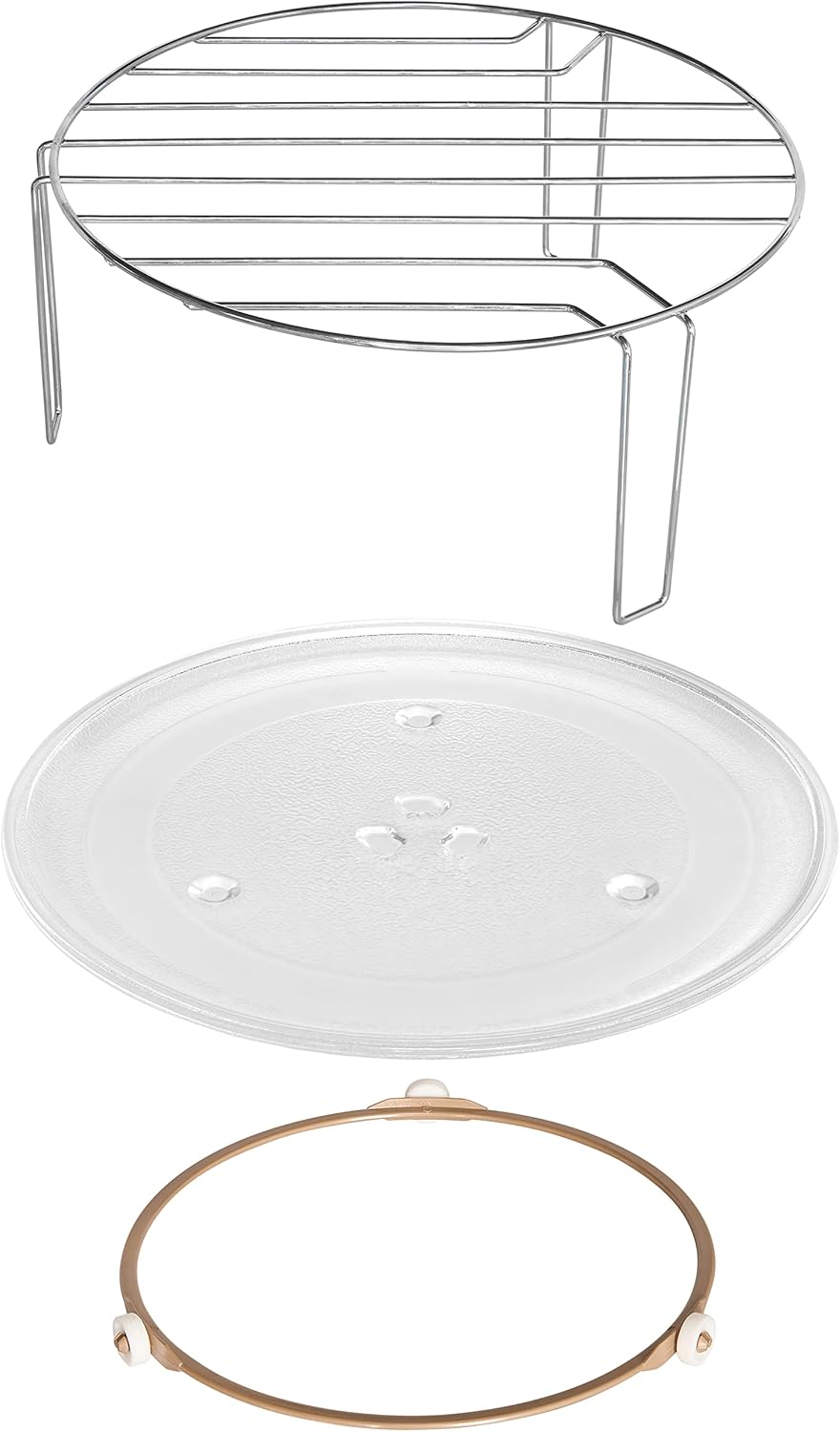
Figure 3: Included accessories: glass turntable, turntable ring, and metal grill rack.
3. Setup and Installation
This microwave oven is designed for built-in installation. Ensure the installation area meets the specified dimensions and ventilation requirements for safe and proper operation.
Installation Requirements:
- Niche Dimensions (H x W x D): 36.2 cm x 56.0 cm x 32.5 cm.
- Ensure adequate ventilation space around the appliance as indicated in the diagram.
- The power cable length is 100 cm. Ensure a suitable, grounded power outlet is accessible within this range.

Figure 4: Installation diagram showing the required niche dimensions and ventilation clearances for the built-in microwave.
Initial Setup:
- Unpack the microwave oven and all accessories, removing any packaging materials.
- Clean the interior and exterior surfaces with a damp cloth.
- Place the turntable ring in the center of the oven cavity, then place the glass turntable securely on top.
- Install the microwave into the prepared niche according to the provided installation diagram and instructions.
- Plug the power cord into a grounded electrical outlet.
4. Operating Instructions
Familiarize yourself with the control panel to effectively use your microwave oven for various cooking tasks.
Control Panel Overview:
The control panel features a digital display, dedicated function buttons (Microwave, Grill/Combi, Menu, Timer/Clock, Defrost), and a rotary knob for setting time and weight. The oven door opens by pressing the button located below the control panel.
Basic Microwave Operation:
- Place food in a microwave-safe container on the glass turntable.
- Close the oven door securely.
- Press the "Microwave" button.
- Rotate the knob to set the desired cooking time and power level (5 levels available, up to 800 W).
- Press "START/+30sec" to begin cooking.
Grill Function:
- Place food on the grill rack provided, ensuring it is suitable for grilling.
- Press the "Grill/Combi" button to select the grill function (1000 W).
- Rotate the knob to set the desired grilling time.
- Press "START/+30sec" to begin grilling.
Combination Cooking:
The combination function allows you to use both microwave and grill for versatile cooking results. Press the "Grill/Combi" button repeatedly to cycle through combination modes. Refer to the full manual for specific combination settings and recommended cooking times.
Defrost Function:
Press the "Defrost" button and use the rotary knob to select defrost by time or by weight. The microwave will automatically adjust power levels for efficient defrosting. Follow the instructions on the display for optimal results.
Automatic Programs:
The microwave features 8 pre-set automatic programs for common dishes such as cake, pizza, soup, and vegetables. Press the "Menu" button repeatedly to cycle through the programs (A-1 to A-8). Once the desired program is selected, press "START/+30sec" to begin.
Setting the Clock:
Press the "Timer/Clock" button, then use the rotary knob to set the current time. Press "Timer/Clock" again to confirm the setting.
5. Maintenance and Cleaning
Regular cleaning and maintenance will help preserve the appearance and performance of your microwave oven and ensure hygienic operation.
Cleaning the Interior:
- Always unplug the appliance from the power outlet before cleaning.
- Wipe the interior cavity, door seals, and turntable with a damp cloth and mild detergent after each use.
- For stubborn food splatters, place a bowl of water with lemon juice inside and microwave for a few minutes to create steam, which helps loosen residue. Then wipe clean.
- The glass turntable and turntable ring can be washed in warm soapy water or in a dishwasher.
Cleaning the Exterior:
- Wipe the exterior surfaces with a soft, damp cloth. Avoid abrasive cleaners, scouring pads, or harsh chemicals.
- For stainless steel surfaces, use a specialized stainless steel cleaner to maintain its finish and prevent streaks.
6. Troubleshooting
If you encounter issues with your microwave oven, refer to the following common problems and solutions before contacting service.
| Problem | Possible Cause | Solution |
|---|---|---|
| Microwave does not start. | Door not closed properly; power cord unplugged; household fuse blown or circuit breaker tripped. | Ensure door is firmly closed. Check power connection. Check household fuse/circuit breaker. |
| Food not heating evenly. | Food not stirred or rearranged; turntable not rotating; incorrect power level or cooking time. | Stir or rearrange food during cooking. Ensure turntable and ring are correctly placed and clean. Adjust power and time as needed. |
| Unusual noise during operation. | Turntable or turntable ring not correctly positioned; foreign object in cavity. | Reposition turntable and ring. Remove any foreign objects from the oven cavity. |
| Display shows an error code. | Internal malfunction. | Unplug the microwave for a few minutes, then plug it back in. If the error persists, contact customer service. |
7. Specifications
| Feature | Specification |
|---|---|
| Brand | Exquisit |
| Model | EMW20-DG-020 (815326000) |
| Color | Stainless Steel |
| Product Dimensions (D x W x H) | 36.6 x 59.5 x 38.4 cm |
| Niche Dimensions (H x W x D) | 36.2 x 56.0 x 32.5 cm |
| Capacity | 20 Liters |
| Microwave Power | 800 W (5 power levels) |
| Grill Power | 1000 W |
| Material | Stainless Steel |
| Turntable Diameter | 27 cm |
| Cable Length | 100 cm |
| Weight | 14.1 kg |
| Special Features | Defrost function, Digital timer, 8 Auto programs, Combination cooking |
8. Warranty and Support
For detailed warranty information and customer support, please refer to the warranty card included with your product or visit the official Exquisit website. Keep your proof of purchase for any warranty claims.
If you require technical assistance, have questions not covered in this manual, or need to report a fault, please contact Exquisit customer service through their official channels.
