1. Introduction
This manual provides essential information for the safe and efficient operation, installation, and maintenance of your AMANA K-Series PTAC (Packaged Terminal Air Conditioner) model PTC123K35AXXX. This unit is designed to provide 12,000 BTU of cooling and 3.5 kW of heating, making it suitable for conditioning spaces up to 550 sq. ft. It features a through-the-wall installation design and incorporates advanced technologies for enhanced control and quiet operation.
Key features include Digismart Technology for energy management, integrated Bluetooth and RF connectivity for simplified setup and control via the Amana brand mobile app, and an ultra-quiet two-fan design with a Sound Transmission Class (STC) rating of 29. The unit is designed and assembled in the U.S.A. and offers an EER value of up to 14.0.
2. Safety Information
Read all instructions before use. Failure to follow these instructions may result in property damage, personal injury, or death.
- Electrical Safety: Ensure the unit is connected to a properly grounded 230V, 20 Amp electrical outlet. Do not use extension cords. All electrical work must be performed by a qualified electrician in accordance with local and national electrical codes.
- Installation: Installation must be performed by qualified personnel. Improper installation can result in electric shock, fire, or water leakage.
- Maintenance: Disconnect power before performing any maintenance or cleaning. Do not attempt to repair the unit yourself. Contact qualified service personnel for repairs.
- Ventilation: Ensure proper airflow around the unit. Do not block air intake or exhaust vents.
- Refrigerant: This unit contains R410-A refrigerant. Servicing involving refrigerant must be performed by certified technicians.
3. Product Overview
The AMANA K-Series PTAC PTC123K35AXXX is a robust and efficient climate control solution. Its design focuses on quiet operation, energy efficiency, and modern control capabilities.
Components and Features:
- Main Unit: The primary housing containing all operational components.
- Air Filters: Easily accessible polypropylene intake air filters for maintaining air quality.
- Internal Components: Includes compressor, evaporator, condenser coils, and fans.
- Power Cord: Equipped with a 6-20 P plug for 230V, 20 Amp electrical service.
- Digismart Technology: Enables centralized control and energy cost reduction for multiple units.
- Bluetooth and RF Connectivity: Facilitates wireless communication with wall thermostats and the Amana brand mobile app.
- Quiet Operation: Two-fan design and improved materials reduce operating noise and external sound transmission (STC 29).
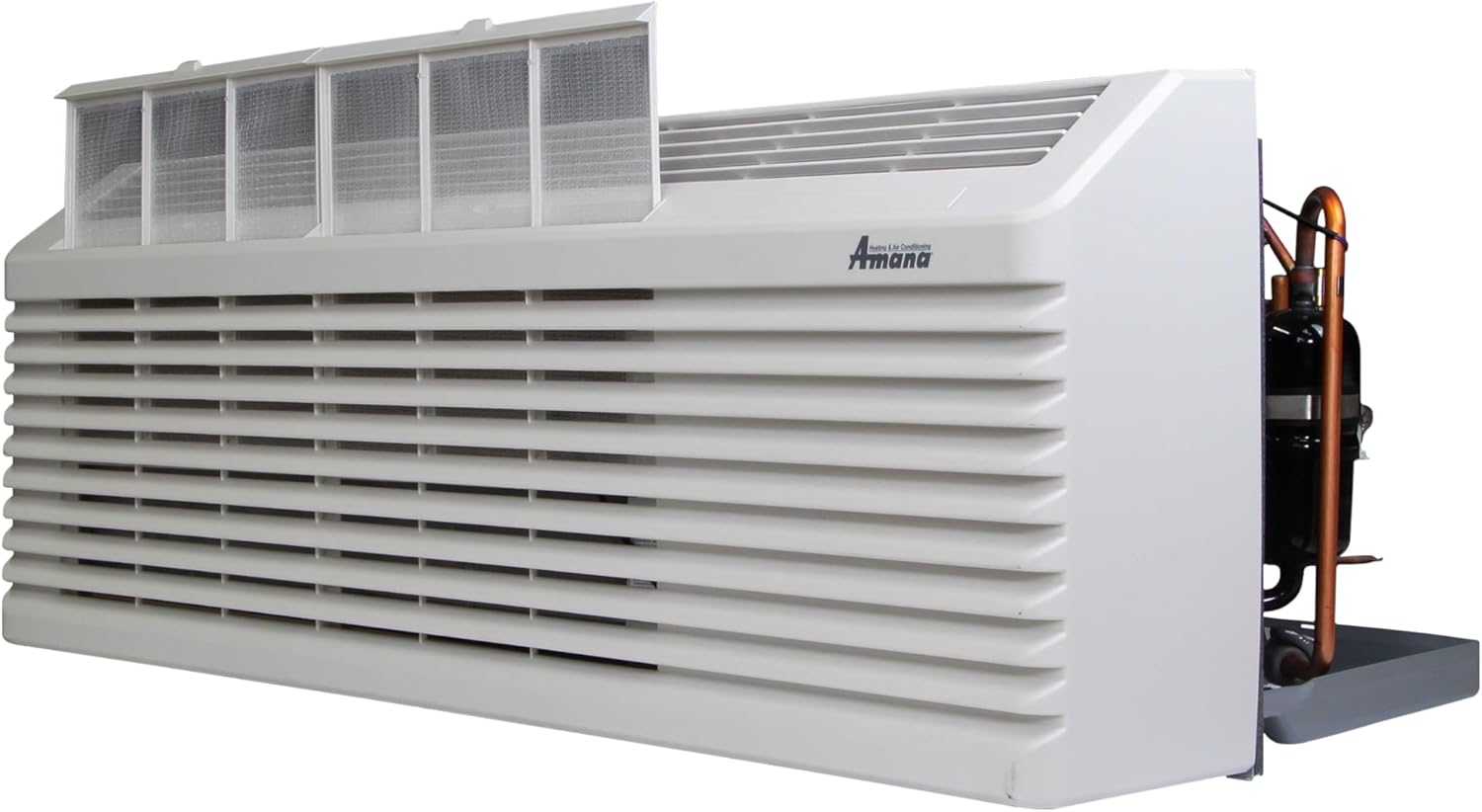
Figure 3.1: Overall view of the AMANA K-Series PTAC unit.

Figure 3.2: Front view of the PTAC unit, showing the accessible air filters at the top.
4. Setup and Installation
Proper installation is crucial for the performance and longevity of your PTAC unit. It is strongly recommended that installation be performed by a qualified HVAC technician.
Installation Requirements:
- Sleeve and Rear Grille: New installations require a compatible PTAC sleeve and a rear grille. These items are not included with the unit and must be purchased separately. The unit fits a standard PTAC sleeve size of 42" (Width) x 16 1/16" (Height) x 14 1/8" (Depth).
- Electrical Connection: The unit requires a 230V, 20 Amp dedicated circuit. The power cord is equipped with a 6-20 P plug. Ensure the electrical outlet is correctly installed and grounded.
- Thermostat: This K-Series unit requires a wired or wireless wall thermostat for operation. The unit itself does not feature an integrated control pad.
- Mobile App: Initial setup and configuration, including accessing advanced features and diagnostics, are performed using the Amana brand mobile app via Bluetooth connectivity.
Installation Steps (Summary - Refer to full installation guide for details):
- Install the PTAC sleeve and rear grille into the wall opening according to their respective instructions.
- Carefully slide the PTC123K35AXXX unit into the installed sleeve.
- Connect the power cord to the dedicated 230V, 20 Amp outlet.
- Install and connect the wired or wireless wall thermostat.
- Download the Amana brand mobile app and follow the in-app instructions to pair with the unit via Bluetooth for initial configuration and settings.
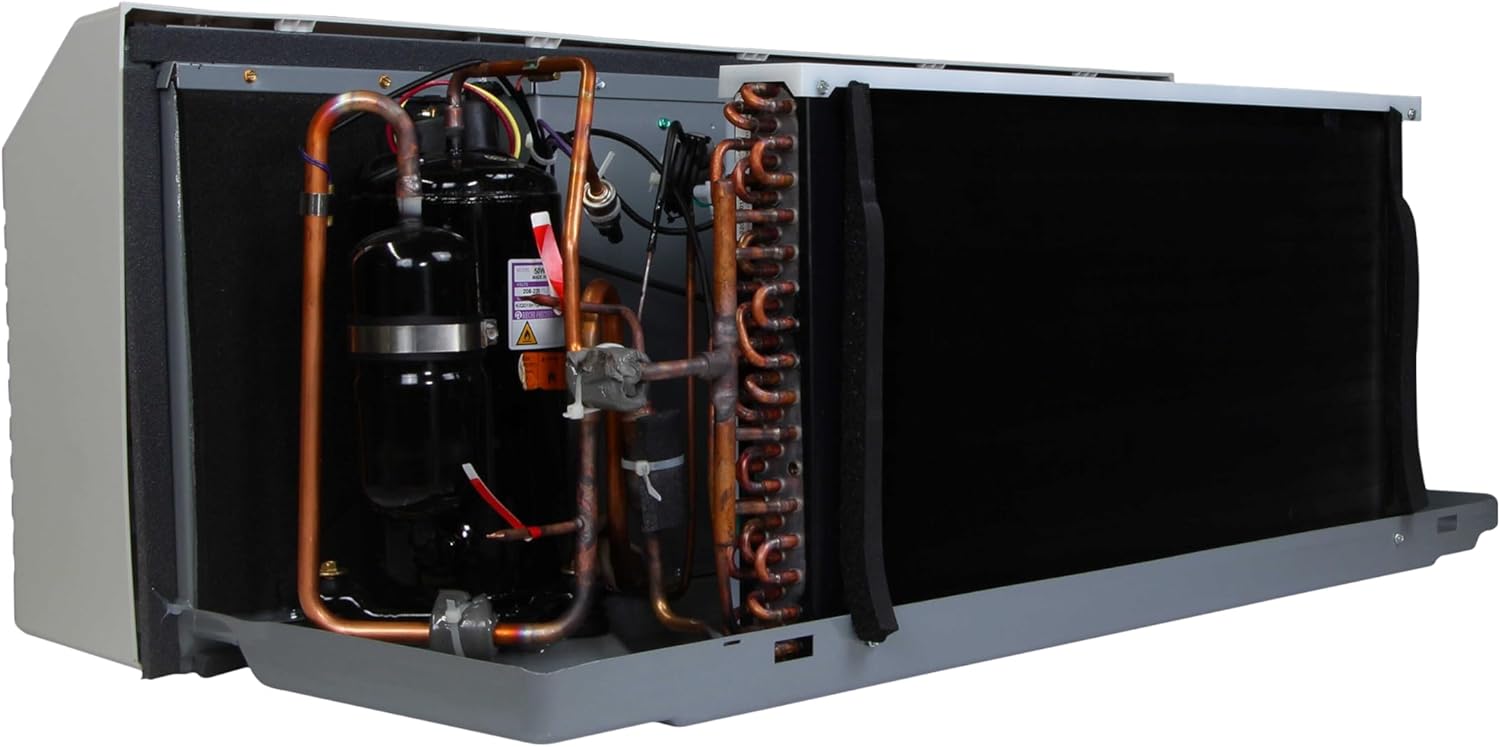
Figure 4.1: The 20 Amp power plug (NEMA 6-20P) required for the unit.
5. Operating Instructions
The AMANA K-Series PTAC PTC123K35AXXX is controlled externally through a wall thermostat or the Amana brand mobile app.
Control Methods:
- Wall Thermostat: Use the connected wired or wireless wall thermostat to set desired temperature, operating mode (Cooling, Heating, Fan Only), and fan speed. Refer to your thermostat's specific instructions for detailed operation.
- Amana Brand Mobile App: Download the official Amana brand mobile app to your smartphone or tablet. Connect to the unit via Bluetooth or RF for comprehensive control. The app allows you to:
- Adjust temperature and operating modes.
- Configure unit settings.
- Access advanced features.
- Perform troubleshooting and diagnostics.
Operating Modes:
- Cooling: Provides air conditioning to lower room temperature.
- Heating: Utilizes the 3.5 kW electric heater to raise room temperature.
- Fan Only: Circulates air without heating or cooling.
- Auto Restart: The unit will automatically restart with previous settings after a power outage.
- Defrost Control: Manages defrost cycles during heating operation to maintain efficiency.
6. Maintenance
Regular maintenance ensures optimal performance and extends the lifespan of your AMANA PTAC unit.
Filter Cleaning:
The unit is equipped with a polypropylene intake air filter. Clean the filter regularly, typically every 2-4 weeks, or more frequently depending on usage and air quality.
- Disconnect Power: Always turn off the unit and disconnect power before accessing the filter.
- Remove Filter: Locate and carefully remove the intake air filter(s) from the top of the unit (refer to Figure 3.2).
- Clean Filter: Wash the filter with warm, soapy water. Rinse thoroughly and allow it to air dry completely before reinstallation. Do not use harsh chemicals or abrasive cleaners.
- Reinstall Filter: Once dry, carefully slide the filter back into its position.
General Cleaning:
- Wipe the exterior of the unit with a soft, damp cloth. Do not spray water directly onto the unit.
- Ensure the condensate drain pan is clear of debris to prevent overflow.
Professional Servicing:
It is recommended to have the unit inspected and serviced by a qualified HVAC technician annually to ensure optimal performance and address any potential issues with internal components, refrigerant levels, or electrical connections.

Figure 6.1: Internal components of the PTAC unit, including the compressor and copper coils. Professional servicing is required for these parts.
7. Troubleshooting
Before contacting customer support, review the following common issues and solutions.
| Problem | Possible Cause | Solution |
|---|---|---|
| Unit does not turn on | No power; Thermostat not connected/powered; Unit not properly seated in sleeve. | Check power supply and circuit breaker. Ensure thermostat is powered and communicating. Verify unit is fully inserted into the sleeve. |
| Unit not cooling/heating effectively | Dirty air filter; Blocked air vents; Incorrect thermostat setting; Refrigerant leak (cooling); Heater malfunction (heating). | Clean air filter. Ensure no obstructions to airflow. Verify thermostat settings. For refrigerant or heater issues, contact a qualified technician. |
| Thermostat pairing issues | Incorrect pairing procedure; Signal interference; Thermostat battery low. | Refer to the Amana brand mobile app or thermostat manual for pairing instructions. Ensure thermostat batteries are fresh. Reduce potential interference. |
| Unusual noise during operation | Loose components; Fan obstruction; Compressor issue. | Disconnect power and inspect for loose parts or obstructions. If noise persists or is severe, contact a qualified technician. |
For advanced diagnostics and troubleshooting, utilize the Amana brand mobile app, which can provide detailed information about unit status and error codes. If issues persist after attempting these solutions, contact AMANA customer support or a certified service technician.
8. Specifications
| Specification | Detail |
|---|---|
| Brand | AMANA |
| Model Info | PTC123K35AXXX |
| Cooling Capacity | 12,000 BTU (1 Ton) |
| Heating Capacity | 3.5 kW |
| Voltage | 230 Volts |
| Wattage | 3.5 KW (Heater) |
| Efficiency | High (EER up to 14.0) |
| Installation Type | Through The Wall |
| Product Dimensions | 14"D x 42"W x 16"H |
| Item Weight | 120 pounds |
| Refrigerant | R410-A |
| Filter Type | Polypropylene intake air filter |
| Special Features | Auto Restart, Defrost Control, Front Desk Control, Remote Controlled, Wi-Fi Option, Cooling, Heating, Electric Heater, Universal Size, Anti Corrosion Design. 24V option |
| Compatible Devices | DS01G, DSA01NM, MMW-2, PHWT-A150H, PHWT-A200 |
| Material Type | Aluminum, Copper, Galvanized Steel, Plastic and Insulation Materials, Polypropylene |
9. Warranty and Support
For specific warranty information regarding your AMANA K-Series PTAC PTC123K35AXXX, please refer to the warranty card included with your product or visit the official AMANA website. Warranty terms typically cover manufacturing defects and may vary.
If you require technical assistance, have questions about operation, or need to schedule service, please contact AMANA customer support. Have your model number (PTC123K35AXXX) and serial number ready when you call.
AMANA Customer Support: Refer to your product documentation or the AMANA website for current contact information.


