
BONTEC CT139M
BONTEC TV Wall Mount Instruction Manual
Model: CT139M
Brand: BONTEC
1. Introduction
Thank you for choosing the BONTEC TV Wall Mount. This product is designed to provide a secure, flexible, and space-saving solution for mounting your television. With its robust construction and full-motion capabilities, you can achieve optimal viewing angles from various positions in your room. Please read this manual carefully before installation and use to ensure safe and proper operation.
2. Key Features
- Extra Long Extendable Arm: Offers an extension range from 2.6 inches (6.6 cm) when retracted to 40.9 inches (103.9 cm) when fully extended, providing maximum flexibility for positioning and space-saving when not in use.
- Wide Compatibility: Suitable for 32-75 inch TVs with VESA patterns ranging from 200x100mm to 600x400mm. Supports TVs weighing up to 132 lbs (60 kg). Compatible with wood studs, concrete, and brick walls. Note: Do not mount on drywall alone.
- Full Motion Adjustment: Allows for 180° swivel (left to right), +/-8° tilt (up and down), and +/-3° level adjustment, enabling you to customize your viewing experience and reduce glare.
- Heavy-Duty Design: Manufactured from high-quality cold-rolled steel, ensuring exceptional stability, durability, and long-term reliability for your television.
- Easy Installation: Comes with all necessary hardware and clear instructions, allowing for quick setup, typically within 15 minutes. Includes a bonus HDMI cable.
3. Package Contents
Before beginning installation, please verify that all components listed below are present and undamaged. If any parts are missing or defective, please contact BONTEC customer support.

Figure 3.1: Included Hardware and Tools
This image displays the complete set of hardware provided with the BONTEC TV wall mount. It includes self-tapping screws, concrete anchors, washers, a 4mm Allen key, a wrench, an HDMI cable, cable ties, and a bubble level. Various sizes of M4, M6, and M8 screws with corresponding spacers and washers are also shown for TV attachment.
- Wall Plate Assembly
- TV Brackets (2x)
- Self-tapping Screws (ST6.3*55mm) x6
- Concrete Anchors (D6*50mm) x6
- Washers (D6mm) x6
- 4mm Allen Key
- Wrench
- HDMI Cable
- Cable Ties
- Bubble Level
- Various TV Screws (M4, M6, M8 in different lengths) and Spacers
4. Installation Guide
Proper installation is crucial for the safety and stability of your TV. It is highly recommended that two people perform the installation. Ensure you have the necessary tools (drill, stud finder, level, measuring tape) before starting.
4.1 Pre-Installation Checks
- Wall Type: Identify your wall type (wood stud, concrete, or brick). This mount is not suitable for drywall alone.
- TV Weight & Size: Ensure your TV is between 32-75 inches and weighs no more than 132 lbs (60 kg).
- VESA Pattern: Check the VESA mounting holes on the back of your TV. This mount supports VESA patterns from 200x100mm to 600x400mm.
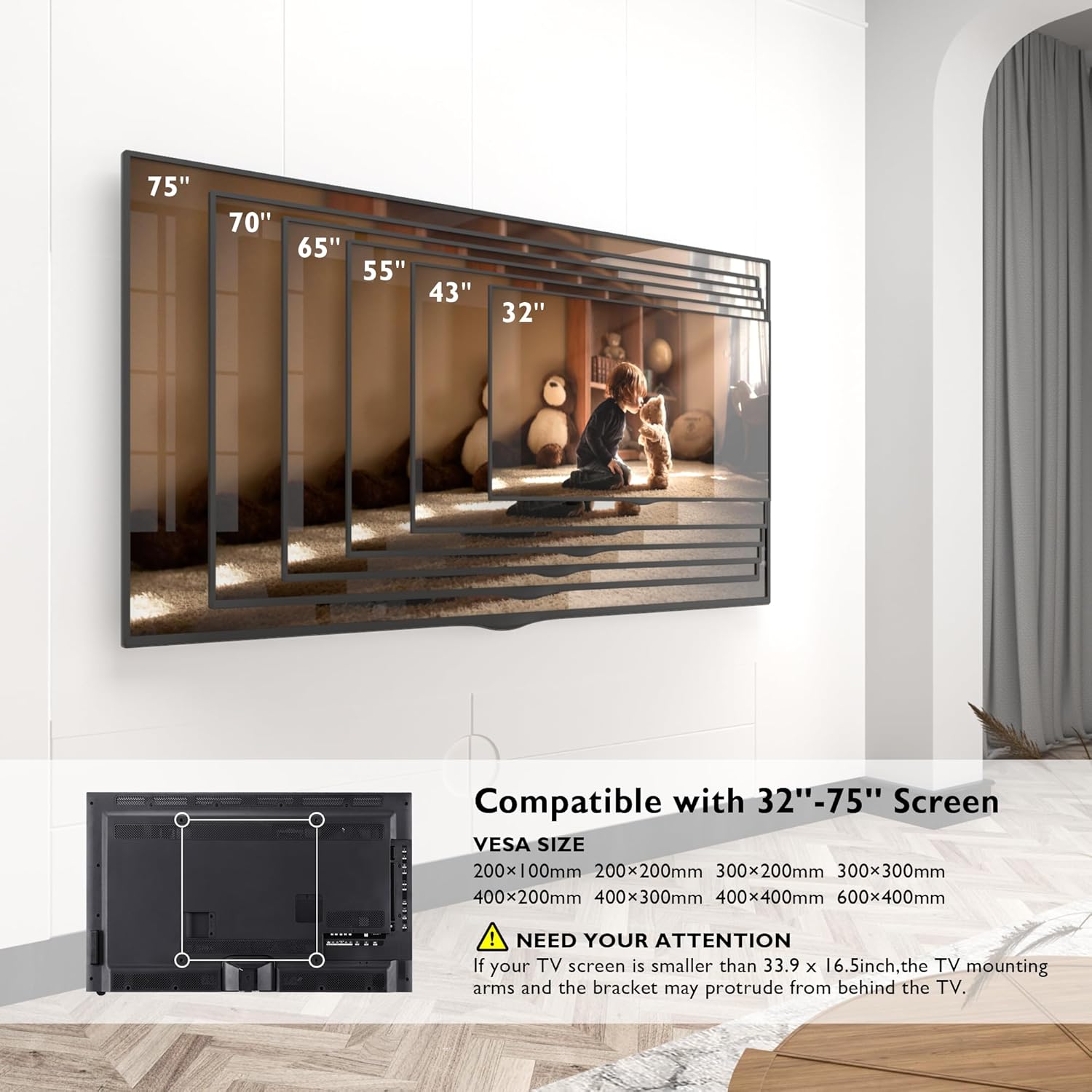
Figure 4.1: TV Size and VESA Compatibility
This image shows the range of TV sizes (32 to 75 inches) and compatible VESA mounting patterns (from 200x100mm up to 600x400mm) that the BONTEC TV wall mount supports. It also includes a warning that if the TV screen is smaller than 33.9 x 16.5 inches, the mounting arms and bracket may protrude from behind the TV.

Figure 4.2: Diverse Wall Compatibility
This image demonstrates the different wall types suitable for mounting the BONTEC TV bracket: wood studs, concrete walls, and brick walls. A prominent warning indicates that the mount should not be installed on drywall alone, emphasizing the need for proper structural support.
4.2 Mounting the Wall Plate
- Locate the desired mounting position on your wall. Use a stud finder to locate wood studs if applicable.
- Mark the drill holes for the wall plate. Use the included bubble level to ensure the plate is perfectly horizontal.
- Drill pilot holes according to your wall type. For wood studs, drill directly. For concrete or brick, insert the provided concrete anchors.
- Secure the wall plate to the wall using the self-tapping screws and washers. Ensure it is firmly attached.
4.3 Attaching TV Brackets
- Carefully place your TV face down on a soft, clean surface to prevent scratches.
- Attach the two TV brackets to the back of your TV using the appropriate screws and spacers from the hardware kit. Ensure the brackets are centered and securely fastened to the VESA mounting holes.
4.4 Mounting TV to Wall Plate
- With assistance, carefully lift the TV with the attached brackets.
- Hook the TV brackets onto the wall plate. Ensure the TV is securely seated on the mount.
- Engage any safety locking mechanisms on the brackets to prevent accidental dislodgement.
5. Operating Instructions
The BONTEC TV Wall Mount offers versatile adjustments for an optimal viewing experience.
5.1 Extending and Retracting the Arm
Gently pull or push the TV to extend or retract the arm. The arm can extend up to 40.9 inches (103.9 cm) from the wall and retract to a minimum of 2.6 inches (6.6 cm).

Figure 5.1: Longer Extension Capability
This diagram illustrates the impressive extension range of the BONTEC TV wall mount, showing it can extend from a compact 2.6 inches to a full 40.9 inches from the wall. It also highlights the robust load capacity of 60kg (132lbs).
5.2 Swivel Adjustment
The mount allows for a 180° swivel range, enabling you to turn your TV left or right to face different areas of the room.

Figure 5.2: Wider Swivel Range
This image demonstrates the extensive 180-degree swivel capability of the TV wall mount, allowing the television to be angled significantly to the left or right for flexible viewing from various positions in a room.
5.3 Tilt and Level Adjustment
Adjust the tilt by +/-8° to reduce glare from lights or windows. The +/-3° level adjustment helps ensure your TV is perfectly horizontal after installation.

Figure 5.3: Tilt and Level Adjustment
This diagram illustrates the tilt functionality of the TV wall mount, allowing for an adjustment of +/-8 degrees to minimize glare. It also shows the +/-3 degree level adjustment for fine-tuning the horizontal alignment of the TV.
5.4 Product Demonstration Video
Video 5.4: BONTEC TV Wall Mount with Extra Long Articulated Arm
This video provides a visual demonstration of the BONTEC TV Wall Mount's full range of motion, including its extra-long extension, wide swivel capabilities, and tilt/level adjustments. It showcases how the mount can be used to position the TV optimally in various room settings.
6. Maintenance
To ensure the longevity and safe operation of your BONTEC TV Wall Mount, follow these maintenance guidelines:
- Cleaning: Use a soft, dry cloth to wipe down the mount. Avoid abrasive cleaners or solvents that could damage the finish.
- Periodic Checks: Regularly inspect all screws and bolts to ensure they remain tight. Over time, vibrations or frequent adjustments may cause them to loosen.
- Lubrication: If the articulating arms become stiff, a small amount of silicone-based lubricant can be applied to the pivot points. Do not use oil-based lubricants.
- Weight Limit: Never exceed the maximum weight capacity of 132 lbs (60 kg).
7. Troubleshooting
If you encounter any issues with your BONTEC TV Wall Mount, refer to the following common problems and solutions:
- TV is not level:
Check the +/-3° level adjustment feature. Loosen the leveling screws slightly, adjust the TV to be level using the built-in bubble level or a separate one, and then re-tighten the screws. Ensure the wall plate itself was installed level. - Difficulty extending or retracting the arm:
Ensure no cables are snagged or obstructing the movement. Check for any debris in the joints. If the movement is stiff, apply a small amount of silicone lubricant to the articulating joints. - TV feels unstable or wobbly:
Immediately remove the TV from the mount. Re-check all wall mounting screws and TV bracket screws to ensure they are securely tightened. Verify that the wall type is appropriate and that the anchors (if used) are properly installed. Ensure the TV's weight does not exceed the 132 lbs (60 kg) limit. - Missing parts:
Refer to the 'Package Contents' section. If any parts are missing, do not proceed with installation. Contact BONTEC customer support for assistance.
8. Specifications
| Brand | BONTEC |
| Model Number | CT139M |
| Compatible TV Sizes | 32 - 75 Inches |
| Maximum Load Capacity | 132 lbs (60 kg) |
| VESA Compatibility | 200x100mm, 200x200mm, 300x200mm, 300x300mm, 400x200mm, 400x400mm, 600x400mm |
| Extension Range | 2.6 inches (6.6 cm) to 40.9 inches (103.9 cm) |
| Swivel Angle | 180° (Left to Right) |
| Tilt Angle | +/-8° (Up and Down) |
| Level Adjustment | +/-3° |
| Material | Alloy Steel (Cold-Rolled Steel) |
| Color | Black |
| Item Weight | 19 pounds (8.6 kg) |
| Country of Origin | China |
9. Warranty and Support
For warranty information and customer support, please refer to the official BONTEC website or contact their customer service directly. Keep your purchase receipt as proof of purchase for any warranty claims.
For further assistance or technical support, please visit: BONTEC Store on Amazon
Related documentsCT139M


Ask a question about this manual
Ask about setup, troubleshooting, compatibility, parts, safety, or missing instructions. Manuals+ will review the question and use this page’s manual context to help answer it.