1. Introduction
This manual provides essential instructions for the safe and effective operation of your Pyle PPHP1569UT 15-Inch PA Combo Speaker System. Please read this manual thoroughly before use and retain it for future reference. This system features a 500 Watt maximum power output, Bluetooth wireless streaming, multiple input options, and an integrated carry handle for portability.

Image 1.1: The Pyle PPHP1569UT 15-Inch PA Combo Speaker System, including two speakers on stands, a wired microphone, various audio cables, and a remote control.
2. Important Safety Instructions
- Power Source: Connect the unit only to an AC power outlet of the specified voltage (AC110/220V 50/60HZ).
- Ventilation: Ensure proper ventilation. Do not block ventilation openings.
- Water and Moisture: Do not expose this appliance to rain or moisture. Do not place objects filled with liquids, such as vases, on the apparatus.
- Heat: Do not place near heat sources such as radiators, heat registers, stoves, or other apparatus (including amplifiers) that produce heat.
- Cleaning: Clean only with a dry cloth.
- Servicing: Do not attempt to service this product yourself. Refer all servicing to qualified service personnel.
- Placement: Place the speakers on a stable, level surface or securely mount them on compatible 35mm speaker stands.
3. Package Contents
Verify that all items are present in the box:
- 15-inch Bluetooth Active PA Speaker
- 15-inch Passive PA Speaker
- (2) Speaker Stands
- Power Cable
- Audio Cable 5M (SpeakON to SpeakON for connecting active to passive speaker)
- Wired Microphone
- Remote Control (requires 3V Lithium Battery, CR2025, included)
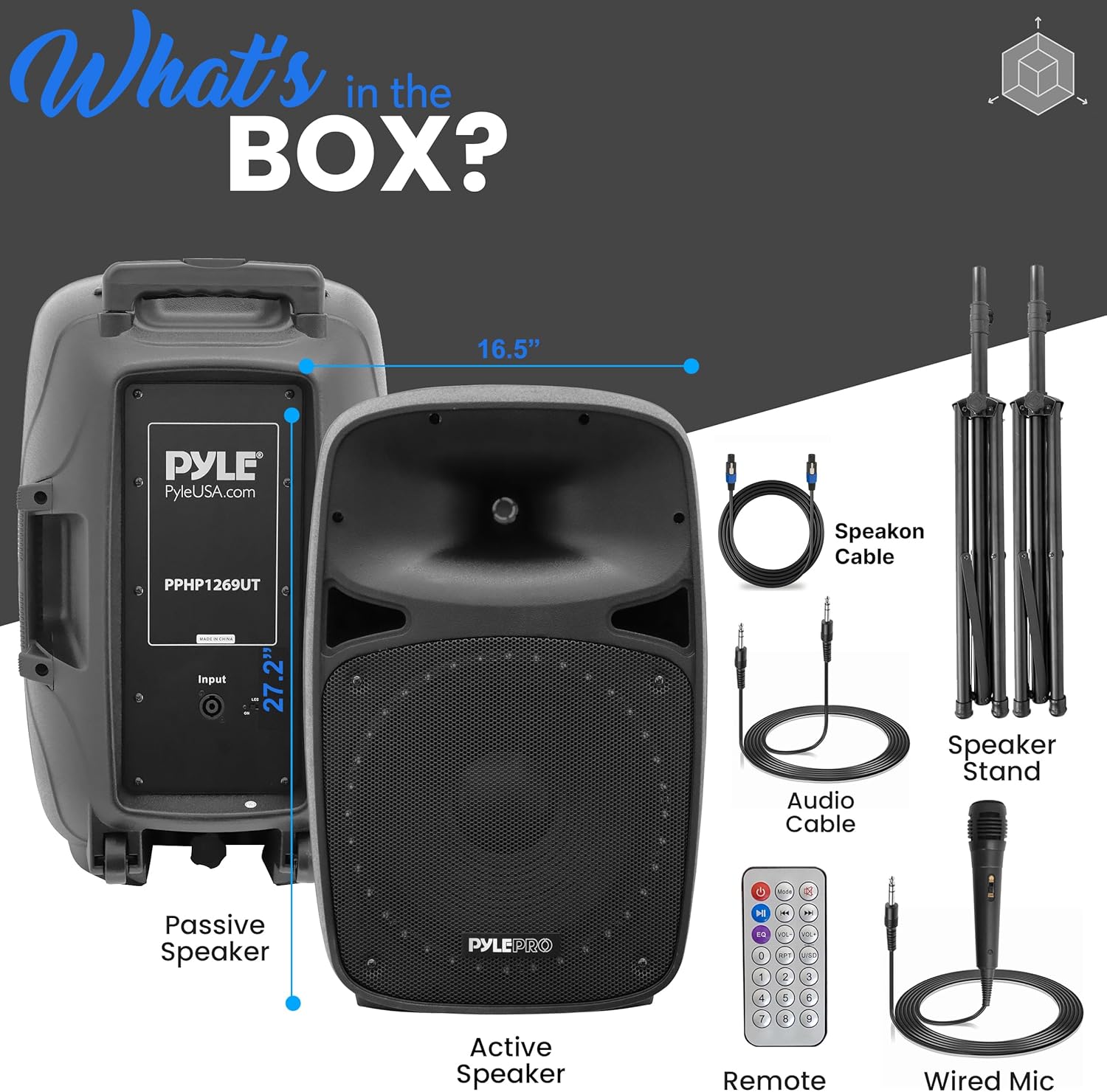
Image 3.1: Visual representation of the Pyle PPHP1569UT package contents.
4. Parts and Controls
Familiarize yourself with the rear panel controls and connections of the active speaker:
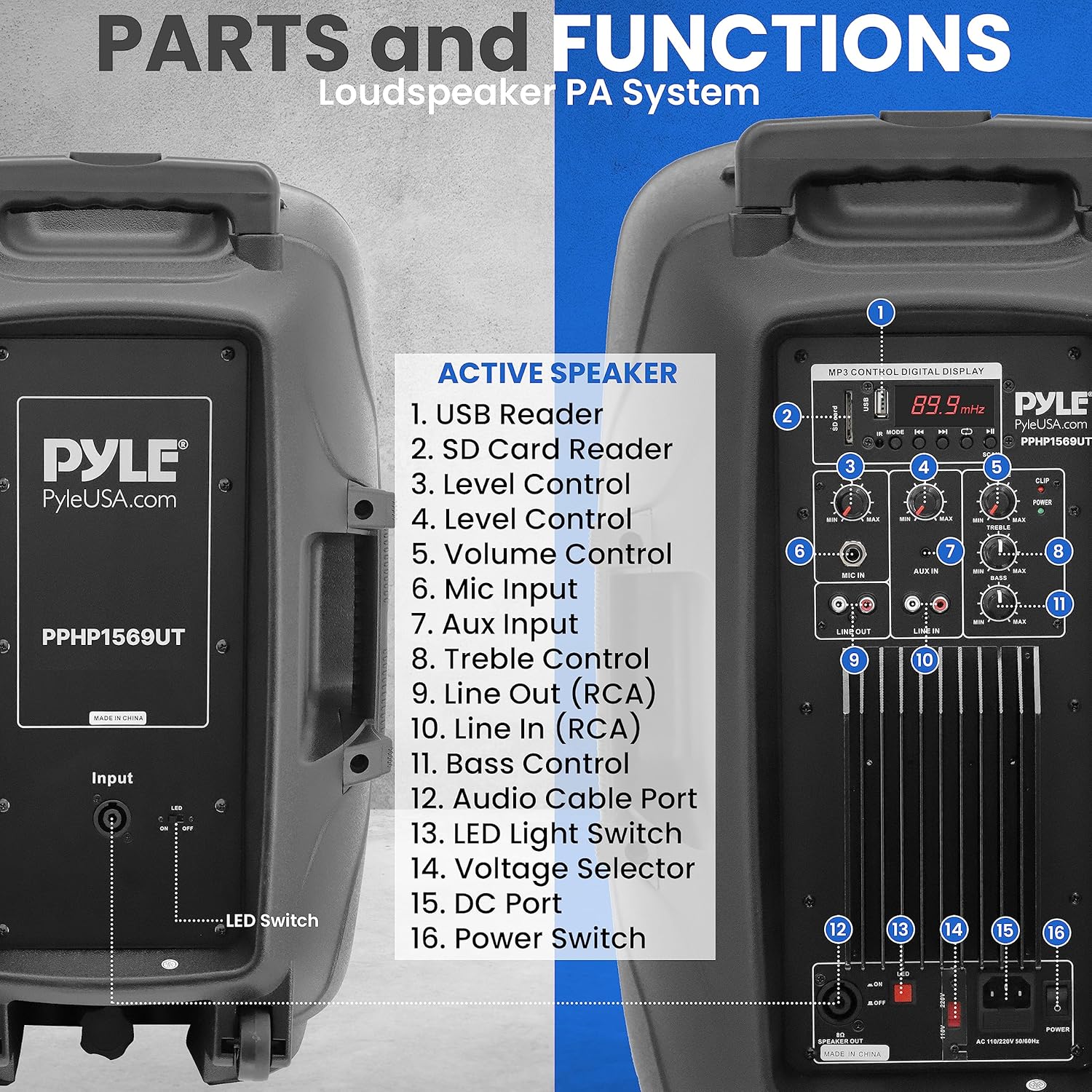
Image 4.1: Rear panel of the active speaker with numbered labels for each control and input.
- USB Reader: Insert a USB flash drive for MP3/WMA playback.
- SD Card Reader: Insert an SD memory card for MP3/WMA playback.
- Level Control: Adjusts the input level for various sources.
- Volume Control: Master volume adjustment for the entire system.
- Mic Input: 1/4'' Jack for connecting a microphone.
- Aux Input: 3.5mm Stereo Line Input for connecting external audio devices.
- Treble Control: Adjusts the high-frequency response.
- Line Out (RCA): RCA (L/R) output for connecting to other audio equipment.
- Line In (RCA): RCA (L/R) input for connecting external audio devices.
- Bass Control: Adjusts the low-frequency response.
- Audio Cable Port: SpeakON connector for linking to the passive speaker.
- Voltage Selector: Switch between 110V and 220V power.
- DC Port: For DC power input (if applicable, refer to specific model details).
- Power Switch: Turns the unit ON/OFF.
- LED Light Switch: Controls the LED lights on the speaker grille.
5. Setup Instructions
5.1 Speaker Placement
- Place the speakers on a stable, flat surface or mount them on the provided 35mm speaker stands. Ensure the stands are fully extended and locked for stability.
- Position the speakers to achieve optimal sound dispersion for your listening area.
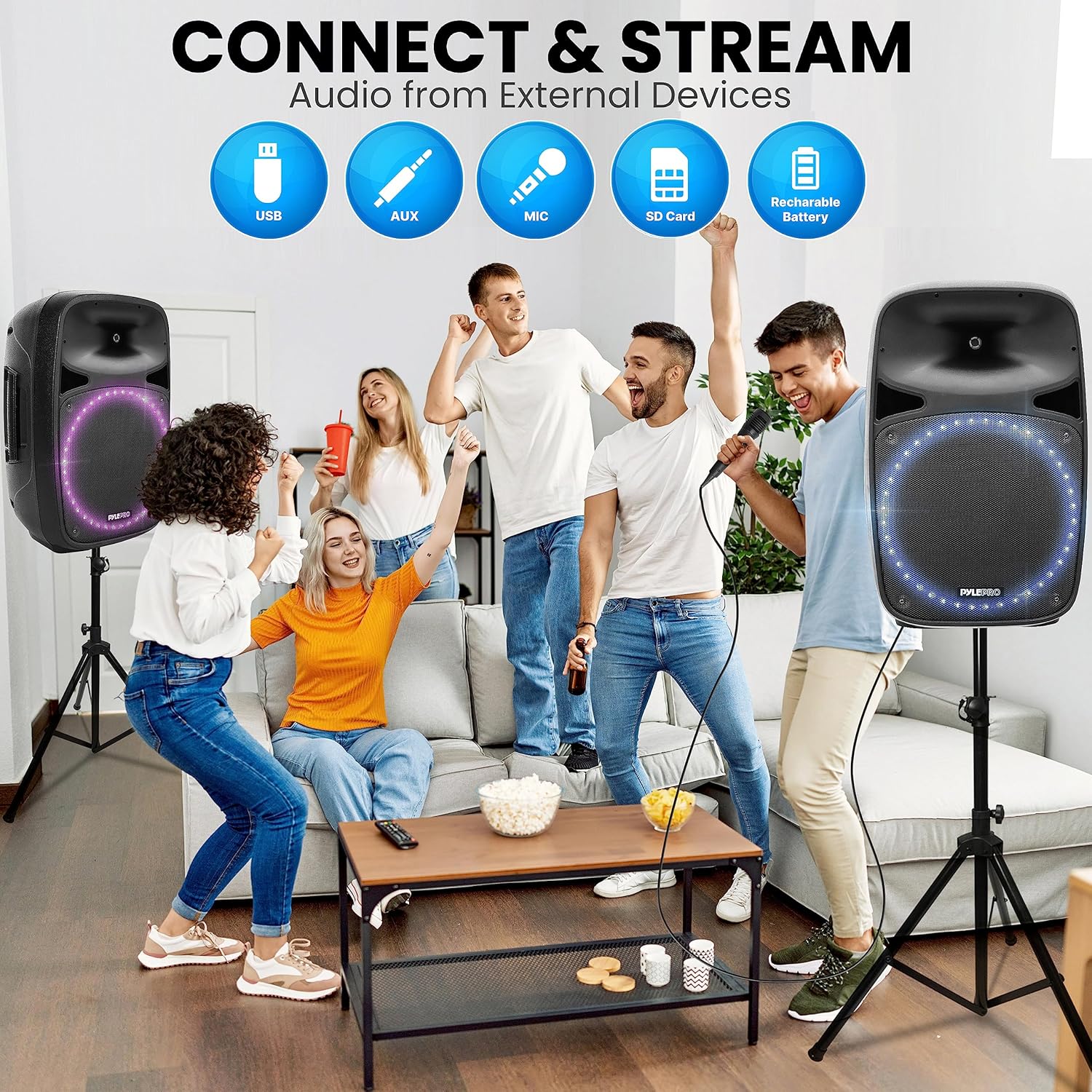
Image 5.1: The speaker's integrated carry handle, 35mm speaker stand mount, and roller caster wheels for easy transport and setup.
5.2 Connecting the Speakers
- Identify the active speaker (with controls) and the passive speaker.
- Use the provided 5-meter SpeakON audio cable to connect the 'Audio Cable Port' on the active speaker to the corresponding input on the passive speaker.
5.3 Power Connection
- Ensure the 'Voltage Selector' on the active speaker is set to the correct voltage for your region (110V or 220V).
- Connect the power cable to the active speaker and then to a suitable AC power outlet.
- Do not turn on the power switch until all connections are made.
6. Operating Instructions
6.1 Powering On/Off
Flip the 'Power Switch' to the ON position to turn on the system. Flip it to OFF to power down.
6.2 Bluetooth Wireless Streaming
- Turn on the speaker system. The digital LCD display will indicate the current mode.
- Press the 'Mode' button (if available, typically near the LCD) to select Bluetooth mode. The display will show 'BLUE' or a Bluetooth icon.
- On your Bluetooth-enabled device (smartphone, tablet, PC), search for available Bluetooth devices.
- Select the device named 'Pyle ' from the list.
- Once paired, you can stream audio wirelessly. The Bluetooth version is 5.0, offering a wireless range of 100+ feet.

Image 6.1: The speaker's built-in Bluetooth functionality for wireless audio streaming from compatible devices.
6.3 AUX/Line Input
- Connect your external audio device (e.g., MP3 player, laptop) to the 'Aux Input' (3.5mm stereo) or 'Line In (RCA)' using an appropriate audio cable.
- Select the corresponding input mode on the speaker system.
- Adjust the 'Level Control' and 'Volume Control' as needed.
6.4 USB/SD Card Playback
- Insert a USB flash drive or SD memory card (up to 32GB) containing MP3 or WMA audio files into the respective 'USB Reader' or 'SD Card Reader'.
- The system should automatically switch to USB/SD mode and begin playback. If not, press the 'Mode' button.
- Use the playback controls (Play/Pause, Next, Previous) on the rear panel or remote control.

Image 6.2: The speaker system supports various external audio sources including USB, AUX, Microphone, and SD Card.
6.5 Microphone Usage
- Connect the wired microphone to the 'Mic Input' (1/4'' Jack).
- Adjust the 'Mic Volume' control to your desired level.
- Ensure the microphone is not pointed directly at the speakers to prevent feedback.
6.6 Tone Controls
Use the 'Treble Control' and 'Bass Control' knobs to adjust the high and low frequencies of the audio output to suit your preference.
7. Maintenance
7.1 Cleaning
- Always disconnect the power before cleaning.
- Use a soft, dry cloth to clean the exterior surfaces of the speakers.
- Do not use liquid cleaners, aerosols, or solvents, as these may damage the finish or internal components.
7.2 Storage
- When not in use for extended periods, store the speaker system in a cool, dry place, away from direct sunlight and extreme temperatures.
- It is recommended to store the speakers in their original packaging or a protective cover to prevent dust accumulation and physical damage.
8. Troubleshooting
| Problem | Possible Cause | Solution |
|---|---|---|
| No power | Power cable not connected; Power switch off; Outlet malfunction | Ensure power cable is securely connected; Turn power switch ON; Test outlet with another device. |
| No sound | Volume too low; Incorrect input mode; Cables not connected properly; Passive speaker not connected | Increase Master Volume; Select correct input mode; Check all audio cable connections; Ensure active and passive speakers are connected via SpeakON cable. |
| Bluetooth not connecting | Speaker not in Bluetooth mode; Device too far; Incorrect device selected | Switch speaker to Bluetooth mode; Move device closer (within 100ft); Select 'Pyle ' from your device's Bluetooth list. |
| Microphone not working | Microphone not connected; Mic Volume too low; Faulty microphone | Ensure microphone is securely plugged into 'Mic Input'; Increase 'Mic Volume'; Test with another microphone if possible. |
| Distorted sound | Volume too high; Input signal too strong; Damaged speaker | Reduce Master Volume or input level; Check source device output; Contact support if distortion persists at low volumes. |
9. Technical Specifications
- Max Power Output: 500 Watt
- RMS Power Output: 120 Watt
- Amplifier Class: AB
- Woofer Size: 15-inch (2x)
- Tweeter Size: 1.0-inch (2x)
- Tweeter Material: PEI Diaphragm
- Woofer Basket Material: Stamped Steel
- Impedance: 8 Ohm
- Frequency Response (Crossover): 3.3kHz
- Bluetooth Version: 5.0
- Bluetooth Wireless Range: 100+ feet
- Bluetooth Network Name: 'Pyle '
- Audio Inputs: 1/4'' Jack Microphone Input, 3.5mm Stereo Line Input, RCA (L/R) Input, USB, SD Card
- Audio Outputs: RCA (L/R) Out
- Digital Audio File Compatibility: MP3, WMA
- Maximum SD/USB Flash Memory Support: 32GB
- Power: AC110/220V 50/60HZ (Selectable)
- Product Dimensions (L x W x H): 16.5'' x 14.6'' x 27.2'' inches
- Item Weight: 77.8 pounds
- Mounting Type: 35mm Speaker Stand Mount Compatible
- Remote Control Battery: 3V Lithium Battery, CR2025
10. Warranty and Support
For warranty information, technical support, or service inquiries, please refer to the warranty card included with your product or visit the official Pyle website. Do not attempt to repair the unit yourself, as this may void your warranty.


