
PUTORSEN B0BTBJLDW4
PUTORSEN Universal VESA Pole Mount Instruction Manual
Model: B0BTBJLDW4
For 17 to 32 inch Screens, up to 8kg/17.6lbs
1. Product Overview
The PUTORSEN Universal VESA Pole Mount is designed to securely attach monitors or TVs ranging from 17 to 32 inches to a pole. It supports VESA mounting patterns of 75x75 mm and 100x100 mm, with a maximum weight capacity of 8kg (17.6 lbs). This full-motion mount offers versatile adjustment options for optimal viewing.

Image 1: Overview of the PUTORSEN Universal VESA Pole Mount and accessories.
2. What's in the Box (Parts List)
Verify that all components are present before beginning installation.
- Single Fully Adjustable Arm (1)
- Mounting Hardware Kit (1) - Includes various screws and tools
- VESA Plate (1)
- Cable Ties (4)
Note: The pole for mounting is not included.
3. Specifications
- Brand: PUTORSEN
- Model: B0BTBJLDW4
- Material: Alloy Steel
- Color: Black
- Compatible Screen Sizes: 17 to 32 inches
- Weight Capacity: Up to 8kg (17.6 lbs)
- VESA Compatibility: 75x75 mm, 100x100 mm
- Pole Diameter Compatibility: 1.1" to 2.4"
- Tilt Adjustment: +30° to -30°
- Swivel Adjustment: +90° to -90°
- Screen Rotation: +180° to -180°
- Arm Extension: Up to 10.6 inches (269mm)
4. Safety Information
- Ensure the mounting pole is stable and capable of supporting the combined weight of the mount and your monitor/TV.
- Do not exceed the maximum weight capacity of 8kg (17.6 lbs).
- Verify that your monitor/TV has VESA 75x75 mm or 100x100 mm mounting holes.
- Use appropriate tools and follow all installation steps carefully to prevent injury or damage.
- Keep small parts away from children.
5. Setup and Installation
Follow these steps for proper installation of your PUTORSEN Universal VESA Pole Mount.
5.1. Attach VESA Plate to Monitor/TV
- Carefully place your monitor or TV face down on a soft, clean surface to prevent scratches.
- Align the VESA plate with the mounting holes on the back of your monitor/TV.
- Secure the VESA plate using the appropriate screws from the mounting hardware kit and a screwdriver. Ensure screws are tightened firmly but do not overtighten.
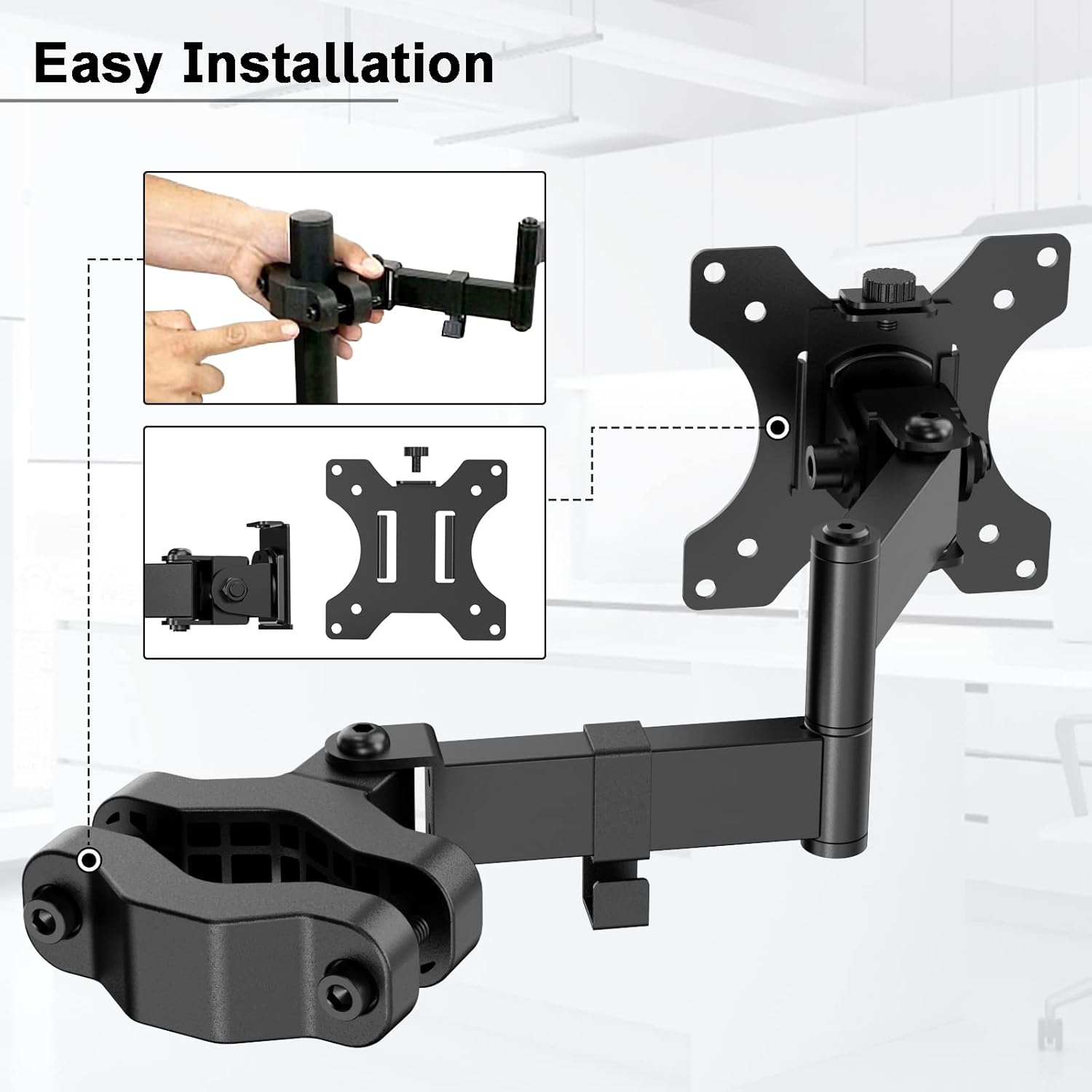
Image 2: Attaching the VESA plate to the monitor.
5.2. Mount Arm to Pole
- Identify a suitable pole with a diameter between 1.1" and 2.4".
- Separate the two halves of the pole clamp on the monitor arm.
- Position the clamp around the pole at the desired height.
- Re-attach the two halves of the clamp and tighten the screws securely using the provided wrench. Ensure the clamp is firm and does not slide.

Image 3: Pole diameter compatibility for the mount.
5.3. Attach Monitor/TV to Arm
- Carefully lift the monitor/TV with the attached VESA plate.
- Slide the VESA plate onto the mounting head of the arm until it clicks into place or is secured by the locking mechanism.
- Ensure the monitor is securely attached before releasing it.

Image 4: Monitor attached to the pole mount, illustrating compatibility.
5.4. Cable Management
Use the provided cable management clips to route cables along the arm and pole for a tidy setup.

Image 5: Example of cable management using the integrated clips.
5.5. Installation Video
For a visual guide, refer to the official installation video:
Video 1: Official installation guide for the PUTORSEN Pole Mount. This video demonstrates the assembly process and attachment to a pole.
6. Operating Instructions
The PUTORSEN Universal VESA Pole Mount offers full motion capabilities for ergonomic viewing.
- Tilt: Adjust the screen vertically from +30° to -30° to reduce glare and find the ideal viewing angle.
- Swivel: Rotate the screen horizontally from +90° to -90° for easy screen sharing or viewing from different positions.
- Screen Rotation: Rotate the screen +180° to -180° to switch between landscape and portrait orientations.
- Arm Extension: Extend the arm up to 10.6 inches (269mm) to bring the screen closer or push it further away.
- Height Adjustment: The arm can be adjusted vertically along the pole to set the screen at a comfortable height.

Image 6: Visual representation of the mount's full motion capabilities.

Image 7: Arm extension details and measurements.
7. Maintenance
To ensure the longevity and proper function of your pole mount, follow these maintenance guidelines:
- Cleaning: Wipe the mount with a soft, damp cloth. Avoid abrasive cleaners or solvents that could damage the finish.
- Tightness Check: Periodically check all screws and bolts to ensure they remain tight. Re-tighten if necessary, but do not overtighten.
- Lubrication: If any joints become stiff over time, a small amount of silicone-based lubricant can be applied to the moving parts.
8. Troubleshooting
If you encounter issues with your PUTORSEN Universal VESA Pole Mount, refer to the following common solutions:
- Mount is unstable or slides down the pole:
- Ensure the pole clamp screws are fully tightened.
- Verify that the pole diameter is within the specified range of 1.1" to 2.4".
- Confirm the monitor weight does not exceed 8kg (17.6 lbs).
- Monitor is not level:
- Check the VESA plate attachment to the monitor and the arm. Adjust as needed.
- Some mounts allow for minor leveling adjustments at the VESA plate connection point.
- Difficulty adjusting arm movement:
- The joints may be stiff. Apply a small amount of silicone lubricant if necessary.
- Ensure no cables are snagged or obstructing movement.
9. Warranty and Support
PUTORSEN stands behind the quality of its products. This package includes the PUTORSEN Single Fully Adjustable Arm, Mounting Hardware Kit, VESA Plate, and 4 additional cable ties.
For any assistance or inquiries, please contact our professional service team, available 7 days a week, 24 hours a day. Refer to your purchase documentation or the PUTORSEN official website for specific contact details.
We are committed to providing customer service to all customers who have purchased products from us.
Related documentsB0BTBJLDW4


Ask a question about this manual
Ask about setup, troubleshooting, compatibility, parts, safety, or missing instructions. Manuals+ will review the question and use this page’s manual context to help answer it.