
Introduction
This manual provides essential instructions for the safe and efficient operation of your multicomp PRO MP740404 Electric Solder Pot. Please read this manual thoroughly before use and retain it for future reference.
Safety Instructions
WARNING: This product contains chemicals known to the State of California to cause cancer and birth defects or other reproductive harm. Always use in a well-ventilated area.
- Always wear appropriate personal protective equipment (PPE), including safety glasses and heat-resistant gloves, when operating the solder pot.
- Ensure the work area is well-ventilated to prevent inhalation of solder fumes.
- Do not touch the solder pot or molten solder directly as temperatures can reach up to 480°C.
- Place the solder pot on a stable, heat-resistant surface.
- Do not immerse the solder pot in water or any other liquid.
- Disconnect the power cord from the outlet before cleaning or performing any maintenance.
- Keep out of reach of children.
- Use only lead-free solder with this unit, as it is designed for lead-free operation.
- Ensure the power supply matches the specified voltage (115V AC 60Hz).
Package Contents
Verify that all items are present in the package:
- multicomp PRO MP740404 Electric Solder Pot
- User Manual (this document)
Product Overview
The multicomp PRO MP740404 is a corrosion-resistant and heat-resistant alloy solder pot designed for lead-free soldering applications. It features quick heating, accurate temperature control, and a durable stainless steel crucible.
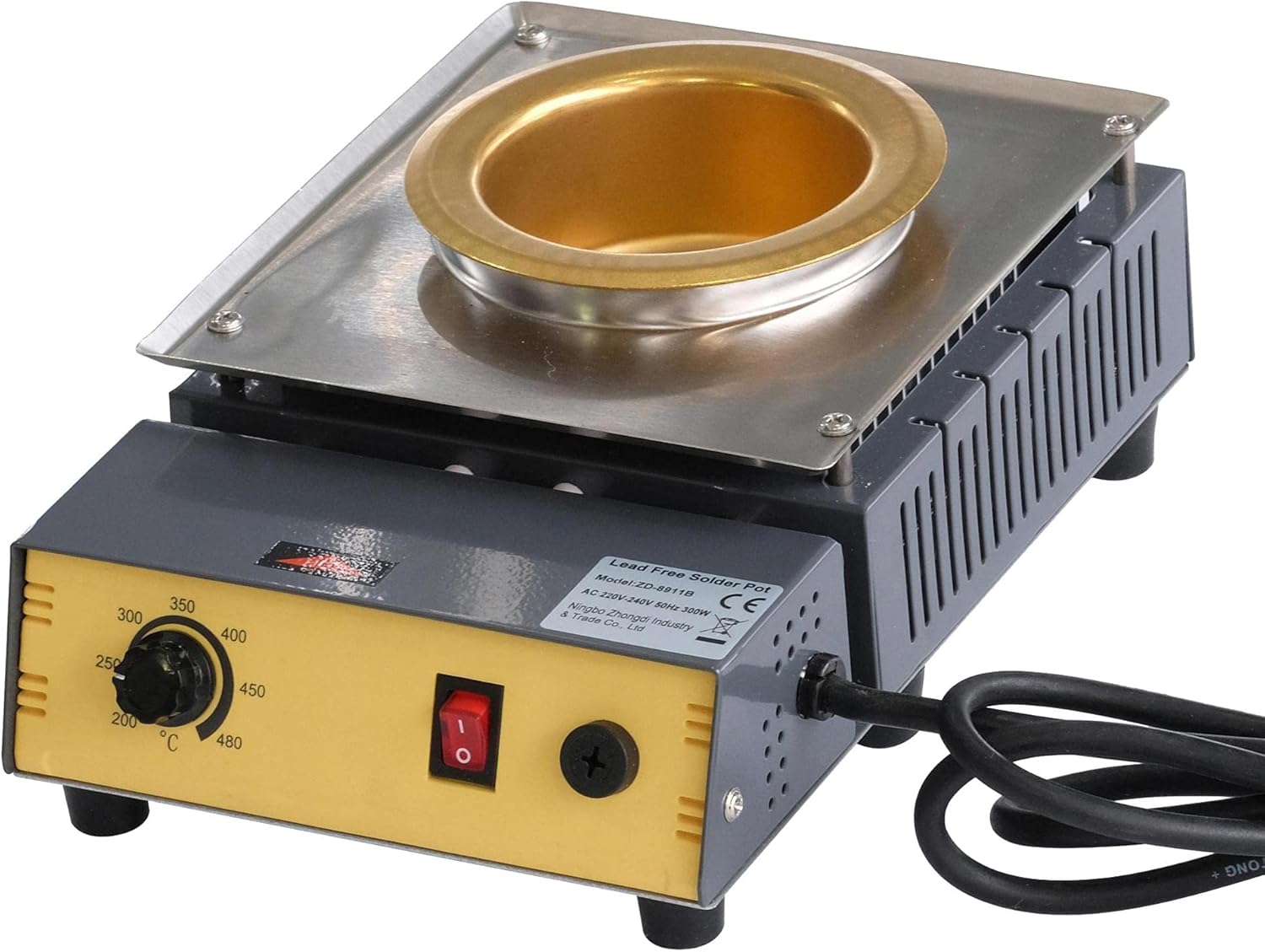
Image 1: Front view of the multicomp PRO MP740404 Electric Solder Pot, showing the temperature control knob, power switch, and the solder pot crucible.
Setup
- Unpack the solder pot and place it on a stable, non-flammable, and heat-resistant workbench.
- Ensure there is adequate ventilation around the unit.
- Connect the power cord to a grounded 115V AC 60Hz power outlet.
- Add the desired amount of lead-free solder to the crucible. Do not overfill.
Operating Instructions
- Power On: Flip the red power switch to the 'ON' position. The indicator light will illuminate.
- Set Temperature: Rotate the temperature control knob to the desired temperature setting between 200°C and 480°C.
- Heating: Allow the solder pot to heat up. The melting time typically ranges from 8 to 25 minutes, depending on the amount of solder and desired temperature.
- Soldering: Once the solder is molten and at the set temperature, you can begin your soldering process. Dip components or wires into the molten solder as required.
- Power Off: After use, turn the temperature control knob to the minimum setting, then flip the power switch to the 'OFF' position.
- Cool Down: Allow the unit to cool down completely before handling or storing. The crucible and molten solder will remain hot for an extended period after power-off.
Important: Always ensure proper ventilation and wear protective gear during operation.
Maintenance
- Cleaning the Crucible: Regularly clean the crucible to remove dross and oxidized solder. Use a suitable dross skimmer or tool designed for solder pot maintenance. Ensure the unit is cool and unplugged before cleaning.
- Exterior Cleaning: Wipe the exterior of the unit with a damp cloth. Do not use abrasive cleaners or solvents.
- Storage: Store the solder pot in a dry, dust-free environment when not in use.
- Inspection: Periodically inspect the power cord for any signs of damage. If damaged, discontinue use and contact qualified service personnel.
Troubleshooting
| Problem | Possible Cause | Solution |
|---|---|---|
| Unit does not power on. | No power supply; faulty power cord; power switch off. | Check power outlet and cord connection; ensure power switch is ON. |
| Solder not melting or heating slowly. | Incorrect temperature setting; too much solder; unit not given enough time to heat. | Adjust temperature knob; reduce solder quantity; allow sufficient heating time (8-25 minutes). |
| Excessive fumes. | Inadequate ventilation. | Ensure work area is well-ventilated; use a fume extractor. |
Specifications
| Feature | Specification |
|---|---|
| Model Number | MP740404 |
| Voltage | 115V AC 60Hz |
| Rated Power | 300W |
| Temperature Range | 200°C to 480°C |
| Melting Time | 8 to 25 minutes |
| Max Melting Capacity | 1350g |
| Solder Pot Size | Ø80mm |
| Material | Stainless Steel Crucible |
| Approval | CE Approved |
| UPC | 713179652016 |

Image 2: Specifications sheet for multicomp PRO Solder Pots, detailing voltage, power, temperature range, melting time, capacity, and pot size.
Warranty and Support
For warranty information or technical support, please refer to the multicomp PRO official website or contact your local distributor. Keep your purchase receipt as proof of purchase.