
Introduction
This manual provides detailed instructions for the installation, operation, and maintenance of your RecPro RV Bluetooth Electronic Entry Door Lock with Deadbolt, Model RP-2352. This lock offers keyless entry and enhanced security for your RV, camper, or travel trailer through Bluetooth connectivity and an integrated keypad.
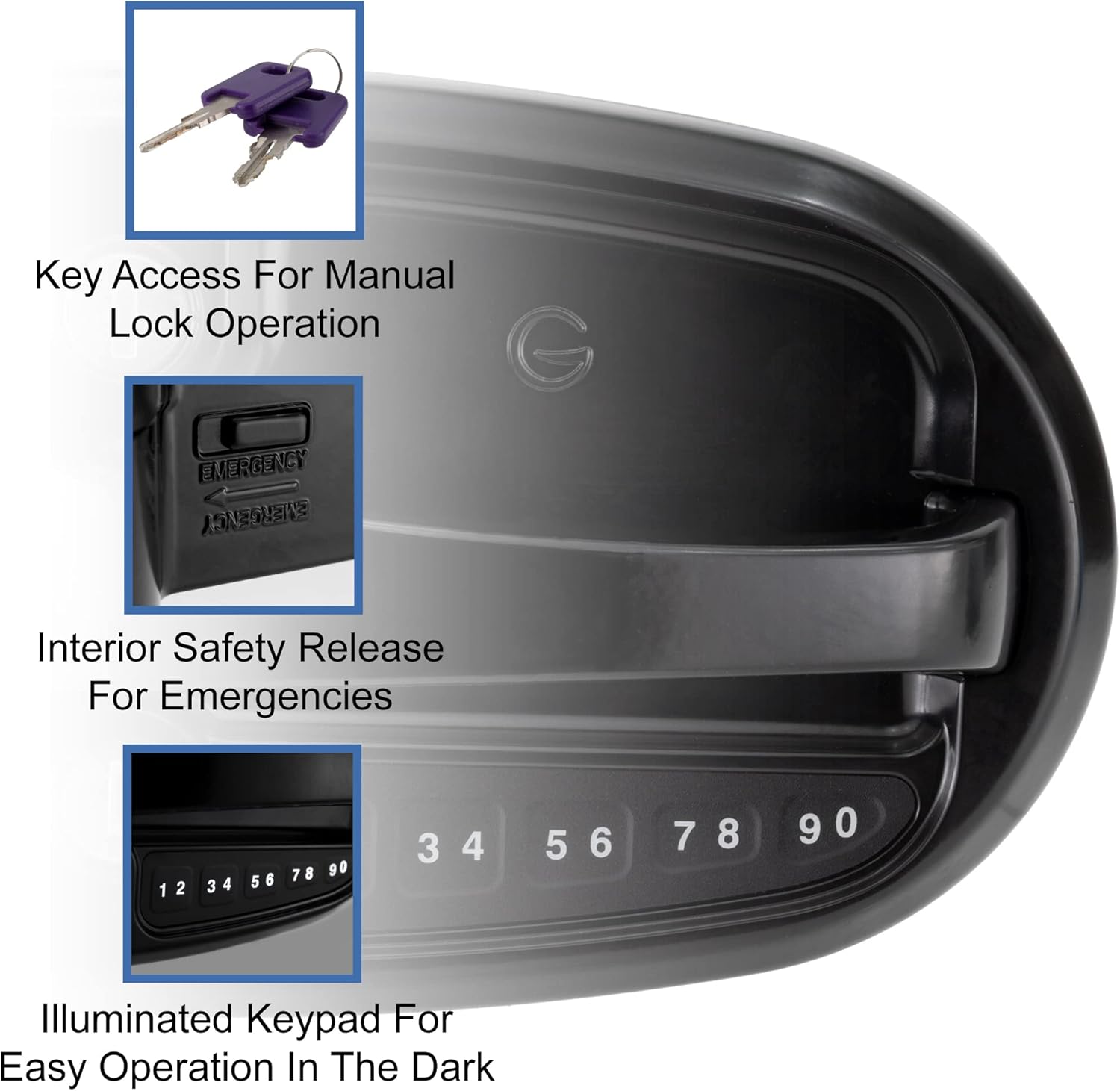
Image: The RecPro RV Electronic Door Lock, showcasing its durable metal design, ergonomic handle, and electronic keyless entry features.
Key features include:
- Bluetooth Connectivity: Easy connection with your smartphone via the free Global Link Connect app for keyless entry.
- Ergonomic Handle Design: Designed for a comfortable grip during operation.
- Illuminated Keypad: Ensures visibility for keyless entry in low-light conditions, supporting both factory default and user-defined PINs.
- Audio Feedback: Provides audible alerts for unlocking, locking, and low battery status.
Setup and Installation
The RecPro RV Electronic Door Lock is designed for straightforward installation. It fits most standard RV door cutouts and features a simple screw-together design. Only one Type 123 battery is required for operation (one is included).

Image: The RecPro RV Electronic Door Lock installed on an RV door, demonstrating its easy installation and Bluetooth connectivity with a smartphone.
Pre-Installation Checks
- Verify your RV door cutout dimensions match the lock specifications.
- Ensure you have the necessary tools: screwdriver, measuring tape.
- Confirm the included Type 123 battery is present.
Installation Steps
- Remove your existing RV door lock, if applicable.
- Carefully insert the new RecPro lock into the door cutout.
- Align the internal and external components and secure them with the provided screws.
- Install the Type 123 battery into the designated compartment.
- Test the lock's mechanical operation with the physical keys and the deadbolt.

Image: Detailed measurements for the RecPro RV Electronic Door Lock (Model RP-2352) to assist with installation and compatibility checks.
Operating Instructions
Manual Key Operation
The lock can be operated manually using the provided physical keys. Insert the key into the keyhole and turn to lock or unlock the main latch. The deadbolt also has a separate keyhole for manual operation.
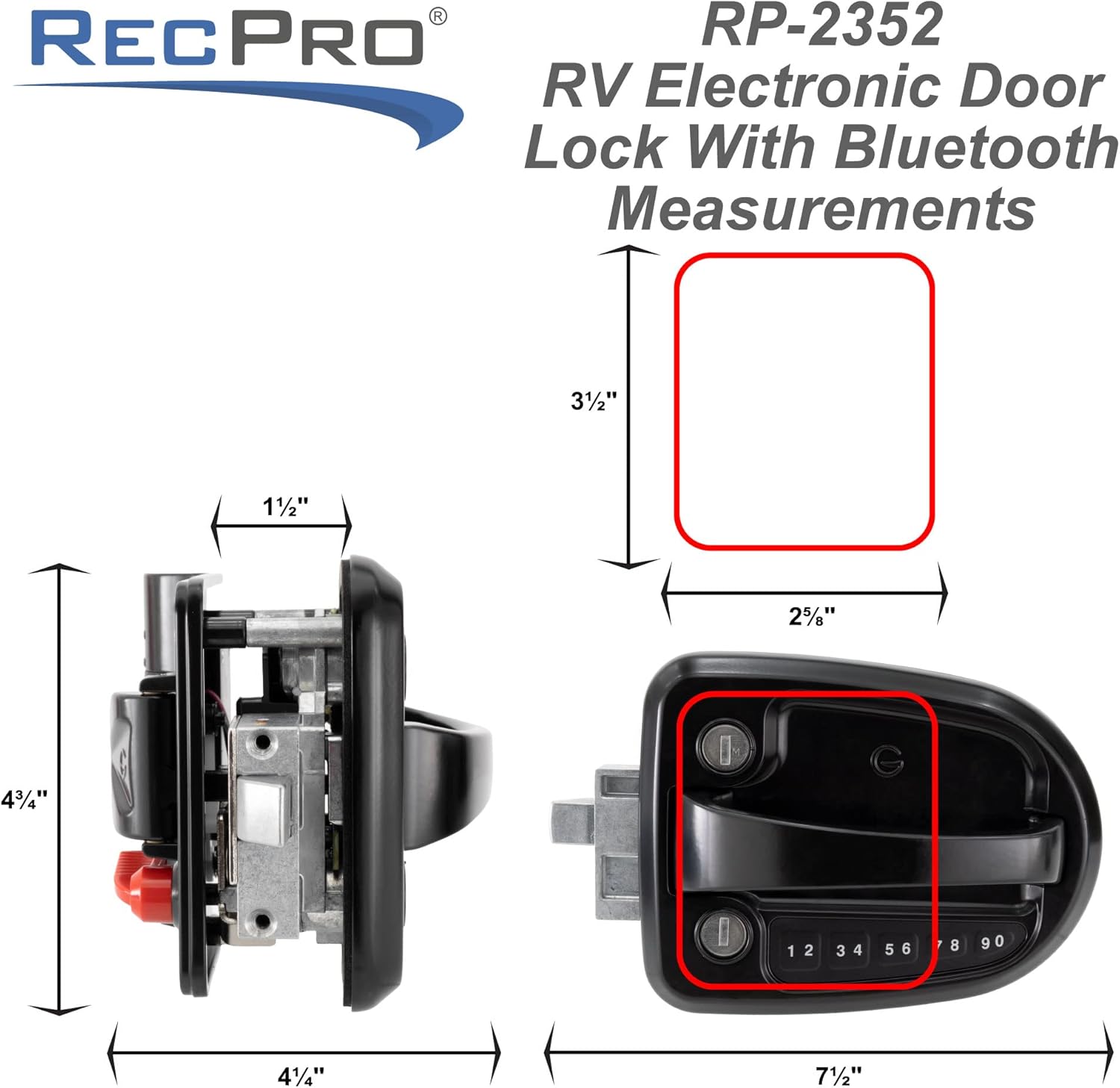
Image: This image highlights the key access points for manual lock operation, the interior safety release, and the illuminated keypad for easy use in the dark.
Keypad Operation
The integrated keypad allows for keyless entry. The keypad is illuminated for use in low-light conditions.
- Unlocking: Enter your 4-8 digit PIN code followed by the Lock/Unlock button. The lock will emit an audio confirmation and unlock.
- Locking: Press the Lock/Unlock button. The lock will emit an audio confirmation and lock.
- Changing PIN: Refer to the Global Link Connect app instructions for changing the user PIN. The lock supports a factory default PIN and a user-defined PIN.
Bluetooth Connectivity (Global Link Connect App)
The lock connects to your smartphone via Bluetooth using the free Global Link Connect app.
- Download the "Global Link Connect" app from your smartphone's app store.
- Enable Bluetooth on your smartphone.
- Open the app and follow the on-screen instructions to pair your lock. You may need to be in close proximity to the lock during pairing.
- Once paired, you can lock and unlock your RV door directly from the app. The app also allows for managing user PINs and monitoring battery status.
Deadbolt Operation
The integrated deadbolt provides additional security.
- From Exterior: Use the physical key in the deadbolt keyhole or operate via the Global Link Connect app if supported.
- From Interior: Use the mechanical knob on the interior side of the lock to engage or disengage the deadbolt.
Interior Safety Release
For emergencies, the lock features an interior safety release. This mechanism allows for quick exit from the RV even if the lock is engaged. Locate the "EMERGENCY" lever on the interior handle and operate it as indicated.

Image: The interior side of the lock, highlighting the low battery indicator and the emergency release mechanism for quick exits.
Maintenance
Battery Replacement
The lock uses one Type 123 battery. When the battery is low, the lock will provide an audio feedback alert. Replace the battery promptly to ensure continuous operation.
- Locate the battery compartment on the interior side of the lock.
- Open the compartment cover.
- Remove the old battery and insert a new Type 123 battery, ensuring correct polarity.
- Close the battery compartment cover securely.
- Test the lock's operation after battery replacement.
General Cleaning
Clean the exterior of the lock with a soft, damp cloth. Avoid using abrasive cleaners or solvents, as these can damage the finish or electronic components.
Troubleshooting
| Problem | Possible Cause | Solution |
|---|---|---|
| Lock not responding to keypad. | Low battery; incorrect PIN; keypad malfunction. | Replace battery. Re-enter PIN carefully. If issue persists, contact support. |
| Bluetooth connection issues. | Bluetooth off on phone; app not open; lock too far from phone; interference. | Ensure Bluetooth is on and app is open. Move closer to the lock. Restart phone/app. |
| Audio feedback indicates low battery. | Battery power is low. | Replace the Type 123 battery immediately. |
| Lock does not engage/disengage mechanically. | Obstruction in door frame; misalignment; internal mechanism issue. | Check for obstructions. Ensure proper alignment. If issue persists, contact support. |
Specifications (Model RP-2352)
- Brand: RecPro
- Model Name: RP-2352
- Special Feature: Keyless
- Lock Type: Keypad
- Item Dimensions (L x W x H): 11 x 9 x 6 inches
- Recommended Uses: Security
- Style: Modern
- Color: Black
- Number of Pieces: 1
- Included Components: Door lock, keys
- Controller Type: Android, Hand Control, Mechanical knob
- Control Method: App
- Connectivity Protocol: Bluetooth
- UPC: 193652085744
- Manufacturer: RecPro
- Product Dimensions: 11 x 9 x 6 inches
- Item Model Number: RP-2352
- ASIN: B0BT86856V
- Date First Available: January 27, 2023
Warranty and Support
For warranty information or technical support regarding your RecPro RV Bluetooth Electronic Entry Door Lock (Model RP-2352), please contact RecPro customer service directly. Refer to the product packaging or the official RecPro website for the most current contact details and warranty terms.
Manufacturer: RecPro
Website: Visit the RecPro Store on Amazon