
1. Introduction
This manual provides instructions for the safe and effective use of your NEXTORCH P84 Rechargeable Multi-Light Source LED Flashlight. The P84 is a high-performance, compact, and durable flashlight designed for various applications, including law enforcement, outdoor activities, and general utility. It features multiple light sources, including a powerful white LED and integrated red and blue warning lights, along with a Type-C USB rechargeable battery.
Please read this manual thoroughly before operating the device and retain it for future reference.

2. Safety Information
Observe the following safety precautions to prevent injury or damage to the device:
- Do not shine the flashlight directly into eyes. The high intensity light can cause temporary vision impairment or permanent eye damage.
- Keep out of reach of children.
- Do not disassemble the flashlight head or body. This may damage the device and void the warranty.
- Avoid exposing the flashlight to extreme temperatures or direct sunlight for prolonged periods.
- Use only the specified battery type and charging method. Incorrect battery usage or charging can lead to fire, explosion, or leakage.
- The flashlight may become warm during extended use, especially on high output modes. This is normal.
- The red and blue warning lights are typically for law enforcement use. Exercise caution and adhere to local regulations when using these features in public areas.
3. Package Contents
Verify that all items are present in your package:
- NEXTORCH P84 Flashlight
- Type-C USB Charging Cable
- Hand Strap
- User Manual (this document)
- 1 x 21700 Lithium-Ion Battery (included inside the flashlight)
4. Setup
4.1 Initial Charging
Before first use, fully charge the flashlight battery.
- Locate the Type-C USB charging port. It is hidden under the head of the flashlight.
- To access the charging port, gently twist the head of the flashlight counter-clockwise until the port is revealed.
- Insert the Type-C USB cable into the flashlight's charging port and connect the other end to a compatible USB power source (e.g., computer, wall adapter).
- The LED power indicator lights will show the charging status. Charging is complete when all indicator lights are solid.
- Once charging is complete, twist the flashlight head clockwise to cover and protect the charging port.

4.2 Attaching the Hand Strap
Attach the included hand strap to the designated loop on the tail cap of the flashlight for secure carrying.
5. Operating Instructions
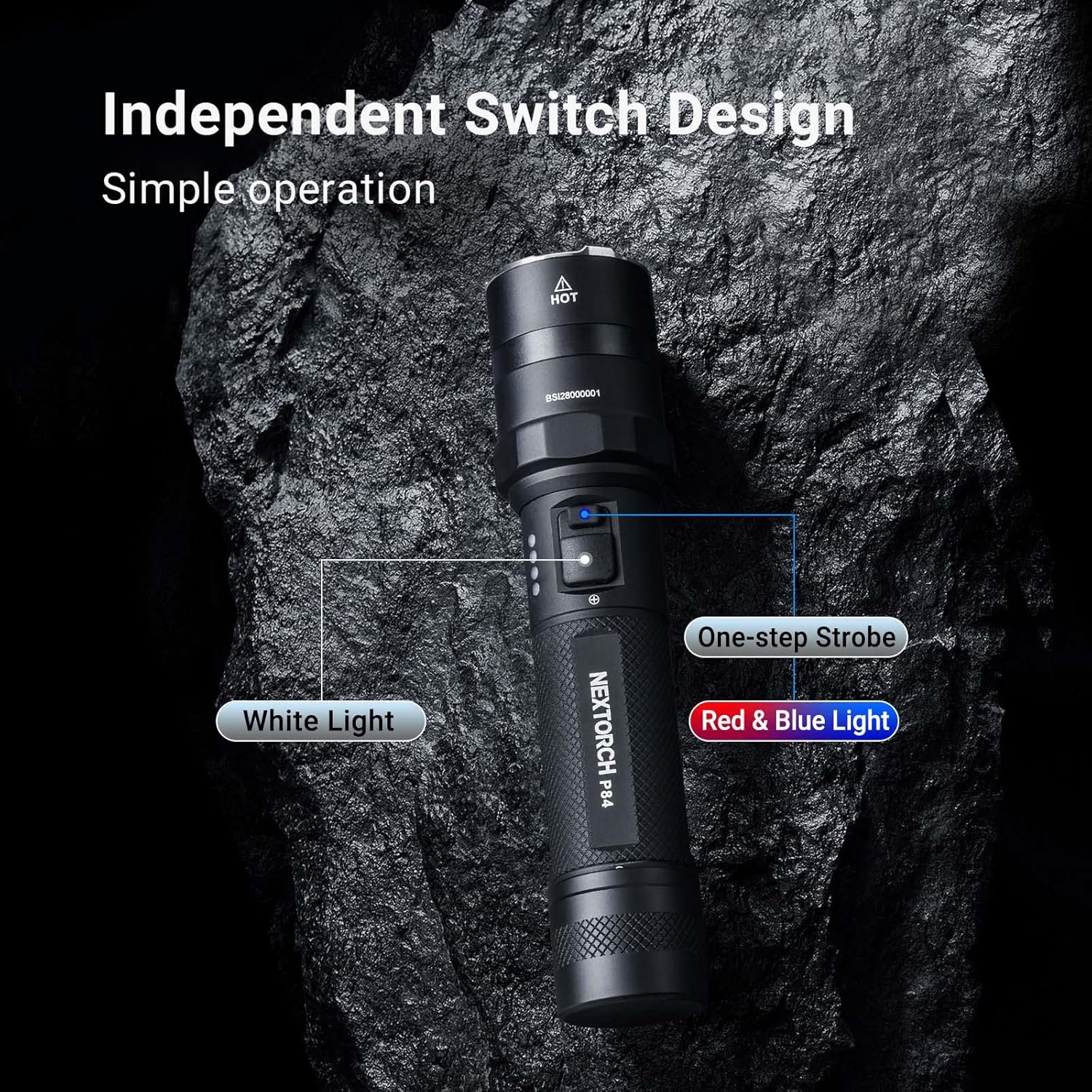
The NEXTORCH P84 features an independent dual-switch design for intuitive control of white light and warning light functions.
5.1 White Light Operation
The main switch controls the white light output:
- Momentary On: Lightly press and hold the main switch for momentary high output. Release to turn off.
- Constant On/Off: Fully press the main switch until it clicks to turn the flashlight on. Press again to turn off.
- Mode Cycling: With the light on, lightly press the main switch to cycle through modes: High (3000 lm) → Medium (600 lm) → Low (36 lm). The flashlight has a preset 600 lumens for the first bright mode when turned on for duty applications.
- Strobe: Double-click the main switch rapidly to activate strobe mode. Lightly press to return to the previous mode.
5.2 Red & Blue Warning Light Operation
The secondary switch controls the red and blue warning lights:
- Activate Warning Lights: Press the secondary switch to activate the warning light module.
- Mode Cycling: With the warning lights on, press the secondary switch to cycle through the five available modes:
- Red & Blue Strobe (360° omnidirectional)
- Red Flash (fixed frequency for signaling)
- Blue Flash (fixed frequency for signaling)
- Constant Red Light (comfortable night vision, anti-mosquito, S.O.S. warning)
- Constant Blue Light (short wavelength, high intensity for patrol, tracking, marker signals)
- Turn Off Warning Lights: Press and hold the secondary switch for approximately 1 second to turn off the warning lights.


5.3 Battery Level Indicator
The LED indicators on the side of the flashlight display the remaining battery power. Monitor these indicators to know when recharging is necessary.
6. Maintenance
- Cleaning: Clean the flashlight body with a soft, damp cloth. Do not use abrasive cleaners or solvents.
- O-Rings: Periodically inspect the O-rings for wear and tear. Lubricate them with silicone grease to maintain the IPX7 waterproof rating. Replace damaged O-rings promptly.
- Threads: Keep the threads clean and lightly lubricated to ensure smooth operation when accessing the charging port.
- Storage: If storing the flashlight for an extended period, remove the battery or ensure it is partially charged (around 50%) to prolong battery life. Store in a cool, dry place.
7. Troubleshooting
| Problem | Possible Cause | Solution |
|---|---|---|
| Flashlight does not turn on. | Low battery. Loose battery connection. Faulty switch. |
Charge the battery. Ensure the battery is correctly inserted and the tail cap is tightened. Contact customer support if the switch is faulty. |
| Light output is dim or flickers. | Low battery. Poor contact between battery and terminals. |
Charge the battery. Clean battery contacts and ensure secure connection. |
| Flashlight gets excessively hot. | Extended use on high mode. Insufficient airflow. |
Reduce output mode. Allow the flashlight to cool down. This is normal for high-lumen flashlights. |
| Charging not working. | Charging cable not properly connected. Charging port obstructed. Faulty cable or power source. |
Ensure cable is fully inserted. Check for debris in the charging port. Try a different USB cable or power source. |
If the problem persists, please contact NEXTORCH customer support.
8. Specifications
| Feature | Detail |
|---|---|
| Model | P84 |
| Light Output (White) | High: 3000 lm, Medium: 600 lm, Low: 36 lm, Momentary On, Strobe |
| Light Output (Warning) | Red & Blue Flash, Red Flash, Blue Flash, Red Light, Blue Light (all 2 lm) |
| Beam Distance | High: 260 m, Medium: 110 m, Low: 28 m |
| Run Time | High: 2 h 45 min, Medium: 4 h 30 min, Low: 60 h Red & Blue Flash: 180 h, Red Flash: 105 h, Blue Flash: 105 h, Red Light: 50 h, Blue Light: 50 h |
| Impact Resistance | 2 meters |
| Waterproof Rating | IPX7 (1 meter submersible) |
| Power | 30 W |
| Dimensions | Length: 160 mm (6.3 inches), Head Diameter: 35 mm (1.38 inches), Body Diameter: 28.5 mm (1.12 inches) |
| Weight | 164 g (5.78 oz) (without battery) |
| Material | Aircraft-grade Aluminum Alloy with Hard Anodized Finish |
| Light Source | White / Red / Blue Light LEDs |
| Battery | One 21700 Lithium-Ion Battery (4800mAh) |
| Charging Port | Type-C USB (hidden) |

9. Warranty & Support
NEXTORCH offers a five-year warranty on all flashlights. This warranty covers manufacturing defects and workmanship under normal use.
For warranty claims, technical support, or any questions regarding your P84 flashlight, please contact NEXTORCH customer service. Refer to the official NEXTORCH website for the most current contact information.
Online resources and additional information may be available on the NEXTORCH Store on Amazon.


