
Philco PES3530-BK
Contents
Philco Stereo Shelf System User Manual
Model: PES3530-BK
Brand: Philco
Introduction and Safety Information
Thank you for purchasing the Philco Stereo Shelf System. This manual provides important information for the safe and efficient operation of your new audio system. Please read it thoroughly before use and retain it for future reference.
Important Safety Instructions:
- Do not block any ventilation openings. Install in accordance with the manufacturer's instructions.
- Do not install near any heat sources such as radiators, heat registers, stoves, or other apparatus (including amplifiers) that produce heat.
- Protect the power cord from being walked on or pinched, particularly at plugs, convenience receptacles, and the point where they exit from the apparatus.
- Only use attachments/accessories specified by the manufacturer.
- Unplug this apparatus during lightning storms or when unused for long periods of time.
- Refer all servicing to qualified service personnel. Servicing is required when the apparatus has been damaged in any way, such as power-supply cord or plug is damaged, liquid has been spilled or objects have fallen into the apparatus, the apparatus has been exposed to rain or moisture, does not operate normally, or has been dropped.
- Do not expose this apparatus to dripping or splashing and ensure that no objects filled with liquids, such as vases, are placed on the apparatus.
Package Contents
Please check that all items listed below are included in your package:
- Main Unit (CD Player, FM Radio, Bluetooth, USB, AUX)
- Two Bookshelf Speakers
- Remote Control
- Power Cord
- User Guide (this manual)

Image: What's in the Box. This image displays the main unit, two speakers, remote control, power cord, and user guide, illustrating all components included with the Philco Stereo Shelf System.
Setup
1. Placement
Place the main unit and speakers on a stable, flat surface. Ensure there is adequate ventilation around the unit to prevent overheating. Keep the system away from direct sunlight, heat sources, and moisture.
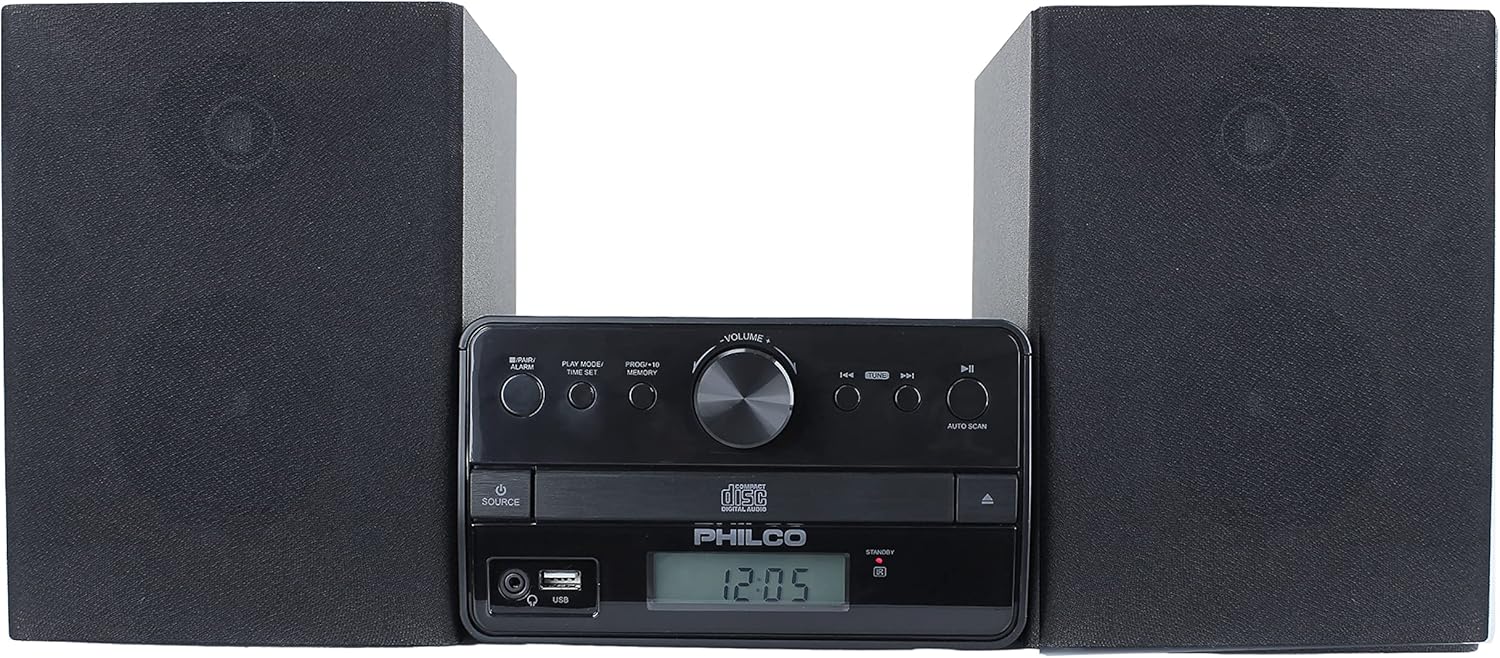
Image: Front view of the Philco Stereo Shelf System. This image shows the compact design of the main unit positioned between its two bookshelf speakers.
2. Connecting Speakers
Connect the speaker wires from the back of each speaker to the corresponding speaker terminals on the main unit. Ensure correct polarity (positive to positive, negative to negative) for optimal sound quality.
3. Connecting Power
Plug the power cord into the AC inlet on the back of the main unit, then plug the other end into a standard wall outlet (AC 120V ~ 60Hz).
4. Initial Power On
Press the POWER button on the main unit or the remote control to turn on the system. The LCD display will illuminate.
Operating Instructions
Power On/Off
Press the POWER button ( ) on the front panel or the remote control to switch the unit on or off. The unit will enter standby mode when turned off.
Source Selection
Press the SOURCE button on the main unit or remote control repeatedly to cycle through available input modes: CD, FM Radio, Bluetooth, USB, and AUX.
CD Player Operation
- Press the SOURCE button to select CD mode.
- Press the OPEN/CLOSE button to open the CD tray.
- Place a CD (Audio CD, CD-R/CD-RW) with the label side facing up into the tray.
- Press the OPEN/CLOSE button again to close the tray. The unit will read the disc.
- Press PLAY/PAUSE to start or pause playback.
- Use the SKIP buttons (◀◀ / ▶▶) to navigate between tracks.
- To program tracks, refer to the "Program Play" section in the full user guide.
FM Radio Operation
- Press the SOURCE button to select FM mode.
- Press the AUTO SCAN button to automatically scan and save available FM stations.
- Use the SKIP buttons (◀◀ / ▶▶) to manually tune or select saved preset stations.
- To save a station manually, tune to the desired frequency, then press and hold the MEMORY button until the preset number flashes, then use the SKIP buttons to select a preset number and press MEMORY again to confirm.
Bluetooth Streaming
- Press the SOURCE button to select Bluetooth mode. The display will show "BT" and flash, indicating it's ready for pairing.
- On your smartphone, tablet, or other Bluetooth device, enable Bluetooth and search for "PHILCO PES3530-BK".
- Select the unit to pair. Once connected, the "BT" indicator will stop flashing.
- You can now play audio from your device through the stereo system.
USB Playback
- Insert a USB flash drive into the USB port on the front of the main unit.
- Press the SOURCE button to select USB mode. The unit will automatically begin playing compatible MP3 files.
- Use the PLAY/PAUSE and SKIP buttons to control playback.
AUX Input
- Connect an external audio device (e.g., MP3 player, smartphone) to the AUX IN port on the front of the main unit using a 3.5mm audio cable (not included).
- Press the SOURCE button to select AUX mode.
- Play audio from your connected device. Volume can be controlled via the stereo system or the external device.
Remote Control
The included remote control allows for convenient operation of all functions from a distance. Ensure the remote's battery is inserted correctly. Point the remote directly at the main unit's sensor.
Note on Volume Control: While the remote control includes volume buttons, in certain modes (e.g., CD, FM), these buttons may also control track or station changes. For consistent volume adjustment, it is recommended to use the volume knob on the main unit.
Maintenance
Cleaning the Unit
Wipe the exterior of the unit with a soft, dry cloth. Do not use abrasive cleaners, waxes, or solvents as they may damage the finish. For stubborn stains, a slightly damp cloth can be used, followed by a dry cloth.
CD Care
Handle CDs by their edges. Keep them clean and free of scratches. Store CDs in their cases when not in use. If a CD is dirty, wipe it gently from the center outwards with a soft, lint-free cloth.
General Care
Avoid placing heavy objects on the unit. Do not expose the unit to extreme temperatures or humidity. If the unit will not be used for an extended period, unplug it from the power outlet.
Troubleshooting
| Problem | Possible Cause | Solution |
|---|---|---|
| No power | Power cord not connected; Power outlet not working. | Ensure power cord is securely plugged in. Try a different power outlet. |
| No sound | Volume too low; Speakers not connected properly; Incorrect source selected. | Increase volume. Check speaker connections. Select the correct input source. |
| CD not playing or skipping | CD is dirty or scratched; CD inserted incorrectly; Disc format not supported. | Clean the CD. Insert CD with label side up. Ensure it's an Audio CD, CD-R/RW. |
| Scraping sound from CD player | Internal mechanism issue. | This may indicate a manufacturing defect. If persistent, contact customer support. |
| Poor FM reception | Antenna not extended or positioned correctly; Interference. | Extend and adjust the FM antenna. Move the unit away from other electronic devices. |
| Bluetooth not connecting | Unit not in pairing mode; Device too far; Bluetooth on device is off. | Ensure unit is in Bluetooth mode and "BT" is flashing. Move device closer. Enable Bluetooth on your device. |
| Remote control not working | Battery depleted or inserted incorrectly; Obstruction between remote and unit. | Replace battery. Ensure correct polarity. Remove any obstructions. Point directly at sensor. |
| LCD display too bright | Fixed display brightness. | The display brightness is not adjustable. Consider placing the unit in an area where the brightness is not an issue, or use a light-dimming film if necessary. |
Specifications
- Model Number: PES3530-BK
- Product Dimensions (L x W x H): 9.57 x 21.02 x 7.13 inches
- Item Weight: 7.5 pounds
- Connectivity Technology: Bluetooth, USB, AUX
- Color: Black
- Speaker Type: Bookshelf
- Manufacturer: PHC Americas, LLC
- Output Power: 30W RMS (2 x 15W)
- Supported Disc Formats: Audio CD, CD-R/CD-RW
- Supported USB Audio Formats: MP3
Warranty and Support
Philco products are manufactured to high-quality standards. This product is covered by a standard manufacturer's warranty against defects in materials and workmanship. Please refer to the warranty card included in your package for specific terms and conditions.
For technical support, troubleshooting assistance, or warranty claims, please contact Philco customer service. Contact information can typically be found on the Philco website or on the warranty card.
You can also visit the official Philco Store for more information and support resources: Philco Store on Amazon
Ask a question about this manual
Ask about setup, troubleshooting, compatibility, parts, safety, or missing instructions. Manuals+ will review the question and use this page’s manual context to help answer it.