
1. Introduction
This manual provides essential information for setting up, operating, and maintaining your ASUS ROG Strix G17 G713PI-DS94 gaming laptop. Designed for high-performance gaming, this laptop features an AMD Ryzen 9 7945HX processor, NVIDIA GeForce RTX 4070 Laptop GPU, a 17.3-inch QHD 240Hz display, and advanced cooling solutions. Please read this manual thoroughly to ensure optimal performance and longevity of your device.

Image 1.1: The ASUS ROG Strix G17 G713PI-DS94 gaming laptop, showcasing its sleek design and illuminated keyboard.
2. Package Contents
Verify that all items are present in your product packaging:
- ASUS ROG Strix G17 G713PI-DS94 Gaming Laptop
- Power Cord & Adapter
- User Manual (this document)
Video 2.1: An unboxing video for the ROG G15 and G17 series, demonstrating the contents and initial presentation of the laptop.
3. Setup
3.1 Initial Power-On
- Unpack the laptop and power adapter from the box.
- Connect the power adapter to the laptop's power input port and then to a power outlet.
- Open the laptop lid. The laptop may power on automatically, or you may need to press the power button located above the keyboard.
- Follow the on-screen instructions to complete the Windows 11 initial setup, including language selection, network connection, and user account creation.
3.2 Connecting Peripherals
Your ROG Strix G17 offers comprehensive connectivity options for various peripherals:
- USB Ports: Connect external storage, mice, keyboards, and other USB devices.
- HDMI Port: Connect to an external monitor or TV for extended display.
- LAN (RJ45) Jack: For wired network connections.
- Audio Combo Jack: For headphones or headsets.

Image 3.1: Rear and side view of the ASUS ROG Strix G17, highlighting its various connectivity ports including USB, HDMI, and LAN.
4. Operating Instructions
4.1 Power Management
- Power On: Press the power button.
- Sleep Mode: Close the lid or press the power button briefly.
- Shut Down: Go to Start Menu > Power > Shut down in Windows 11.
4.2 Keyboard and Touchpad
The laptop features a full-size keyboard with 4-Zone RGB backlighting, customizable via Aura Sync technology. Dedicated gaming hotkeys provide quick access to essential commands. The touchpad supports multi-touch gestures for intuitive navigation.
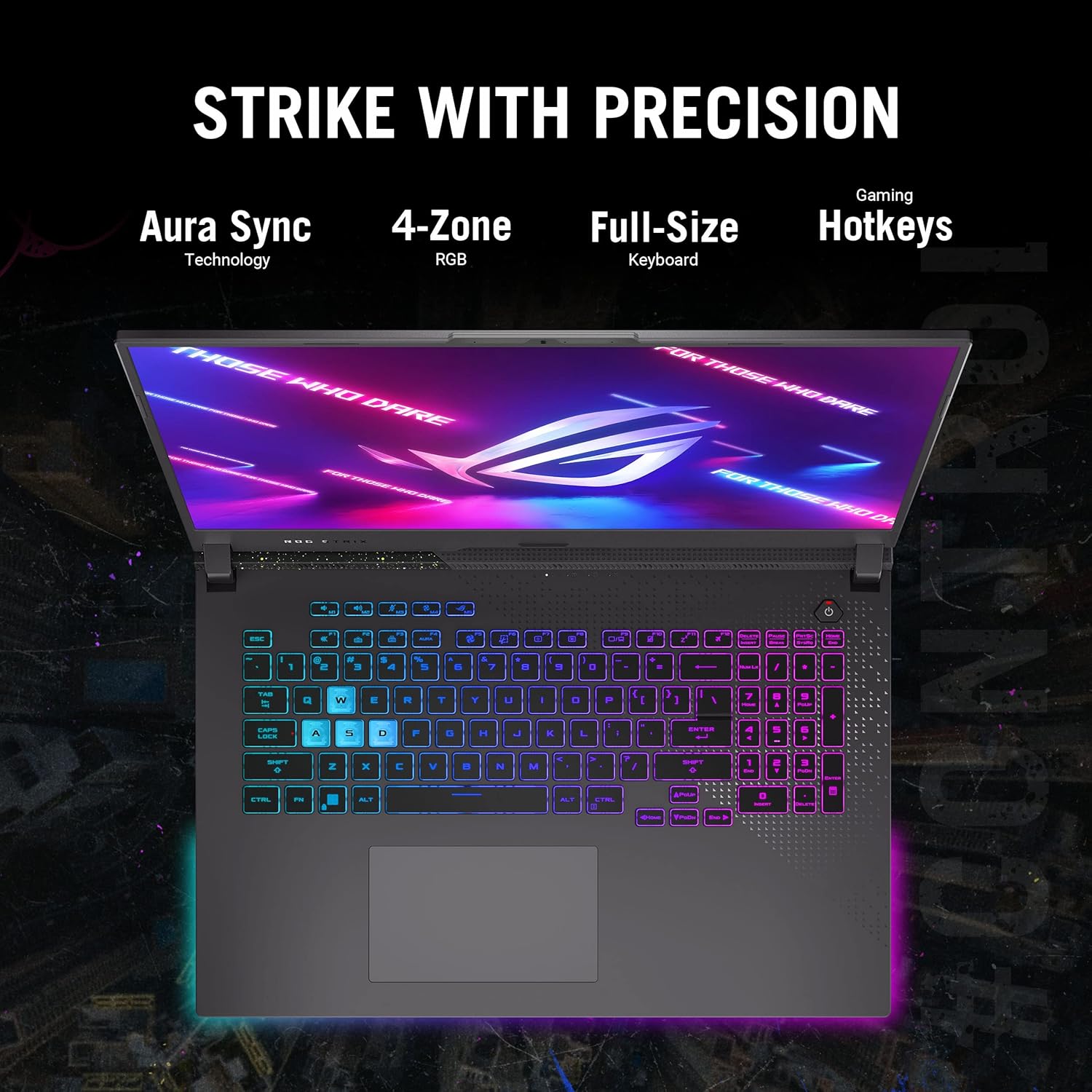
Image 4.1: Top-down view of the ASUS ROG Strix G17 keyboard, showcasing its 4-Zone RGB backlighting and full-size layout.
4.3 Display Features
Experience immersive visuals on the 17.3-inch QHD (2560 x 1440) display with a 240Hz refresh rate and 3ms response time. It supports 100% DCI-P3 color space, Dolby Vision, and NVIDIA Adaptive-Sync for smooth, tear-free gaming.

Image 4.2: The ASUS ROG Strix G17 display showcasing its QHD 240Hz panel with Dolby Vision and Adaptive-Sync support.
4.4 Audio System
The laptop features a 5.1.2 channel virtual surround sound system with Two-Way AI Noise Cancellation, Dolby Atmos, and Hi-Res Audio support, providing clear and immersive audio for gaming and multimedia.

Image 4.3: The ASUS ROG Strix G17 display with a visual representation of its 5.1.2 channel virtual surround sound and audio technologies.
5. Performance Features
5.1 Processor and Graphics
Equipped with an AMD Ryzen 9 7945HX processor and an NVIDIA GeForce RTX 4070 Laptop GPU (140W Max TGP), the ROG Strix G17 delivers exceptional performance for demanding games and tasks. The MUX Switch with Advanced Optimus automatically optimizes performance and battery life by routing frames directly from the dGPU to the display, bypassing the iGPU.

Image 5.1: Diagram illustrating the AMD Ryzen CPU and NVIDIA GPU working together for esports domination in the ROG Strix G17.
5.2 Memory and Storage
The laptop features 16GB of DDR5-4800MHz memory for swift multitasking and a 1TB PCIe 4x4 SSD for rapid loading times and ample storage capacity.
5.3 ROG Intelligent Cooling
To maintain peak performance during intense gaming sessions, the ROG Strix G17 incorporates an advanced cooling system. This includes Thermal Grizzly’s Conductonaut Extreme liquid metal on the CPU, Arc Flow Fans with 84 curved blades for improved airflow and reduced noise, 4 fan outlets, and anti-dust tunnels to keep heatsinks clear of debris.

Image 5.2: Detailed view of the ROG Intelligent Cooling system, highlighting Conductonaut Extreme liquid metal, Arc Flow Fans, and anti-dust tunnels.
Video 5.3: A video showcasing the rigorous quality tests performed on ROG systems, including vibration, panel pressure, twisting, mechanical shock, keyboard durability, port plugging, hinge rotation, drop tests, acoustic tests, humidity, extreme temperature, and high altitude simulations, demonstrating the laptop's robust build quality.
6. Maintenance
6.1 Cleaning Your Laptop
- Use a soft, lint-free cloth to clean the screen and chassis.
- For stubborn smudges, lightly dampen the cloth with water or a screen-safe cleaner.
- Avoid using harsh chemicals or abrasive materials.
- Regularly clean the keyboard and touchpad to prevent dust buildup.
6.2 Software Updates
Keep your operating system and drivers updated to ensure optimal performance and security. Windows Update can be accessed via the Settings menu. ASUS Armoury Crate software can assist with driver and firmware updates specific to your ROG hardware.
6.3 Battery Care
To prolong battery life, avoid fully discharging the battery frequently. For extended storage, charge the battery to approximately 50-60% and store the laptop in a cool, dry place.
7. Troubleshooting
7.1 Common Issues and Solutions
- Laptop not powering on: Ensure the power adapter is securely connected and the power outlet is functional. Try a different outlet.
- Screen is blank: Connect an external monitor to check if the display output is working. If it is, the internal display may require service.
- Performance issues: Check for background applications, update drivers, ensure adequate ventilation, and verify power settings are set to 'Performance' mode.
- Overheating: Ensure fan vents are clear of obstructions. Consider using a cooling pad. Monitor temperatures using ASUS Armoury Crate.
7.2 Contacting Support
If you encounter issues that cannot be resolved using the troubleshooting steps, please visit the official ASUS support website or contact their customer service for assistance. Have your model number (G713PI-DS94) and serial number ready.
8. Specifications
| Feature | Specification |
|---|---|
| Brand | ASUS |
| Series | ROG Strix G17 |
| Model Number | G713PI-DS94 |
| Operating System | Windows 11 Home |
| Screen Size | 17.3 Inches |
| Screen Resolution | 2560 x 1440 pixels (QHD) |
| Processor | AMD Ryzen 9 7945HX (5.4 GHz) |
| Graphics Coprocessor | NVIDIA GeForce RTX 4070 |
| Graphics Card RAM Size | 8 GB |
| RAM Memory Installed Size | 16 GB DDR5 (4800 MHz) |
| Hard Drive | 1 TB SSD (PCIe Gen 4x4) |
| Wireless Type | 802.11ax (Wi-Fi 6E) |
| Number of USB 3.0 Ports | 2 |
| Item Weight | 5.9 pounds |
| Product Dimensions | 15.55 x 1.21 x 11.1 inches |
| Color | Eclipse Gray |
| Special Feature | Backlit Keyboard |
9. Warranty and Support
Your ASUS ROG Strix G17 laptop comes with a standard 12-month warranty. This warranty covers manufacturing defects and provides access to expert support and diagnostics. In addition, ASUS offers a 90-day warranty on all warranty replacement parts.
ASUS also provides one year of free Accidental Damage Protection (ADP) against liquid spills, drops, and electrical surges for new laptops registered within 60 days of purchase. Please refer to the warranty card included in your package or visit the official ASUS website for full terms and conditions and registration details.

Image 9.1: Information regarding ASUS's Accidental Damage Protection (ADP) covering liquid spills, electrical surges, and accidental drops.