
1. Introduction
This manual provides essential information for the proper installation, operation, and maintenance of your Definitive Technology Dymension DM95 On-Wall Surround Speaker. Please read this manual thoroughly before using your speaker to ensure optimal performance and safety.
2. Important Safety Instructions
- Read Instructions: Retain these instructions for future reference.
- Heed Warnings: Follow all warnings on the appliance and in the operating instructions.
- Cleaning: Clean only with a dry cloth.
- Ventilation: Do not block any ventilation openings. Install in accordance with the manufacturer's instructions.
- Heat: Do not install near any heat sources such as radiators, heat registers, stoves, or other apparatus (including amplifiers) that produce heat.
- Power Cords: Protect the power cord from being walked on or pinched, particularly at plugs, convenience receptacles, and the point where they exit from the apparatus.
- Attachments/Accessories: Use only attachments/accessories specified by the manufacturer.
- Wall Mounting: When mounting to a wall, ensure the mounting surface can support the speaker's weight and use appropriate hardware. Consult a qualified installer if unsure.
- Servicing: Refer all servicing to qualified service personnel. Servicing is required when the apparatus has been damaged in any way, such as power-supply cord or plug is damaged, liquid has been spilled or objects have fallen into the apparatus, the apparatus has been exposed to rain or moisture, does not operate normally, or has been dropped.
3. Package Contents
The Definitive Technology Dymension DM95 package includes:
- Two (2) Definitive Technology Dymension DM95 On-Wall Surround Speakers
Please inspect the contents for any damage or missing items. Contact your dealer immediately if you find any issues.
4. Setup and Installation
4.1 Speaker Placement
The DM95 speakers are designed for flexible placement as on-wall surround, side, or rear speakers in a home theater system. They are compatible with other Dymension series speakers, including the DM30 and DM80, allowing for a cohesive sound profile.
For optimal surround sound, position the DM95 speakers to the sides or slightly behind the main listening area, at or slightly above ear level when seated. The angled design helps direct sound effectively.

Image: Front view of two DM95 speakers, showcasing the 5.25" mid/bass woofer and aluminum oxide tweeter. The angled design is visible, optimized for directing sound in a surround setup.
4.2 Wall Mounting
The DM95 speakers are designed for secure wall mounting. Ensure the wall material can support the weight of the speaker (approximately 11.02 lbs per speaker). Use appropriate wall anchors and screws (not included) for your specific wall type.
- Identify the desired mounting location, ensuring it is free of electrical wires or plumbing.
- Mark the screw positions on the wall using the speaker's keyhole slots as a template.
- Drill pilot holes and insert appropriate wall anchors if necessary.
- Secure screws into the wall, leaving a small gap for the keyhole slots.
- Carefully align the speaker's keyhole slots with the screws and slide the speaker down to lock it in place.
- Ensure the speaker is firmly seated and stable before releasing.

Image: A person's hands carefully positioning a DM95 speaker onto a wall, demonstrating the wall-mounting process.
4.3 Speaker Connections
Connect the DM95 speakers to your amplifier or AV receiver using high-quality speaker wire. Observe correct polarity (+ to + and - to -) for each speaker and channel.
- Positive (+) Terminal: Connect the red terminal on the speaker to the red (+) terminal on your amplifier.
- Negative (-) Terminal: Connect the black terminal on the speaker to the black (-) terminal on your amplifier.
The DM95 is designed for wired connectivity and supports 5.1 or 7.1 surround sound channel configurations.

Image: Close-up of the DM95 speaker's rear panel, highlighting the wired speaker terminals (red and black) and the treble control switch.
4.4 Treble Control Adjustment
The DM95 features a treble control switch on the rear panel to fine-tune the high-frequency response to your listening environment and preference.
- DEFAULT (-10dB): Provides a neutral treble response.
- BOOST (+3dB): Increases the treble output for a brighter sound.
Adjust this switch while listening to various audio content to find the setting that best suits your room acoustics and personal taste.
5. Operation
Once properly installed and connected, your DM95 speakers will function as part of your home theater system. Ensure your AV receiver or amplifier is configured to recognize the speakers in their designated surround, side, or height channels (for Dolby Atmos/DTS:X applications).
- Power On: Turn on your AV receiver/amplifier and select the desired audio source.
- Volume Control: Adjust the volume using your receiver's controls.
- Sound Modes: Experiment with different surround sound modes (e.g., Dolby Atmos, DTS:X, Dolby Surround, DTS Neural:X) on your receiver to experience the full capabilities of your system.
The DM95 speakers are designed to deliver wide dispersion and precise details, enhancing the immersive experience of movie soundtracks and music.
6. Maintenance and Care
- Cleaning: Dust the speaker cabinets with a soft, dry cloth. Avoid using abrasive cleaners, solvents, or harsh chemicals, as these can damage the finish.
- Grilles: The speaker grilles can be carefully removed for cleaning if necessary. Use a soft brush or vacuum cleaner with a brush attachment to remove dust.
- Placement: Avoid placing speakers in direct sunlight or near heat sources, which can cause discoloration or damage to components.
- Handling: When moving speakers, always lift them carefully from the base. Avoid dropping or subjecting them to strong impacts.
7. Troubleshooting
| Problem | Possible Cause | Solution |
|---|---|---|
| No sound from speaker | Loose speaker wire connection | Check and re-secure all speaker wire connections at both the speaker and the amplifier/receiver. Ensure correct polarity. |
| Sound is distorted or unclear | Overdriven amplifier, incorrect treble setting, or damaged speaker wire | Reduce amplifier volume. Adjust the treble control switch on the speaker's rear panel. Inspect speaker wires for damage and replace if necessary. |
| Uneven sound balance | Incorrect receiver settings or speaker placement | Check your AV receiver's speaker level settings and balance. Ensure speakers are placed symmetrically relative to the listening position. |
| Speaker sounds too bright or too dull | Treble control switch setting | Adjust the treble control switch on the rear of the speaker (DEFAULT or BOOST) to suit your preference. |
8. Specifications
The following table outlines the key specifications for the Definitive Technology Dymension DM95 On-Wall Surround Speaker:
| Feature | Detail |
|---|---|
| Model Name | DM95 |
| Speaker Type | Component, On-Wall Surround Speaker |
| Woofer Diameter | 5.25 Inches (BDSS Mid/Bass Woofer) |
| Tweeter Type | Aluminum Oxide Tweeter |
| Speaker Maximum Output Power | 100 Watts |
| Frequency Response | Up to 30 KHz (Tweeter upper limit) |
| Connectivity Technology | Wired |
| Surround Sound Channel Configuration | 5.1 or 7.1 Compatible |
| Material | Aluminum (for tweeter) |
| Color | Black |
| Product Dimensions (D x W x H) | 13"D x 7.2"W x 8.3"H |
| Item Weight | 11.02 Pounds (per speaker) |
| Included Components | Speakers (2) |
| Special Feature | Bass Boost (via BDSS technology), Linear Response Waveguide |
| UPC | 747192137243 |
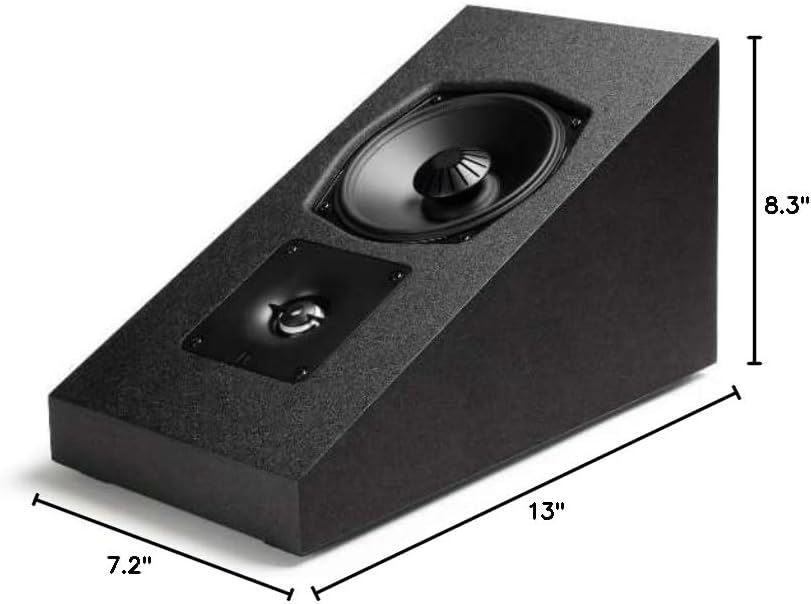
Image: Diagram illustrating the physical dimensions of the DM95 speaker: 13" (depth), 7.2" (width), and 8.3" (height).
9. Warranty and Support
Definitive Technology products are built to the highest quality standards. The Dymension DM95 speakers come with a limited warranty. Please refer to the warranty card included with your product or visit the official Definitive Technology website for detailed warranty terms and conditions.
For technical support, troubleshooting assistance, or service inquiries, please contact Definitive Technology customer support through their official website or authorized service centers. Keep your purchase receipt as proof of purchase for warranty claims.
Official Brand Store: Definitive Technology Store on Amazon


