
Introduction
The Garmin Edge 840 is a compact GPS cycling computer designed to enhance your cycling experience with advanced navigation, performance tracking, and adaptive coaching features. This manual provides essential information for setting up, operating, and maintaining your device.
What's in the Box
- Edge 840 device
- Out-front mount
- Standard mount
- Tether
- USB-C cable
- Documentation
Setup
1. Initial Device Charging
Before first use, fully charge your Edge 840 using the provided USB-C cable. Connect the cable to the device and a USB power adapter or computer USB port. The device will indicate when charging is complete.
2. Mounting the Device
Choose between the out-front mount or the standard mount based on your preference. Securely attach the chosen mount to your bicycle handlebars according to the instructions provided in the included documentation. Ensure the device clicks firmly into place on the mount.
3. Powering On and Initial Configuration
Press and hold the power button to turn on the device. Follow the on-screen prompts to select your language, set up basic user profiles, and connect to the Garmin Connect app on your smartphone for full functionality and data synchronization.
4. Sensor Pairing (Optional)
If you have compatible sensors (e.g., power meter, heart rate monitor), pair them with your Edge 840 through the device settings. Refer to the sensor's manual for specific pairing instructions.
Operating Instructions
Basic Operation: Touchscreen and Buttons
The Edge 840 features both a responsive touchscreen and physical buttons for navigation and control. Use the touchscreen for quick selections and swiping, and the buttons for reliable control in various conditions, such as with gloves or in wet weather.
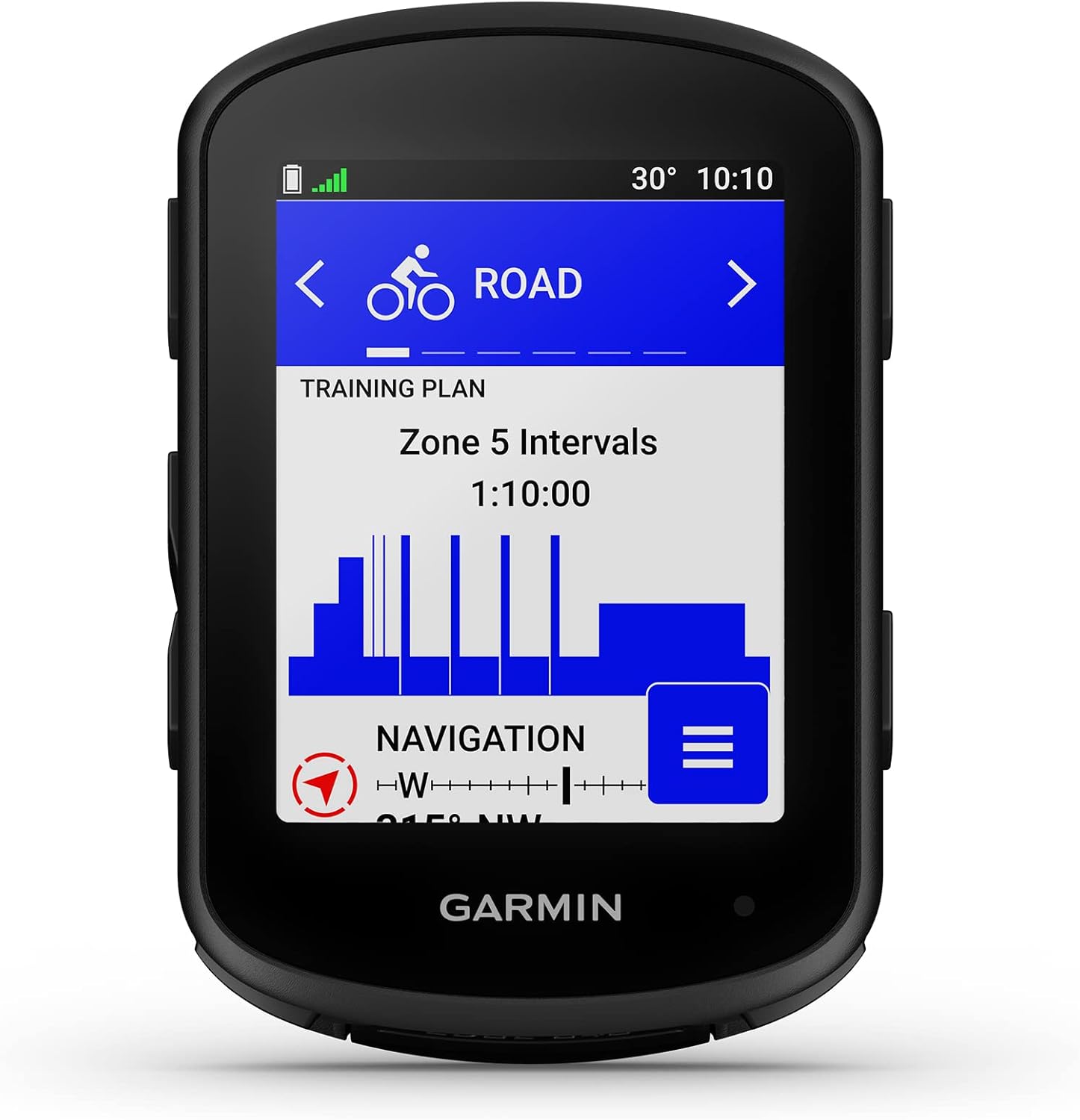
Image: Front view of the Garmin Edge 840 displaying a 'Zone 5 Intervals' training plan. The screen shows current temperature, time, and navigation details. This image illustrates the device's user interface for training.

Image: Side view of the Garmin Edge 840, highlighting its physical buttons. The screen displays various ride metrics including speed (18.2 mph), calories (750), power (193 watts), timer (1:24:14), distance (22.4 miles), and elevation (2214 feet). This image demonstrates the device's data display capabilities during a ride.
Navigation Features
- Multi-band GNSS: Provides enhanced positioning accuracy, especially in challenging environments like dense tree cover or urban areas.
- Ride-Specific Routing: Get routes tailored to your ride type, whether mountain, gravel, or road.
- Turn-by-Turn Directions: Stay on course with clear on-screen directions and alerts.
- Back to Start: Navigate back to your starting point if you get lost or wish to end your ride early.

Image: The Garmin Edge 840 mounted on bicycle handlebars, displaying a detailed map with a route highlighted. This illustrates the device's multi-band GNSS technology for enhanced navigation accuracy.

Image: The Garmin Edge 840 screen showing a detailed navigation map with a highlighted route and current position. The top of the screen indicates the next turn and distance. This image demonstrates the device's navigation capabilities.
Training and Performance Features
- Daily Suggested Workouts: View personalized workout recommendations and training prompts directly on screen.
- Targeted Adaptive Coaching: When paired with compatible sensors, receive power targets throughout a course and stamina insights to manage your effort.
- ClimbPro Ascent Planner: See remaining ascent and grade when climbing, allowing you to gauge your effort. This feature is available on every ride, even without a pre-loaded course.
- Cycling Ability and Course Demands: Classify your strengths as a cyclist and compare them to the demands of a specific course to focus your training. Requires compatible power meter and heart rate monitor.
- Power Guide: Recommends power targets throughout a course to help manage your efforts. Requires compatible power meter.
- Stamina Insights: Monitor your remaining stamina during a ride. Requires compatible power meter and heart rate monitor.
- Training Status: Evaluate your performance indicators to determine if your training is productive.
- Heat and Altitude Acclimation: Track how your body is adapting to environmental conditions.
- Event Goals: Set race distance and time goals to receive daily suggested workouts.
- Cycling Dynamics: Access advanced cycling metrics for insight into performance under variable conditions. Requires compatible sensors.
- MTB Dynamics: Track mountain biking metrics such as jump count, jump distance, and hang time.
- Grit and Flow Metrics: Grit rates the difficulty of a trail, while Flow measures how smoothly you ride it.

Image: The Garmin Edge 840 screen showing 'Training Status' as 'Productive'. It displays VO2 Max (54, Excellent) and Acute Load (950, Optimal), indicating effective training. This image demonstrates the device's ability to provide performance insights.

Image: The Garmin Edge 840 screen displaying the ClimbPro ascent planner. It shows a graphical representation of an upcoming climb, including current grade (5%), remaining distance (7.1 miles), and total elevation gain (2296 feet). This image highlights the device's climbing assistance feature.
Connectivity and Alerts
- Smart Notifications: Receive alerts for calls, texts, and other notifications from your paired smartphone.
- GroupTrack Feature: Check the location of other riders in your group (up to 50 riders) when connected to your smartphone with network coverage.
- Nutrition and Hydration Alerts: Receive notifications reminding you when to hydrate or eat during your ride.
Battery Life
The Edge 840 offers up to 26 hours of battery life in demanding use cases and up to 32 hours in battery saver mode. For optimal battery performance, ensure the device is fully charged before each ride.

Image: A cyclist riding on a winding road, with text overlay highlighting 'Extended Battery Life'. The text states the Edge 840 offers up to 26 hours in intense mode and up to 42 hours in battery saver mode. This image emphasizes the device's long-lasting power.
Maintenance
Cleaning the Device
Regularly clean your Edge 840 with a soft, damp cloth. Avoid using abrasive cleaners or solvents that could damage the device's screen or casing. Ensure the USB-C port cover is securely closed to prevent water and debris ingress.
Software Updates
Periodically check for software updates via the Garmin Connect app or Garmin Express on your computer. Keeping your device's software up to date ensures optimal performance and access to the latest features.
Storage
When not in use for extended periods, store the device in a cool, dry place away from direct sunlight. Charge the battery to approximately 50% before storing to prolong battery life.
Troubleshooting
Device Not Powering On
- Ensure the device is fully charged.
- Try holding the power button for at least 15 seconds to perform a soft reset.
GPS Signal Issues
- Ensure you are in an open area with a clear view of the sky.
- Wait a few minutes for the device to acquire satellite signals.
- Verify that the device software is up to date.
Touchscreen Unresponsive
- Ensure the screen is clean and dry.
- Restart the device.
- If the issue persists, use the physical buttons for navigation and contact Garmin Support.
Specifications
| Feature | Specification |
|---|---|
| Product Dimensions | 2.3 x 3.4 x 0.8 inches |
| Item Weight | 2.8 ounces |
| Model Number | 010-02695-00 |
| Batteries | 1 Lithium Ion battery (included) |
| Wireless Communication | Bluetooth, Wi-Fi |
| Connectivity Technology | Bluetooth, USB, Wi-Fi |
| Display Resolution | 246 x 322 pixels |
| Human Interface Input | Buttons, Touchscreen |
| Color | Black |
| Screen Size | 2.6 Inches |
| Battery Life | Up to 26 Hours (demanding use), up to 32 Hours (battery saver mode) |
| Map Type | North America (pre-loaded) |
| Special Features | ClimbPro Ascent Planner, Cycling Ability and Course Demands, Event Adaptive Training, Heat and Altitude Acclimation, InReach® Device Compatibility, LiveTrack Feature, MTB Dynamics, Multi-Band GNSS, Smart Notifications, Stamina Insights |
Warranty and Support
For warranty information, please refer to the documentation included with your Garmin Edge 840 or visit the official Garmin website. For technical support, product registration, and additional resources, please visit the Garmin Store or contact Garmin customer service.