
Taylor 5295845
Taylor Digital Waterproof Kitchen Food and Meat Thermometer Instruction Manual
Model: 5295845
Introduction
The Taylor Precision Products Waterproof Programmable Folding Thermometer is designed to help you achieve perfect cooking temperatures for various foods. Its waterproof design allows for easy cleaning, and programmable presets simplify the cooking process. This manual provides detailed instructions for setup, operation, and maintenance of your new thermometer.
Product Overview
Your Taylor Digital Waterproof Thermometer is equipped with several features to enhance your cooking experience:
- Waterproof Design: Certified to IPX7, allowing for safe cleaning under running water or submersion.
- High Accuracy: Measures temperatures from -40°F to 482°F (-40°C to 250°C) with precision.
- Sleek Design with Easy Reading: Features a convenient folding narrowed tip probe for safe storage and an extra-large, blue backlit 0.5-inch display for visibility in low light.
- Programmable Presets: Includes preset temperatures for various protein types, eliminating the need for external charts.
- Battery Operated: Comes with two (2) AAA batteries for immediate use.

Figure 1: Front view of the Taylor Digital Thermometer with the probe extended, showing the digital display.

Figure 2: Overview of key features including waterproof capability, backlit display, and programmable settings.
Setup
Before first use, you need to activate the batteries:
- Locate the battery compartment on the back of the thermometer.
- Using a small Phillips head screwdriver (not included), loosen the screws to remove the battery compartment door.
- Remove the plastic insulation tab protecting the batteries.
- Ensure the waterproof gasket is securely in place.
- Replace the battery compartment door and tighten the screws to ensure a tight seal.

Figure 3: View of the battery compartment, showing the two AAA batteries inside.
Operating Instructions
Follow these steps to use your thermometer:
- Power On/Off: Extend the probe to automatically power on the thermometer. To power off, fold the probe back into the unit or press and hold the power button (⑂) for 2 seconds.
- Select Temperature Unit: Press the ℉/℃ button to switch between Fahrenheit and Celsius.
- Measure Temperature: Insert the narrowed tip probe into the thickest part of the food, avoiding bone or gristle. The temperature will display on the backlit LCD screen within seconds.
- Hold Function: Press the HOLD button to freeze the current temperature reading on the display. Press again to release.
- Using Presets: Press the SET button to cycle through pre-programmed temperature settings for different meat types (e.g., Beef, Pork, Poultry, Ground Meat). The display will show an icon indicating the meat type.
- Custom Programming: To set a custom target temperature, cycle through the presets until you find a blank setting (without a farm animal icon). Use the up (▲) and down (▼) arrows to adjust the target temperature.
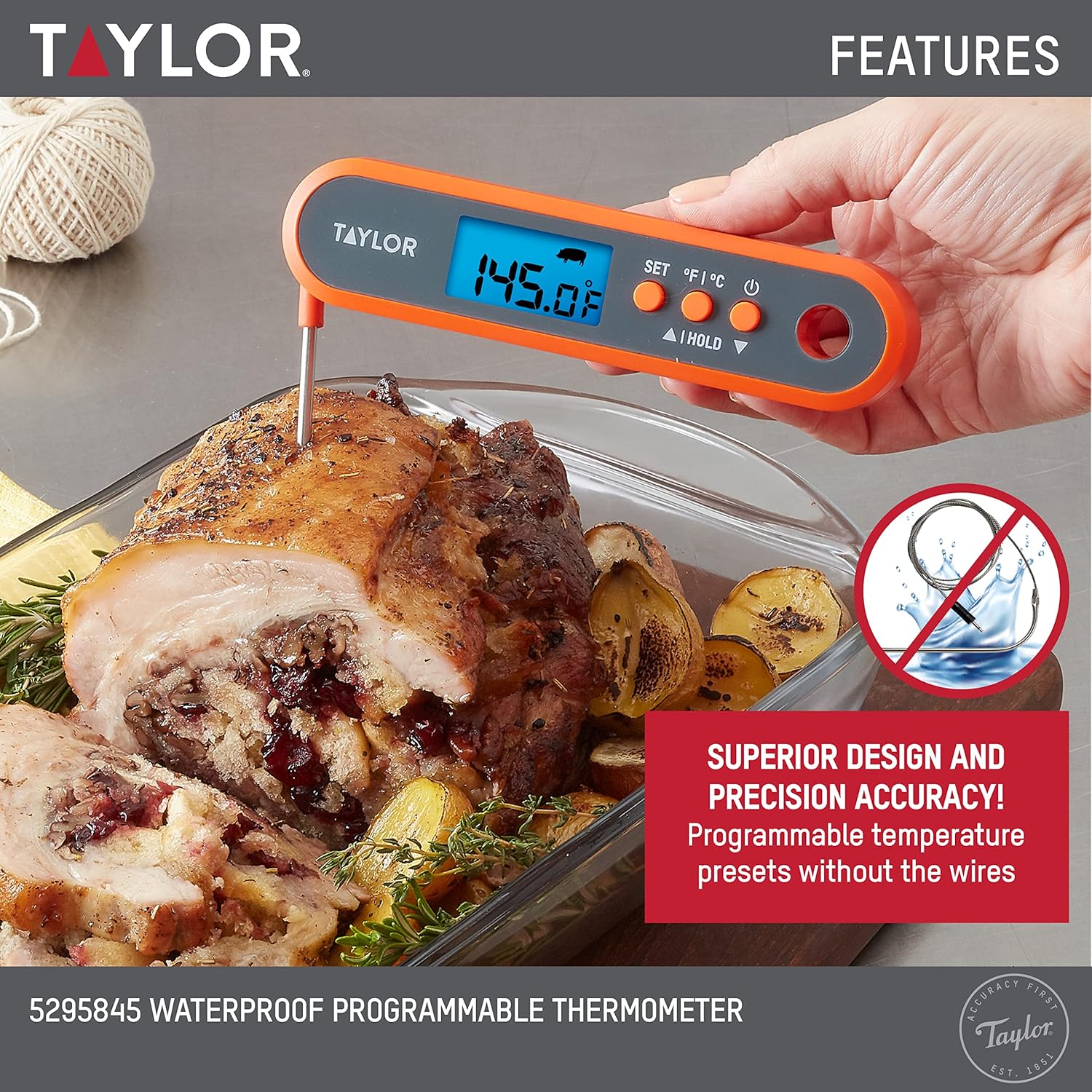
Figure 4: The thermometer displaying a preset temperature for a specific meat type.
Maintenance
Proper care ensures the longevity and accuracy of your thermometer:
- Cleaning: The thermometer is IPX7 waterproof, allowing it to be washed under running water or submerged in a sink for easy cleaning. Hand wash only. Do not place in a dishwasher.
- Storage: Fold the probe back into the unit for safe and compact storage. The integrated hang-hole also allows for convenient hanging.
- Battery Replacement: If the display becomes dim or unresponsive, replace the two AAA batteries as described in the Setup section.

Figure 5: The thermometer being cleaned under running water, highlighting its IPX7 waterproof rating.
Troubleshooting
| Problem | Possible Cause / Solution |
|---|---|
| Thermometer does not turn on. |
|
| Inaccurate temperature readings. |
|
| Display is dim or flickering. | Batteries are low and need to be replaced. |
Specifications
- Model Number: 5295845
- Temperature Range: -40°F to 482°F (-40°C to 250°C)
- Waterproof Rating: IPX7
- Display Type: Digital, Backlit LCD (0.5-inch digit height)
- Power Source: 2 x AAA batteries (included)
- Probe Length: 4 inches
- Dimensions: Approximately 6.25 x 1.5 inches (folded)
- Material: Plastic (outer material)
- Care Instructions: Hand Wash Only
- Country of Origin: China
- Manufacturer: Lifetime Brands Inc.

Figure 6: Detailed dimensions and temperature range of the thermometer.
Warranty and Support
For warranty information or technical support, please refer to the contact details provided with your product packaging or visit the official Taylor website. Keep your purchase receipt for warranty claims.
Related documents5295845

Ask a question about this manual
Ask about setup, troubleshooting, compatibility, parts, safety, or missing instructions. Manuals+ will review the question and use this page’s manual context to help answer it.