
1. Introduction and Overview
Thank you for choosing the ONKRON TS1881DV-B Dual Screen Mobile TV Stand. This versatile and robust stand is designed to securely hold two flat-screen televisions ranging from 40 to 65 inches, with a combined weight capacity of up to 200.6 lbs. Its mobile design, featuring smooth-rolling wheels, allows for easy relocation, making it ideal for various environments such as offices, conference rooms, educational institutions, trade shows, or home multimedia setups.
This manual provides detailed instructions for assembly, operation, and maintenance to ensure safe and optimal use of your new TV stand. Please read all instructions carefully before assembly and retain this manual for future reference.

Image 1.1: The ONKRON TS1881DV-B Dual Screen Mobile TV Stand, fully assembled and ready for use.

Image 1.2: The mobile TV stand positioned in a large room, demonstrating its suitability for presentations and large gatherings.
2. Safety Information
To ensure safe operation and prevent damage, please adhere to the following safety guidelines:
- Weight Capacity: Do not exceed the maximum aggregate load capacity of 200.6 lbs (91 kg) for the TVs and 11 lbs (5 kg) per shelf. Overloading can cause instability and damage.
- TV Size: This stand is designed for TVs between 40 and 65 inches. Using TVs outside this range may compromise stability or fit.
- VESA Compatibility: Ensure your TVs' VESA mounting patterns are within the supported range of 200x200mm to 800x500mm.
- Assembly: Assemble the stand strictly according to the instructions. Incorrect assembly can lead to product failure or injury.
- Stability: Always ensure all screws and bolts are tightened securely before mounting TVs and before moving the stand.
- Moving the Stand: When moving the stand, ensure the path is clear of obstacles. Move slowly and carefully, especially on uneven surfaces. Always lock the wheels once the stand is in its desired position.
- Children and Pets: Keep children and pets away from the stand during assembly and when moving it. Do not allow them to climb on or play with the stand.
- Maintenance: Regularly inspect the stand for any loose parts or signs of wear. Tighten any loose connections immediately.
- Environment: Do not expose the stand to excessive moisture, direct sunlight, or extreme temperatures.
3. Package Contents
Before beginning assembly, please verify that all components listed below are present and undamaged. If any parts are missing or damaged, do not proceed with assembly and contact ONKRON customer service.

Image 3.1: All parts included in the ONKRON TS1881DV-B package.

Image 3.2: Detailed view of the included hardware (screws and washers).
Component List:
- Base (1)
- Vertical Poles (2)
- TV Mounting Bracket (1)
- VESA Adapters (4)
- Adjustable Shelves (2)
- Top Shelf for Webcam/PTZ Camera (1)
- Casters/Wheels (4, with locks)
- Hardware Kit (various screws, washers, nuts, wrenches)
- Cable Management Clips/Channels
4. Specifications
| Feature | Specification |
|---|---|
| Model Number | TS1881DV-B |
| Compatible TV Sizes | 40 - 65 inches (per TV) |
| Maximum Aggregate Load Capacity | 200.6 lbs (91 kg) |
| VESA Compatibility | 200x200mm, 200x300mm, 200x400mm, 300x100mm, 300x200mm, 300x300mm, 300x400mm, 400x200mm, 400x300mm, 400x400mm, 500x400mm, 600x200mm, 600x300mm, 600x400mm, 700x400mm, 700x500mm, 800x200mm, 800x400mm, 800x500mm |
| Height Adjustment Range | 53.5" to 64.9" (1350mm to 1650mm) |
| Shelf Load Capacity | 11 lbs (5 kg) per shelf |
| Material | Alloy Steel, Metal (SPCC steel) |
| Item Weight | 103.6 lbs (47 kg) |
| Color | Black |

Image 4.1: VESA compatibility and weight limits for the ONKRON TS1881DV-B.
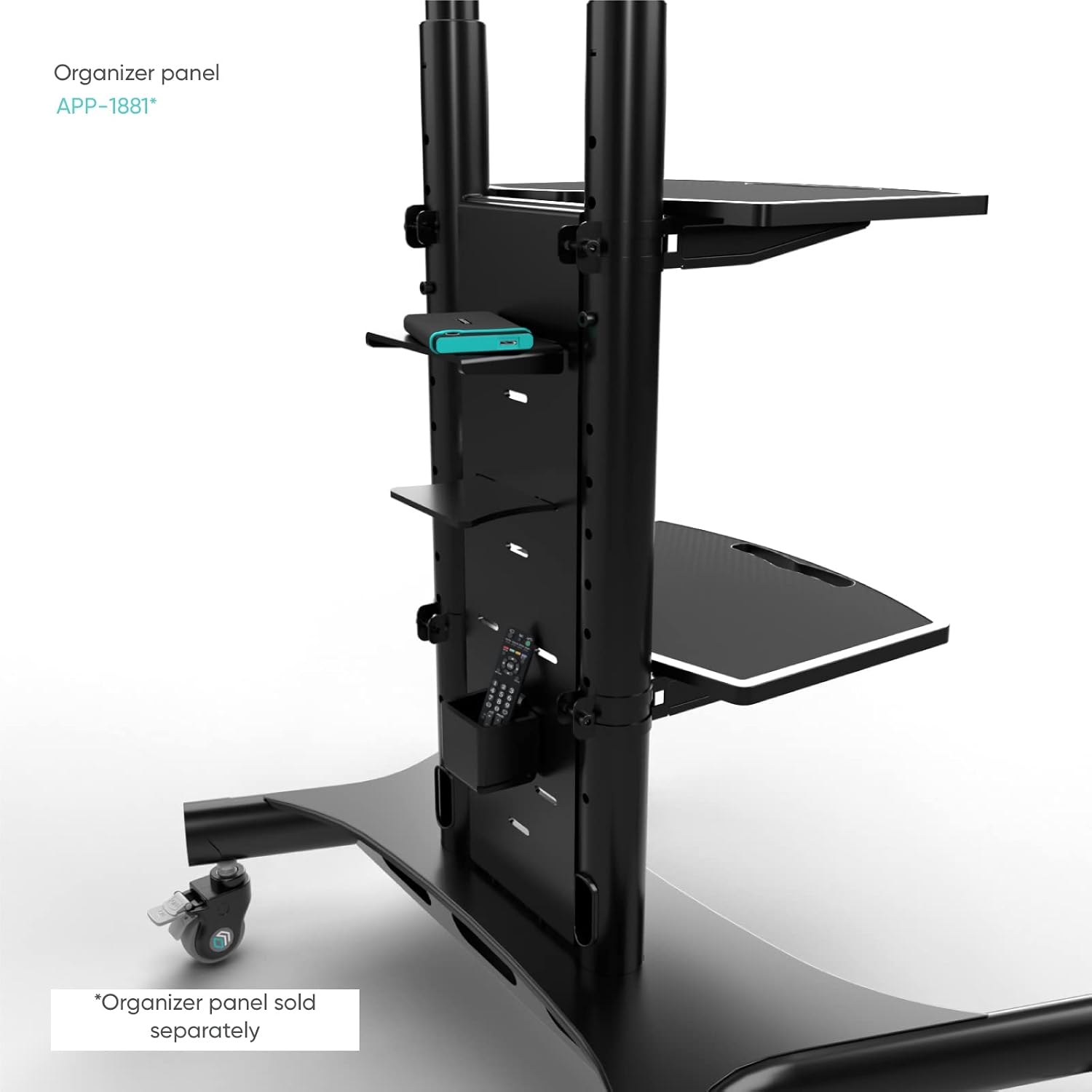
Image 4.2: Comprehensive dimensional overview of the assembled TV stand.
5. Setup and Assembly Instructions
Follow these steps carefully to assemble your ONKRON Dual Screen Mobile TV Stand. It is recommended to have at least two people for assembly, especially when mounting the TVs.
Step-by-Step Assembly:
- Unpack and Identify Parts: Lay out all components on a soft, clean surface to prevent scratches. Compare them with the 'Package Contents' section to ensure all parts are present.
- Assemble the Base: Attach the casters (wheels) to the base frame. Ensure two of the casters with locking mechanisms are positioned at the front for easy access. Tighten all bolts securely.
- Attach Vertical Poles: Securely attach the two vertical support poles to the assembled base using the provided hardware. Ensure they are firmly seated and aligned.
- Install Shelves: Slide the two adjustable shelves and the top webcam/PTZ shelf onto the vertical poles at your desired heights. These can be adjusted later. Secure them with the provided locking mechanisms.
- Attach TV Mounting Bracket: Secure the main TV mounting bracket horizontally across the top of the vertical poles. Ensure it is level and all fasteners are tightened.
- Prepare TVs for Mounting: Attach the VESA adapter brackets to the back of each TV using the appropriate screws from the hardware kit. Ensure the screws are compatible with your TV's VESA holes and do not overtighten.
- Mount TVs: With assistance, carefully lift each TV and hook the VESA adapter brackets onto the main TV mounting bracket on the stand. Ensure both TVs are securely seated.
- Secure TVs: Once the TVs are hung, use the safety screws or locking mechanisms on the VESA adapter brackets to secure the TVs to the main bracket, preventing accidental dislodgement.
- Cable Management: Route all TV and device cables through the integrated cable management channels within the vertical poles to maintain a tidy and safe setup.

Image 5.1: Key features of the stand, including adjustable shelves, height adjustment, and cable management.
6. Operating Instructions
Adjusting Height:
The TV stand's height can be adjusted from 53.5" to 64.9" (1350mm to 1650mm) in 2-inch increments. To adjust, loosen the locking mechanisms on the vertical poles, carefully raise or lower the TV mounting bracket to the desired height, and then securely tighten the locking mechanisms. Ensure both sides are adjusted equally to keep the TVs level.
Moving the Stand:
To move the stand, unlock all four casters by flipping their locking levers. Gently push or pull the stand to its new location. Once in position, always engage the locking levers on all casters to prevent unintended movement and ensure stability.

Image 6.1: Detail of the rubberized, locking casters for secure positioning and easy mobility.
Using Shelves:
The two adjustable shelves can hold AV equipment, laptops, or other accessories up to 11 lbs (5 kg) each. The top shelf is specifically designed for webcams or PTZ cameras. Adjust their height by loosening their respective clamps, sliding them to the desired position, and re-tightening the clamps.
Portrait Screen Orientation:
For screens with VESA up to 400x400mm, the stand supports portrait screen orientation. This requires careful re-mounting of the TVs in the vertical position. Ensure the VESA pattern of your TV is compatible with this orientation and that the TV is securely fastened.
7. Maintenance
Regular maintenance will prolong the life and ensure the safe operation of your ONKRON TV stand.
- Cleaning: Use a soft, dry cloth to wipe down the stand. For stubborn marks, a slightly damp cloth with mild soap can be used, followed by drying thoroughly. Avoid abrasive cleaners or solvents.
- Check Connections: Periodically (e.g., every 3-6 months) inspect all screws, bolts, and locking mechanisms. Tighten any that have become loose due to vibration or movement.
- Caster Maintenance: Keep the wheels free of dust, hair, and debris to ensure smooth rolling. If wheels become stiff, clean them and apply a small amount of silicone-based lubricant if necessary.
- Weight Distribution: Ensure that the weight of the TVs and any equipment on the shelves is evenly distributed to maintain stability.
8. Troubleshooting
If you encounter any issues with your ONKRON Dual Screen Mobile TV Stand, refer to the following common problems and solutions:
| Problem | Possible Cause | Solution |
|---|---|---|
| Stand feels unstable or wobbly. | Loose connections; uneven weight distribution; overloaded. | Check and tighten all screws and bolts. Redistribute weight evenly. Ensure total weight does not exceed 200.6 lbs. |
| Difficulty moving the stand. | Casters are locked; debris in casters; casters need lubrication. | Unlock all casters. Clean any debris from the wheels. Apply a small amount of silicone lubricant if necessary. |
| TVs are not level. | Uneven height adjustment; VESA brackets not aligned. | Ensure both vertical poles are adjusted to the same height. Re-check that VESA brackets are securely and evenly attached to both TVs and the main mounting bar. |
| Shelves slide down. | Shelf clamps are loose; shelf is overloaded. | Tighten the shelf clamps securely. Ensure the weight on each shelf does not exceed 11 lbs. |
If you experience issues not covered here, or if the problem persists, please contact ONKRON customer service for assistance.
9. Warranty and Customer Support
ONKRON TV stands undergo multi-stage quality control to ensure safety and reliability. We are committed to providing high-quality products and excellent customer service.
For any questions regarding the assembly, operation, maintenance, or troubleshooting of your ONKRON Dual Screen Mobile TV Stand (Model TS1881DV-B), please do not hesitate to contact our expert customer support team. Our representatives are ready to assist you with any inquiries you may have.
Please visit the official ONKRON website or refer to your product packaging for the most current contact information and warranty details.
Thank you for choosing ONKRON.