
AT&T EL50019
AT&T EL50019 Accessory Handset User Manual
Model: EL50019
Introduction
This manual provides comprehensive instructions for the AT&T EL50019 Accessory Handset. This handset is designed to expand your existing AT&T EL52219 series phone system, offering enhanced communication features such as a full-duplex speakerphone, Caller ID, and a backlit keypad and display for improved visibility. Please read this manual thoroughly to ensure proper setup, operation, and maintenance of your accessory handset.
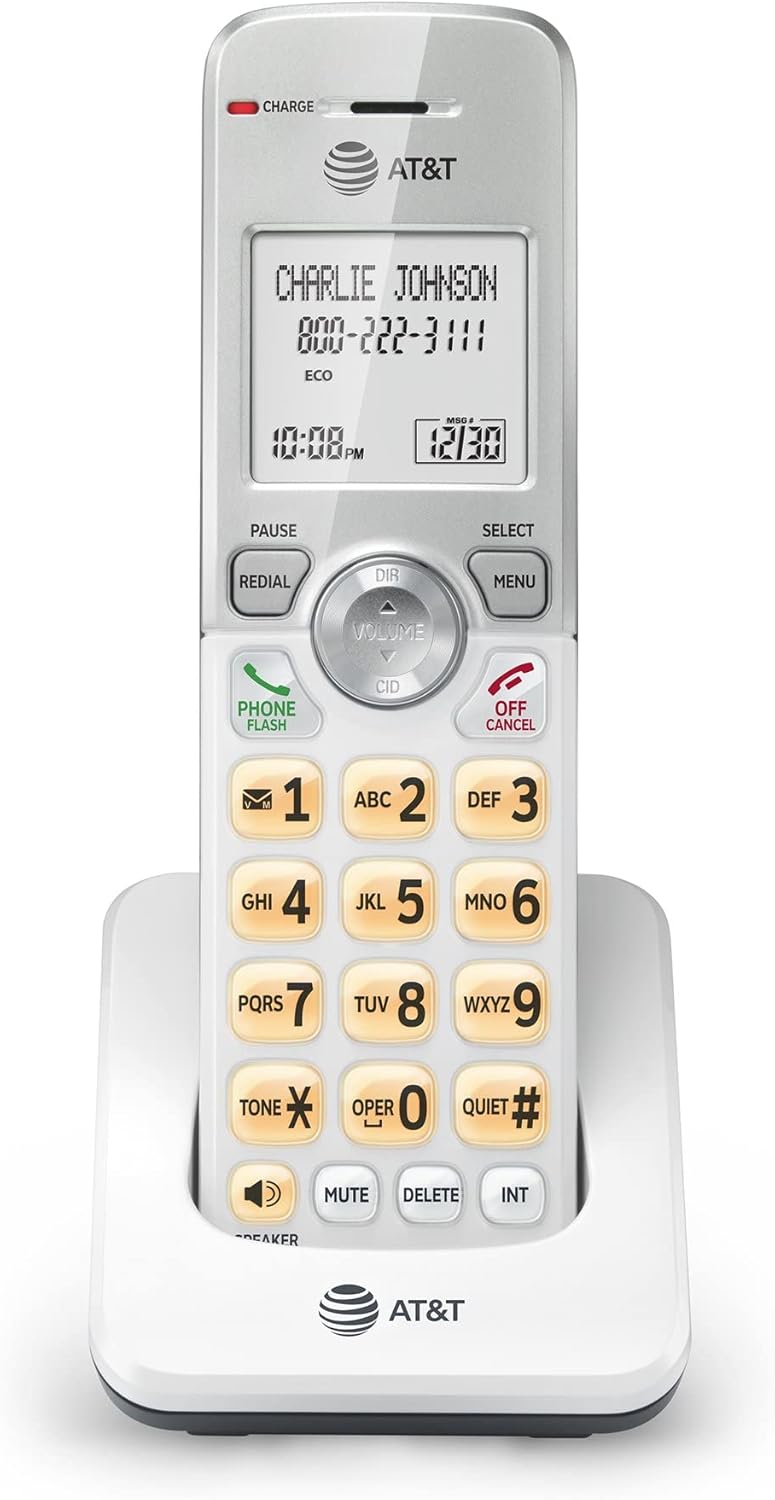
Figure 1: Front view of the AT&T EL50019 Accessory Handset, showing the display, keypad, and navigation buttons.
Important Safety Instructions
When using your telephone equipment, basic safety precautions should always be followed to reduce the risk of fire, electric shock, and injury to persons, including the following:
- Do not use this product near water, for example, near a bathtub, washbowl, kitchen sink, or laundry tub, in a wet basement or near a swimming pool.
- Avoid using a telephone (other than a cordless type) during an electrical storm. There may be a remote risk of electric shock from lightning.
- Do not use the telephone to report a gas leak in the vicinity of the leak.
- Use only the power cord and batteries indicated in this manual. Do not dispose of batteries in a fire. They may explode. Check with local codes for special disposal instructions.
- Do not disassemble the product. Refer to the "Troubleshooting" section for common issues. If the product requires service, contact AT&T customer support.
Package Contents
Ensure all items are present in your package:
- AT&T EL50019 Accessory Handset
- Handset Battery
- Handset Charger Cradle
- Power Adapter for Charger Cradle
- User's Manual (this document)
Note: This is an accessory handset and requires an AT&T EL52219 series phone system to operate.
Setup
1. Battery Installation
- Locate the battery compartment on the back of the handset.
- Open the battery compartment cover.
- Connect the battery pack plug into the jack inside the compartment, ensuring correct polarity.
- Place the battery pack into the compartment.
- Close the battery compartment cover securely.
2. Charging the Handset
Before initial use, charge the handset for at least 16 hours. A full charge ensures optimal battery performance.
- Plug the small end of the power adapter into the power jack on the back of the charger cradle.
- Plug the large end of the power adapter into a standard electrical outlet not controlled by a wall switch.
- Place the handset face forward in the charger cradle. The "CHARGE" indicator light on the handset will illuminate, confirming it is charging.

Figure 2: The AT&T EL50019 Accessory Handset placed in its charging cradle.
3. Registering the Handset
This accessory handset must be registered to your AT&T EL52219 series base unit before use. Refer to your main EL52219 series phone system manual for detailed registration instructions. Typically, this involves placing the handset in the base unit's charger and pressing a registration button on the base unit.
4. Initial Settings (Date/Time)
Once registered, the handset may prompt you to set the date and time. Follow the on-screen instructions using the navigation keys and the MENU/SELECT button. Correct date and time settings are crucial for Caller ID and call log accuracy.
Operating Instructions
Making and Receiving Calls
- To Make a Call: Press PHONE/FLASH or any dialing key, then dial the number.
- To Answer a Call: When the phone rings, press PHONE/FLASH or any dialing key.
- To End a Call: Press OFF/CANCEL or place the handset back in the charger cradle.
Speakerphone Function
The EL50019 features a simulated full-duplex speakerphone, allowing both parties to speak and be heard simultaneously for more natural conversations.
- To Activate Speakerphone: During a call, press the SPEAKER button.
- To Switch Back to Handset: Press PHONE/FLASH.
Caller ID/Call Waiting
The handset displays the caller's name and number (if available) for incoming calls. It also supports Call Waiting, allowing you to answer a second call while on the phone.
- Review Caller ID History: Press CID to scroll through the 50-name and number caller ID history.
- To Answer a Waiting Call: Press PHONE/FLASH when you hear the call waiting tone.
Phonebook Directory
Store up to 50 names and numbers in the phonebook for quick dialing.
- Access Phonebook: Press DIR.
- Add/Edit Entries: Follow on-screen prompts after pressing MENU/SELECT and navigating to the Phonebook option.
Redial and Mute
- Redial: Press REDIAL to view the last 10 dialed numbers. Press PHONE/FLASH to dial a selected number.
- Mute: During a call, press MUTE to temporarily silence your microphone. Press again to unmute.
Quiet Mode
Activate Quiet Mode to silence all ringers on the handset for a set period, useful for undisturbed sleep or meetings.
- Activate/Deactivate: Press and hold the QUIET# button. Follow the prompts to set the duration.
Voicemail
The handset features a voicemail waiting indicator and quick access key.
- Access Voicemail: When the voicemail indicator is on, press and hold 1 (or the designated voicemail access key) to dial your voicemail service.
Intercom and Conference Calls
If you have multiple registered handsets, you can use the intercom feature or conduct conference calls.
- Intercom: Press INT, then dial the number of the handset you wish to call.
- Conference Call: During an external call, press MENU/SELECT, select "Conference," then dial the internal handset or external line you wish to add.
Volume Control
Adjust the listening volume during a call or the ringer volume when idle.
- Call Volume: Press VOLUME up or down during a call.
- Ringer Volume: Press VOLUME up or down when the handset is idle.
Maintenance
Cleaning the Handset
Clean the handset and charger cradle with a soft, slightly damp cloth. Do not use cleaning sprays or harsh chemicals, as they may damage the finish or electrical components.
Battery Care
- To preserve battery life, avoid overcharging by leaving the handset off the charger for short periods after it is fully charged.
- If the handset will not be used for an extended period, remove the battery to prevent leakage.
- Replace the battery when the handset consistently shows a low battery indicator or experiences significantly reduced talk/standby time.
Troubleshooting
If you experience difficulty with your phone, please try the following suggestions. For customer service, visit the AT&T website or refer to the contact information provided with your main EL52219 series phone system.
| Problem | Solution |
|---|---|
| No dial tone. |
|
| Handset does not charge. |
|
| Poor sound quality. |
|
| Display is blank or dim. |
|
Specifications
| Feature | Detail |
|---|---|
| Model | EL50019 (Accessory Handset) |
| Technology | DECT 6.0 Digital Technology |
| Caller Identification | Yes (50 name/number history) |
| Phonebook Capacity | 50 names and numbers |
| Speakerphone | Simulated Full-Duplex Handset Speakerphone |
| Display | Extra-large LCD, Backlit |
| Keypad | Backlit, Enlarged Font |
| Quiet Mode | Yes |
| ECO Mode | Power-conserving technology |
| Redial Memory | Last 10 numbers |
| Intercom | Yes (between handsets) |
| Conference Call | Yes (between outside line and up to 2 cordless handsets) |
| Power Source | Corded Electric (for charger cradle) |
| Batteries | 1 Unknown battery (included) |
| Dimensions (Package) | 9 x 6 x 4 inches |
| Weight (Item) | 3 pounds |
Warranty and Support
For warranty information and technical support, please refer to the documentation included with your original AT&T EL52219 series phone system. You may also visit the official AT&T website for cordless phones or contact their customer service directly. Keep your purchase receipt as proof of purchase for warranty claims.
Online Support: www.att.com/support
Related documentsEL50019


Ask a question about this manual
Ask about setup, troubleshooting, compatibility, parts, safety, or missing instructions. Manuals+ will review the question and use this page’s manual context to help answer it.