
Product Overview
The Clarion JM-Carry On is a portable speaker designed for versatile audio playback. It features a wired microphone input, multi-color light effects, and an in-built battery for on-the-go use. Its compact and portable design allows for easy transport and setup in various environments.

Image: Clarion JM-Carry On Portable Bluetooth Speaker shown with its wired microphone.
Video: An overview of the Clarion Portable Bluetooth Speaker, highlighting its features and audio performance.
Package Contents
Please check the box for the following items:
- Clarion JM-Carry On Portable Bluetooth Speaker
- Wired Microphone
- Charging Cable
Initial Setup
- Charging the Speaker: Connect the provided charging cable to the speaker's charging port and a suitable power source. The LED indicator will show charging status. Ensure the speaker is fully charged before first use for optimal battery life.
- Power On/Off: Locate the power switch on the speaker. Slide it to the 'ON' position to power on the device. Slide it to 'OFF' to power off.
- Bluetooth Pairing:
- Turn on the speaker. It will automatically enter Bluetooth pairing mode, indicated by a flashing LED.
- On your smartphone or tablet, enable Bluetooth and search for available devices.
- Select "Clarion JM-Carry On" from the list. A confirmation tone will sound upon successful pairing.
- Connecting Wired Microphone: Insert the wired microphone's plug into the designated microphone input jack on the speaker.
Operation Guide
- Mode Selection: Use the 'Mode' button to switch between Bluetooth (BT), FM Radio, USB, and AUX input modes.
- Bluetooth Mode: Once paired, audio from your connected device will play through the speaker. Use your device or the speaker's controls for volume and track navigation.
- FM Radio Mode: In FM mode, press and hold the 'Play/Pause' button to auto-scan and save available radio stations. Use the 'Next/Previous' buttons to navigate through saved stations.
- USB/AUX Mode: Insert a USB drive into the USB port for MP3 playback or connect an external audio device via the AUX input using a 3.5mm audio cable.
- TWS (True Wireless Stereo) Functionality: To connect two JM-Carry On speakers for stereo sound, ensure both speakers are in Bluetooth mode and not connected to any device. Press and hold the TWS button on one speaker until you hear a pairing tone. The two speakers will connect, and then you can pair your device to the primary speaker.
- Sound Control: Adjust the master volume using the main rotary knob. Separate controls may be available for microphone volume and echo effects.
- LED Light Effects: The speaker features multi-color LED light effects. Use the dedicated 'Light' button to cycle through different light modes or turn them off.
Care and Maintenance
- Cleaning: Use a soft, dry cloth to clean the speaker's exterior. Do not use abrasive cleaners or solvents.
- Storage: Store the speaker in a cool, dry place away from direct sunlight and extreme temperatures.
- Battery Care: To prolong battery life, avoid fully discharging the battery frequently. Charge the speaker regularly, even if not in use for extended periods.
- Water Resistance: This speaker is not waterproof. Avoid exposure to water or high humidity.
Troubleshooting Guide
| Problem | Solution |
|---|---|
| Speaker does not power on. | Ensure the battery is charged. Connect the charging cable and try again. Check the power switch position. |
| No sound from the speaker. | Check the volume level on both the speaker and the connected device. Ensure the correct input mode (BT, AUX, USB) is selected. |
| Bluetooth pairing fails. | Ensure the speaker is in pairing mode. Turn off and on Bluetooth on your device. Move the device closer to the speaker. Disconnect from other Bluetooth devices. |
| Microphone is not working. | Ensure the microphone is securely plugged into the correct jack. Check the microphone volume control on the speaker. |
| FM radio reception is poor. | Adjust the speaker's position. Extend any external antenna if available. |
Technical Specifications
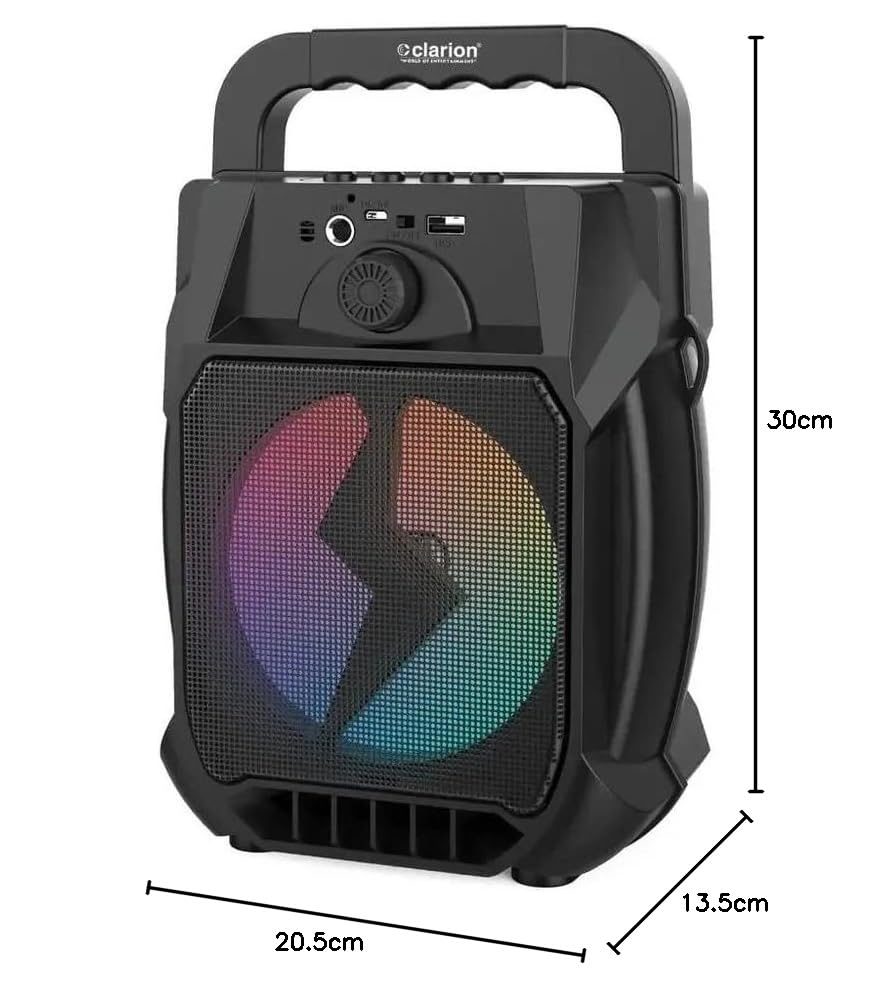
Image: Clarion JM-Carry On Portable Bluetooth Speaker with its dimensions indicated.
- Brand: Clarion (Generic)
- Model Name: JM-Carry On
- Speaker Maximum Output Power: 20 Watts RMS
- Connectivity Technology: Auxiliary, Bluetooth, USB
- Audio Output Mode: Stereo
- Mounting Type: Floor Standing
- Speaker Type: Satellite
- Product Features: Built-In Microphone, Radio, Subwoofer, Multi-color Light Effect, Sound Controller
- Control Method: Touch
- Woofer Driver Diameter: 6.5 Inches
- Battery Average Life: 3-4 Hours
- Battery Capacity: 1.2 Amp Hours (3.7V)
- Item Dimensions (D x W x H): 13.5 x 20.5 x 30 Centimeters
- Compatible Devices: Smartphone, Tablet
- Power Source: Battery Powered
Warranty and Customer Support
This Clarion JM-Carry On Portable Bluetooth Speaker comes with a 1-year warranty on the speaker unit from the date of purchase. Please retain your purchase receipt as proof of warranty.
For any technical assistance, troubleshooting, or warranty claims, please contact Clarion Computers customer support. Refer to your purchase documentation for specific contact details or visit the official Clarion Computers website for support information.
Note: The warranty typically covers manufacturing defects and does not cover damage caused by misuse, accidents, unauthorized modifications, or normal wear and tear.