
Drive Medical LS9500N
Drive Medical PreserveTech Lateral Rotation System
Model: LS9500N - User Manual
1. Introduction
The Drive Medical PreserveTech Lateral Rotation System (Model LS9500N) is an advanced air mattress system designed to provide pressure redistribution and lateral rotation therapy. This system is intended to assist in the prevention and treatment of pressure injuries by continuously changing pressure points and promoting circulation. It features a control unit for customizable settings, a foam base for power outage protection, and high side air bolsters for patient safety.
2. Important Safety Information
Please read all instructions carefully before operating the system. Failure to follow safety guidelines may result in injury or damage to the product.
- Always ensure the control unit is placed on a stable, flat surface and is not obstructed.
- Do not use the system near open flames or sources of ignition.
- Keep the control unit and power cord away from water or excessive moisture.
- Audio and visual alarms will alert you to low air pressure or power failure. Address these alerts promptly.
- The CPR connector allows for rapid deflation in emergency situations. Familiarize yourself with its location and operation.
- Only use accessories and replacement parts approved by Drive Medical.
- Ensure the patient's weight does not exceed the maximum weight capacity of 500 pounds.
3. Components Included
The Drive Medical PreserveTech Lateral Rotation System typically includes the following components:
- PreserveTech Lateral Rotation Mattress with integrated 2" foam base and 10" high side air bolsters.
- Digital Control Unit.
- Removable Quilted Four-Way Stretch Polyurethane Coated Cover.
- Air Hose Connector.
- Power Cord.
4. Setup Guide
Follow these steps to set up your PreserveTech Lateral Rotation System:
- Unpack Components: Carefully remove all components from the packaging. Inspect for any visible damage.
- Position Mattress: Place the mattress directly onto the bed frame. Ensure the head end of the mattress aligns with the head end of the bed. The mattress features a 2" foam base for protection.
- Connect Air Hoses: Locate the air hose connector at the foot end of the mattress. Connect the air hose from the control unit securely to the mattress connector. Ensure a snug fit to prevent air leaks.
- Position Control Unit: Place the digital control unit on a stable surface at the foot end of the bed, or hang it securely on the bed frame using the integrated hangers (if available). Ensure the unit is easily accessible and its vents are not blocked.
- Connect Power: Plug the power cord into the control unit, then plug the other end into a grounded electrical outlet.
- Initial Inflation: Press the 'Power' button on the control unit. The mattress will begin to inflate. Allow approximately 20-30 minutes for the mattress to fully inflate and stabilize before placing a patient on it.
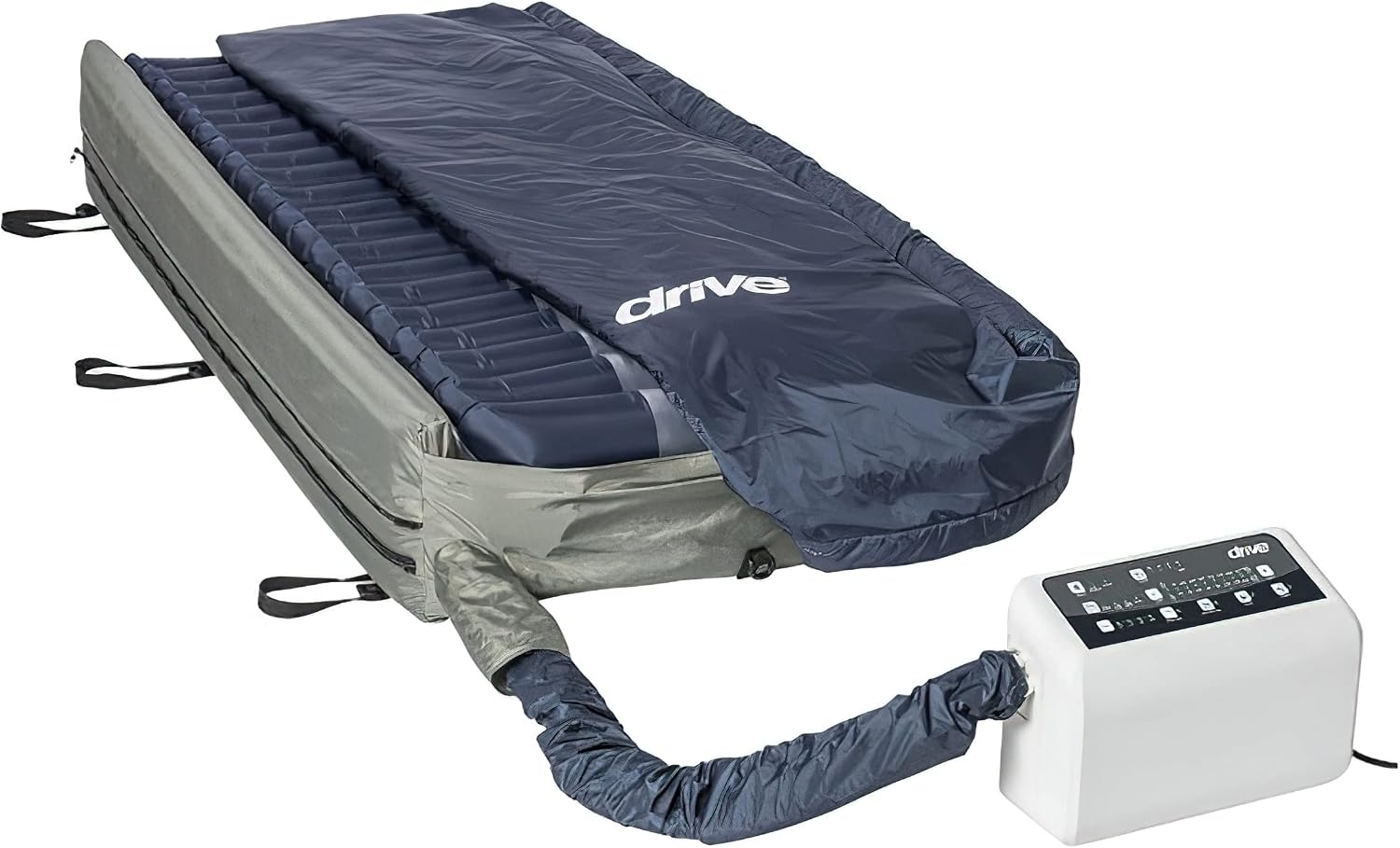
Image: The Drive Medical PreserveTech Lateral Rotation System, showing the mattress connected to the control unit via an air hose. The mattress is covered in a dark blue material, and the white control unit is visible on the right.

Image: A side view of the Drive Medical PreserveTech mattress, highlighting the inflated air cells and the 10-inch high side air bolsters designed for fall prevention. The control unit is visible in the foreground.
5. Operating Instructions
The digital control unit allows for precise adjustments to optimize patient comfort and therapy.

Image: A close-up view of the Drive Medical PreserveTech control unit, displaying its various buttons and LED indicators for comfort level, turning cycles, and alarm status.
5.1. Control Unit Overview
The control unit features a user-friendly interface with buttons and LED indicators for various functions:
- Power Button: Turns the system on/off.
- Comfort Level Adjustment: Allows selection of 10 comfort levels to adjust mattress firmness.
- Turning Cycle Time: Adjusts the duration of each turning cycle (10, 20, 30, or 60 minutes).
- Turn Angle Adjustment: Sets the maximum turn angle up to 40 degrees.
- Turning Modes: Select combinations of 1/4, 1/2, 3/4, and adjustable turning positions with left, right, both, or static (none) directions.
- Low Air Loss: Activates the on-demand low air loss feature to manage skin microclimate.
- Auto Firm: Rapidly inflates the mattress to maximum firmness for patient transfers or procedures.
- Lock Button: Locks the control panel to prevent accidental changes to settings.
- Pillow Feature: Provides head stability and comfort by maintaining inflation in the head section.
- Alarm Indicators: Visual and audio alerts for low pressure and power failure.
5.2. Adjusting Comfort Level
Use the comfort level buttons (often indicated by '+' and '-' or numerical settings) to increase or decrease the overall firmness of the mattress. Observe the patient's comfort and skin condition when adjusting.
5.3. Setting Turning Cycles
The system offers adjustable turning cycles to prevent prolonged pressure on any single area. Select the desired cycle time (10, 20, 30, or 60 minutes) and the turning angle (up to 40 degrees). You can also choose the direction of rotation (left, right, both, or static for no rotation).
5.4. Low Air Loss Function
Activate the Low Air Loss feature to allow a small amount of air to escape through microscopic holes in the mattress surface. This helps to reduce heat and moisture buildup, contributing to a healthier skin microclimate.
5.5. Rapid Deflation (CPR Connector)
In an emergency requiring rapid patient transfer or CPR, locate the CPR connector (typically a red pull tab) on the mattress. Pulling this tab will quickly deflate the mattress, providing a firm surface for medical intervention.
6. Maintenance and Cleaning
Proper maintenance ensures the longevity and hygienic operation of your system.
- Cover Cleaning: The removable quilted four-way stretch polyurethane coated cover should be hand washed with mild soap and water. Do not machine wash or tumble dry. Allow to air dry completely before reattaching.
- Mattress Cleaning: The mattress itself can be wiped down with a damp cloth and mild disinfectant. Ensure no liquid enters the air cells or connections.
- Control Unit Cleaning: Wipe the exterior of the control unit with a dry or slightly damp cloth. Do not use abrasive cleaners or immerse the unit in water.
- Cable Management: Utilize the built-in side loop cable management system to keep cords organized and prevent tripping hazards or damage.
- Regular Inspection: Periodically check air hoses for kinks or damage, and ensure all connections are secure.
7. Troubleshooting
If you encounter issues with your system, refer to the following common problems and solutions:
| Problem | Possible Cause | Solution |
|---|---|---|
| Low Pressure Alarm sounds/Mattress not fully inflated | Air leak, hose disconnected, kinked hose, power interruption, control unit malfunction. | Check all air hose connections. Ensure hoses are not kinked. Verify power supply. If problem persists, contact customer support. |
| Power Failure Alarm sounds | Power cord disconnected, power outage, control unit malfunction. | Check power cord connection to outlet and control unit. Verify power to the outlet. If power is restored and alarm continues, contact customer support. |
| Control unit buttons unresponsive | Control panel is locked, internal error. | Press the 'Lock' button to unlock the panel. If still unresponsive, power cycle the unit (turn off, unplug, wait 30 seconds, plug in, turn on). |
| Mattress not turning | Turning cycle not activated, incorrect settings, internal issue. | Ensure a turning cycle time and direction are selected. Check if the unit is in 'Static' mode. If issues persist, contact customer support. |
For issues not listed here or if solutions do not resolve the problem, please contact Drive Medical customer support.
8. Specifications
| Feature | Detail |
|---|---|
| Model Number | LS9500N |
| Overall Dimensions (WxLxH) | 36 x 80 x 10 inches |
| Item Weight | 43 pounds |
| Weight Capacity | 500 pounds |
| Mattress Layers of Foam | 1 (2" foam base) |
| Side Air Bolsters | 10" high |
| Air Cells | 20, 8" individual split air cells |
| Pump Airflow | 50 LPM |
| Pump Cycle Time | 10/20/30/60 minutes (adjustable) |
| Pump Power | 120V/60Hz |
| Pump Type | Compressor |
| Cover Material | Top Cover: 43% Polyurethane + 57% Polyester | Base: 50% PVC + 50% Nylon |
| Alarms | Low Pressure and Power Failure (Audio and Visual) |
| Special Features | Pillow feature, Rapid deflation (CPR connector), Side loop cable management system |
9. Warranty and Support
Drive Medical products are manufactured to high standards and are backed by a limited warranty. Specific warranty details, including duration and coverage, are typically provided with your product at the time of purchase. Please refer to the warranty card or documentation included in your product packaging for complete information.
For technical support, replacement parts, or warranty claims, please contact Drive Medical customer service directly. You can usually find their contact information on the product packaging, their official website, or by searching for 'Drive Medical customer support' online.
Drive Medical Official Website: www.drivemedical.com
Ask a question about this manual
Ask about setup, troubleshooting, compatibility, parts, safety, or missing instructions. Manuals+ will review the question and use this page’s manual context to help answer it.