Introduction
This manual provides essential information for the safe and efficient operation of your Nedis Bluetooth® Speaker, model SPBT3600BK. Please read this manual thoroughly before using the device and keep it for future reference.
The Nedis RGB Bluetooth® speaker is a wireless 2.0-channel 16W speaker designed to deliver rich sound while being incredibly lightweight and portable.
Safety Information
To ensure safe operation, please observe the following precautions:
- Do not expose the device to extreme temperatures, direct sunlight, or high humidity.
- Do not disassemble, repair, or modify the device. This will void the warranty.
- Keep the device away from water and other liquids. The device has an IPX6 rating, meaning it is protected against powerful water jets, but it is not designed for submersion.
- Use only the supplied USB cable for charging.
- Keep out of reach of children.
- Avoid listening at high volume levels for extended periods to prevent hearing damage.
Package Contents
Ensure all items are present and in good condition upon unpacking:
- Nedis Bluetooth® Speaker (SPBT3600BK)
- USB Charging Cable
- User Manual (this document)
Product Overview
Familiarize yourself with the various parts of your Nedis Bluetooth® Speaker.
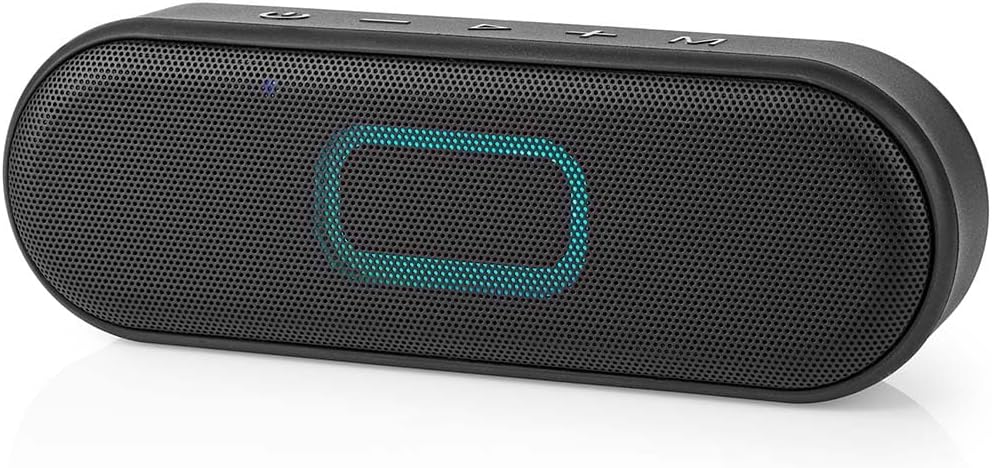
Figure 1: Front view of the Nedis Bluetooth speaker (SPBT3600BK) showing the speaker grille and a blue illuminated central area. The top panel features control buttons.
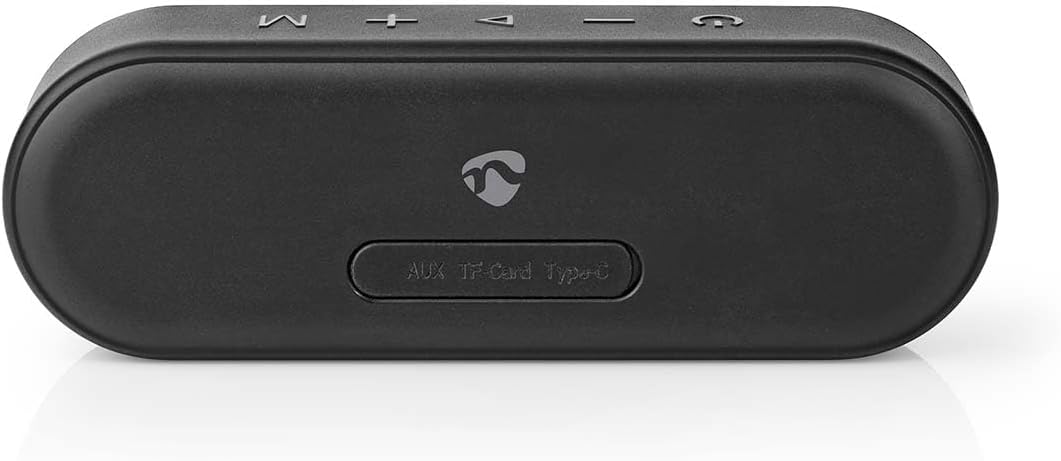
Figure 2: Bottom view of the speaker, highlighting the rubber flap covering the AUX, TF Card, and Type-C charging ports for water resistance.

Figure 3: Close-up view of the protected ports, including the AUX input, TF (Micro SD) card slot, and USB Type-C charging port, revealed by lifting the protective rubber cover.
Control Buttons (Top Panel):
- Power Button (⏻): Press and hold to power on/off.
- Volume Down / Previous Track (-): Short press for volume down, long press for previous track.
- Play/Pause / Call Answer (▶): Short press to play/pause, short press to answer/end call.
- Volume Up / Next Track (+): Short press for volume up, long press for next track.
- Mode Button (M): Short press to switch between Bluetooth, AUX, and TF Card modes.
Setup
1. Charging the Speaker
Before first use, fully charge the speaker. The charging port is located under the protective rubber flap on the bottom of the device.
- Lift the rubber flap on the bottom of the speaker.
- Connect the supplied USB charging cable to the USB Type-C port on the speaker.
- Connect the other end of the USB cable to a suitable USB power adapter (not included) or a computer's USB port.
- The charging indicator light will illuminate during charging and turn off when fully charged.
A full charge typically takes approximately 3-4 hours. The speaker offers up to 12 hours of playback time on a full charge.
2. Powering On/Off
- To Power On: Press and hold the Power button (⏻) for 2-3 seconds. You will hear an audible prompt, and the LED indicator will flash.
- To Power Off: Press and hold the Power button (⏻) for 2-3 seconds. You will hear an audible prompt, and the LED indicator will turn off.
Operating
1. Bluetooth Pairing
The speaker will automatically enter Bluetooth pairing mode when powered on for the first time or if no device is connected.
- Ensure the speaker is powered on and the LED indicator is flashing rapidly (indicating pairing mode). If not, short press the Mode button (M) until it enters Bluetooth mode.
- Enable Bluetooth on your smartphone, tablet, or other Bluetooth-enabled device.
- Search for available Bluetooth devices. The speaker will appear as "SPBT3600BK" or "Nedis Speaker".
- Select "SPBT3600BK" or "Nedis Speaker" from the list to connect.
- Once successfully paired, you will hear an audible confirmation, and the LED indicator will glow solid blue.
The speaker will automatically reconnect to the last paired device when powered on, if that device's Bluetooth is enabled and within range.
2. Audio Playback
- Play/Pause: Short press the Play/Pause button (▶).
- Volume Up: Short press the Volume Up button (+).
- Volume Down: Short press the Volume Down button (-).
- Next Track: Long press the Volume Up button (+).
- Previous Track: Long press the Volume Down button (-).
3. Answering/Ending Calls
When connected via Bluetooth, the speaker can be used for hands-free calls.
- Answer Call: Short press the Play/Pause button (▶) when a call comes in.
- End Call: Short press the Play/Pause button (▶) during a call.
- Reject Call: Long press the Play/Pause button (▶) when a call comes in.
4. Using AUX Input
Connect an external audio device using a 3.5mm audio cable (not included).
- Lift the rubber flap on the bottom of the speaker.
- Connect one end of a 3.5mm audio cable to the AUX port on the speaker.
- Connect the other end to the audio output of your external device.
- Short press the Mode button (M) until the speaker enters AUX mode.
- Control playback from your external device.
5. Using TF (Micro SD) Card
Play music directly from a Micro SD card.
- Lift the rubber flap on the bottom of the speaker.
- Insert a Micro SD card (up to 32GB, FAT32 format) with MP3 audio files into the TF Card slot.
- The speaker will automatically switch to TF Card mode and begin playing. If not, short press the Mode button (M) until it enters TF Card mode.
- Use the speaker's control buttons for playback (Play/Pause, Next/Previous Track, Volume).
6. True Wireless Stereo (TWS) Pairing (If applicable)
If you have two Nedis SPBT3600BK speakers, you can pair them together for a true wireless stereo experience.
- Ensure both speakers are powered on and not connected to any Bluetooth device.
- On one speaker (this will be the master speaker), double-press the Mode button (M). It will enter TWS pairing mode.
- The master speaker will search for the second speaker. Once connected, you will hear an audible confirmation.
- Now, connect your Bluetooth device to the master speaker as described in the "Bluetooth Pairing" section.
- Audio will now play through both speakers in stereo.
- To disconnect TWS, double-press the Mode button (M) on either speaker.
Maintenance
Proper care will ensure the longevity of your speaker.
- Cleaning: Wipe the speaker with a soft, dry cloth. Do not use abrasive cleaners, alcohol, or chemical solvents.
- Storage: When not in use for extended periods, store the speaker in a cool, dry place, away from direct sunlight and extreme temperatures.
- Battery Care: To prolong battery life, avoid fully discharging the battery frequently. Charge the speaker regularly, even if not in use.
- Water Resistance: Ensure the rubber flap covering the ports is securely closed to maintain the IPX6 water resistance rating.
Troubleshooting
| Problem | Possible Cause | Solution |
|---|---|---|
| Speaker does not power on. | Low battery. | Charge the speaker fully. |
| No Bluetooth connection. | Speaker not in pairing mode; Device Bluetooth off; Speaker too far from device. | Ensure speaker is in pairing mode (flashing LED). Turn on Bluetooth on your device. Move speaker closer to device (within 10 meters). Forget device on your phone and re-pair. |
| No sound. | Volume too low; Incorrect mode; Device not playing. | Increase volume on both speaker and connected device. Press Mode button to select correct input (Bluetooth, AUX, TF Card). Ensure music is playing on the connected device. |
| Sound distortion. | Volume too high; Device too far; Interference. | Lower volume. Move speaker closer to device. Avoid obstacles between speaker and device. |
| Cannot pair two speakers for TWS. | One or both speakers already connected to a device. | Ensure both speakers are disconnected from any Bluetooth devices before attempting TWS pairing. |
Specifications
| Model Number | SPBT3600BK |
| Brand | NEDIS |
| Product Dimensions | 60 x 182 x 43 mm (H x W x D) |
| Weight | 410 grams |
| Max. Speaker Output Power | 16 Watts |
| Connectivity Technology | Bluetooth |
| Audio Output Mode | Stereo |
| Mounting Type | Tabletop |
| Speaker Type | Soundbar |
| Special Feature | For Music, RGB Lighting |
| Recommended Use | For smartphone or tablet |
| Compatible Devices | Laptop, Tablet, Smartphone |
| Battery Life | Up to 12 hours |
| Water Resistance Rating | IPX6 |
Warranty and Support
Nedis products are built to high quality standards and come with a standard warranty period. For detailed warranty terms and conditions, please refer to the warranty card included with your product or visit the official Nedis website.
For technical support, troubleshooting assistance, or to inquire about spare parts, please contact Nedis customer service. Contact information can typically be found on the Nedis website or on the product packaging.
Website: www.nedis.com