
1. Product Overview
The Eurotronic 700083 Comet Plus is an electronic radiator thermostat designed to regulate room temperature efficiently. This device allows for precise temperature control, contributing to energy savings and enhanced comfort in your home or office. It features programmable heating and economy times, ensuring your spaces are heated only when needed.
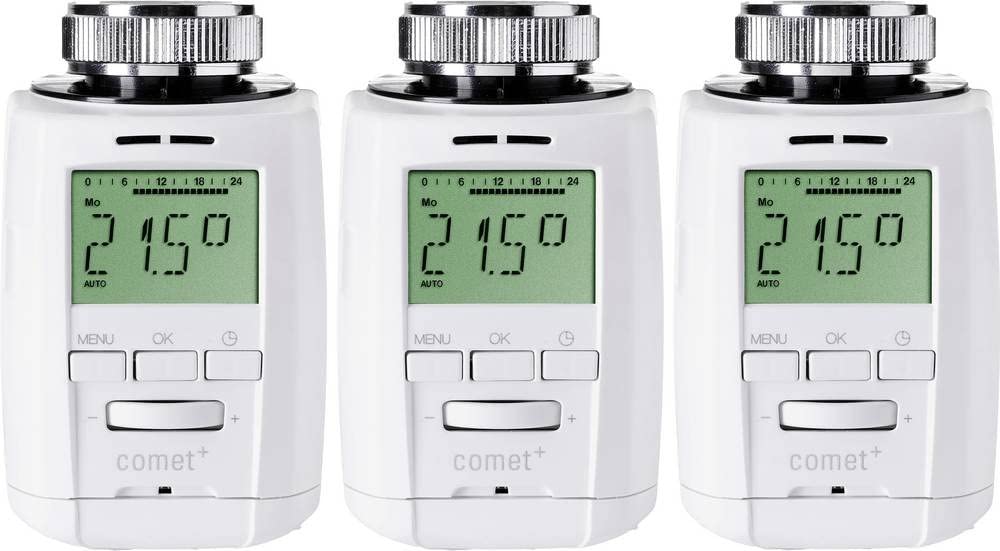
Image: Four Eurotronic Comet Plus electronic radiator thermostats, showcasing their compact design and digital display.
2. Key Features
- Valve-Friendly Design: Equipped with Eurotronic valve protection for extended valve lifespan.
- Energy Savings: Potential to save up to 30% on heating costs through optimized temperature management.
- Customizable Schedules: Individually adjustable heating and economy times to match your daily routine.
- Extensive Programming: Supports 8 programmable heating periods.
- Daily Flexibility: Four heating and four economy times can be set per day.
- Quiet Operation: Extra quiet, almost inaudible operation, ideal for bedrooms and playrooms.
- Durable Construction: High-quality metal nuts for secure attachment to the radiator.
- Long Battery Life: Designed for extended battery life.
- Clear Display: Very easy-to-read display for convenient monitoring and adjustments.
3. Package Contents
The Eurotronic 700083 Comet Plus package typically includes the following items:
- 1x Eurotronic 700083 Comet Plus Electronic Radiator Thermostat
- 2x AA Batteries (or similar, depending on model)
- Mounting hardware (various adapters for different valve types)
- Instruction Manual

Image: Contents of the Eurotronic Comet Plus package, including the thermostat, batteries, and various mounting adapters.
Video: An overview of the Eurotronic smart thermostat, demonstrating its components and basic assembly. This video is provided by the seller and shows the typical contents and initial setup steps for a similar Eurotronic thermostat.
4. Technical Specifications
| Feature | Specification |
|---|---|
| Brand | Eurotronic |
| Model | 700083 |
| Product Dimensions (D x W x H) | 13D x 11W x 7H centimeters |
| Controller Type | Push Button |
| Color | Multi-colored (typically white) |
| Temperature Control Type | Heating |
| Included Components | Mounting hardware |
| Power Source | Battery Powered |
| Voltage | 230 Voltage (Note: This likely refers to the system voltage, not the device's battery voltage.) |
| Display Type | LED |
| Control Method | Touch (via buttons) |
| Backlight | Yes |
| Style | Compact |
| Manufacturer | Eurotronic |
| ASIN | B0BSXFQL3K |
5. Setup Instructions
Follow these steps to install and set up your Eurotronic 700083 Comet Plus radiator thermostat:
- Prepare the Radiator Valve: Ensure your radiator valve is compatible. If you have an old thermostatic head, remove it. For manual valves, you may need an adapter (included in the mounting hardware).
- Insert Batteries: Open the battery compartment of the Comet Plus thermostat and insert the required batteries (typically 2x AA). Ensure correct polarity.
- Mount the Thermostat:
- Select the appropriate adapter from the included mounting hardware if necessary.
- Place the thermostat onto the radiator valve.
- Secure the thermostat by tightening the metal nut. Do not overtighten.
- Initial Calibration: After mounting, the thermostat will typically perform an initial calibration. This involves opening and closing the valve to determine its end positions. Allow this process to complete without interruption.
- Set Date and Time: Once calibrated, follow the on-screen prompts to set the current date and time. Refer to the detailed instructions in the included manual for specific button presses.
Video: Demonstrates the installation process of a Eurotronic smart thermostat, including battery insertion and mounting onto a radiator valve. This video is provided by the seller and is relevant for understanding the setup steps.
6. Operating Instructions
The Eurotronic Comet Plus offers various modes and programming options for optimal heating control.
6.1. Basic Temperature Adjustment
Use the + and - buttons on the device to manually increase or decrease the desired room temperature. The current set temperature will be displayed on the LED screen.
6.2. Programming Heating Schedules
The thermostat allows for up to 8 programmable heating periods per day, with four heating and four economy times. To set these schedules:
- Press the MENU button to enter the programming mode.
- Navigate through the options using the + and - buttons to select "Program" or "Schedule".
- Press OK to confirm.
- Follow the on-screen instructions to set the desired start and end times for heating and economy periods for each day of the week.
- Use the OK button to confirm each setting and the MENU button to exit programming mode.
6.3. Special Functions
- Holiday Mode: Set a specific temperature for a defined period when you are away.
- Open Window Detection: The thermostat can detect a sudden drop in temperature (e.g., when a window is opened) and temporarily close the valve to save energy.
- Child Lock: Prevents unauthorized changes to settings.
For detailed instructions on activating and customizing these functions, please refer to the complete user manual provided with your product.
7. Maintenance
To ensure optimal performance and longevity of your Eurotronic 700083 Comet Plus thermostat, follow these maintenance guidelines:
- Cleaning: Wipe the device regularly with a soft, dry cloth. Do not use abrasive cleaners or solvents.
- Battery Replacement: Replace batteries when the low battery indicator appears on the display. Use high-quality AA batteries.
- Valve Check: Periodically check the radiator valve for smooth operation. The thermostat performs a valve decalcification function weekly to prevent blockages.
- Avoid Obstructions: Ensure no curtains, furniture, or other objects obstruct the thermostat, as this can affect temperature readings.
8. Troubleshooting
If you encounter issues with your Eurotronic 700083 Comet Plus, refer to the following common problems and solutions:
| Problem | Possible Cause / Solution |
|---|---|
| Thermostat not responding |
|
| Room temperature is incorrect |
|
| Thermostat makes unusual noises |
|
| Display shows an error code |
|
If the problem persists, please contact Eurotronic customer support.
9. Warranty and Support
The Eurotronic 700083 Comet Plus comes with a manufacturer's warranty. For specific details regarding the warranty period and terms, please refer to the warranty information included in your product packaging or visit the official Eurotronic website.
Spare Parts Availability: Spare parts are available within the EU for a duration of 1 year.
For technical support, troubleshooting assistance, or warranty claims, please contact Eurotronic customer service through their official channels.


