
1. Introduction
This manual provides essential instructions for the proper use, installation, and maintenance of your Invigorated Water PH001 Ultra Alkaline Water Filter. This filter is designed to enhance water quality by increasing pH, adding beneficial minerals, and reducing common contaminants. Please read this manual thoroughly before use to ensure optimal performance and longevity of your filter.
2. Safety Information
- Use only with potable (safe to drink) water.
- Do not expose the filter to freezing temperatures.
- Keep out of reach of children.
- Ensure proper installation to prevent leaks.
- Dispose of used filters according to local regulations.
3. Product Overview
The PH001 Ultra filter features an advanced multi-layered filtration system designed to improve water quality. It utilizes upgraded extra-porous carbon powder and multiple membrane filters for enhanced contaminant removal. The filter also incorporates a comprehensive stone-silica blend, including ORP spheres, Alkaline, Tourmaline, and Far Infrared materials, to elevate pH, soften water, and introduce trace minerals.

Image 3.1: Internal structure of the PH001 Ultra filter, showing its multi-layered filtration media.

Image 3.2: Comparison highlighting the enhanced filtration capabilities of the PH001 Ultra filter, including 97.4% chlorine removal and upgraded components.
Key Benefits:
- Enhanced Filtration: Up to 15% improved contaminant elimination, including chlorine and heavy metals.
- Alkaline Water: Elevates water pH and adds beneficial trace minerals like calcium and magnesium.
- Eco-Conscious: Made from BPA-free, food-grade materials, reducing plastic bottle waste.
Video 3.1: An official video from Invigorated Living demonstrating the benefits of alkaline water and the product's features.
4. Setup
- Unpack the Filter: Carefully remove the new PH001 Ultra filter from its packaging.
- Rinse the Filter: Hold the filter under cold running tap water for approximately 30 seconds to rinse off any loose carbon dust.
- Soak the Filter: Submerge the filter completely in a bowl of cold water for 10-15 minutes. This helps to prime the filter and remove any trapped air.
- Install the Filter: Insert the prepared filter into the designated compartment of your compatible Invigorated Water pitcher or dispenser system. Ensure it is securely seated.
- Initial Flush: Fill your system with tap water and allow one full cycle of water to filter through. Discard this first batch of filtered water, as it may contain residual carbon dust.

Image 4.1: Visual guide for replacing the filter, illustrating the steps for preparation and installation.
5. Operating Instructions
After successful setup, your Invigorated Water system is ready for use.
- Filling: Pour tap water into the top reservoir of your Invigorated Water pitcher or dispenser. The water will slowly pass through the PH001 Ultra filter into the lower chamber.
- Filtration Time: Allow sufficient time for the water to filter completely. Filtration speed may vary depending on water quality and filter age.
- Dispensing: Once filtered, the water is ready for consumption. Use the dispenser tap or pour directly from the pitcher.
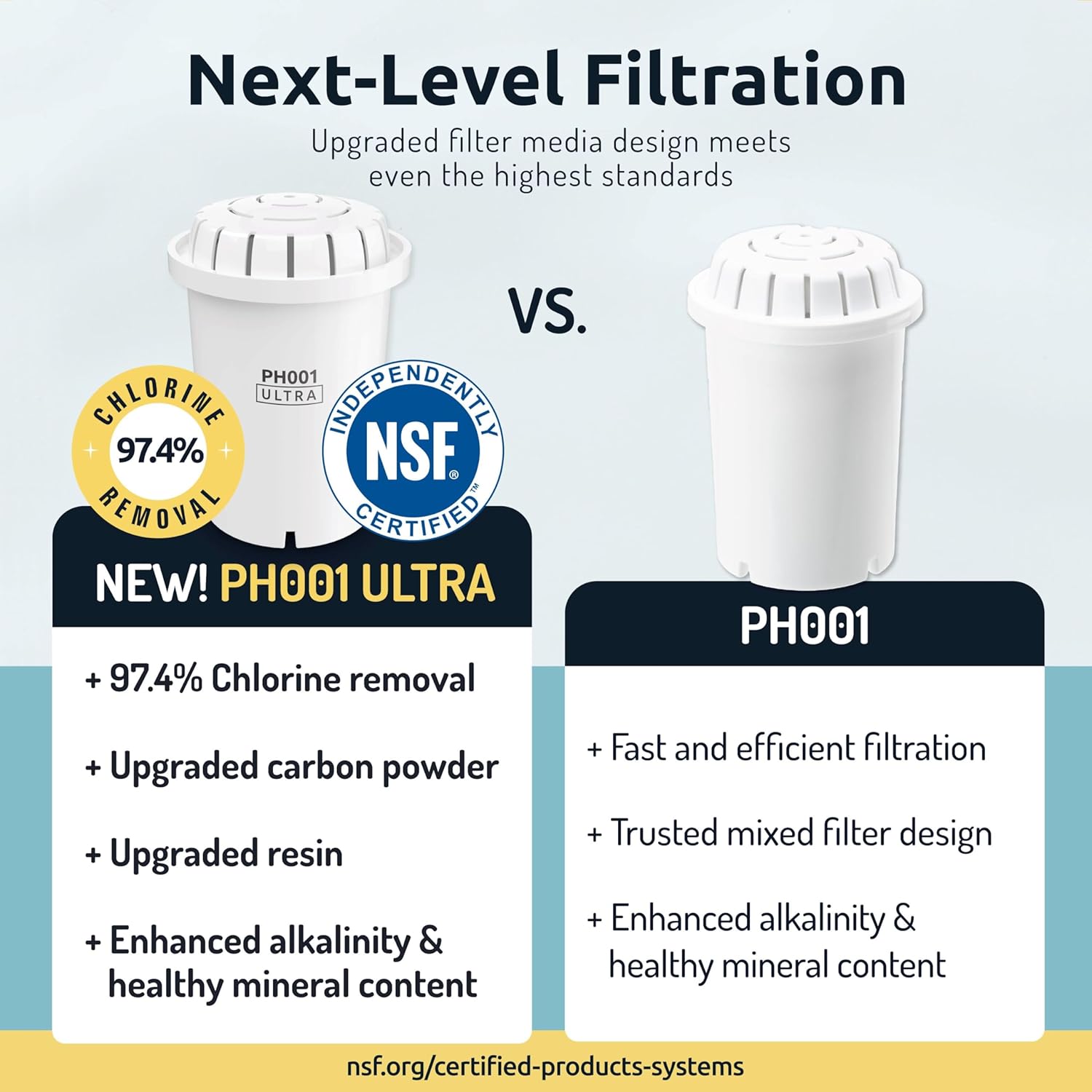
Image 5.1: An Invigorated Water pitcher demonstrating the filter in use, with water being filtered.
6. Maintenance
Regular maintenance ensures your filter continues to provide high-quality alkaline water.
Filter Replacement:
The PH001 Ultra filter has a capacity of approximately 96 gallons (360 liters) or lasts for about 1-2 months, depending on usage and water quality. Replace the filter when you notice a decrease in filtration speed or a change in water taste.
- Remove the old filter from the system.
- Follow the 'Setup' instructions (Section 4) for preparing and installing your new PH001 Ultra filter.
- Discard the first filtered batch of water.

Image 6.1: A 3-pack of PH001 Ultra replacement filters, indicating availability for continued use.
Cleaning the System:
Periodically clean your water pitcher or dispenser according to the manufacturer's instructions for the specific system model. This typically involves washing with mild soap and water.
7. Troubleshooting
- Slow Filtration: If filtration is slow, ensure the filter was properly primed by soaking it before installation. Re-soak the filter if necessary.
- Unusual Taste: If the water has an unusual taste, ensure the initial flush was performed. If the taste persists, the filter may need to be re-primed or replaced.
- Leaks: Check that the filter is securely installed in its compartment and that all parts of your pitcher/dispenser are correctly assembled.
8. Specifications
| Model Number | PH001ULTRA3 |
| Material | Polypropylene (PP) |
| Item Weight | 0.68 Kilograms (1.5 pounds) |
| External Testing Certification | CE |
| Product Benefits | Enhances water pH and hydration, eliminates contaminants, and promotes environmental conservation |
| UPC | 850006539765 |
| Filter Lifespan | Up to 96 Gallons / 1-2 Months |
Compatibility:
The PH001 Ultra filter is designed for use with various Invigorated Water pitcher and dispenser systems, including pH Refresh, pH Restore, and pH Recharge models.

Image 8.1: Visual representation of the PH001 Ultra filter's compatibility with different Invigorated Water pitcher and dispenser models.
9. Warranty & Support
For warranty information, product registration, or customer support, please visit the official Invigorated Water website or contact their customer service department. Details can typically be found on the product packaging or the brand's online resources.
Website: invigoratedwater.com