1. Introduction
This user manual provides detailed instructions for the setup, operation, maintenance, and troubleshooting of your TELEFUNKEN XH24SN550MVD 24-inch Smart TV. Please read this manual thoroughly before using the television to ensure proper and safe operation.
The TELEFUNKEN XH24SN550MVD is a versatile 24-inch Smart TV featuring HD Ready resolution, HDR support, a built-in Triple-Tuner for various reception types (DVB-T2, DVB-C, DVB-S2), an integrated DVD player, and a 12-volt power connection for mobile use. It also offers smart TV functionalities with access to popular streaming services and voice control compatibility.
2. Safety Information
Always observe the following safety precautions to prevent electric shock, fire, or damage to the device:
- Do not expose the TV to rain or moisture.
- Do not block ventilation openings.
- Ensure proper grounding for the power supply.
- Do not place heavy objects on the power cord.
- Unplug the TV during lightning storms or when unused for long periods.
- Refer all servicing to qualified service personnel.
3. What's in the Box
Upon unpacking, please ensure all items are present and undamaged:
- TELEFUNKEN XH24SN550MVD Smart TV
- Remote Control
- 2x AAA Batteries for Remote Control
- User Manual (this document)

Image: Front view of the TELEFUNKEN XH24SN550MVD Smart TV, showing its 24-inch screen, HD Ready resolution, HDR10 support, and various streaming service logos. A remote control and a DVD disc are also visible.
4. Setup
4.1. Assembling the Stand (if applicable)
If your TV comes with a separate stand, carefully attach it to the bottom of the TV using the provided screws. Place the TV face down on a soft, clean surface to prevent screen damage during assembly.
4.2. Connecting Peripherals
The TV offers various connection ports for external devices:
- HDMI (CEC + ARC): Connect Blu-ray players, game consoles, or soundbars. (2 ports available)
- USB: For media playback from USB drives. (1 port available)
- CI+ Slot: For conditional access modules (CAM) for encrypted channels.
- VGA: For connecting a computer.
- Back AV: For older analog devices.
- Headphone Output: For private listening.
- Digital Audio Output (Coaxial): For connecting to a home theater system.
- Antenna (RF/F): For connecting an antenna or satellite dish.
- WLAN: For wireless internet connection.
- 12 Volt Connection: For mobile use, e.g., in an RV.
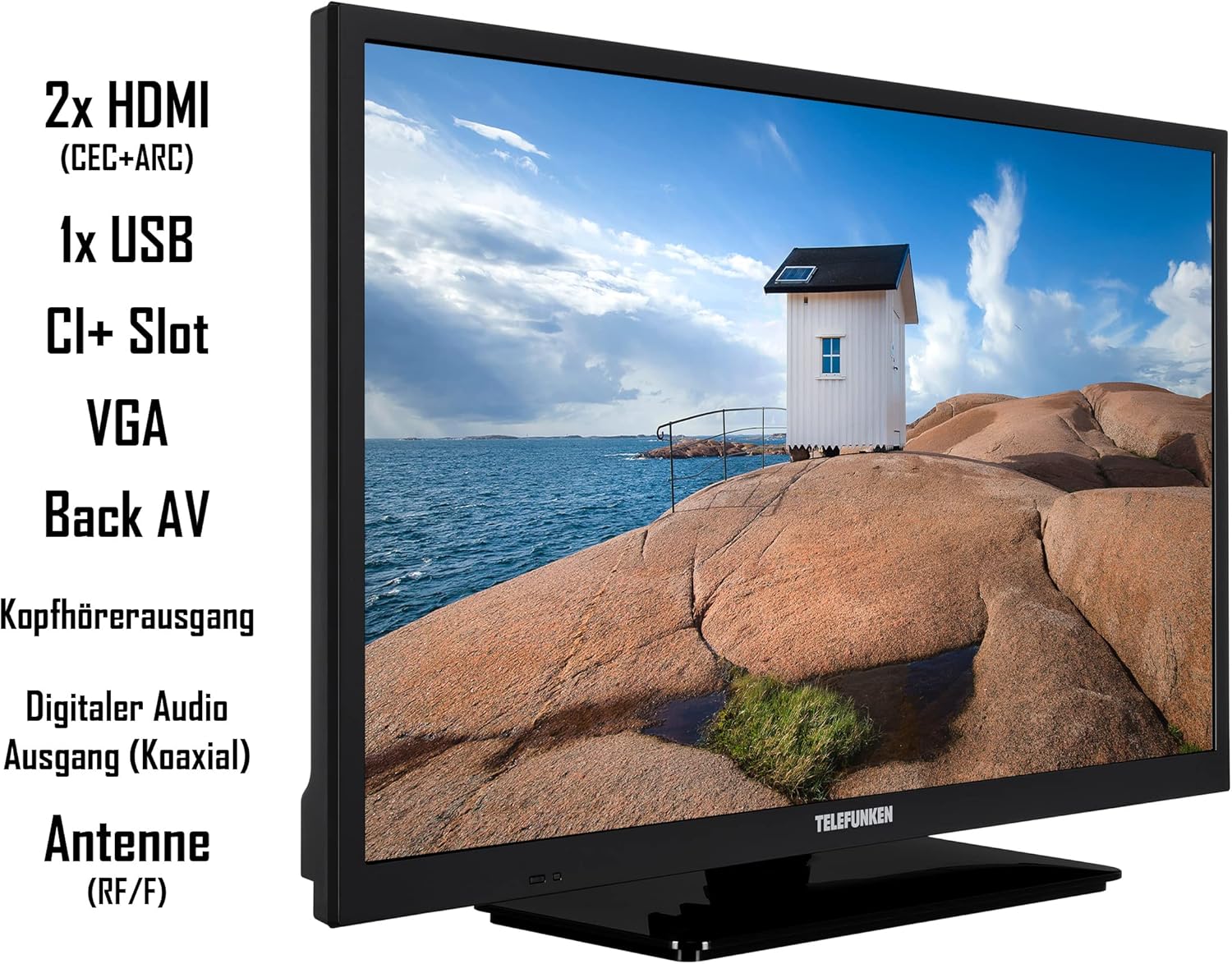
Image: Side view of the TELEFUNKEN XH24SN550MVD Smart TV, highlighting its connectivity options including 2x HDMI, 1x USB, CI+ Slot, VGA, Back AV, Headphone Output, Digital Audio Output (Coaxial), and Antenna (RF/F) ports.
4.3. Power Connection
Connect the power cable to the TV and then to a suitable power outlet. For 12-volt operation, use the dedicated 12V input.

Image: A graphic showing the "12V Power Supply" logo, indicating the TV's compatibility with 12-volt power sources, ideal for mobile use.

Image: A recreational vehicle (RV) parked in a scenic outdoor setting, with the "12V Power Supply" logo overlaid, illustrating the TV's suitability for use in mobile environments.
4.4. Initial Setup Wizard
Upon first power-on, the TV will guide you through an initial setup wizard. This includes language selection, country, network connection (Wi-Fi), and channel scanning for DVB-T2, DVB-C, or DVB-S2.
For satellite reception, you can test the HD+ package for 6 months free of charge. Activation is typically done during installation.

Image: A promotional image for HD+ integration, showing the TELEFUNKEN TV and details about 26 private HD channels, 3 Ultra HD channels, and HD+ comfort functions like restart, media libraries, and UHD-Switch, with a note about 6 months free testing.
5. Operating the TV
5.1. Remote Control Functions
The included remote control provides full functionality for navigating your TV. Key buttons include:
- Power Button: Turns the TV on/off or to standby.
- Number Buttons (0-9): Direct channel selection.
- Volume Up/Down: Adjusts the volume.
- Channel Up/Down: Changes channels.
- Navigation Buttons (Up, Down, Left, Right, OK): For menu navigation and selection.
- Back/Exit: Returns to the previous screen or exits a menu.
- Quick Access Buttons: Dedicated buttons for popular streaming services like Netflix, YouTube, Prime Video, and Twitch.

Image: A close-up of the TELEFUNKEN Smart TV remote control, highlighting its quick access buttons for YouTube, Netflix, Prime Video, and Twitch.
5.2. Smart TV Features
Connect your TV to the internet via Wi-Fi to access a wide range of smart features and streaming applications. Supported services include Prime Video, Netflix, DAZN, YouTube, and Twitch. Additional subscriptions may be required for some services.

Image: A graphic showcasing various streaming services available on the TELEFUNKEN Smart TV, including Prime Video, Netflix, Maxdome, YouTube, DAZN, and Twitch, with a background of sports action.
5.3. Voice Control (Alexa & Google Assistant)
The TV supports voice control via Amazon Alexa or Google Assistant. A separate smart speaker (e.g., Amazon Echo, Google Home) is required for this functionality. Once connected, you can use voice commands to change channels, adjust volume, open apps, and more.

Image: An Amazon Echo device next to a TELEFUNKEN TV, with "Works with Alexa" and "Works with Ok Google" logos, demonstrating voice control capabilities. A speech bubble shows "Alexa, increase volume to 20."
5.4. Integrated DVD Player
Insert a DVD into the integrated DVD player slot. The TV will automatically switch to the DVD input or prompt you to select it. Use the remote control for playback functions (Play, Pause, Stop, Skip).

Image: The DVD logo prominently displayed next to a person enjoying popcorn, illustrating the integrated DVD player feature of the TV.
5.5. Picture Quality Features
The TV supports HDR 10 including HLG, Super Resolution, and Micro Dimming for enhanced picture quality, offering high contrast and natural colors.
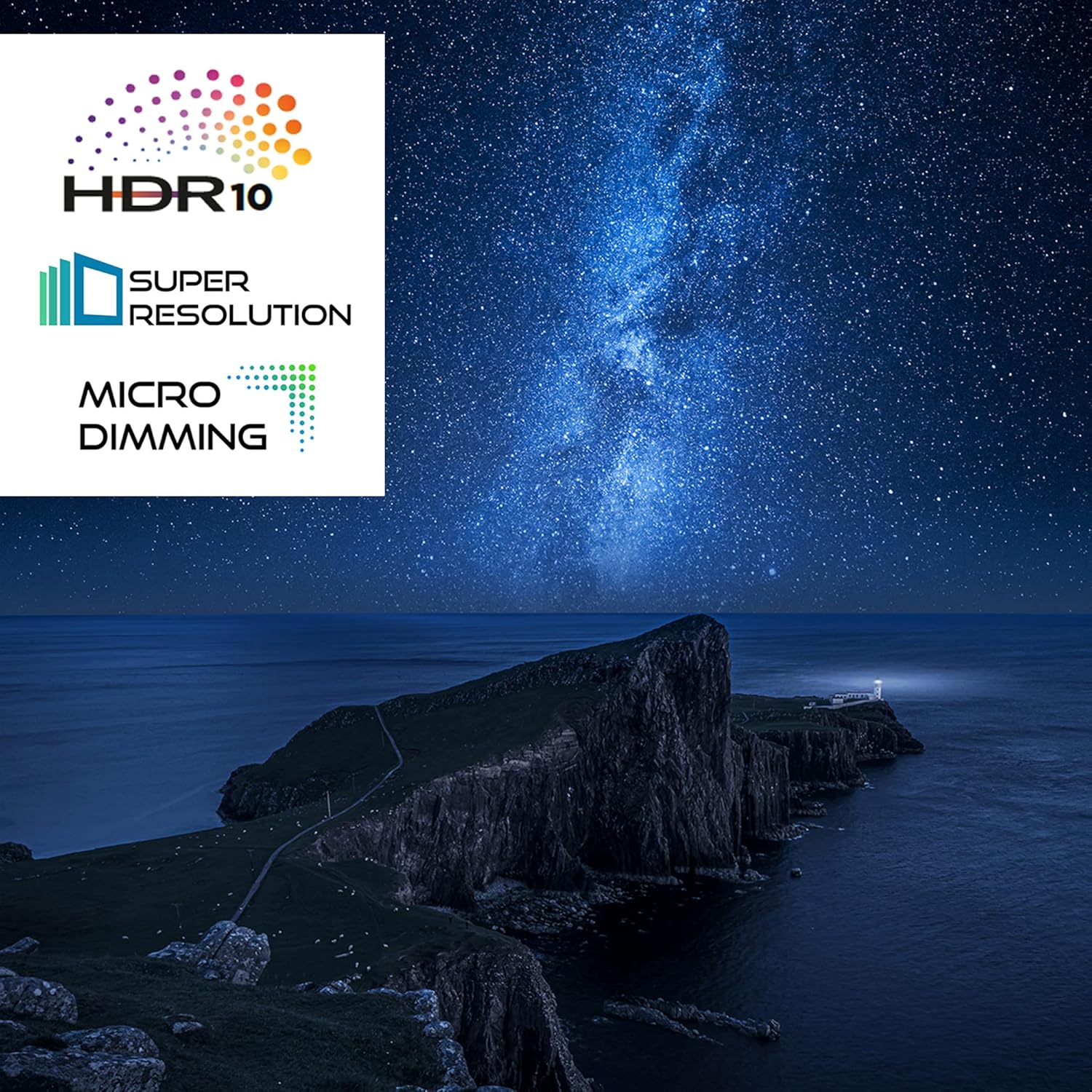
Image: Logos for HDR10, Super Resolution, and Micro Dimming, indicating advanced picture enhancement technologies, set against a backdrop of a starry night sky over a coastline.
6. Maintenance
- Cleaning the Screen: Use a soft, lint-free cloth specifically designed for electronics. Do not use abrasive cleaners or solvents.
- Cleaning the Casing: Wipe with a soft, dry cloth.
- Ventilation: Ensure the ventilation openings are clear of dust and obstructions to prevent overheating.
7. Troubleshooting
| Problem | Possible Cause | Solution |
|---|---|---|
| No Power | Power cord disconnected; no power from outlet. | Check power cord connection; test outlet with another device. |
| No Picture/Sound | Incorrect input source; loose cable connection. | Select correct input source (HDMI, AV, etc.); check all cable connections. |
| Remote Control Not Working | Dead batteries; obstruction between remote and TV. | Replace batteries; remove obstructions; ensure line of sight. |
| Cannot Connect to Wi-Fi | Incorrect password; router issues; TV too far from router. | Verify password; restart router; move TV closer or use a Wi-Fi extender. |
| DVD Playback Issues | Dirty or scratched disc; incorrect disc format. | Clean the disc; try a different disc; ensure it's a compatible DVD format. |
8. Specifications
| Feature | Detail |
|---|---|
| Model Number | XH24SN550MVD |
| Screen Size | 24 inches (60 cm) |
| Display Technology | LED |
| Resolution | 768p (HD Ready) |
| Refresh Rate | 50 Hz |
| Special Features | DVD-Player, 12 Volt Connection, HD+ (6 months included) |
| Connectivity | 2x HDMI (CEC + ARC), 1x USB, WLAN, CI+ Slot, VGA, Back AV, Headphone Out, Digital Audio Out (Coaxial) |
| Supported Internet Services | Netflix, Prime Video, Twitch, YouTube, DAZN |
| Product Dimensions (W x H x D) | 55.3 x 36.5 x 13.5 cm (with stand) |
| Weight | 3.75 Kilograms |
| Energy Efficiency Class (2021) | E |
| Annual Energy Consumption | 16.00 kWh per year (based on 4 hours/day, 365 days) |

Image: Diagram showing the dimensions of the TELEFUNKEN XH24SN550MVD Smart TV, including width (55.3 cm), height (36.5 cm), and depth (13.5 cm), along with the 24-inch / 60 cm diagonal screen size.
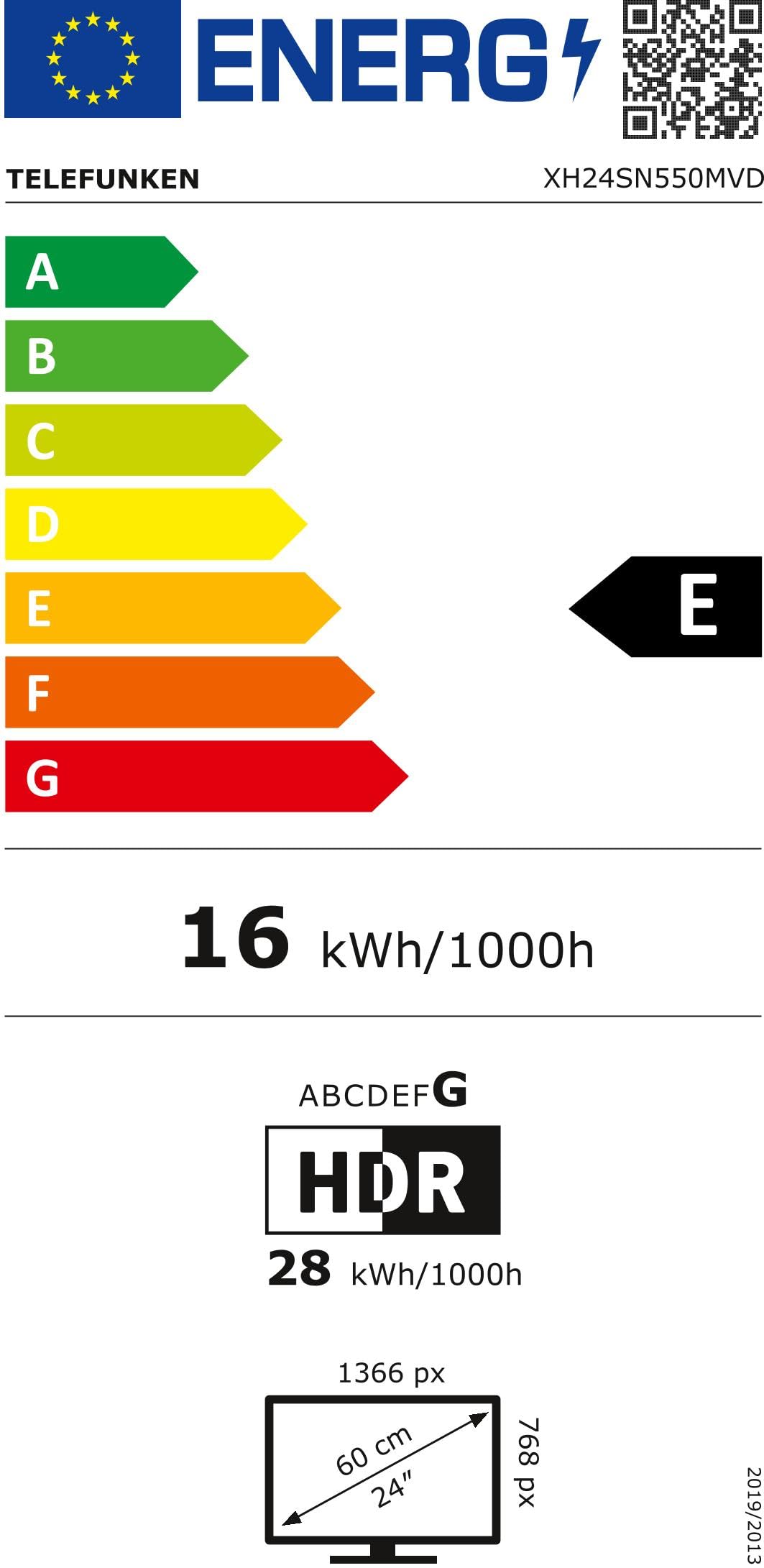
Image: The EU Energy Efficiency Label for the TELEFUNKEN XH24SN550MVD, showing an 'E' rating and an annual energy consumption of 16 kWh/1000h.
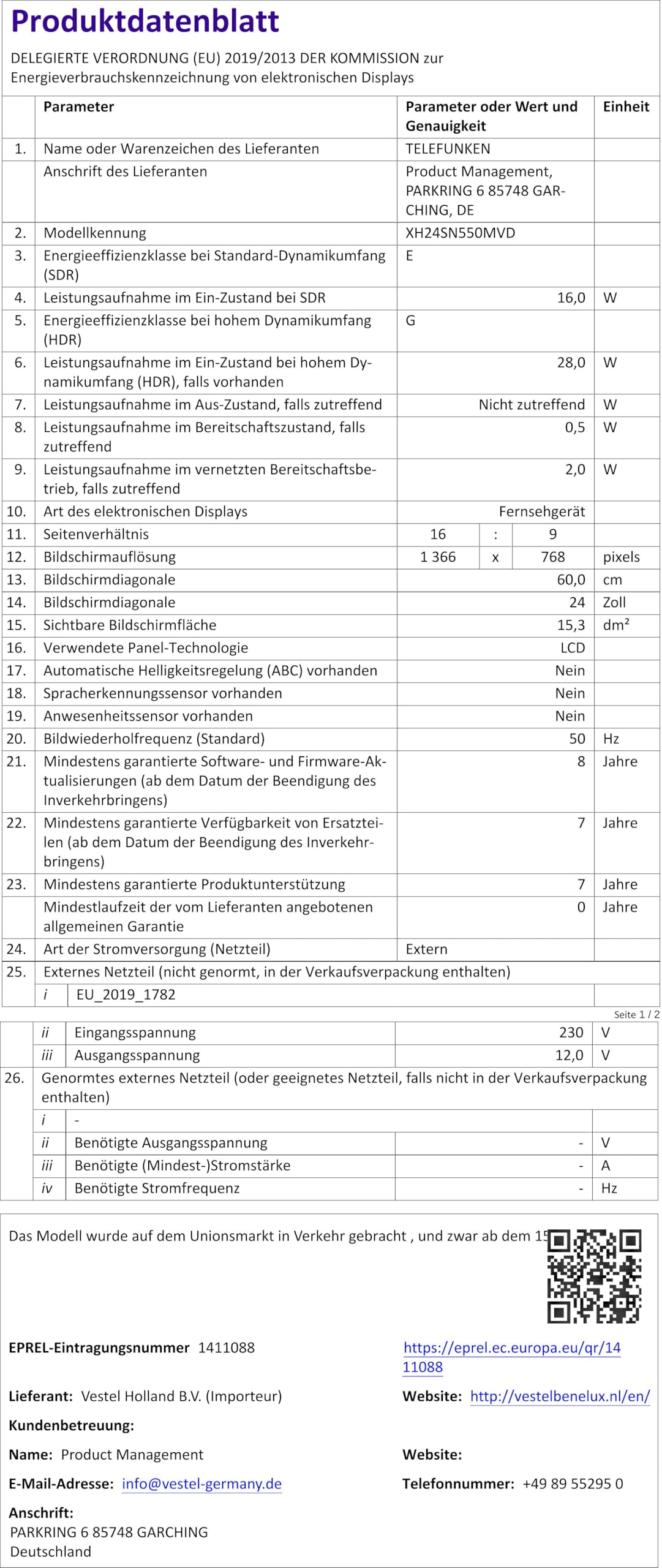
Image: The product fiche for the TELEFUNKEN XH24SN550MVD, detailing technical specifications such as model number, dimensions, energy consumption, and various display parameters. A QR code is visible, linking to the EPREL database.
For more details, refer to the official EPREL database: https://eprel.ec.europa.eu/qr/1411088
9. Warranty and Support
TELEFUNKEN products come with a standard manufacturer's warranty. Please refer to the warranty card included with your product for specific terms and conditions. For technical support, service, or warranty claims, please contact TELEFUNKEN customer service or visit their official website.
You can also visit the official TELEFUNKEN store on Amazon for more information and support: TELEFUNKEN Amazon Store
10. Additional Information
10.1. Optimal Viewing Distance
For the 24-inch HD Ready display, the recommended viewing distance is approximately 150 cm (59 inches).

Image: A chart illustrating optimal viewing distances for various TV sizes and resolutions (4K, Full HD, HD). For a 24-inch HD TV, the recommended distance is approximately 150 cm.
10.2. Official Product Video
Watch the official product video for more information on the TELEFUNKEN Smart TV features, including integration with JOYN streaming service.
Video: An official promotional video for TELEFUNKEN TVs, highlighting features and integration with the JOYN streaming service. The video showcases various content types available on JOYN, emphasizing free streaming on all Telefunken TVs.


