Introduction
Thank you for choosing the Parkside 12V 2.4A PLGK 12 A2 X12V Team Charger. This manual provides important information for the safe and proper operation, maintenance, and care of your charger. Please read these instructions thoroughly before first use and keep them for future reference. This charger is designed exclusively for charging Parkside X12V Team series batteries.
Setup
Unpacking
Carefully remove all components from the packaging. Ensure all parts are present and undamaged. Dispose of packaging materials responsibly.
Connecting to Power
- Ensure the charger is placed on a stable, non-flammable surface.
- Connect the charger's power cord to a standard electrical outlet. The power cord length is approximately 1.5 meters.
- Verify that the power outlet provides the correct voltage as specified on the charger's rating label.

Image: Front view of the Parkside 12V 2.4A PLGK 12 A2 X12V Team Charger, showing the battery slot and LED indicators.
Operating Instructions
Charging a Battery
- Ensure the charger is connected to a power supply.
- Insert a compatible Parkside X12V Team battery into the charger's slot. The charger is compatible with batteries such as PAPK 12 A1, PAPK 12 A2, PAPK 12 A3, PAPK 12 B1, PAPK 12 B2, PAPK 12 B3, PAPK 12 D1, and PAPK 12 C1.
- The charger will automatically begin the charging process.
- The charging time for a 12V/2Ah battery is approximately 60 minutes. The charger features an automatic charge stop function to prevent overcharging.

Image: Side view of the Parkside 12V 2.4A PLGK 12 A2 X12V Team Charger, illustrating how a battery fits into the charging slot.
LED Indicators
The charger is equipped with LED indicators to show the charging status:
- Red LED: Indicates the battery is charging.
- Green LED: Indicates the battery is fully charged.
- Flashing Red LED: May indicate a fault or an incompatible battery. Refer to the troubleshooting section.
Compatible Tools
This charger is designed for batteries used with various Parkside X12V Team tools, including but not limited to:
- Parkside PAT 12 A1 Cutter
- Parkside PMSA 12 B2 Router
- Parkside POFA 12 A1 Hammer Drill
- Parkside PBHA 12 A1 Angle Grinder
- Parkside PWSA 12 2 B1 Mini Chainsaw
- Parkside PGHSA 12 A1 Multifunctional Garden Tool
- Parkside PKGA 12 A1 Multifunctional Tool
- Parkside PAMFW 12 C3 Drill Driver
- Parkside PBSA 12 C2 Renovation Polisher
- Parkside PAAP 12 A1 Planer
- Parkside PHA 12 A1 Hedge Trimmer
- Parkside PHSA 12 A1 Hedge Trimmer

Image: A circular diagram illustrating the wide range of Parkside X12V Team tools that share the same battery system, emphasizing the charger's compatibility.
Maintenance
Cleaning
- Always disconnect the charger from the power supply before cleaning.
- Use a dry, soft cloth to wipe the exterior of the charger.
- Do not use any liquids, solvents, or abrasive cleaning agents, as these can damage the charger.
- Keep the ventilation slots free from dust and debris.
Storage
- Store the charger in a dry, dust-free environment, away from direct sunlight and extreme temperatures.
- Ensure the charger is disconnected from the power supply when not in use for extended periods.
Troubleshooting
If you encounter issues with your Parkside charger, refer to the following common problems and solutions:
- Charger not powering on:
- Check if the power cord is securely plugged into both the charger and the electrical outlet.
- Verify that the electrical outlet is functional by testing it with another device.
- Check for tripped circuit breakers or blown fuses in your electrical panel.
- Battery not charging (Red LED flashing or no indication):
- Ensure the battery is correctly inserted into the charger.
- Confirm that the battery is a compatible Parkside X12V Team series battery.
- The battery might be too hot or too cold. Allow it to reach room temperature before attempting to charge.
- If the issue persists, the battery or charger may be faulty. Do not attempt to repair.
- Unusual noises or smells during charging:
- Immediately disconnect the charger from the power supply and remove the battery.
- Do not use the charger again. Contact customer support or a qualified technician.
Specifications
| Brand | PARKSIDE |
| Model | PLG 12 A2 |
| Nominal Power | 50 W |
| Input Voltage | 12 Volt |
| Output Voltage | 12 Volt DC |
| Current | 2.4 Ampere |
| Charging Time (12V/2Ah) | Approx. 60 minutes |
| Power Cord Length | 1.5 m |
| Product Dimensions | 10 x 10 x 5 cm |
| Product Weight | 340 g |
| Compliance | CE, RoHS |
| Number of Ports | 1 |
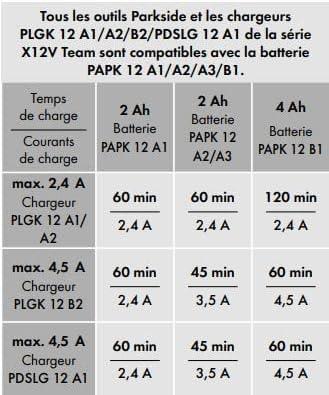
Image: A table detailing charging times for different Parkside 12V batteries (2Ah, 4Ah) with various chargers, including the PLGK 12 A1/A2 model.
Warranty and Support
Warranty Information
Specific warranty terms and conditions for the Parkside 12V 2.4A PLGK 12 A2 X12V Team Charger should be obtained from your point of purchase or the official Parkside manufacturer's website. Please retain your proof of purchase for any warranty claims.
Customer Support
For technical assistance, spare parts, or service inquiries, please contact the retailer where you purchased the product or refer to the official Parkside customer service channels available in your region. Do not attempt to open or repair the charger yourself, as this will void the warranty and may pose safety risks.


