
Introduction
The Klipsch Reference Premiere RP-1200SW is a 12-inch high-excursion subwoofer designed to deliver powerful and efficient low-frequency sound for home theater and audio systems. This manual provides essential information for setting up, operating, and maintaining your subwoofer.

Image: Front view of the Klipsch RP-1200SW subwoofer, highlighting the 12-inch copper-colored Cerametallic woofer cone.
What's in the Box
Upon unpacking, ensure all items are present:
- Klipsch Reference Premiere RP-1200SW Subwoofer
- Power Cord
- User Manual (this document)
Setup
1. Placement
The RP-1200SW features a front-firing driver, allowing for flexible placement within your room. Experiment with different locations to achieve optimal bass response. Placing the subwoofer in a corner can often enhance bass output, while placement along a wall may provide a more balanced sound. Ensure adequate ventilation around the unit.

Image: The Klipsch RP-1200SW subwoofer with its grille installed, demonstrating typical room placement.
2. Connections
The RP-1200SW offers multiple connection options:
- LFE Input: Connect a single RCA cable from your receiver's LFE output to the subwoofer's LFE input for dedicated low-frequency effects.
- Stereo RCA Inputs: For receivers without an LFE output, connect stereo RCA cables from your receiver's pre-out (subwoofer or main) to the subwoofer's left and right RCA inputs.
- WA-2 Wireless Port: For wireless connectivity, connect an optional Klipsch WA-2 Wireless Subwoofer Kit (sold separately) to the WA-2 port. This allows for flexible placement without audio cables.
Both RCA and wireless inputs can be used simultaneously, enabling connection to multiple systems if desired.
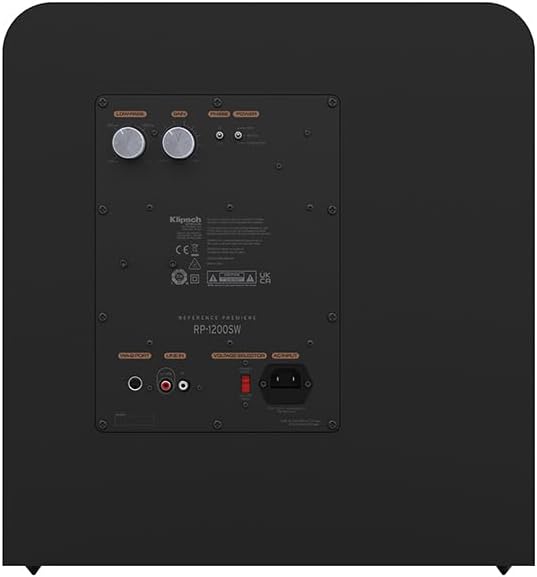
Image: Rear panel of the subwoofer, detailing the input connections and control layout.

Image: Illustration of the subwoofer connected wirelessly using an optional WA-2 kit, allowing for flexible room placement.
3. Initial Configuration
After connecting, adjust the subwoofer's settings to integrate it seamlessly with your main speakers and room acoustics. Use the controls on the rear panel:
- Low-Pass Crossover: This control determines the highest frequency the subwoofer will reproduce. Adjust it to blend smoothly with your main speakers. A common starting point is 80Hz, but it may vary based on your main speakers' low-frequency capabilities.
- Phase: The phase control (0° or 180°) helps ensure the subwoofer's output is in sync with your main speakers. Listen for the most impactful and coherent bass response.
- Gain (Volume): Adjust the gain to match the output level of your main speakers. Start with a low setting and gradually increase until the bass is balanced and not overpowering.

Image: Detailed view of the subwoofer's easy-to-use controls for fine-tuning audio output.
Operating
Once set up, the subwoofer operates automatically with your audio system. It features a 1/2-watt standby mode for energy efficiency, activating when an audio signal is detected and entering standby when no signal is present for a period.
Power On/Off
Connect the subwoofer to a power outlet using the provided power cord. The subwoofer will typically power on automatically when an audio signal is received. To manually power off, use the power switch located on the rear panel.
Adjusting Sound
Minor adjustments to the Low-Pass, Phase, and Gain controls can be made as needed to suit different audio content or listening preferences. Always make small adjustments and listen to the effect before making further changes.
Maintenance
To ensure the longevity and optimal performance of your Klipsch RP-1200SW subwoofer, follow these maintenance guidelines:
- Cleaning: Use a soft, dry cloth to clean the cabinet. Avoid abrasive cleaners or solvents. For the grille, a soft brush can remove dust.
- Placement: Keep the subwoofer away from direct sunlight, heat sources, and excessive moisture. Ensure proper airflow around the rear panel to prevent overheating.
- Handling: When moving the subwoofer, lift it carefully to avoid damage to the cabinet or internal components.
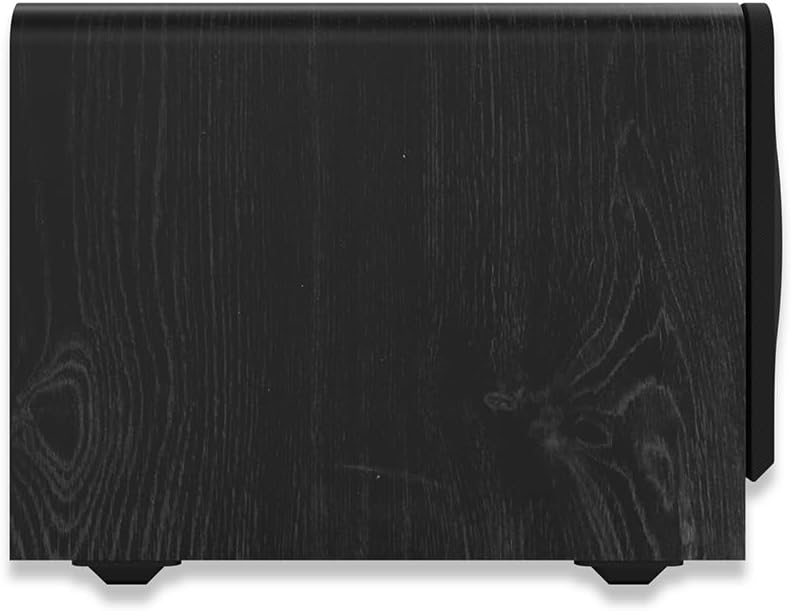
Image: Side view of the subwoofer, highlighting its durable ebony vinyl finish.
Troubleshooting
If you encounter issues with your subwoofer, refer to the following common troubleshooting steps:
- No Sound:
- Ensure the subwoofer is plugged into a working power outlet and the power switch is on.
- Check all audio connections between the subwoofer and your receiver/source.
- Verify the receiver's subwoofer output is enabled and the volume is not muted.
- Adjust the subwoofer's Gain control.
- Distorted or Boomy Sound:
- Reduce the subwoofer's Gain (volume) control.
- Adjust the Low-Pass Crossover setting to a lower frequency.
- Experiment with the Phase control (0° or 180°).
- Try repositioning the subwoofer in the room.
- Humming or Buzzing Noise:
- Ensure all cables are securely connected.
- Try plugging the subwoofer into a different electrical outlet.
- If using RCA cables, try a different cable or ensure it's not running parallel to power cables.
Specifications
Key technical specifications for the Klipsch Reference Premiere RP-1200SW subwoofer:
| Model Name | RP-1200SW |
| Speaker Type | Subwoofer |
| Subwoofer Diameter | 12 Inches |
| Mounting Type | Floor Standing |
| Material | MDF, Vinyl |
| Product Dimensions (DxWxH) | 25.92"D x 17"W x 18.89"H |
| Item Weight | 68.9 pounds (31.3 Kilograms) |
| Speaker Maximum Output Power | 800 Watts |
| Frequency Response | 138 Hz (Note: Subwoofers typically specify a lower frequency range. Users should refer to official Klipsch documentation for full frequency range.) |
| Connectivity Technology | Dual RCA/LFE Line In, WA-2 Wireless Port |
| Special Feature | 1/2-WATT STANDBY MODE |
| UPC | 743878047394 |

Image: Dimensional drawing of the Klipsch RP-1200SW subwoofer.
Product Overview Video
Video: An official overview of the Klipsch Reference Premiere Subwoofers, highlighting key features and design elements. This video provides visual details on the advanced acoustics, balanced performance, Cerametallic woofers, Class D amplifier, front-firing slot port, and design upgrades of the subwoofer series.
Warranty
The Klipsch Reference Premiere RP-1200SW subwoofer comes with a Limited Warranty. For specific terms, conditions, and duration of the warranty, please refer to the warranty card included with your product or visit the official Klipsch website. Keep your proof of purchase for warranty claims.
Support
For further assistance, technical support, or service inquiries regarding your Klipsch RP-1200SW subwoofer, please contact Klipsch customer support through their official website or the contact information provided in your product packaging.
- Online Support: Visit the official Klipsch website for FAQs, product registration, and support resources.
- Contact Information: Refer to your product documentation for specific phone numbers or email addresses for customer service in your region.


