
1. Introduction
The Blaupunkt KRD 100 is a versatile kitchen radio designed to enhance your audio experience while cooking or baking. It features DAB+ and FM PLL tuners for clear radio reception, Bluetooth connectivity for wireless audio streaming, and a vibrant 2.4-inch color LED display. This radio also includes practical functions such as an integrated LED light for workspace illumination, a clock, two independent countdown timers, and an alarm function. The KRD 100 offers flexible installation options, allowing it to be mounted under cabinets or used freestanding with its integrated stand.
2. Safety Instructions
Please read these safety instructions carefully before using the device and keep them for future reference. Incorrect use may result in electric shock, fire, or other hazards.
- Power Source: Only use the provided power cable and connect the device to a power outlet with the correct voltage as indicated on the device label.
- Water and Moisture: Do not expose the device to dripping or splashing water. Do not place objects filled with liquids, such as vases, on the device. Avoid using the device in high humidity environments. While the product is rated as water-resistant, direct exposure to water should be avoided.
- Ventilation: Ensure adequate ventilation around the device. Do not block any ventilation openings.
- Heat: Keep the device away from heat sources such as radiators, heat registers, stoves, or other heat-producing appliances.
- Cleaning: Disconnect the device from the power supply before cleaning. Use a soft, dry cloth. Do not use liquid cleaners or aerosol cleaners.
- Servicing: Do not attempt to service this product yourself. Refer all servicing to qualified service personnel.
- Placement: Ensure the device is placed on a stable surface or securely mounted to prevent it from falling.
3. Package Contents
Verify that all items are present in the package:
- Blaupunkt KRD 100 Radio Unit
- 75 Ω Launch Antenna
- Drilling Template
- Mounting Hardware (4 spacers, 4 long screws, 4 short screws)
- Power Cable
- User Manual (this document)
- Warranty Card
4. Product Overview
Familiarize yourself with the main components and controls of your Blaupunkt KRD 100 radio.

Figure 4.1: Front view of the Blaupunkt KRD 100 kitchen radio, displaying the screen and control buttons.
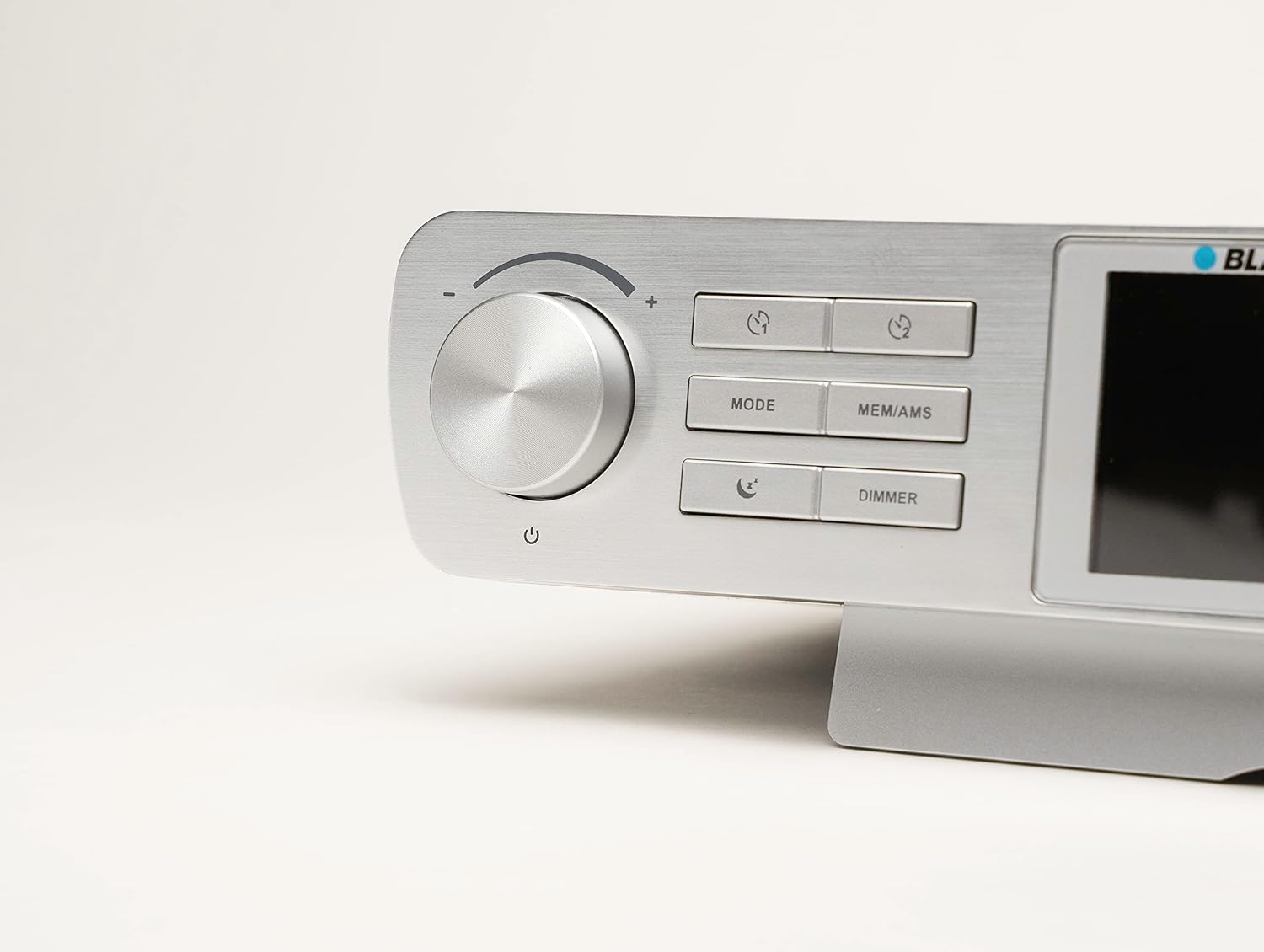
Figure 4.2: Detailed view of the control panel, including the volume/power knob, Mode, MEM/AMS, and Dimmer buttons.
Controls and Display:
- Volume Knob / Power Button: Rotate to adjust volume. Press to power on/off.
- MODE Button: Switches between DAB+, FM, and Bluetooth modes.
- MEM/AMS Button: Accesses station memory and initiates Automatic Memory Scan.
- DIMMER Button: Adjusts the brightness of the display.
- Timer Buttons: Dedicated buttons for setting and controlling the two countdown timers.
- 2.4-inch Color LED Display: Shows station information, time, settings, and other relevant data.
- Integrated LED Light: Located on the underside of the unit, provides illumination for the workspace.
5. Setup
5.1 Mounting Options
The Blaupunkt KRD 100 can be installed in two ways: under-cabinet mounting or freestanding on a flat surface.

Figure 5.1: The KRD 100 radio installed under a kitchen cabinet, demonstrating its space-saving design.

Figure 5.2: Dimensions of the KRD 100 radio, useful for planning installation space.
Under-Cabinet Mounting:
- Prepare the Surface: Choose a suitable location under a kitchen cabinet, ensuring enough space and clearance.
- Use Drilling Template: Place the provided drilling template against the underside of the cabinet and mark the drilling points.
- Drill Holes: Carefully drill holes at the marked positions.
- Attach Spacers: Insert the 4 spacers into the drilled holes.
- Secure the Radio: Align the radio with the spacers and use the long screws to secure it firmly to the cabinet. Use the short screws if the cabinet material is thinner.
Freestanding Use:
Simply place the radio on a stable, flat surface. The integrated stand provides stability.
5.2 Power Connection
- Connect the provided power cable to the DC input port on the back of the radio.
- Plug the other end of the power cable into a standard wall outlet.
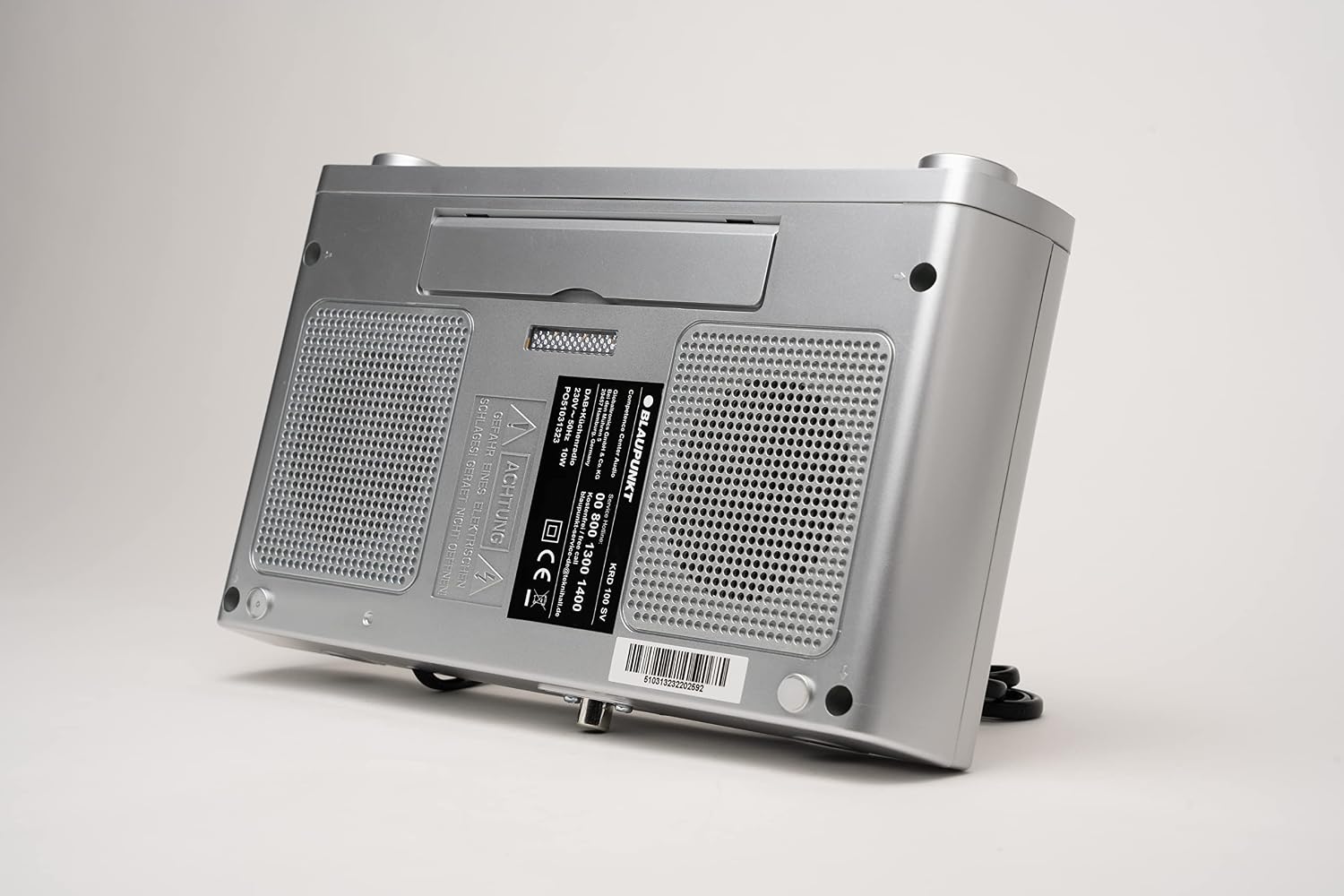
Figure 5.3: Rear view of the KRD 100, indicating connection points for power and antenna.
5.3 Antenna Connection
- Connect the 75 Ω launch antenna to the antenna input port on the back of the radio.
- Extend the antenna fully for optimal reception. Adjust its position if reception is poor.
6. Operating Instructions
6.1 Power On/Off and Volume Control
- Power On: Press the Volume knob. The display will light up.
- Power Off: Press and hold the Volume knob until the display turns off.
- Volume Adjustment: Rotate the Volume knob clockwise to increase volume and counter-clockwise to decrease volume.
6.2 Mode Selection
Press the MODE button repeatedly to cycle through the available modes:
- DAB+ Radio
- FM Radio
- Bluetooth
6.3 DAB+ Radio Operation
- Switch to DAB+ mode using the MODE button.
- The radio will automatically perform an initial scan for available DAB+ stations. This may take a few moments.
- To manually initiate a scan, press and hold the MEM/AMS button.
- Use the tuning/navigation buttons (usually integrated with the volume knob or separate buttons) to browse through the list of found stations.
- To save a favorite station (up to 30 presets for DAB+), tune to the desired station, then press and hold the MEM/AMS button. Follow the on-screen prompts to select a preset number.
6.4 FM Radio Operation
- Switch to FM mode using the MODE button.
- To automatically scan and save stations, press and hold the MEM/AMS button. The radio will scan for strong signals and store them (up to 30 presets for FM).
- To manually tune, use the tuning/navigation buttons to adjust the frequency.
- To save a favorite station, tune to the desired frequency, then press and hold the MEM/AMS button. Follow the on-screen prompts to select a preset number.
6.5 Bluetooth Streaming
- Switch to Bluetooth mode using the MODE button. The display will show "Bluetooth Pairing" or similar.
- On your smartphone or tablet, enable Bluetooth and search for available devices.
- Select "Blaupunkt KRD 100" from the list of devices.
- Once paired, you can stream audio from your device to the radio. Control playback and volume from your connected device or the radio's volume knob.
6.6 Clock and Time Setting
The radio typically sets the time automatically via DAB+ or FM RDS signals. If manual adjustment is needed:
- Access the system settings menu (refer to the specific button combination in your quick start guide if not obvious).
- Navigate to "Time/Date" settings.
- Adjust hours, minutes, and date using the navigation buttons.
- Confirm your settings.
6.7 Countdown Timers
The KRD 100 features two independent countdown timers, ideal for cooking or baking.
- Press one of the dedicated Timer buttons.
- Use the navigation buttons to set the desired countdown duration.
- Press the Timer button again to start the countdown.
- An audible alert will sound when the timer reaches zero.
6.8 Alarm Function
Set an alarm to wake up to an alarm sound or your favorite radio station.
- Access the alarm settings menu.
- Set the alarm time, alarm source (buzzer or radio station), and volume.
- Activate the alarm.
- When the alarm sounds, press the SNOOZE button (if available, often the volume knob press) for a temporary delay (5, 10, 15, or 30 minutes).
6.9 Integrated LED Light
The integrated LED light illuminates your workspace.
- Press the dedicated Light button (if available) or refer to the manual for specific activation instructions.
- Press again to turn off the light.
6.10 Display Dimmer
Adjust the display brightness to your preference.
- Press the DIMMER button repeatedly to cycle through different brightness levels or to activate an energy-saving mode.
7. Maintenance
7.1 Cleaning
- Always disconnect the radio from the power supply before cleaning.
- Use a soft, slightly damp cloth to wipe the exterior surfaces.
- Do not use abrasive cleaners, solvents, or strong detergents, as these can damage the finish.
- Ensure no liquid enters the device openings.
7.2 General Care
- Avoid placing heavy objects on top of the radio.
- Protect the display from scratches.
- If the radio will not be used for an extended period, unplug it from the power outlet.
8. Troubleshooting
If you encounter issues with your Blaupunkt KRD 100, refer to the following common problems and solutions:
| Problem | Possible Cause | Solution |
|---|---|---|
| No power / Device does not turn on | Power cable not connected properly; Power outlet not working. | Check if the power cable is securely plugged into both the radio and the wall outlet. Test the outlet with another device. |
| Poor DAB+ or FM reception | Antenna not extended or positioned correctly; Weak signal in your area; Interference from other electronic devices. | Fully extend and reposition the antenna. Try moving the radio to a different location. Keep the radio away from other electronic devices that may cause interference. |
| Bluetooth device cannot pair | Bluetooth not enabled on your device; Radio not in Bluetooth pairing mode; Device too far from the radio. | Ensure Bluetooth is enabled on your smartphone/tablet. Switch the radio to Bluetooth mode. Move your device closer to the radio (within 10 meters). |
| No sound or low volume | Volume set too low; Mute function activated; Incorrect audio source selected. | Increase the volume using the knob. Check if the radio is muted. Ensure the correct mode (DAB+, FM, Bluetooth) is selected. For Bluetooth, check volume on both the radio and the connected device. |
| Display is blank or flickering | Dimmer setting too low; Power issue; Device malfunction. | Press the DIMMER button to adjust brightness. Power cycle the device (unplug and plug back in). If the problem persists, contact support. |
9. Specifications
| Brand | BLAUPUNKT |
| Model Number | KRD 100 |
| Color | KRD 100 / Silver |
| Connectivity Technology | Bluetooth |
| Tuner Technology | DAB+, FM PLL |
| Supported Radio Bands | DAB+, FM |
| Display Type | Color LED |
| Display Size | 2.4 inches (approx. 6 cm) |
| Audio Output Mode | Stereo |
| Max Power Output | 4 Watts (2 x 2W RMS) |
| Power Source | Mains powered (via included power cable) |
| Product Dimensions (L x W x H) | 25.9L x 16W x 5.9H cm |
| Item Weight | 745 Grams |
| Special Features | Integrated clock, 2 countdown timers, LED light, alarm function, snooze function |
| Compatible Devices | Tablet (via Bluetooth) |
| Internal Material | Metal |
| Water Resistance Level | Water-resistant |
10. Warranty and Support
10.1 Manufacturer's Warranty
The Blaupunkt KRD 100 comes with a 2-year manufacturer's warranty. Please refer to the included warranty card for detailed terms and conditions.
10.2 Customer Support
For technical assistance, troubleshooting beyond this manual, or warranty claims, please contact Blaupunkt customer support. Contact information can typically be found on the warranty card or the official Blaupunkt website.
Online Resources: You may find additional support and FAQs on the official Blaupunkt website: www.blaupunkt.com


