
1. Introduction
The Parkside PKDL A1 Climate Data Logger is a precision instrument designed for accurate measurement and recording of air temperature and relative humidity. This device is ideal for monitoring environments where consistent climate conditions are critical, such as storage facilities, laboratories, or residential areas prone to humidity fluctuations. It can store up to 32,000 data records, including date and time, and offers adjustable recording intervals for comprehensive environmental analysis.
2. Safety Instructions
- Read this manual thoroughly before initial use and keep it for future reference.
- Do not expose the device to extreme temperatures, direct sunlight, or excessive moisture.
- Do not open the device casing; there are no user-serviceable parts inside.
- Use only specified batteries. Ensure correct polarity when inserting batteries.
- Keep the device and its components out of reach of children.
- Avoid strong impacts or vibrations to prevent damage to the internal components.
3. Package Contents
Verify that all items are present and in good condition:
- 1x Parkside PKDL A1 Climate Data Logger
- 1x Battery
- 1x Wall mount
- 1x Set of mounting material (screws, wall plugs)
- 1x Instruction Manual
4. Device Overview
Familiarize yourself with the components of your PKDL A1 data logger:

Figure 1: Front view of the Parkside PKDL A1 Climate Data Logger. This image displays the device's main screen, showing temperature and time, along with the 'Play' (triangle) and 'Pause' (two vertical bars) buttons for controlling data logging.

Figure 2: Side view of the Parkside PKDL A1, illustrating the integrated USB Type-A connector. The protective cap is removed, revealing the port used for connecting to a computer for data transfer and configuration.

Figure 3: The Parkside PKDL A1 Climate Data Logger shown mounted on a wall using its included wall bracket. This demonstrates the device's intended placement for environmental monitoring.
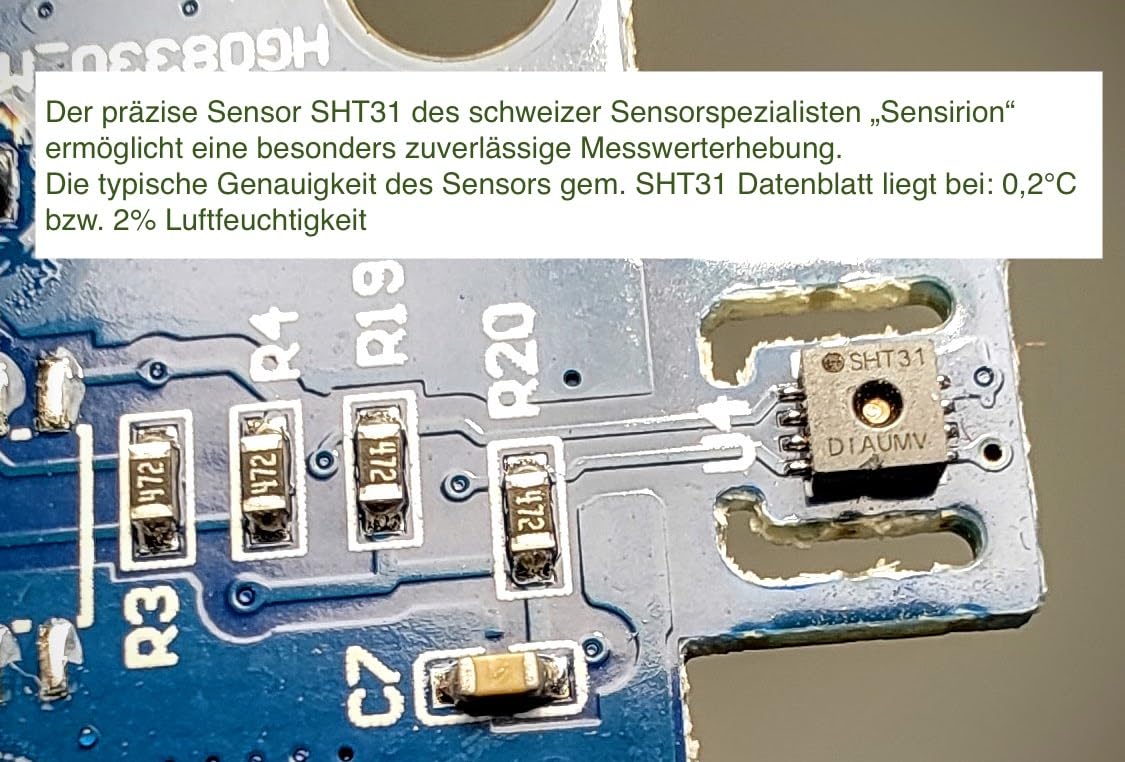
Figure 4: A close-up view of the internal SHT31 sensor on the device's circuit board. This precise sensor from Sensirion enables reliable measurement, with a typical accuracy of 0.2°C and 2% relative humidity.
5. Setup
- Battery Installation: Locate the battery compartment on the back of the device. Open it and insert the provided battery, ensuring the correct polarity (+/-) as indicated. Close the compartment securely.
- Initial Power-On: The device will automatically power on and display current temperature, humidity, and time readings on the LCD screen.
- Software Installation: The analysis software is essential for configuring device settings (e.g., recording interval, alarm limits) and downloading recorded data. Refer to the separate instructions provided with the software for download details and installation steps. The software is compatible with Microsoft Windows 7 and 10.
- Mounting: Use the provided wall mount and mounting material to secure the device in your desired monitoring location. Ensure the location allows for accurate environmental readings and is easily accessible for data retrieval.
6. Operation
- Display Information: The LCD screen continuously shows the current temperature in degrees Celsius (°C), relative humidity (RH%), and the current time.
- Starting Recording: To begin data logging, press the 'Play' button (indicated by a triangle icon) on the front of the device. The device will start recording data at the interval configured via the analysis software.
- Stopping Recording: To stop data logging, press the 'Pause' button (indicated by two vertical bars icon).
- Alarm Function: The device features configurable high and low limit alarms for both temperature and humidity. If a measured value exceeds or falls below these set limits, an LED alarm signal will activate. These alarm limits are configured using the analysis software on your computer.
7. Data Transfer and Analysis
- Connect to PC: Carefully remove the protective cap from the USB Type-A connector located on the side of the data logger. Plug the device into an available USB port on your computer.
- Software Launch: Open the analysis software that you previously installed on your computer (compatible with Microsoft Windows 7, 10).
- Data Download: Follow the instructions within the software to download the recorded data from the PKDL A1 device to your computer.
- Analysis and Export: The software provides tools for graphical evaluation of the collected data. You can export the data in common formats such as PDF or Excel files for further analysis and reporting.
8. Maintenance and Cleaning
- Cleaning: Clean the exterior of the device with a soft, dry cloth. Do not use abrasive cleaners, solvents, or chemical agents, as these can damage the casing or internal components.
- Battery Replacement: When the low battery indicator appears on the display, replace the battery promptly to ensure continuous operation and accurate data logging. Refer to the battery installation steps in Section 5.
- Storage: If storing the device for an extended period, remove the battery to prevent leakage and potential damage. Store in a cool, dry place.
9. Troubleshooting
- No Display: Check if the battery is correctly installed and has sufficient charge. Replace the battery if necessary.
- No Data Recording: Ensure that data logging has been initiated by pressing the 'Play' button. Verify the recording interval settings through the analysis software.
- Connection Issues with PC: Ensure the USB connector is fully inserted into both the device and the computer's USB port. Try using a different USB port on your computer. Confirm that the analysis software is correctly installed and running.
- Inaccurate Readings: Ensure the device is placed in an area free from direct heat sources, strong air currents, or extreme humidity fluctuations that could affect local readings.
10. Specifications
- Model: PKDL A1 - HG08330
- Measurement Range:
- Temperature: -30 to 70 °C
- Relative Humidity: 0 to 100 % RH
- Accuracy:
- Temperature: ±0.5 °C
- Relative Humidity: ±2.5 % RH
- Resolution:
- Temperature: ±0.1 °C
- Relative Humidity: ±0.1 % RH
- Data Storage Capacity: Up to 32,000 records
- Recording Interval: Adjustable from 10 seconds to 24 hours
- Interface: USB Type-A
- Software Compatibility: Microsoft Windows 7, 10
- Dimensions: Approximately 38 x 98 x 14 mm
- Weight: Approximately 100 g
- Material: Plastic
11. Disposal Information
Do not dispose of the device or its battery with ordinary household waste. Electronic devices and batteries contain materials that can be harmful to the environment if not disposed of properly. Please follow local regulations for the separate collection and recycling of electronic waste and batteries. Contact your local authorities or recycling center for information on proper disposal methods.
12. Warranty and Support
For detailed warranty information, terms, and conditions, please refer to the documentation provided at the time of purchase. For technical support, troubleshooting assistance beyond this manual, or inquiries regarding spare parts, please contact the manufacturer's customer service department or your point of purchase. Keep your proof of purchase for warranty claims.
