
Modern Ember Aerus
Modern Ember Aerus 50 Inch Smart Linear Electric Fireplace User Manual
Model: Aerus | Brand: Modern Ember
1. Important Safety Information
Please read this entire manual carefully before installation and operation of your electric fireplace. Failure to follow these instructions may result in fire, electric shock, or personal injury. Keep this manual for future reference.
- Always disconnect power before cleaning or performing maintenance.
- Do not operate the fireplace with a damaged cord or plug.
- Ensure the fireplace is installed on a stable, level surface or securely mounted to a wall.
- Keep combustible materials at least 3 feet (0.9 meters) away from the front of the fireplace.
- Do not block the air vents.
2. Product Overview
The Modern Ember Aerus 50 Inch Smart Linear Electric Fireplace offers a modern heating solution with customizable flame effects and smart control options. It is designed for both recessed in-wall and wall-mount installations.

Image: The Modern Ember Aerus 50 Inch Smart Linear Electric Fireplace, shown with its remote control and a smartphone displaying the control app.
Included Components:
- Electric Fireplace Unit
- Remote Control
- Ember Bed Crystals
- Log Set
- Outlet Plug-in Kit

Image: A close-up view of the fireplace's ember bed, featuring realistic driftwood logs and clear crystal media.
3. Setup and Installation
The Aerus 50 Inch Electric Fireplace offers two primary installation methods: wall-mounted or recessed in-wall.
Installation Options:
- Wall-Mounted: The unit can be directly mounted onto a wall surface.
- Recessed In-Wall: The unit can be recessed into a wall or frame for a flush, seamless appearance. This option requires a suitable wall opening.

Image: A visual representation illustrating the two installation methods: wall-mounted and recessed in-wall, with a diagram showing how the unit fits into a 2"x6" wall frame for recessing.
Wiring Options:
- Plug-in: Use the included plug kit to connect to a standard 120V outlet.
- Hardwire: For professional in-wall installations, the unit can be hardwired. Exercise caution and consult a qualified electrician for hardwire installations.
Dimensions:
The fireplace unit measures approximately 5.75 inches deep, 50 inches wide, and 17.63 inches high.

Image: A diagram detailing the sleek profile and dimensions of the fireplace, highlighting its depth, width, and height.
4. Operating Instructions
The Aerus fireplace offers multiple control methods for convenience.
Control Options:
- Remote Control: Use the included remote to adjust settings.
- Wi-Fi App: Connect the fireplace to your home Wi-Fi network and control it via a dedicated smartphone application.
- Voice Control: Compatible with Alexa and Google Assistant for voice commands.
- Digital Touch Panel: Manual controls located on the unit itself.

Image: An illustration of the multiple convenient control options available, including the remote control, Alexa compatibility, Google Assistant readiness, Wi-Fi app enablement, and a digital touch panel.
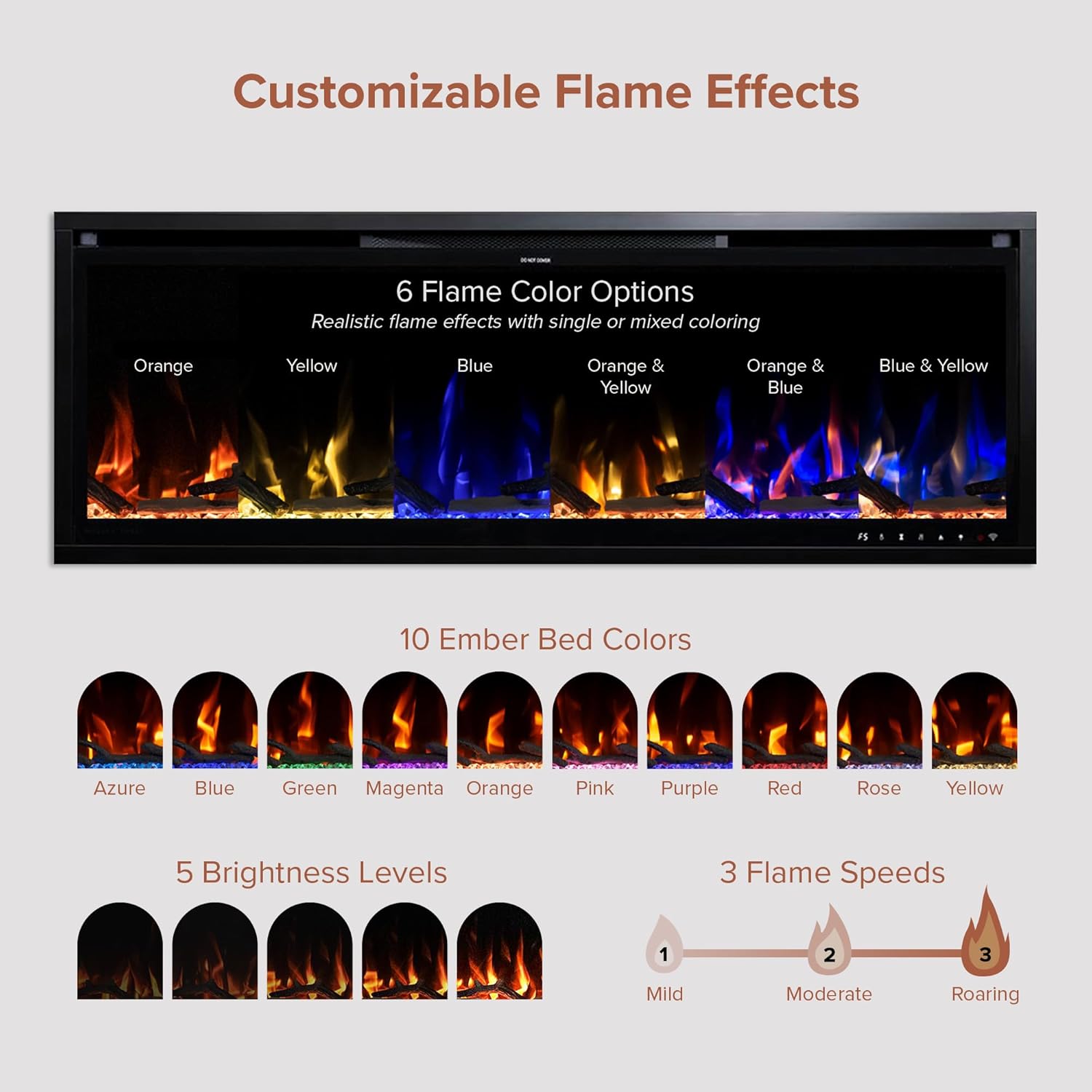
Image: A detailed view of the remote control, highlighting its various buttons for adjusting flame color, ember bed color, flame speed, timer, and temperature settings.
Heat Settings:
- Adjustable room temperature range: 68°F to 88°F.
- The heating function can be turned off completely, allowing for year-round ambiance without heat.
- Provides supplemental heating for areas up to 400 square feet.
- Heat output: 5000 British Thermal Units (BTU).

Image: The fireplace in operation, demonstrating its year-round ambiance control with adjustable heat settings ranging from 68°F to 88°F.
Flame and Ember Effects:
- Flame Colors: Choose from 5 distinct flame colors or mixed color options.
- Flame Brightness: 5 adjustable brightness levels.
- Flame Speeds: 3 different flame speeds (Mild, Moderate, Roaring).
- Ember Bed Colors: 10 customizable ember bed colors.

Image: A visual guide to the customizable flame effects, showcasing 6 flame color options, 10 ember bed colors, 5 brightness levels, and 3 flame speeds.
Timer Function:
Set a timer for automatic shut-off, ranging from 30 minutes to 9 hours.
5. Maintenance
Regular maintenance ensures optimal performance and longevity of your fireplace.
- Cleaning: Ensure the unit is powered off and cool before cleaning. Use a soft, damp cloth to wipe surfaces. Avoid abrasive cleaners.
- Ventilation: The fireplace is vent-free. Ensure the top vent is clear of any obstructions to allow for proper heat dissipation.
- Ember Bed: Periodically clean the ember bed crystals and logs to maintain their appearance.
6. Troubleshooting
If you encounter issues with your fireplace, refer to the following common solutions.
| Problem | Possible Cause | Solution |
|---|---|---|
| Fireplace does not turn on / No power | No power to the unit, loose connection, or internal fault. | Check if the power cord is securely plugged into a working 120V outlet. If hardwired, verify the circuit breaker. Ensure the main power switch on the unit is ON. |
| Unit turns off shortly after turning on | Overheating protection activated, or internal component issue. | Ensure vents are not blocked. Allow the unit to cool down. If the problem persists, contact customer support. |
| Remote control not working | Dead batteries, remote out of range, or sensor obstruction. | Replace remote batteries. Ensure no obstructions between the remote and the fireplace sensor. Try using the digital touch panel or Wi-Fi app. |
| Wi-Fi/Alexa connectivity issues | Incorrect Wi-Fi password, network interference, or app configuration error. | Ensure your Wi-Fi network is active and the password is correct. Restart your router and the fireplace. Reconfigure the fireplace in the app. Ensure the app and fireplace firmware are up to date. |
| Heat function not operating | Heat setting too low, heat function turned off, or internal heater issue. | Verify the desired temperature setting is above the current room temperature. Ensure the heat function is enabled via remote, app, or touch panel. Check for any obstructions around the heat outlet. |
For issues not listed here, or if solutions do not resolve the problem, please contact Modern Ember customer support.
7. Specifications
| Feature | Detail |
|---|---|
| Brand | Modern Ember |
| Model Name | Aerus |
| Product Dimensions | 5.75"D x 50"W x 17.63"H |
| Item Weight | 58.7 Pounds |
| Power Source | Corded Electric (120V) |
| Material | Metal |
| Finish Type | Painted |
| Installation Type | Wall Mount, Recessed In-Wall |
| Heat Output | 5000 British Thermal Units (BTU) |
| Heating Coverage | Up to 400 sq. ft. |
| Special Features | 10 Ember Colors, Multi-Color Flames, Remote Included, Timer, WiFi/Alexa Enabled |
| Room Type | Living Room (suitable for various indoor spaces) |
| Ventilation Type | Vent Free |
| UPC | 810116822072 |
8. Warranty Information
The Modern Ember Aerus Electric Fireplace comes with a Limited Warranty. For specific details regarding warranty coverage, duration, and terms, please refer to the official warranty documentation included with your product or contact Modern Ember customer support directly. Proof of purchase may be required for warranty claims.
9. Customer Support
For further assistance, technical support, or to inquire about parts and service, please contact Modern Ember customer support.
- Official User Manual (PDF): Download Here
- User Guide (PDF): Download Here
- Manufacturer Website: Visit the Modern Ember Store for more information and contact options.
Related documentsAerus


Ask a question about this manual
Ask about setup, troubleshooting, compatibility, parts, safety, or missing instructions. Manuals+ will review the question and use this page’s manual context to help answer it.