
1. Introduction
This manual provides essential information for the safe and effective use of your Dr. Fuji Cyber Body Fit Slimmer FJ-700. Please read this manual thoroughly before operating the device and retain it for future reference.
The Dr. Fuji Cyber Body Fit Slimmer FJ-700 is a vibration platform designed to assist in improving balance, strength, flexibility, endurance, and muscle toning. It features 10 intensity levels, adjustable via a remote control, to simulate various exercise intensities from walking to running.
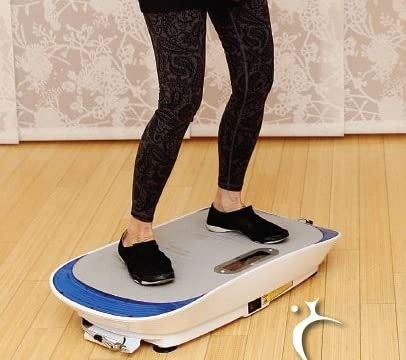
Image 1.1: Dr. Fuji Cyber Body Fit Slimmer FJ-700 main unit. This image displays the compact vibration platform, highlighting its design and size.
2. Safety Information
WARNING: To reduce the risk of serious injury, read all instructions and warnings before using this product.
- Consult your physician before starting any new exercise program, especially if you have pre-existing medical conditions, are pregnant, or have recently undergone surgery.
- This device is intended for adult use only. Keep out of reach of children and pets.
- Use the Cyber Body Fit Slimmer on a stable, level surface. Ensure adequate space around the device for safe operation.
- Do not use the device if you are experiencing pain, dizziness, or discomfort. Stop immediately and consult a physician.
- Do not immerse the device in water or expose it to excessive moisture.
- Always ensure the power cord is not damaged and is properly connected to a grounded outlet.
- Do not attempt to modify or repair the device yourself. Contact qualified service personnel for assistance.
3. Package Contents
Carefully unpack the box and ensure all items are present and in good condition. If any items are missing or damaged, contact your retailer or Dr. Fuji customer support.
- Dr. Fuji Cyber Body Fit Slimmer FJ-700 Main Unit
- Remote Control
- Power Adapter
- User Manual (this document)
4. Setup
- Unpack: Remove all components from the packaging. Retain packaging for storage or if return is necessary.
- Placement: Place the Cyber Body Fit Slimmer on a firm, level, and non-slip surface. Ensure there is at least 1 meter (3 feet) of clear space around the device.
- Power Connection: Insert the power adapter into the power input port on the device. Plug the other end of the power adapter into a standard electrical outlet.
- Remote Control: Ensure the remote control has batteries installed. If not, open the battery compartment and insert the required batteries (typically 2x AAA, not specified in input, so general advice).
5. Operating Instructions
The Dr. Fuji Cyber Body Fit Slimmer FJ-700 is operated primarily using the included remote control.
- Power On: Press the POWER button on the remote control or the main unit. The display on the unit will illuminate.
- Select Intensity: Use the + and - buttons on the remote control to adjust the vibration intensity level. There are 10 levels available, with 1 being the lowest and 10 being the highest. Start with a lower intensity and gradually increase as you become comfortable.
- Start Exercise: Step onto the platform. You can stand, sit, or perform various exercises as recommended by a fitness professional.
- Duration: The device typically operates in timed sessions. A common session duration is 10 minutes. Refer to the display for remaining time.
- Power Off: Press the POWER button again to turn off the device. Always power off and unplug the unit when not in use.
Recommended Usage:
- Begin with 5-10 minute sessions, 3-5 times per week.
- Maintain a comfortable posture and ensure your body is balanced on the platform.
- Stay hydrated during and after your sessions.
6. Maintenance
Proper maintenance ensures the longevity and optimal performance of your Dr. Fuji Cyber Body Fit Slimmer FJ-700.
- Cleaning: Disconnect the power cord before cleaning. Wipe the surface of the device with a soft, damp cloth. Do not use abrasive cleaners or solvents.
- Storage: Store the device in a cool, dry place away from direct sunlight and extreme temperatures. Ensure it is unplugged when stored for extended periods.
- Inspection: Periodically inspect the power cord for any signs of damage. If damaged, discontinue use and contact customer support.
- No User-Serviceable Parts: The Dr. Fuji Cyber Body Fit Slimmer FJ-700 contains no user-serviceable parts. Do not attempt to open or repair the unit yourself.
7. Troubleshooting
If you encounter issues with your Dr. Fuji Cyber Body Fit Slimmer FJ-700, refer to the following common problems and solutions:
| Problem | Possible Cause | Solution |
|---|---|---|
| Device does not power on. | Power cord not connected; Power outlet not working; Device malfunction. | Ensure power cord is securely plugged into both the device and a working electrical outlet. Test the outlet with another appliance. If problem persists, contact customer support. |
| Remote control is not working. | Dead batteries; Obstruction between remote and unit; Remote malfunction. | Replace batteries in the remote control. Ensure there is a clear line of sight between the remote and the unit's sensor. If problem persists, contact customer support. |
| Vibration is weak or inconsistent. | Low intensity setting; Device overload; Internal issue. | Increase the intensity level using the remote control. Ensure the user's weight does not exceed the device's maximum capacity (not specified, but general advice). If problem persists, contact customer support. |
If you experience a problem not listed here, or if the suggested solutions do not resolve the issue, please contact Dr. Fuji customer support for further assistance.
8. Specifications
| Model Number: | FJ-700 |
| Brand: | Dr. Fuji |
| Material: | Metal |
| Color: | Gray |
| Age Range: | Adult |
| UPC: | 039339297256 |
| ASIN: | B0BSG5X7ZK |
9. Warranty and Support
For warranty information, please refer to the documentation included with your purchase or contact the retailer from whom you purchased the Dr. Fuji Cyber Body Fit Slimmer FJ-700. Warranty terms and conditions may vary.
For technical support, replacement parts, or any other inquiries, please contact Dr. Fuji customer service. Contact details are typically available on the manufacturer's website or included in your product packaging.